
- NewsmagUsing the theme translations together with WPML
- NewsmagHow to update a plugin
- NewsmagCustom Post Type Support
- NewsmagAbove footer ads
- NewsmagWeather Widget
- NewsmagHow to update the theme
- NewsmagIntroduction
- NewsmagLogo & Favicon
- NewsmagFooter templates
- NewsmagUsing other ads
- NewsmagCustom ad spots
- NewsmagArticle ads
- NewsmagSidebar ads
- NewsmagHeader ads
- NewsmagLoading image effects
- NewsmagCategory top post styles
- NewsmagSmart Lists
- NewsmagGeneral settings
- NewsmagTheme thumbs
- NewsmagtagDiv slider gallery
 MDNM2017
Now that we updated the wordpress platform, we are unable to edit the dates (time stamp) on a post. Block editor does not work anymore. And we cannot edit our home page either. What gives – https://infomeddnews.com
 Jabed
JabedI want to make the site’s width wider, like the example site: 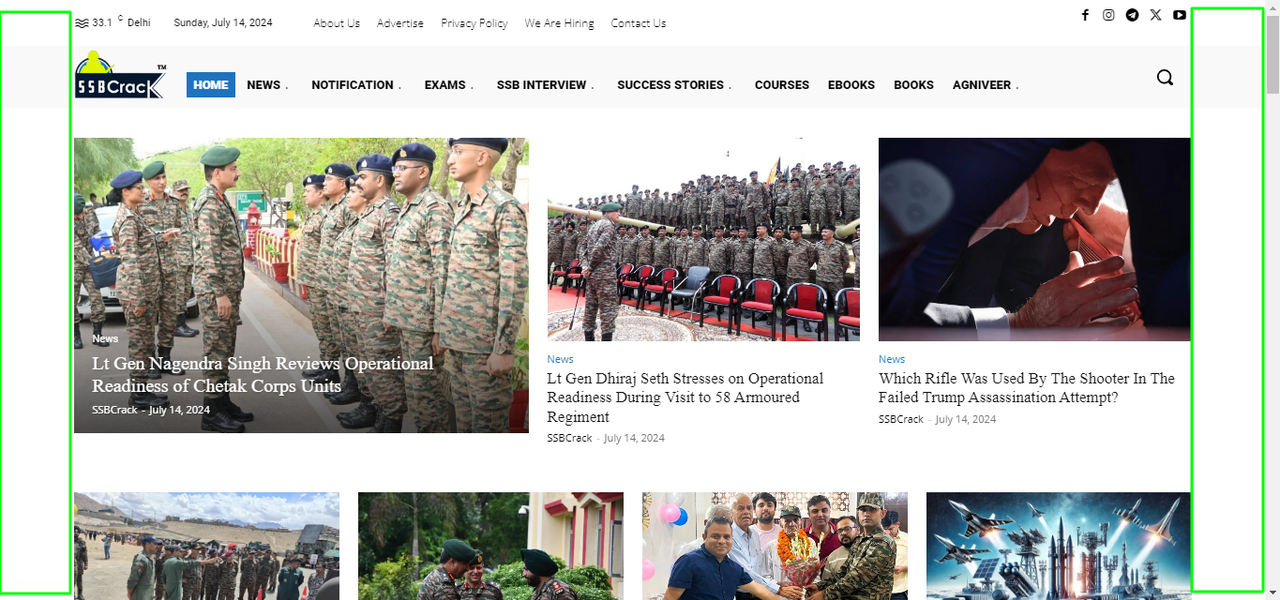
Here’s my site’s wideness: 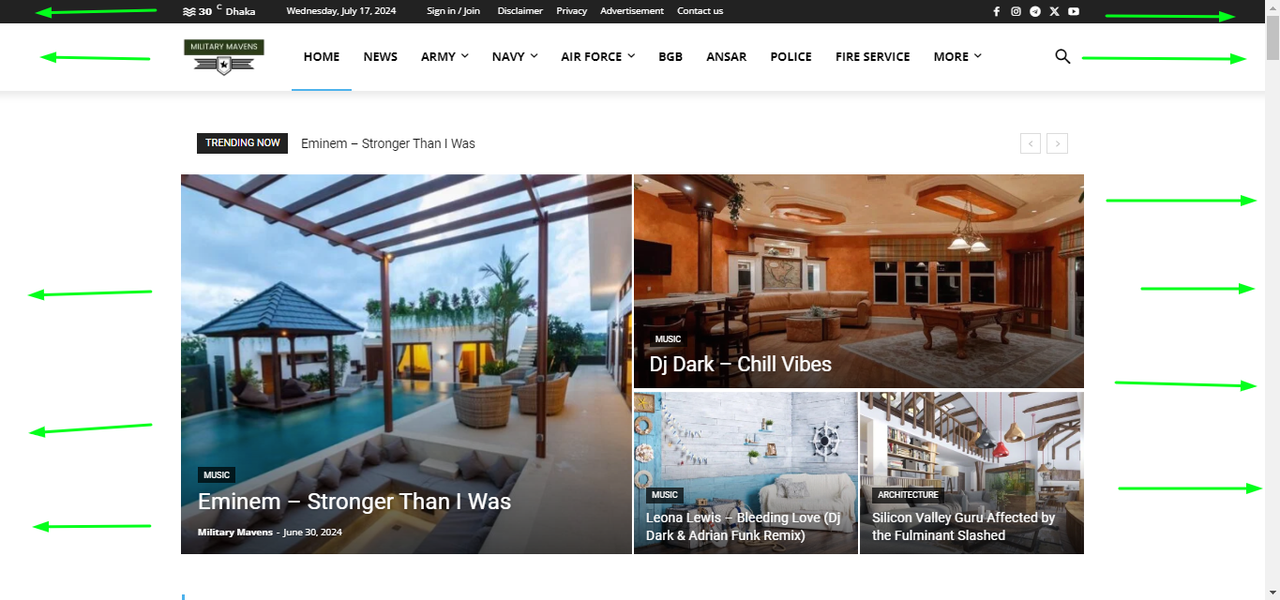 Current Site’s Width
 Total Motorsport Admin
Hi TagDiv, I have some queries…
Is there a known fix for the issues on the screenshot, mainly concerning the font files (ex. can we add “font-display: swap;”).
Here are the links to the files in question:
1. https://www.total-motorsport.com/wp-content/plugins/td-composer/assets/fonts/font-awesome/fontawesome-webfont.eot
2. https://www.total-motorsport.com/wp-content/plugins/td-composer/mobile/images/icons/mobile-theme.eot?16
1. https://www.total-motorsport.com/wp-content/plugins/td-composer/mobile/images/icons/mobile-theme.eot?16
2. https://www.total-motorsport.com/wp-content/plugins/td-composer/mobile/images/icons/mobile-theme.woff?16
Screenshot = https://ibb.co/qWw4XjV
Additional resources:
Efficient cache policy:
https://developer.chrome.com/docs/lighthouse/performance/uses-long-cache-ttl/?utm_source=lighthouse&utm_medium=lr
Learn more about font-display:
https://developer.chrome.com/docs/lighthouse/performance/font-display/?utm_source=lighthouse&utm_medium=lr
Also, the element ‘Big Grid Flex 3’, doesn’t allow content preloading as the other block elements. I provided screenshots as examples.
Screenshot 1 = https://ibb.co/Xt54GWJ
Screenshot 2 = https://ibb.co/HTddz3M
Is there a known way of preloading this grid and its elements?
Thanks in advance
 austrocrates
 For example what i mean: On this site, at the end is the misfuctionally foo gallery: https://thelma.at/kunstpark-runde-olbendorf/
 Sushant
I am not able to use “Edit with TagDiv Composer” please help.
Whenever I click on it, it shows
This page isn’t working
hindustangazette.com didn’t send any data.
ERR_EMPTY_RESPONSE
 Axel GC
 Hello Bettina,
Thanks for the links. I have followed some of the procedures described there, but unfortunately without success.
The link “Edit with TagDiv Composer” generates error 403. However, if, for example, the “Homepage” page is opened via “Edit”, the page can be opened in the Composer using the blue “TAGDIV COMPOSER” button.
What is the difference between “Edit with TagDiv Composer” and “TAGDIV COMPOSER”
Thanks for your help
Kind regards
Axel
austrocrates So … yes, i think this was the problem.
The list is now on the left side, but i have to change something in the “list” design … change the width from 100% to 10% and the padding also, but now i looks like the default theme. It runs and i hope i do everything right with changing the design.
Thank you & best regards
 Bettina
 Hello!
You can create a menu with custom links, for example, items like this: https://app.screencast.com/tP6Mk6tbvLf1c
The subcategories should be added normally, or you can add a page ID that displays the other subcategory, as you will build in the tagdiv composer. Check out this guide: https://forum.tagdiv.com/page-menu/
Thank you!
 brockpress_
 Hi!
Thank you very much for the suggestion.
Would there be a way to display posts only in two categories?
For example, only articles are in the “news” and “2023-2024” categories.
Any help is appreciated!
 Ans
AnsAs subject, please allow restrict Post Type (to post) for Search in Mobile Theme, similar to related setting TagDiv composer for modules&desktop.
Please consider, thank you.
 sco
scoHello,
There are multiple bugs with the flex loop filters:
(1) the filters work fine when we activate the “multi” option, but if we deactivate it, then the filters don’t work anymore.
For instance, I use the pa_lang as taxonomy:
– when the “multi” option is activated, then url shows the right condition : ?tdb_tax_pa_lang=english
– but if the “multi” option is deactivated, it writes an incorrect condition in the url : ?taxonomy=pa_lang&term=anglais (instead of tdb_tax_pa_lang=english)
(2) Filters can be displayed through 5 options (button, dropdown, dropdown search, color, image).
– if color or image are selected they don’t show.
(3) The headers of the filters cannot be edited. A wrong text is displayed as the post type is automatically added to the name filter.
– For instance, if I add the language filters (pa_lang from woocommerce), the header reads “Product Language” instead of “Language” alone, and there is no way to edit this.
Thanks for your help.
Bettina Hello!
A workaround there could be to add the category “this year,” for example, and assign it to the articles from this year. Then you can filter by the category ID.
Thank you!
 Anamaria
 Hello,
Please check with the tagDiv Composer and disable the H1. For example, H1 from logo(header, footer, mobile, sticky): https://forum.tagdiv.com/topic/6-h1-tags-on-front-page-bing-have-deindexed-my-site/
Thank you!
 Calin
Calin Hello,
Most possible the sidebar to be there if you receive that message and something to interfere with it. What I can suggest is to install the classic widget plugin and see of those are there. Also, you can do a test using only the theme plugins to see if the sidebar suggest are display. In case that you want, we can take a look, for this will be need to contact us via email at contact@tagdiv.com and provide a temporary wp-admin access and an example with a sidebar when this “This name is already used as a sidebar name. Please use another name!” is received.
Thank you!
Bettina Hello!
We have 3 options available for mobile versions that you can use:
1. Responsive version: A responsive version of your website looks similar to the desktop version. TagDiv Composer is used to edit the page. Click on the mobile viewport: https://www.screencast.com/t/XDQJedlggSB. There, you can see your mobile version and edit or adjust the elements to look better.
2. Mobile pages: https://tagdiv.com/newspaper-10-3-7-update-brings-customizable-and-fast-mobile-pages
3. Mobile theme plugin: The Mobile Theme is a performance-optimized theme included in the main Newspaper theme that only loads on mobile devices. It comes with its own templates and designs for pages, posts, categories, etc., so your current templates from the desktop theme will get converted to the mobile theme layout. Please see https://forum.tagdiv.com/the-mobile-theme/ and https://forum.tagdiv.com/mobile-theme-introduction/ for more information.
A full explanation is here: https://www.youtube.com/watch?v=SpGkOnJeNZY
If you need to use mobile version 1 or 2, then you need to uninstall the Mobile Theme plugin and AMP.
1. I can see that you use the Mobile theme right now and you can try to add the shortcode in the mobile editor(check documentation) if this is from an external plugin.
2. Unfortunately, there are no options to display the CPTs as in the cloud templates. You can do that only with custom code. For customization and other services, you can contact our custom work team here: https://tagdiv.com/premium-customization-services/.
3. If you will use cloud templates, then there are some settings of the “Header live search” to specify the taxonomies, create some results sections and exclude posts/pages.
4. Unfortunately, we have no design idea for an alert box. But you can use a modal popup to build the one you like: https://forum.tagdiv.com/modal-popup/ You can trigger it as a button or page and it can open automatically or by clicking the button.
5. Check this thread: https://forum.tagdiv.com/topic/excessive-dom-size/
I hope that helps you!
Thank you!
Anamaria Hello,
You need to update the theme, you should download the latest version of it from the Theme Forest account and download it.
I recommend that you update the theme manually https://forum.tagdiv.com/how-to-update-the-theme-2/ via FTP/cPanel/File Manager, also if possible disable extra plugins during the theme update to avoid any problems that may arise and make sure that you have activated the tagDiv Standard pack plugin to keep the website’s look. You can try to update the theme on a staging website.
After you update the theme, you need to update the theme plugins too.
In the worst cases, the settings in the theme panel may be lost (there have been isolated cases), in these cases, after the theme plugins that were previously used are activated, you will have to use a backup for the theme panel -> https://forum.tagdiv.com/import-export-theme-settings/
You could consider reinstalling the WordPress version, and checking for this plugin wp-zexit.php. It might be wise to inspect via FTP if it doesn’t appear in the WordPress -> Plugins. Additionally, using Wordfence to scan the website and remove unknown users would be prudent.
Change admin passwords and delete admin accounts you are not familiar with;
– Delete any weird/unknown plugins;
– Delete the weird/unknown themes;
– Clean unfamiliar Theme Panel injected code (example – https://i.imgur.com/4q70kCv.png);
– Clean WordPress files (example – https://i.imgur.com/stJCqiK.png)
Please block /wp-json/tdw/save_css
If an attacker wants to target this URL /wp-json/tdw/save_css they can do so. Even if the website uses a different theme, the attacker can still try that URL. We could add an option to be able to enable/disable the Live CSS, it will be considered. But for now in order to remove it this can only be done with a modification to the composer plugin. I think that all that removing it requires is to comment this line of code – https://prnt.sc/RtwvL5Nc4ikR -> https://prnt.sc/ymZmhdUfp57U But as I mentioned, the attacker can still try to access the URL.
If you want, you can contact our custom work team here, and they can help you update the theme safely: https://tagdiv.com/premium-customization-services/
Thank you!
 Abder Fath
Hello, I tried using Yoast and Rank math to disable the indexing of pagination pages like “www.example.com/agency-directory/?tdb-loop-page=2” but couldn’t it’s not working even that the following options are enabled “Noindex Search Results, Noindex Subpages, Noindex Paginated Single Pages”.
Is there a way to do it? Thank you!
 bburzycki
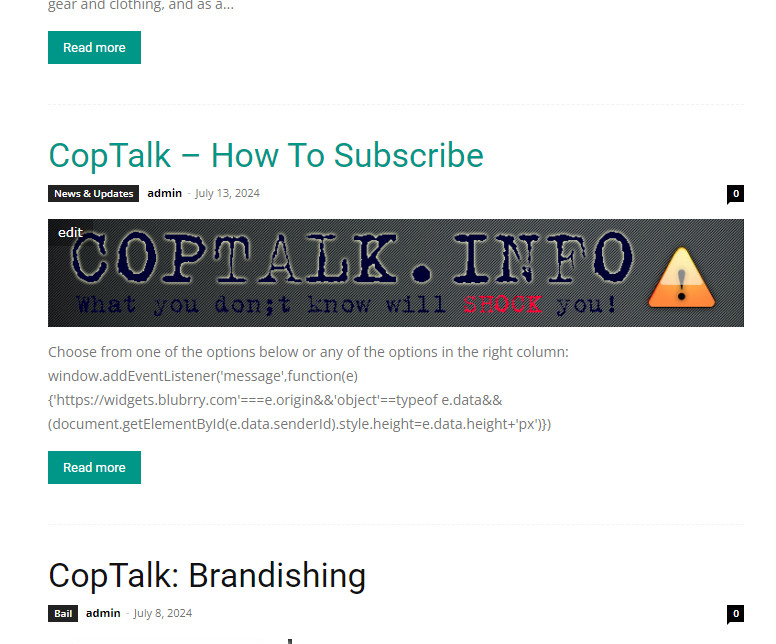
Is there any way for embed code from a post to not show up in the front page partial preview? Sadly the code shows on the front page but when you go to the post it shows the correct embed?
Screenshot here
 Jean-Eudes SANSON
Hello Tagdiv team,
I have a mega menu activated on a primary category (level 1) which has for example 2 subcategories (level 2). Let’s say one of these subcategories has for example 2 subcategories (level 3).
For example :
category level 1 => Mega menu activated
– category level 2
– category level 2
– – category level 3
– – category level 3
…
How can I only display level 2 subcategories? Because there, all my subcategories are displayed (and I have several dozen…) which result in a real mess :-O
Looking forward to your reply,
Kind regards,
Jean-Eudes
 sparky263
I want to put a text line below the menu bar and have it the full width of the header block. How do I do it? Example in this screenshot https://www.screencast.com/t/Xp8lz0qd9
 WellnessDD
 For example, I tried to find this article by searching for ‘menopause’ and ‘Minerva,’ but there were no results. Additionally, when I searched for the title ‘Did You Know That Menopause Could Be Affecting Your Mental Health?’, there were no results either. Please advise as soon as possible.
 danilloleite
I need help with some items with the newspaper theme. 1 – how do I make a shortcode work in the mobile plugin? my home has the status of the trains. It’s a box with a green, red or yellow ball.
2 – on the first page of the mobile home, it shows my posts ok. but I have a cpt for traffic, how do I make the traffic post appear on the mobile plugin home in the first highlighted rectangle?
3 – I am creating a cpt for events and I know that the flex build does not search for custom fields, any tips on what I should do to achieve this?
4 – where do I have a documentation of the theme styles? for example I want to create an alert box in the post, how do I do it? type tip, warning or suggestion… within the article.
5 – google always complains about big dom, how to fix it?
My website is: https://www.abctudo.com.br/
 nycinsider
All of a sudden when I upload a new image to WP via the “set featured image” box in post editor, WP is autoresizing them and shrinking them. For example, my banner images are all 1280px wide and WP is making them 300px wide. I have tried uploading featured images via post editor and also uploading directly via Media new image. I am not inserting images into posts and choosing a size – WP is doing this outside of that. Any thoughts?
Anamaria Hi,
I think that you have malware on the website.
f you want to update the theme, you should download the latest version of it from Theme Forest account and download it.
I recommend that you update the theme manually https://forum.tagdiv.com/how-to-update-the-theme-2/ via FTP/cPanel/File Manager, also if possible disable extra plugins during the theme update to avoid any problems that may arise and make sure that you have activated the tagDiv Standard pack plugin to keep the website’s look. You can try to update the theme on a staging website.
After you update the theme, you need to update the theme plugins too.
In the worst cases, the settings in the theme panel may be lost (there have been isolated cases), in these cases, after the theme plugins that were previously used are activated, you will have to use a backup for the theme panel -> https://forum.tagdiv.com/import-export-theme-settings/
You could consider reinstalling the WordPress version, and checking for this plugin wp-zexit.php. It might be wise to inspect via FTP if it doesn’t appear in the WordPress -> Plugins. Additionally, using Wordfence to scan the website and remove unknown users would be prudent.
Change admin passwords and delete admin accounts you are not familiar with;
– Delete any weird/unknown plugins;
– Delete the weird/unknown themes;
– Clean unfamiliar Theme Panel injected code (example – https://i.imgur.com/4q70kCv.png);
– Clean WordPress files (example – https://i.imgur.com/stJCqiK.png)
Please block /wp-json/tdw/save_css
If an attacker wants to target this URL /wp-json/tdw/save_css they can do so. Even if the website uses a different theme, the attacker can still try that URL. We could add an option to be able to enable/disable the Live CSS, it will be considered. But for now in order to remove it this can only be done with a modification to the composer plugin. I think that all that removing it requires is to comment this line of code – https://prnt.sc/RtwvL5Nc4ikR -> https://prnt.sc/ymZmhdUfp57U But as I mentioned, the attacker can still try to access the URL.
Thank you!
Calin Ok, here is a code that you can use on that page:
        .td_flex_block_1 {

            counter-reset: section; /* Initialize the counter */

        }

        .td_module_flex::before {

            counter-increment: section; /* Increment the counter */

            content: counter(section) ". "; /* Display the counter value followed by a dot and space */

        }
IT will be indicate to add an extra class on the block you want to use the css and replace the td_flex_block_1 that is a general class and the code will apply on all modules from those blocks (example class – https://i.imgur.com/8Pfdwlx.png)
I hope this will help you!



