
- NewsmagBlock settings tutorial
- NewsmagCategory tag on modules/blocks
- NewsmagtagDiv Composer Tutorial
- NewsmagWeather Widget
- NewsmagExchange widget
- NewsmagInstagram widget
- NewsmagHow to use the Visual Composer plugin
- NewsmagIntroduction
- NewsmagFooter templates
- NewsmagCustom ad spots
- NewsmagLoading image effects
- NewsmagSmart sidebar
- NewsmagFeatured images
- NewsmagGeneral settings
- Newsmag7 days post sorting
- NewsmagTheme thumbs
- NewsmagExcerpts introduction
- NewsmagTheme colors introduction
- NewsmagtagDiv slider gallery
- NewsmagVideo playlist
 danij1980
unmindful that property is failing to make the submenu does not disappear when you remove the mouse
Please check the page i´m building:
http://flug.solbooking.com/
What can i do??
I totally blocked and do not know how to fix this bug
Thanks
 Caum
Caum Hello,
I was not clear. Sorry. I was talking about the widgets called [tagDiv] Block 1 to 25.
Are they blocks resized in 1 column as we can see on the demo pages http://demo.tagdiv.com/newspaper/block-1/ to http://demo.tagdiv.com/newspaper/block-20/ ?
Best,
David
 Andrei L.
 Hi
To achieve that you have to edit theme’s core files and change the html structure for block title. A solution would be this one: http://screencast.com/t/VR5IdaQv9l – http://screencast.com/t/1ki43BVpx
You just have to replace the code from td_block_template_1.php file with this one: http://pastebin.com/AMXmseUx then add this css in theme panel > custom code > custom css:
.arrowblock {

width:auto;

border-top: 1px solid transparent;

}

.arrowright {

float:right;

border-top: 15px solid transparent;

border-bottom: 15px solid transparent;

border-left: 30px solid green;

}

.rect {

width:90px;

height:10px;

background-color:transparent;

}
Note that this solution will affect all blocks titles. If you want to apply it only for some blocks you’ll need a new function which will be called on specif blocks. You can take the above code as example but if you’re not aware of the steps that must be taken in order to achieve the desired result mu advice is to look for someone who can help you with implementation because we can’t offer custom work.
I hope this helps.
Thanks!
Caum Hello Catalin,
On the demo website, we can see examples of modules 1 to 19 (https://forum.tagdiv.com/theme-thumbs/) but nothing about the MX ones.
What are the looks or design of the Modules MX?
More, it is a little bit difficult to understand exactly what are modules and their multiple uses.
We can use them for category page layouts, for Archive template and in blocks.
I can’t find any documentation to explain all this. A simple information and definition on modules could be useful.
Best,
David
 Bogdan B.
 Hi,
the font should not affect the block title layout so please post a link to your site so I can inspect it. If you do not want to post it here, you can send us an email at contact@tagdiv.com and you can also provide wp-admin so we can inspect the back-end as well. It will help us on our search.
Thank you!
Andrei L. Hi
The theme make a request to admin-ajax.php when on the page are used blocks with ajax pagination. When next/prev or load more button it’s pressed the theme make a request to this file to get the next posts. This is also valid from infinite load pagination. When the page it’s accessed by many visitors and on that page you have lots of blocks with pagination the server receive lots of requests and may be unable to handle them.
Try to increase the php memory to at least 64MB or if the host allows you can increase it more, also make sure that the parameters from system status have the values indicated here: https://forum.tagdiv.com/system-status-parameters-guide/ and you server meets theme’s requirements: https://forum.tagdiv.com/newsmag-requirements-for-newsmag/
Hope this helps.
Thanks!
Bogdan B. Hi,
The thumbnails in our theme are fixed and cannot be changed through the theme settings. In the block settings you can only activate or deactivate a thumbnail.(this is helpful if you want to prevent the theme from creating some thumbnails you do not plan on using)
Here is a list of thumbnail sizes used in our theme: https://forum.tagdiv.com/theme-thumbs/
If you want to change a thumbnail size, you need to edit the theme files. You can use the theme api system for this if you havfe the proper coding knowledge: https://forum.tagdiv.com/api-thumbnail-introduction/
Thank you!
Bogdan B. Hi,
All these style cascades are from using speedbooster or similar tools to move the css render block to footer. This is good for page speed but bad for visuals unfortunately. There is no middle way about this. If you move style.css to the footer then it will load after all of the content and apply your css settings afterwards. If this bothers you, please remove style.css from speedbooster or other tools so the css will load first. It will not have a significant pagespeed drop.
Thank you!
Bogdan B. Hi,
The category tags can be removed for every module in particular from this section of the theme panel: http://screencast.com/t/Ke7qKqng
if you want to remove the tags for a particular block and not all blocks of that type, then you can add a custom css class on the row in visual composer and use css to hide the category tags.
Here is an example: http://screencast.com/t/hejLj9Cvv
Then I would use this code to hide the tags for this row only:
.mycustomclass .td-post-category{

display:none!important;

}
As for the tags on category pages, they can be removed by changing the category template style from the per-category settings: http://screencast.com/t/5zTtbSaOU
Thank you!
 ArthurConan
First things first: I’m so glad to have discovered Newspaper, it’s an incredible theme!
I’m putting the finishing touches on my site (www.glacierjournal.com) and the thumbnail images for block 18 are super-grainy on the homepage. I followed the steps here to fix the issue, but it didn’t help: https://forum.tagdiv.com/thumbnails-fix-strange-looking-images-on-blocks/
I’m still not sure I understand how to use the settings under ThemePanel => BlockSettings => ThumbsOnModules/Blocks.
I want the thumbnail for block 18 to be 1068 x 590. How/Where do I specify this?
Thanks,
 SarahElaine
 Hi,
That’s what I thought. I was hoping to make the block titles include a pointer arrow beneath them, like this:
http://stackoverflow.com/questions/18816486/how-can-i-make-a-pointy-arrow-with-a-div-in-css
It seems like the way to do that would be to create their own class and then change the block-title div to include the CSS from both?
Maybe this is way off-base but that’s the way I’m imagining it working right now.
Any insight would be greatly appreciated. Thanks!
 awtown
We’d like to remove the author and date on the homepage only for Block 6. And also, remove the author and date from the Slide element.
For the individual posts, we’d like to have the author and date still displayed.
I searched the forum, but only saw an answer for the Newspaper theme. We’re running Newsmag.
Our site is helpuconquer.com
Thanks,
 Birmancevic
Hi guys, your theme is awsome but I m issuing problems with setting it up.
I want on home page to have tabs monday tuesday wednesday thursday friday saturday and sunday and that every shows up boxes with picture as it is here http://www.gdeizaci.com/en
I do not need it contected to calendar just tabs named by days you can see it here on the link
http://s32.postimg.org/wmcxqu02d/Untitled333.png
Can you please explain me what is what it is urgent to make it like that for my client.
 kazihaha
Hi, I use background color for Block 7, and the margin is ugly.
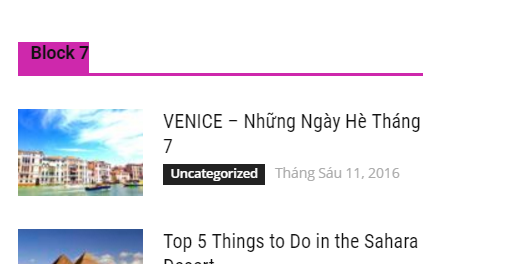
Also the POPULAR ARTICLE widget in footer is missing some top margin.
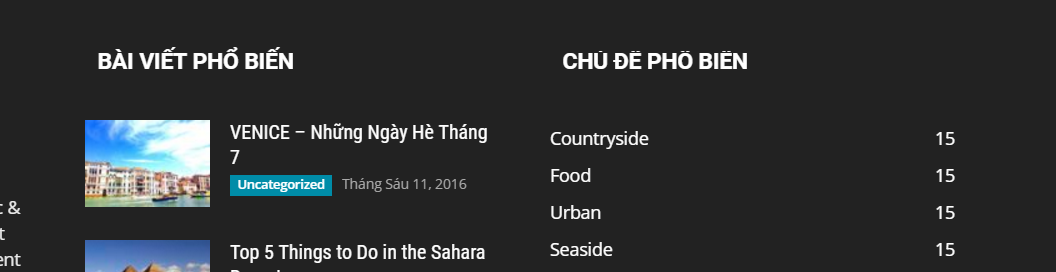
Please help me to fix.
Andrei L. Hi
The css/js generated inline by the theme can’t be moved to footer as it is required for each block added on the page. For each block where ajax it’s used the theme generate a custom javascript which can’t be moved to footer with current implementation for blocks. This is also the case with the inline css. However that css/js does not influence the way other resources are loaded on the page, or the way google render the page.
Thanks!
Andrei L. Hi
There is nos such element in Visual Composer but you can achieve the desired result by combining the existent elements. For example you can use a text block element with a background image like here: http://screencast.com/t/2iWRkOjzzL7O – http://screencast.com/t/cgsc7owFd – http://screencast.com/t/IIIYBxVbZA
This is the example shortcode from Visual Composer: http://pastebin.com/Ahscf3d8 – http://screencast.com/t/FjmsVHsOl
Hope this helps.
Thanks!
Bogdan B. Hi,
If you set the categories in the ajax menu, there will not be any others excepot for the ones that are sub-categories if the ones you add. In that case you need to remove them with a – in front of the ID as the block settings tutorial shows.
Thank you!
Bogdan B. Hi,
The theme used h3 for it;s modules and blocks so if you want to change this behavior you can follow this topic to force the theme to use another heading tag instead of h3: https://forum.tagdiv.com/topic/how-to-change-header-tag-in-page/
This setting applies to all modules at once that means all blocks and modules are affected.
Thank you!
 zingolo
I can’t seem to find how to change all the category colours for the blocks.
See image: https://drive.google.com/open?id=0BzKfDhkGKQp7SDFuUS14N2hvRWs
I’d like to change it to orange instead of black but can’t find it anywhere
Thanks in advance
 Catalin
 Hello kambyz,
So, please notice that this type of feature is useful when you are not using the page builder plus page title template. Before this, you will have to add it manually on the page, using some text blocks with H1 text. This request was from several users and we have found this solution and have implemented in our theme. Please notice that the SEO Yost using the same method to display the H1 tag for official site, like this -> http://screencast.com/t/4wYyNEDgNJmf
If you want to get rid of this H1 logo, you will have to follow the steps -> http://screencast.com/t/HkuuAayUyX4U ->> this is an example to the header style 1. So, if you are using the header style 3, you will have to make this change in header-style-3.php.
Thanks for your understanding!
Catalin Hello Dprasad,
I do not exactly understand what you want to mean. Please notice that the Popular 7 days is one type of sorting and it is used for blocks to display you the most Popular posts from 7 days. You gave me a single post and I do not understand where is the issue? Provide more details about your problem, so I will be able to provide a more accurate response. In order to achieve best results with this type of sorting, please ensure that you have fully followed all the steps which are presented in our documentation here -> https://forum.tagdiv.com/7-days-post-sorting/
Thanks for your understanding!
Andrei L. Hi
You can add a margin from row’s design option: http://screencast.com/t/a18LhJZMO6 – http://screencast.com/t/C0TJadim5
The blank space appear because you have three empty rows after block: http://screencast.com/t/OTJzYOYGBMC Try to remove these rows from Visual Composer then test the page again.
Hope this helps.
Thanks!
Bogdan B. Hi,
The mobile theme will show your about text in the footer section. There is no option to add extra elements for it. if you want a custom footer, we recommend not using the mobile theme, or if you know your way around coding, you can add custom code to this file: http://screencast.com/t/bUu2q1Hj
As for the line, that is added by the demo you install. The default demo will add the line but other demos have different layouts for block titles. Unfortunately there is no setting to chose one or the other on different demos installed.
Thank you!
Catalin Hello Caum,
I suppose that you want to use the Blocks in the Sidebars, right? So, if you want to do that, you will have to use the Visual Composer when you edit your homepage and add what kind of block you want in order to achieve the desired layout, like this -> http://screencast.com/t/pqWZn389ZF For more information about how you can use the Visual Composer, please consult here -> https://forum.tagdiv.com/how-to-use-visual-composer/ and also, this video tutorial could be more useful for you -> https://www.youtube.com/watch?v=LC7iz-v-zIY
If you refer to something else, please provide more details, so I will be able to provide a more accurate response.
Thanks for your understanding!
Catalin Hello Caum,
The modules are used to create the Blocks. For more information about our modules which are used to create the blocks you will find in Theme panel if you check the Excerpts section, like this -> http://screencast.com/t/pgLiFPZH
Hope this helps!
Thanks for your understanding!

