
- NewspaperFlex Block Builder and Flex Loop Builder
- NewspaperHow to use the Flex Blocks cache option
- NewspaperHow to edit modules for Flex Block X
- NewspaperHow to insert a block inside the content of a post
- NewspaperFlex Block Settings Guide
- NewspaperMeta Info on Modules and Blocks
- NewspaperTheme modules and blocks
- TutorialsDefault Block Settings Guide
- NewsmagBlock settings tutorial
- NewsmagCategory tag on modules/blocks
- NewspaperThumbnails – Fix strange looking images on blocks
- NewspaperBlock settings tutorial
- NewspaperCategory Tag on Modules/blocks
- ApiPractical example – How to add a new Block and Module
- Apitd_api_block::delete
- Apitd_api_block::update_key
- Apitd_api_block::update
- Apitd_api_block::add
- ApiAPI – Blocks – Introduction
- NewspaperWP Rocket and Newspaper Theme: Optimization Guide
 ndorado
 Hello,
I have been editing a digital newspaper for several years with my own editing tool. Now I want to transfer it to wordpress with the newspaper theme and I’m doing tests. I have installed the CPT UI plugin. And I can create post types and templates that work very well with newspaper using the theme panel.
But I would like to know if the following is possible.
1. Criteria for content to be published in certain areas or blocks of the home page.
2. Classify the contents with a type of content type criterion but with the same template to later be able to order them. For example by Press Releases.
3. Being able to mark a content by other criteria such as: featured, sponsored, regardless of the categories.
4. Finally, being able to associate it with a client (which is in a client database, of course).
Thank you and regards,
-
This reply was modified 4 years by
ndorado.
 vivreausmic
 Hello, I want ads to only appear between two paragraphs.
If I schedule an advertisement after paragraph 7, here are 3 possible examples:
paragraph 7 | paragraph 8 > ok advertising can be inserted between the two
paragraph 7 | table | > I want the advertisement to be pushed back after the painting
paragraph 7 | 2 columns > I want the ad pushed back after the column block
Is it possible ?
Thanks for your help 🙂
 Anamaria
 Hello,
Please edit with tagDiv Composer, select the block and let the offset field empty with no space, no value and see the results: https://www.screencast.com/t/peVbVmUDE.
Thank you!
Anamaria Hello,
The style for pagination is made with custom code CSS, so please make sure you don’t deleted the CSS CODE (RAW CSS) -> https://i.imgur.com/rf5oiyy.jpg
Also, please check if the code is missing, you can add it, thus is the code
@media (min-width: 1401px) {

  .td_flex_block_2.td_with_ajax_pagination .td-block-inner-pagination .td-next-prev-wrap {

    top: 43% !important;

    margin: 0;

    right: 50%;

    transform: translateX(-680px);

  }

}

@media (min-width: 768px) and (max-width: 1400px) {

  .td_flex_block_2.td_with_ajax_pagination .td-block-inner-pagination .td-next-prev-wrap {

    top: 43% !important;

    margin: 0;

    right: 20px;

  }

}

.td_flex_block_2 .td_module_wrap .td-module-meta-info .entry-title {

  text-shadow: 0 4px 16px rgba(0, 0, 0, 0.3);

}
Set the code in Raw CSS.
Hope this helps you!
Thank you!
 Bettina
 Hello @ekraft!
They are cropped automatically: https://forum.tagdiv.com/featured-image/ ; that’s why you can disable the thumbs you are not using. Set up your thumbs from Newspaper -> Theme panel -> Block settings -> Thumbs on modules/blocks. If you deactivate a dimension from there, next time when you will upload an image, it will not be resized to that dimension.
After changing the thumbnail sizes you need to regenerate your thumbnails using a plugin. Check this: https://forum.tagdiv.com/using-the-theme-with-existing-content/
Thank you!
Bettina Hello @scook!
Please use this filter too: https://www.screencast.com/t/vP4gzsPMPExZ -> https://forum.tagdiv.com/flex-block-settings-guide/
For example: if you have a category template assigned on all the categories you have ( global template), then it is very useful to use a special filter in the category page called category – current category in order to display the posts from the current category. In this mood you won’t have the same posts on each category page.
Thank you!
 therion250
Hello, I have a problem with the Metropolitan demo with the Flex Block 2, since when modifying the content of the home, the buttons automatically move to the top, making them unusable on a PC or Laptop, on a mobile if it works normal, please fix that problem.
Link: https://prnt.sc/26is5su
 Calin
Calin Hi PaulAvery, the WP_MEMORY_LIMIT need to be set like in our guide, in config.php file.
The spinning wheel appears after you click on save settings from theme panel, then most probably you have an admin-ajax.php error, check the console to see if you get some errors.
Normally, admin-ajax.php is blocked by modSecurity from host, it can be from firewall or other security modules/plugins.
If you can not manage the situation, we can do it for you, for this, make a full backup and contact us at contact@tagdiv.com provide wp-admin and cPanel, also provide as many details as you can about the problem.
Thank you!
Anamaria Hello,
Also, please make sure that you have enabled the proper thumbs with these sizes in order to show the featured images properly, check this: https://forum.tagdiv.com/thumbnails-fix-strange-looking-images-on-blocks/ -> https://i.imgur.com/8rs5E6P.png -> https://forum.tagdiv.com/theme-thumbs/ -> https://forum.tagdiv.com/featured-image-or-video/
Thank you!
Calin Hi,
The layout of pages and cloud templates can be edited using tagDiv Composer, edit the page/cloud and select the element that you ant to edit, if this is an individual element and you want to remove, then use the right click. If is a flex block check it in layout tab -> https://i.imgur.com/7lhioe1.png
Thank you!
Anamaria Hello,
1. To make the menu sticky please check this article and set it on always => https://forum.tagdiv.com/header-manager/ -> https://i.imgur.com/wzzBZu6.jpg
2. You can add more blocks from tagDiv Composer -> https://forum.tagdiv.com/flex-block-settings-guide/ -> https://forum.tagdiv.com/big-grid-flex-settings/ -> https://forum.tagdiv.com/posts-loop/ or you can import from tagDiv Cloud Library https://cloud.tagdiv.com/#/load/Blocks
Thnak you!
 AndreaPagani
Hi! I’m trying to show the excerpt in a post, but I can do this just in amp version…
Example:
Normal post (no excerpt) https://www.officina.news/abbigliamento-da-lavoro-invernale-u-power-punta-sul-total-look/
AMP post (with excerpt “La giacca Space, la felpa Rainbow etc.” https://www.officina.news/abbigliamento-da-lavoro-invernale-u-power-punta-sul-total-look/?amp=1
I was able to show it just in the homepage blocks…
Thanks!
Andrea
Anamaria Hello,
I’m sorry, but I’m not sure I fully understand what you are trying to achieve.
If you want to have the author on the blocks, please edit with tagDiv Composer, select the block and in the tab called “Layout” is the option to show the author -> https://i.imgur.com/3Zo0njy.png
Thank you!
Calin Hi Themedad,
From the details that you provided is possible that some settings to block the admin-ajax (usually this can be seen in console this is the case one from this guide https://forum.tagdiv.com/tagdiv-composer-not-working/)
If you agree we can take a look at it, for this please contact us via email at contact@tagdiv.com and provide wp-admin and cPanel access. We’ll check it as soon as possible. Also, please include the link of this topic to can identify you.
Thank you!
Calin Hi michaeldef, that answer was from a long time ago, since then there were many changes in our theme, WordPress and plugins.
What I suggest is to set the events in a flex block and see, those should be display.
Thank you!
Calin Hi michaeldef,
Yes, in a block you can display, posts, pages, events… al that you need to do is to set the post type -> https://forum.tagdiv.com/flex-block-settings-guide/
No, for categories and tags are different fields filters that need to be set, but this depend on what do you want to achieved and what you want to display in blocks.
Thank you!
Calin Hi kabbolig,
This code that you mentioned is referring to a title from that page, now the title can be from any block, this can be fill using the tagDiv Composer , edit the page and click on the block without title -> https://i.imgur.com/QRoQxJn.png set the custom title and the problem should be solved for that block.
The second code seems to be from an iframe with a player, for this problem you can add the title element for that iframe, here is a guide that can help you -> https://equalizedigital.com/accessibility-checker/iframe-missing-title/
Thank you!
 terzhenel
How to make a picture for all blocks into a full picture without cropping or enlarging?
[URL=https://hostingkartinok.com/show-image.php?id=49483c9df022fbc857319d90e9d22af0][IMG]https://s1.hostingkartinok.com/uploads/images/2022/01/49483c9df022fbc857319d90e9d22af0.jpg[/IMG][/URL]
 michaeldef
1) How do you create a floating nav in the Newspaper Pro pre-built similar to one in the Newspaper Magazine Pro pre-built?
2) There appear to be alot more Flex Blocks available in NP Pro than NP Mag Pro. Are the add’l grid blocks available to Mag Pro?
 aleoni
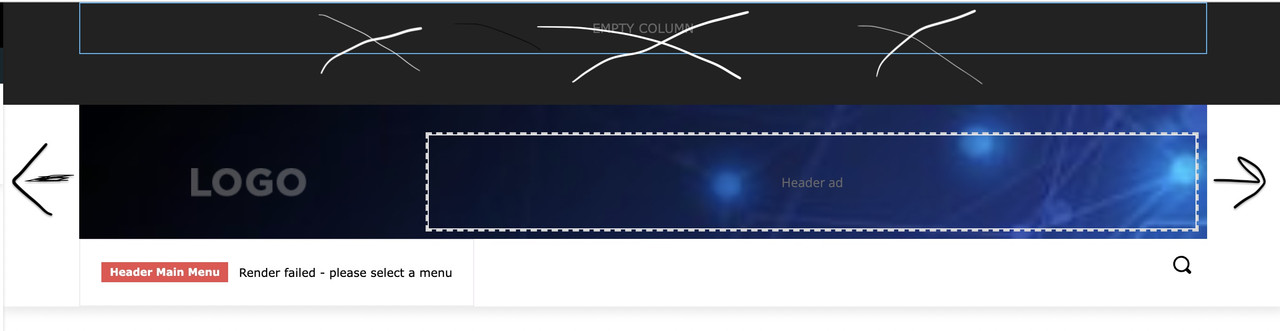
Hi, i am new to Newspaper. I am trying to customize the header, starting from that of Default Pro, and i have some questions. I also attach an image with cross and arrows painted by me to try to explain better 🙂
1. i don’t understand why images are always sfocated, i have tried with images of every dimension.
2. how can i enlarge to the right and left, to touch the margin, the “logo block”? (i think it’s called inner row). I’d like background image from side to side but not on the below menu
3. How do i eliminate the black section up there?
thank you!
 Lalit
Lalit My apologies
The setting was disabled in the Theme Panel’s Block Settings => Meta info on Modules/Blocks => Show Data.
The problem has been fixed now.
Regards,
LalitHi,
Today, I found that Date not showing in the Article meta info across all module (flex block, post loop) on homepage, category pages, tags, author archive pages and so on.
Watch it: https://drive.google.com/file/d/1GqclXZBNnxwR1gbdUCHruLQYjTmKJ4Hz/view?usp=sharing
Is it a bug?
What I have done to find the issue?
1. Deactivated all plugins and reactivated one by one.
2. Switched back to Newspaper parent from the child theme.
3. Deactivated, deleted, and reinstalled only default newspaper plugins – td composer, cloud library, and newsletter.
4. Removed all plugins except the newspaper default.
Please help soon. I am using Newspaper Tech news demo
Regards,
 kimstipguide
 Bettina!
I erased the block and put a new block in it.
Solved.
Thank you.
michaeldef Website: https://bayarearegistry.com/
Events created so far – https://bayarearegistry.com/events/
——————–
I’m not familiar with post types. Does this solution work for different event categories or tags? Suppose I want to create different grid blocks for different event categories or tags? Do I create diff post types for each event category or event tag that I want to use in a grid block?
 c386
c386 Hi Anamaria,
Just tried your recommendation and you’re right, if I enable Post View from Post Settings -> Post and Custom Post Types -> Show Post Views, the sidebar block does then show popular articles from the last 7 days.
Question now is; how can I get it to work without publicly showing post views?
-
This reply was modified 4 years by
c386.



