- NewspaperFlex Block Builder and Flex Loop Builder
- NewspaperHow to use the Flex Blocks cache option
- NewspaperHow to edit modules for Flex Block X
- NewspaperHow to insert a block inside the content of a post
- NewspaperFlex Block Settings Guide
- NewspaperMeta Info on Modules and Blocks
- NewspaperTheme modules and blocks
- NewspaperThumbnails – Fix strange looking images on blocks
- NewspaperBlock settings tutorial
- NewspaperCategory Tag on Modules/blocks
- NewspaperWP Rocket and Newspaper Theme: Optimization Guide
- NewspaperSearch setup for custom post type
- NewspapertagDiv Opt-In Builder – Emails
- NewspaperBookmark – Save For Later
- NewspaperModules Builder in Newspaper Theme
- NewspaperFilters and sorting for taxonomies
- NewspaperUser review system
- NewspaperWooCommerce: Happy “Add to Favorites!”
- NewspaperLockers
- NewspaperLeads
 globalpro
how is content served to the blocks? What are my options?
Is there a video to customize?
Is there API setting available for content push?
Thanks
 syntaxandmotion
 Hi. Thank you. The links are helpful. I have GB library and added the plug-in. I am a little confused and need to clarify. I think we are having an issue because there is no upscaling in WP.
Should we only use image sizes that are seen in the Panel > Block Settings > Thumbs on Modules/Blocks list?
e.g.: 80×60, 100×70, 218×150, 265×198, 324×160, and so on?
I do not understand how to have an image that is not having blank space. I thought 4:3 would work fine because I read this article:
https://forum.tagdiv.com/thumbnails-vs-featured-image-size/
But my 400×300 image results in empty borders when in Big Grid 1, whereas 400×286 works fine. Why is that happening, and how do I prevent it?
 MDNM2017
Hi at https://infomeddnews.com, I need to decrease the space between the title and the excerpt.
I am using Block 22. Thank you.
 Simion C.
 Try as I suggested, create a page and use a theme block or element, use Visual composer as you are using now but place a theme block. Check to see how that loads in comparison with the current homepage. There should be a difference in favor of a theme block or grid for example.
 sanotes
Hello again.
1. Possible or not, to output a picture, which at the beginning of post in the excerpt? Or do I need to put a picture for each post in the featured image ?
2. I have added a special visitor counter of website in the CUSTOM HTML section. The counter appeared at the bottom of the page. Is it possible to add somewhere else. For example where FOOTER COPYRIGHT or FOOTER TEXT?
https://www.dropbox.com/s/i8eysj566kqr4g1/footer.jpg
3. In the theme settings in the section GENERAL theme colors, I can change the color of all links, which also affects the the headers of the posts and buttons “Read more” and buttons up. How do I set the color of links for these areas?
https://www.dropbox.com/s/r65qhqz4pvr38fz/link-color-posts.jpg
4. How can I change the quotation block in the comments? https://www.dropbox.com/s/f6ye0ab26x66zr6/blockquote.jpg?dl=0
Original link to article – http://sanotes.ru/comp-dlya-ofisa-2016/
My settings in Theme Fonts\Post Settings – https://www.dropbox.com/s/5ynnv1a9624ysp9/blockquote-settings.jpg
 brenbrinkman
 Hi simion, it only loads from top to bottom for the theme blocks. It loads weirdly when I use custom elements. Does this mean I can only fix this by using theme blocks?
Simion C. Hi,
Such a sorting method is not available in the theme blocks
– https://forum.tagdiv.com/block-settings-guide/
There are some user provided sorting method modifications that have to be made to theme files, if you want to try and modify the code
– https://forum.tagdiv.com/topic/implemented-new-sort-most-popular-among-posts-of-last-7-days/
 Catalin
 Hello gskitchen,
Here is talking about Ajax Filter which can be added from Block Settings from here -> https://www.screencast.com/t/5jmAt5M75z Clear all of your caches, purge CDN files and check the results.
Thanks for your understanding!
 Bogdan B.
 Hello,
Please provide a link to your site so we can inspect it and provide an example of what this space is. Most likely you are referring to the top padding of a page. If this is the case, please use this forum topic:
https://forum.tagdiv.com/topic/remove-the-blank-space-between-header-and-the-first-block/
Thank you!
Catalin Hello,
Please notice that our theme does not have any such a thumb for this image. Please check our Thumb Module from here -> https://forum.tagdiv.com/theme-thumbs/ Also, if you want to achieve good results. you should regenerate the images using the Force Regenerate plugin with Regenerate Thumbnails. Please check here -> https://forum.tagdiv.com/thumbnails-fix-strange-looking-images-on-blocks/
Thanks for your understanding!
Simion C. Hi,
@myIFI The featured image will not be shown in the actual page. A featured image can be set for pages and thumbnails will be created from it. These thumbnails will be displayed in blocks/modules when a page filtering is set. But the featured image will not be shown in the actual page. That is only for posts currently.
Thanks
Simion C. Hi,
The default color of the article titles is black, but it seems that this is not applying on your website. This is not applying because there is a span element inserted between the block title heading and the link
– https://www.screencast.com/t/kdc1l3MlY
I could give you a code to color them as intended
– https://www.screencast.com/t/EY0vfIbbypxp
This code must be entered in Theme panel->Custom CSS
h3.td-module-title a {

color: #111;

}
Thanks
 NexusFred
Hello,
Just a message to indicate a small list of incompatible plugins :
Admin Menu Editor Version 1.8.2
Black Studio TinyMCE Widget Version 2.6.2
Contact Form 7 Captcha Version 0.0.2
Elementor Version 2.0.3
Justified Image Grid Premium Version 3.8
Maintenance Version 3.6.15
Regenerate Thumbnails Version 3.0.2
Responsive Post Preview Version 1.0.3
TinyMCE Advanced Version 4.6.7
TinyMCE VisualBlocks Version 1.0.5
Ultimate Addons for Visual Composer Version 3.16.20
WP Pipes Version 1.30
WP Real Media Library Version 3.4.5
Physical Custom Upload Dir for Real Media Library Version 1.0.4
WooZone – WooCommerce Amazon Affiliates Version 9.1
…
Best regards
Nexus
 Dominikks
Hello my tagdiv composer menu (every block) is broken.
https://ctrlv.cz/shots/2018/03/31/TUpD.png
https://ctrlv.cz/shots/2018/03/31/958G.png
I’ve tried to reinstall tagdiv composer plugin (deleted and uploaded again) also reactivate also delete and upload whole theme and nothing helped.. I have 8.7.2 theme and composer 2.1.
I don’t know where is problem.
Also when i create new page i dont have tag div composer button there (above text editor) only visual composer.
I can access tag div composer only from admin bar when i have opened the live page..
On my other site is menu working good (www.rezzers.sk).
Just on this i have problem (www.rewind.sk)…
Can you help me or give me some hint?
 tabesuki
Hi, on my website, the final block module does not load the images properly. The module only loads properly once the page is refreshed. How do I fix this? (On my website at https://tabesuki.com/, this would be the “more food” section.) Thanks a lot for your help!
 gskitchen
Hi there,
I’m new here. How can i add menu in a block like 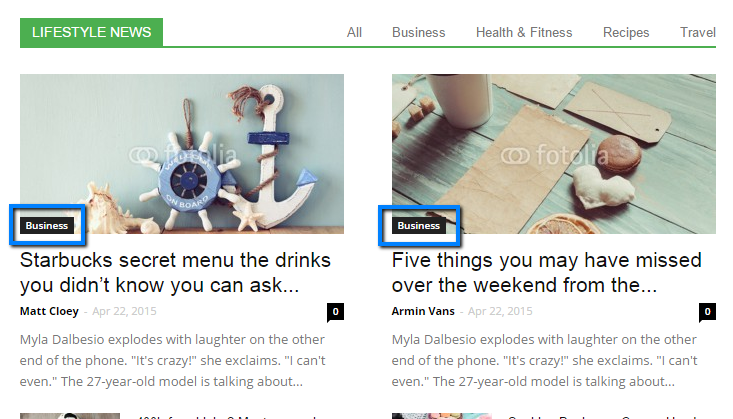 this image, where under LIFESTYLE NEWS, there are menu like All, Recipes, Travwl etc?
I’ve tried by set filter type as filter by category
thnx
 kcbrian
 Thank you Simion, I was able to get that fixed by uninstalling and reinstalling the theme with all plugins deactivated (except tagDiv Composer). Meanwhile I have been trying to change the font size and word count on the Big Grid Slid (Don’t know the particular module and block to edit in excerpts) please help me out cos the words are too long and cover most part of the image on mobile.
 Edward
 You can try this code. Enter it in Theme panel -> Custom Css
/* Remove posts and comments counts in blocks and author widgets */

.author .td-author-post-count {

display: none;

}

.author .td-author-comments-count {

display: none;

}

.td_top_authors .td-author-post-count {

display: none;

}

.td_top_authors .td-author-comments-count {

display: none;

}
 petbiv
I keep getting this error on my Instagram block:
https://webstyr.dk/visitplovdiv/
I tried all types of Instagram IDs, currently it is set to cocacola
 chazlight1
Could you help us remove the blocks that show post and comment count for individual author widgets and for the actual author pages? Our CSS efforts produced no results. Thanks!
Simion C. As long as the option is enabled in the theme panel, and the post views are active, there would be no problem. I activated the option in the theme panel, then configured a block with the 7 days popular sorting
– https://www.screencast.com/t/G8XpeV4iHbE
Now, as posts gather views they will be displayed in the block (according to your category filter)
– https://www.screencast.com/t/0gzNbaWP3EZ
– https://www.screencast.com/t/dxaKB5JDR81G
 Alin [tagDiv]
 Hi,
The theme doesn’t have an option for this. The date can be enabled/disabled globally for all modules/blocks.
Based on get_date function you can create another one and use it only for you specific module – https://www.screencast.com/t/8DhgPvvuT For example – https://www.screencast.com/t/6iQt7wanoLfC – https://pastebin.com/Z7CD9CPQ
Thanks!
Simion C. I have tried copying the same crypto demo homepage code
– https://www.screencast.com/t/Dwg6KOINF2x
Upon using the page code in a new page, I see no problem with it. The flex blocks have all the intended options
– https://www.screencast.com/t/cgz06d5yCXtx
Simion C. Hi,
That should not be a problem, all the blocks which have this option can be limited
– https://www.screencast.com/t/o0MsviCuY3Pi
Be sure to save the page after setting a limit.
Simion C. Hi,
The block widget entered in a sidebar will look just like when the block is placed on a 1 column. In the live theme demo it can be seen how all the blocks look in this layout as well
– https://demo.tagdiv.com/newspaper/block-1/
Switch through blocks and see how they look when placed in 1 column. Depending on the layout in which they are placed blocks may look different.
Thanks