
- NewspaperFlex Block Builder and Flex Loop Builder
- NewspaperHow to use the Flex Blocks cache option
- NewspaperHow to edit modules for Flex Block X
- NewspaperHow to insert a block inside the content of a post
- NewspaperFlex Block Settings Guide
- NewspaperMeta Info on Modules and Blocks
- NewspaperTheme modules and blocks
- NewspaperThumbnails – Fix strange looking images on blocks
- NewspaperBlock settings tutorial
- NewspaperCategory Tag on Modules/blocks
- NewspaperWP Rocket and Newspaper Theme: Optimization Guide
- NewspaperSearch setup for custom post type
- NewspapertagDiv Opt-In Builder – Emails
- NewspaperBookmark – Save For Later
- NewspaperModules Builder in Newspaper Theme
- NewspaperFilters and sorting for taxonomies
- NewspaperUser review system
- NewspaperWooCommerce: Happy “Add to Favorites!”
- NewspaperLockers
- NewspaperLeads
 Anamaria
 Hello,
You can set a featured image for each post here https://forum.tagdiv.com/featured-image-or-video-7/
So if the posts don’t have the featured image, then they will display a blank thumb; you can set a placeholder.
You can set a Placeholder in Theme Panel -> Blocks Settings -> https://i.imgur.com/mo0Cbu2.png
Thank you!
 breakofdawn
I have an issue where I am trying to activate new thumbnail sizing. I go to Theme Panel>Block Setting>Thumbs on Modules/Blocks select all the sizes I want to use, I hit Save, leave the page to go regenerate thumbnails and the new sizes aren’t there. I go back to the Theme Panel page and the original sizes that were there already are the only ones selected. Is there a cache I can reset or is this something that’s been an issue? I searched the forums and didn’t find anything.
 Calin
Calin Ok, first it will be need to enable the option for dates on modules in the theme panel and after that use this custom css:
.td-post-date {

display: none;

}

.td_block_2 .td-post-date {

display: inline-block;

}
The css needs to be set in the theme panel > custom code > custom css.
Thank you!
 Alastair Dixon
 Oh.. and i’m using the ‘flex loop builder block’, incase that helps you diagnose the issue.
 leagcooks
 Hi Colin,
Here is a link to my website..
https://www.ukthemeparkspy.co.uk
i only want to show the dates on block 2 on my home page at the top but still hidden on everything else
thanks
Anamaria Hi,
The exclusive label is displayed on the blocks if your posts are locked -> https://forum.tagdiv.com/lockers/
If you are referring to display the plan that you have assigned on that post, you can use a custom field or custom label https://imgur.com/qhDjo0A, but this option is only for blocks.
Thank you!
Calin Hello,
Yes, the theme panel option for blocks is a global one.
Yes, it can be used a css to hide the dates. Just please provide some links from where you want to hide it and some screenshot to make sure I will remove it from the right blocks.
Thank you!
 Andy81
 This option is not available in Gutenberg Editor it is from the old classic editor. Gutenberg has a “Full size” option in the block setting but you can’t set it as default and it does not work either since it gets overridden by theme’s default size.
Anamaria Hello,
You need to activate the tagdiv Standard pack plugin and clear the cache, but I recommend replacing blocks 1 to 25 with flex blocks and the standard templates (header, footer,single, etc.) with cloud templates.
Thank you!
leagcooksHi, I have used the hide date in the theme panel but it removes the date on everything.
Is it possible with some CSS that it hides the date on categorys/modules but still shows the date on my home page like below?
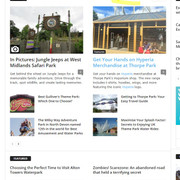
I would like the dates still to be shown on Block 2 on my homepage..
thanks
 kosmofoto
 That doesn’t work either. Installed Classic Editor, and the text box is blank and won’t allow anything to be added to it.
Another issue that remains is that I can’t add any images which have been uploaded to the Media Library.
This was from WordPress Support:
We usually see this type of error coming up if a plugin has added a specific type of block; and then that plugin is disabled. In this case the plugin seems to be “tadv” – at a guess that’d be a tagDiv plugin since I do see a few other tagDiv plugins listed for your site.
“Would you know if there were any tagDiv plugins that were removed or deactivated recently on the site?
If not, it might be worth checking with the tagDiv developers regarding this – they may have seen this type of error from their plugin(s) before and can provide more accurate help to restore the ‘Classic Paragraph’ block they provide.
I took the liberty of trying to create a test draft post – in that post it looks like the default WordPress paragraph blocks are working correctly though of course I had a quick look through the full list of available blocks to see if I could spot any tagDiv-specific blocks but didn’t see any there either.”
Are you sure this can’t be from your end? Everything was working fine until Newspaper 12 was installed.
S
 Bettina
 Hello Stephen!
It’s not from our theme. Please check the threads: https://wordpress.org/support/topic/classic-paragraph-block-causes-block-editor-error-in-widget-area/
https://wordpress.org/support/topic/your-site-doesnt-include-support-for-the-tadv-classic-paragraph-block/
Try to use the Classic Editor plugin instead of Gutenberg to see if you can edit the paragraphs.
Thank you!
kosmofotoHello
I recently updated my theme to Newspaper 12, and now I am having issues with the classic paragraph block, and adding media library images to posts.
This is my blog: https://kosmofoto.com
A WordPress Support Engineer who was helping me said: “I’ve checked the site now and in an existing post I’m seeing the following error:
“Your site doesn’t include support for the “tadv/classic-paragraph” block. You can leave this block intact, convert its content to a Custom HTML block, or remove it entirely.”
I have not deleted any of the tagDiv plug-ins – tagDiv Standard Pack is version 2,6, and the other tagDiv plug-ins also date from 2024.
This is creating huge issues, as I have posts to publish. The error also seems to affect all previous posts, meaning I can’t edit any paragraph blocks in previous posts.
Thanks
Stephen
Anamaria Hello,
If you want to have a post sticky, then you can set it on a block and set the limit value to 1, and to have other posts from other categories, you need to add another block.
You need to set the post id in the filter tab to have a post sticky all the time on that block -> https://i.imgur.com/3uVxMOD.png
Thank you!
Anamaria Hi,
I think that you have malware on the website.
If you want to update the theme, you should download the latest version of it from Theme Forest account and download it.
I recommend that you update the theme manually https://forum.tagdiv.com/how-to-update-the-theme-2/ via FTP/cPanel/File Manager, also if possible disable extra plugins during the theme update to avoid any problems that may arise and make sure that you have activated the tagDiv Standard pack plugin to keep the website’s look. You can try to update the theme on a staging website.
After you update the theme, you need to update the theme plugins too.
In the worst cases, the settings in the theme panel may be lost (there have been isolated cases), in these cases, after the theme plugins that were previously used are activated, you will have to use a backup for the theme panel -> https://forum.tagdiv.com/import-export-theme-settings/
You could consider reinstalling the WordPress version, and checking for this plugin wp-zexit.php. It might be wise to inspect via FTP if it doesn’t appear in the WordPress -> Plugins. Additionally, using Wordfence to scan the website and remove unknown users would be prudent.
Change admin passwords and delete admin accounts you are not familiar with;
– Delete any weird/unknown plugins;
– Delete the weird/unknown themes;
– Clean unfamiliar Theme Panel injected code (example – https://i.imgur.com/4q70kCv.png);
– Clean WordPress files (example – https://i.imgur.com/stJCqiK.png)
Please block /wp-json/tdw/save_css
If an attacker wants to target this URL /wp-json/tdw/save_css they can do so. Even if the website uses a different theme, the attacker can still try that URL. We could add an option to be able to enable/disable the Live CSS, it will be considered. But for now in order to remove it this can only be done with a modification to the composer plugin. I think that all that removing it requires is to comment this line of code – https://prnt.sc/RtwvL5Nc4ikR -> https://prnt.sc/ymZmhdUfp57U But as I mentioned, the attacker can still try to access the URL.
If you want, you can contact our custom work team here, and they can help you update the theme safely: https://tagdiv.com/premium-customization-services/
Thank you!
Andy81Hi, the Default Image Size for the posts is 696×0. I always upload images 1200x wide. I am using a template that has post content wider than 696 px. If I set Content width to 100% in theme builder it oly works for texts but not for in-content image blocks. I am using Gutenberg editor. I have tried to set different image sizes in Post editing settings but with no luck.
 msassanelli
Hi,
when the tdb_single_taxonomies shortcode has no terms or all terms are hidden, I would like to hide the control, including its title.
An empty flex_block can easily be hidden using the CSS class tdc-no-posts. However, there is no similar class provided for the tdb_single_taxonomies shortcode.
Do you have any existing solutions or workarounds for this requirement? I am using the Newspaper theme, version 12.6.6.
Otherwise, I would be pleased if this could be included in the next release.
Regards,
Massimo
 DaveKinetic
Hello,
I recently used a featured video for the first time. Playing the video from the featured video position on a single post works fine. The video plays as expected with the volume turned on. If I press play from one of the blocks on the homepage, the popup modal opens and the video autoplays, but it is always muted.
Is there a setting I am missing to enable sound when the video autoplays?
Bettina Hello Varun!
Make sure the block has no offset: https://forum.tagdiv.com/offset-feature/\
Make a test and deactivate all plugins except tagDiv ones. Also, if you are using a cache plugin, deactivate it, clear all cache, and try again.
If the problem is still there, then please contact us via email at contact@tagdiv.com and provide the following:
– admin url and credentials
– a link to this topic in order to identify you
Thank you!
Anamaria Hi,
For flex block, you should choose the current author “: Author – Current author”special filter: https://forum.tagdiv.com/flex-block-settings-guide/
After, please select an author and check after.
Thank you!
Anamaria Hello Megan,
Yes, you can exclude posts id or categories id -> https://i.imgur.com/Ezg0bJp.png -> https://forum.tagdiv.com/flex-block-settings-guide/
Thank you!
Anamaria You can translate them from Theme Panel -> Translations -> Translations -> https://i.imgur.com/ezhjmLq.png and on the elements where the translation does not apply
you need to edit the pages/templates with tagDiv Composer for the blocks or other elements to change the translation.
Also, for the menu, please go to Appearances -> menus and check the menu there; maybe you didn’t change the page’s name.
Also, the theme options cannot be translated.
Thank you!
Anamaria Hello,
You can use a plugin for this, but Ii don’t know if the likes will be displayed on the blocks.
This can be done only with custom work.
Thank you!
 nolandolce
Hi,
Is it possible to filter out a set of posts or category from the flex blocks, so that they do not appear in the feed?
Thanks!
Megan
 gomakeout
 Hi Simchris,
First of all, thank you for your message.
I just blocked xmlrpc via .htaccess, and we did a full scan of the platform with Wordfence, which didn’t detect any malware.
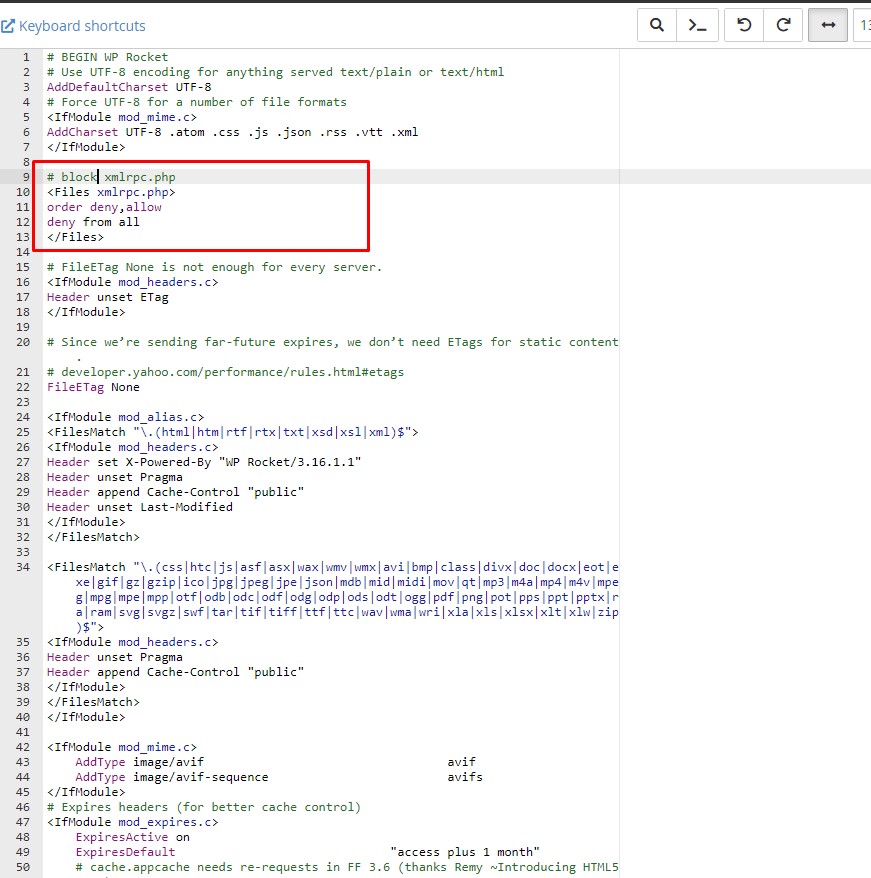
As soon as it’s 7~8 AM here, I’ll get back here to share whether this action worked to reduce CPU usage. If you have any other additional tips, I would appreciate it.



