No search results were found in Documentation!
 designrepublik
I have just updated the theme (12.6.1) and using the latest Town Talk template. It seems like slowing down the website a lot and loading very slowly. May I know if that is a known issue? And you guys will be fixing this?
I am already using Cache and Cloudflare. It was quite fast prior to the update and change in the template.
Appreciate your reply. Thanks!
 bobwei
 The site is NOMRAL under editing mode:
https://drive.google.com/file/d/1tsQ9RczE1AIiX_JuZkTko9XZVnyw2MVg/view?usp=drive_link
But when acess the public link:
https://drive.google.com/file/d/1tnUAhRG5VvVxwsEz5yNFIrY3Oc6YbZPO/view?usp=drive_link
Already Tried:
– Reinstall and Activated All Tagdiv Plugins
– Everything is up to date
– PHP is 7.4
– WordPress is 6.3.2
– The cache plugin is deactivated
– Deactivated all plugin else the tagdivs ones
In the Inspection Console, showing:
https://drive.google.com/file/d/12_GVvJZcJB1AdXQe7sqE1gzOfPc-42Pp/view?usp=drive_link
So, I don’t know why this happen, because the template is worked normally, only today is happen this issue, I didnt make any update or install something before that.
Please Help with this.
-
This reply was modified 2 years by
bobwei. Reason: completing infos for solutions
 rockman008
When I visit my Home page, the installed prebuilt doesn’t show even though I cleared all the cache. Sometimes, it displays, but most of the time, it doesn’t, even in incognito.
I downgraded to 12.5.1, and it works now. It seems like the version 12.5.1 is the stable version.
Prebuilt: Default Pro
Php version: 8.1.2
WordPress Version: 6.2.3
 cybernox
 I’m actually using Openlitespeed and have Litespeed plugin installed. I did cleared the cache. if you want you can take a look I can send the url.
 Anamaria
 Hi,
Please clear the cache.
Thank you!
Anamaria Hi,
I think that was an issue with the cache because now seems to display the responsive version – > https://i.imgur.com/4yunywf.png
Thank you!
 0xid0
0xid0 Hello,
I’ve added the code, but the main image is still clickable.
I looked into the source code just to double-check if i’m seeing a non-cached page and the code is present:
<!-- Custom css from theme panel -->

<style type="text/css" media="screen">.td-read-more{display:none;}.td-main-logo img{width:auto!important}.td-image-container{pointer-events:none}</style>
Thank you
Anamaria Hi,
I checked on more browsers, and the images are displayed. Please clear the browser cache.
Thank you!
 Igor88
 Thanks. The method with tagDiv Composer helped
I have removed the cache plugin, but ads are still not added via Theme panel — Ad
I want to place an advertisement in the text after the first paragraph, it cannot be done through tagDiv Composer. It is possible only through the Theme panel — Ad
-
This reply was modified 2 years by
Igor88.
 emanuelebosi
Hello, I’ve set a post format as Video and I added the element “single post featured image” in the post. Now I see the grey block in the composer editor, but I can’t see the video online. I see just white space. I’ve checked the preference out in the post editor and all things are activated (included featured video). I’ve also removed the cache but nothing appears. What’s happen?
 Bettina
 Hello @Igor88 !
Do you use default templates or cloud templates?
In the cloud templates, you can add the ads when you edit the post with TagDiv Composer in the element called ” Single Post Content ” in the tab ADS. Documentation here: https://forum.tagdiv.com/article-ads/
Or you can use the element called “Ad Box” from TagDiv Composer, and there you need to add the ads: https://forum.tagdiv.com/ads-adsense-overview/
Please try to uninstall the cache plugin and check if the problem is solved.
Thank you!
 sebe
sebe Hi Anamaria,
Well, this only happens to me with the translations > load an available translation > Save Settings. The rest of the settings can be saved without any problem.
Checked the suggestion you told me but not object-cache.php on my wp-content folder.
PHP 8.1
Regards.
Sebe.
 westcoast
 I turned back on Tagdiv Composer and now I’m seeing the homepage but no images.
I tried a different browsers, but still no images.
I see the picture you sent. That was great, but I’m wondering why it’s not working for me.
Update: I cleared my cache
deactivated all my plugins except for Tagdiv Composer and tagDiv Cloud Library
still no images on 3 different browsers.
If I deactivate Tagdiv Composer, I get images everywhere except on my homepage where I just get code.
Right now, I’ve activated all the other plugins again as they don’t seem to be causing the problem
-
This reply was modified 2 years by
westcoast.
 obiwan
Hello,
The Login/register page module is only displaying the login form.
https://prnt.sc/raqPlTc1unC8
We went through all caches clearing already.
Thank you
 meri
meri Hi,
I cleaned all cache and it still doesn’t work on https://www.mondeoz.com desktop version.
Can you kindly help?
Thanks
Anamaria Hi,
Please activate the tagdiv standard pack plugin and clear the cache.
Please downgrade wordpress to version 6.0 using this plugin https://wordpress.org/plugins/wp-downgrade/ after the update, the wordpress to 6.3.2 There are more files infected with malware.
Also, please check this topic https://forum.tagdiv.com/topic/update-required-newspaper-12-1-1-brings-extra-security/
Thank you!
 paulina_g
 It seems that the menu is now displayed according to the settings in the Cloud templates – perhaps the problem was caused by the cache
Anamaria Hi,
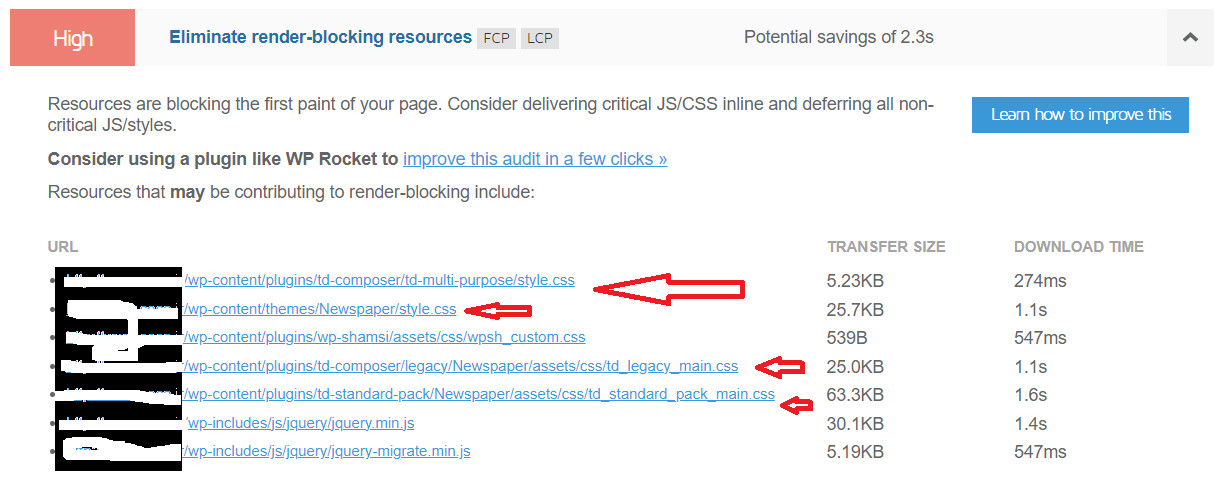
I suggest using WP Rocket plugin.
There are many optimization guides provided by our users here in the forum, some made by us; you could check some of them
– https://www.infophilic.com/get-almost-100-pagespeed-newspaper-theme/
– https://forum.tagdiv.com/cache-plugin-install-and-configure/
– https://forum.tagdiv.com/how-to-make-the-site-faster/
– https://forum.tagdiv.com/topic/high-number-of-ajax-request/
– https://forum.tagdiv.com/topic/score-100100-pagespeed-with-newspaper-wordpress-theme/
– https://www.andraware.com/wp-rocket-for-newspaper-theme/
– https://forum.tagdiv.com/topic/page-speed-guide-for-2023-beginners-and-advanced/
– https://forum.tagdiv.com/topic/newspaper-theme-speedify-your-website/
– https://forum.tagdiv.com/topic/tutorial-chriss-custom-optimizations-for-functions-php-etc/
– https://forum.tagdiv.com/cloudflare-cdn/
– https://forum.tagdiv.com/topic/theme-causing-high-cpu-usage-2/
– https://forum.tagdiv.com/topic/sql-querys-high-cpu/
– https://forum.tagdiv.com/topic/newspaper-theme-slow-to-respond/
– https://premium.wpmudev.org/blog/optimizing-your-wordpress-database-a-complete-guide/
– https://underconstructionpage.com/optimize-wordpress-database/
– https://crunchify.com/better-optimize-wordpress-database-all-in-one-guide/
Also, pagespeed is not covered by support -> https://forum.tagdiv.com/newspaper-theme-support/
If you use Wp Rocket, you can try to exclude the following files
/jquery-?[0-9.](.*)(.min|.slim|.slim.min)?.js
/jquery-migrate(.min)?.js
/wp-content/plugins/td-composer/legacy/Newspaper/js/tagdiv_theme.min.js
tdBlocksArray
To be able to optimize and to remove CLS and LCP please check these guide => https://developers.google.com/web/tools/lighthouse/ -> https://www.sqlpac.com/en/documents/google-pagespeeds-lighthouse-6-new-features-lcp-cls.html -> https://web.dev/lighthouse-whats-new-6.0/ -> https://web.dev/lcp/ -> https://web.dev/cls/
Thank you!
Bettina Hello @tekedia !
Make sure that all the settings are like in our requirements, please follow the guide carefully: https://forum.tagdiv.com/requirements-for-newspaper/
and please increase all requirements that are lower, and follow all steps.
Make a test and deactivate ALL plugins except tagDiv ones, also if you are using a cache plugin, deactivate it, clear all cache and try again.
More documentation about the cloud templates is here:
– https://forum.tagdiv.com/cloud-library-templates/
– https://forum.tagdiv.com/design-post-pages-using-cloud-library-templates/
– https://forum.tagdiv.com/cloud-library-category-templates/
Thank you!
Bettina Hello!
I can see that you have a lot of errors in the console. Make a test and deactivate ALL plugins except tagDiv ones, also if you are using a cache plugin, deactivate it, clear all cache and try again.
We have 3 options for mobile versions that you can use:
1. Responsive version: A responsive version of your website looks similar to the desktop version. TagDiv Composer is used to edit the page.Click on the mobile viewport: https://www.screencast.com/t/XDQJedlggSB. There, you can see your mobile version and edit or adjust the elements to look better.
2. Mobile pages: https://tagdiv.com/newspaper-10-3-7-update-brings-customizable-and-fast-mobile-pages
3. Mobile theme plugin: The Mobile Theme is a performance-optimized theme included in the main Newspaper theme that only loads on mobile devices. It comes with its own templates and designs for pages, posts, categories, etc., so your current templates from the desktop theme will get converted to the mobile theme layout. Please see https://forum.tagdiv.com/the-mobile-theme/ and https://forum.tagdiv.com/mobile-theme-introduction/ for more information.
A full explanation is here: https://www.youtube.com/watch?v=SpGkOnJeNZY
If you need to use mobile version 1 or 2, then you need to uninstall the Mobile Theme plugin and AMP.
Thank you!
Bettina Hello @javid!
First of all, please make sure you have a backup done and then you can update the theme and the TagDiv plugins also.
Our developers are aware of this issue and try to synthesize the composer, which is big, and fix the major problems of the theme and speed.
A cache plugin doesn’t help much with page speed.
Please note that page speed or optimization is not covered by the support team: https://forum.tagdiv.com/newspaper-theme-support/
Thank you for understanding!
Bettina Hello @chalithar !
Make a test and deactivate ALL plugins except tagDiv ones, also if you are using a cache plugin, deactivate it, clear all cache and try again.
Please check this article: https://kinsta.com/knowledgebase/there-has-been-a-critical-error-on-your-website/
Make sure that all the settings are like in our requirements, please follow the guide carefully: https://forum.tagdiv.com/requirements-for-newspaper/
and please increase all requirements that are lower, and follow all steps.
Thank you!
 stefanegirard
 Hi
Yes the cache is clear. Here’s my link:
https://www.stefanegirard.fr/
Thanks
 javid
javidhttps://i.postimg.cc/wMNHFfw8/2023-10-25-094237.jpg
i use litespeed cache plugin but …
Anamaria HI,
Did you clear the cache? Please provide the link to your website.
Thank you!