
- NewspaperHow to use the Flex Blocks cache option
- NewspaperCache plugin – install and configure
- NewspaperWP Rocket and Newspaper Theme: Optimization Guide
- NewspaperFlex Block Settings Guide
- NewspaperGeneral Options that May Interfere with the Newspaper Theme
- NewspaperThe Newspaper Mobile Theme: Introduction
- NewspaperAutoptimize Plugin – install and configuration
- NewspaperHow to update a plugin
- NewspaperCloudflare (CDN)
- NewspaperFacebook Share
- NewsmagRequirements for Newsmag
- NewsmagHow to update the theme
- NewsmagtagDiv Social Counter tutorial
- NewsmagTop bar templates
- NewsmagAjax view count
- TutorialsWhat is Ajax preloading?
- NewspaperVideo Playlist
- Newspaper7 Days Post Sorting
- NewspaperAjax View Count
- NewspaperTop bar templates
 omar ahmed
 1- Gzip compression is still not active
enable sir but this messege from third party ( facebook) — please check messege
يؤدي ضغط https://static.xx.fbcdn.net/rsrc.php/v2/yp/r/sOXUQGepNJD.js إلى توفير ١٦٥٫٨ كيلوبايت (تقليل بنسبة ٧٥٪).
يؤدي ضغط https://static.xx.fbcdn.net/rsrc.php/v2/yI/r/jG4p3Ps_5O2.js إلى توفير ١٢٢٫٦ كيلوبايت (تقليل بنسبة ٧٢٪).
يؤدي ضغط https://static.xx.fbcdn.net/rsrc.php/v2/yf/r/eItQ6CL9r9J.js إلى توفير ١٢٢٫٥ كيلوبايت (تقليل بنسبة ٧١٪).
يؤدي ضغط https://static.xx.fbcdn.net/rsrc.php/v2/yR/r/JgJ7uCwXCUZ.js إلى توفير ٧٠٫٥ كيلوبايت (تقليل بنسبة ٧٠٪).
يؤدي ضغط https://static.xx.fbcdn.net/rsrc.php/v2/yB/r/lSRul-v_nG1.js إلى توفير ٢٤٫٤ كيلوبايت (تقليل بنسبة ٧٠٪).
يؤدي ضغط https://static.xx.fbcdn.net/rsrc.php/v2/yH/r/WaT-PMT8du6.js إلى توفير ٢٤٫١ كيلوبايت (تقليل بنسبة ٦٧٪).
يؤدي ضغط https://static.xx.fbcdn.net/rsrc.php/v2/y0/r/d-obwDWT0IV.js إلى توفير ٢٢ كيلوبايت (تقليل بنسبة ٧٤٪).
يؤدي ضغط https://static.xx.fbcdn.net/rsrc.php/v2/y0/r/ZP_M6dihf5_.css إلى توفير ١٧٫٣ كيلوبايت (تقليل بنسبة ٧٧٪).
يؤدي ضغط https://static.xx.fbcdn.net/rsrc.php/v2/ys/r/MtMLhaIG7mj.css إلى توفير ١٦٫٩ كيلوبايت (تقليل بنسبة ٧٤٪).
يؤدي ضغط https://static.xx.fbcdn.net/rsrc.php/v2/y1/r/OnEtjpeyyGe.css إلى توفير ١٣٫٣ كيلوبايت (تقليل بنسبة ٧٣٪).
يؤدي ضغط https://static.xx.fbcdn.net/rsrc.php/v2/yo/r/wKMVsNFz5XR.js إلى توفير ١١ كيلوبايت (تقليل بنسبة ٦٩٪).
يؤدي ضغط https://static.xx.fbcdn.net/rsrc.php/v2/yP/r/FIuGH8jAmLq.js إلى توفير ٩٫٨ كيلوبايت (تقليل بنسبة ٦٤٪).
يؤدي ضغط https://static.xx.fbcdn.net/rsrc.php/v2/yS/r/ZDQXrINXZRK.js إلى توفير ١٫٨ كيلوبايت (تقليل بنسبة ٥٢٪).
يؤدي ضغط https://static.xx.fbcdn.net/rsrc.php/v2/yj/r/n0F_FGOE19x.css إلى توفير ٦٥٨ بايت (تقليل بنسبة ٥٦٪).
2- please give me type file to put this cpanel in option gzip compression
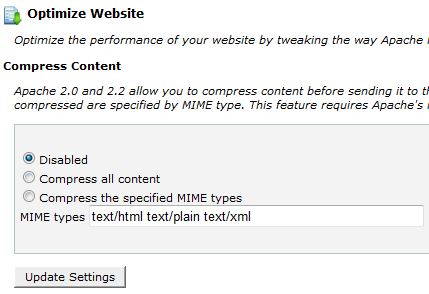
i used option number 3
3- Speed Booster show this messege in system status
v4.2 – Disabled – incompatible plugin detected: disqus-comment-system/disqus.php
i disable this plugin but still not active beacuse widget facebook and almost widget cause issue to speed booster
!!!!
finally i add plugin super cache and enable all option important in plugin but not effect also !!
-
This reply was modified 10 years by
omar ahmed.
 Andrei L.
 Hi
I’ve test this on my side with the latest theme version available on themeforest an works fine: http://screencast.com/t/HFz9RiliMM – http://screencast.com/t/VyQgQTr6Ugsy I am not sure why this is not working on your side but you can try to deactivate all plugins, except Visual Composer, clear all caches and test again. If the problem persist please provide a link where we can inspect this issue closer.
Thanks!
 Vinicius
 Hi,
I did it, but this solution didn’t work to me. I have cleaned the cache and double checked.
Do you have Any other advise or solution?
Thank you in advance!
 Alin [tagDiv]
 Hi,
Please check this also without any plugins active except of Visual Composer, clear cache and see if the issue is still there. I also tested this and did not found any issue with the site background.
If the issue persist please send an email at contact@tagdiv.com and provide wp-admin access so we can take a closer look at this.
Thanks!
Andrei L. Hi
Please make sure that you added the source url properly, clear all caches and test again. Also make sure that all div tags are open and closed like here: http://screencast.com/t/1QSDMuyc
<div class="td-visible-desktop">
<a href="#"><img src="img-url"/></a>
</div>

<div class="td-visible-tablet-landscape">
<a href="#"><img src="img-url"/></a>
</div>

<div class="td-visible-tablet-portrait">
<a href="#"><img src="img-url"/></a>
</div>

<div class="td-visible-phone">
<a href="#"><img src="img-url"/></a>
</div>
If the problem persist please provide your site url so we can inspect it closer.
Thanks!
 Bogdan B.
 Hello,
Please try it without any plugins. Di0able all of them except visual composer, clear your cache and purge cdn files if you use it. Also please check your custom modifications if you have any.
Let us know how it goes.
Andrei L. Hi
Please make sure you do not use any other alphabet letters/symbols when you name your sidebar. When other characters than Latin are used, it is known to crash. Also try to clear all caches, deactivate all plugins except Visual Composer and test again.
Let us know how it goes and if the problem persist please send us an email at contact@tagdiv.com with your login credentials and we will inspect this issue as soon as possible, also include a link to this topic.
Thanks!
Bogdan B. Hello,
I tried it on my end: http://screencast.com/t/Tu2f1bgGzBH6 The ad displays fine. Even in this forum the ad displays fine in your reply above.
Please disable all your plugin except visual composer, clear your cache and purge cdn files to rule out a plugin conflict.
Let us know how it goes.
Thank you!
Andrei L. Hi
I’ve checked your site and the sidebar ad it’s displayed fine on mobile devices: http://screencast.com/t/Y77dMzu1Ya Try to clear the phone’s cache memory and also make sure that you’re not using any adbloker software on your phone then test the site again.
Let us know how it goes.
Thanks!
Andrei L. Hi @teodormiu
Unfortunately the theme doesn’t have such an option and to achieve that you will need custom modifications in theme core files. A solution would be to add a condition in get_image() which check if the current post have a featured image set or it have the generic image as featured image. Then depending by result will be generated two cases: one for the usually featured image which will be displayed in post content and in thumbs. Also you will have a second case for the generic image which will be displayed only in thumbs. This is a complex task which require good coding skills and you’re not aware of the steps you need to take in this regard please consider hiring a developer or a freelancer to do this for you as we can’t offer customization services at the moment.
As a cache plugin we recommend WP Super Cache which it’s tested with the theme and works fine, you can find more details about plugin’s set up in our documentation: https://forum.tagdiv.com/cache-plugin-install-and-configure/
Thanks!
 simchris
 Caching is controlled by any cache plugin you may/may not be using; if you’re using caching built-in to your hosting plan/service. Also caching is found in your web browser, where you can clear your history/cached files (see your help info for web browser you happen to be using).
simchris hmmm… kind of kewl …
testing this on our production site (yeah, I know, crazy?) ….
basically after install, and then flushing permalink cache, we get a new schema added which appends /amp/ to end of all post URLs, giving us an optimized “instant mobile friendly page” …
seems to work:
e.g.,
This is a couple of versions back of Newsmag, not ‘fully’ optimized per my own guide on the forum (ahem), and running mod_pagespeed.
 teodormiu
 Thanks. For number
1. If I disable the featured image, it seems like it disables all featured images in all posts. I would like to only disable the generic (an image I chose for all posts with no good images) featured image that I set up for thumbnails because I do not have a good picture for some particular articles. Here is a post with a generic image http://198.1.95.93/~devgandaculdecol/reportaj-din-nordul-tarii/ I would like this image to appear in the thumbnail but not in the full length article.
2. Also- how do I empty all caches ? In the browser or in the wp dashboard? if so how to exaclty- cant seem to find the option in the theme…
Multumesc mult,
T
 debarup
Hi,
The Facebook and Twitter like, followers count number is not showing
http://www.topfivebuzz.com/
please help, I have removed all cache, but still showing.
Andrei L. Hi
Please make sure that you’re using the updated version of Social Counter plugin, V 3.1. Also check our documentation for more details regarding the plugin’s usage: https://forum.tagdiv.com/newsmag-tagdiv-social-counter-tutorial/ clear all caches and test again.
Thanks!
 Catalin
 Hello PatWire,
I’ve checked again your website on mobile and everything works fine. Please provide more information about your issue, so I can be able to provide a more accurate response. Also, please disable all the active plugins, except Visual Composer and install only the plugins that come bundle with our theme. Clear all your caches and purge the CDN file if you use and try again. After this, if your problem is still there, please make a screenshot of this because it is very useful.
Hope this helps and let us know how it goes!
Thank you!
Andrei L. Hi
I’ve test the sticky menu on my side with the latest theme version and works fine: http://screencast.com/t/PeJaHz4QSKL It could be a cache plugin so you can try to empty all caches and test again.
Thanks!
Bogdan B. Hello,
Please try to disable all your plugins except visual composer, clear your cache and purge your cdn files if you use it. The featured video option should be there.
If it still does not appear please provide more details as to what was changed so the featured video no longer showes up.
Thank you!
 Ardhi
Ardhi Hello Bogdan, I just get the same problem. The thumbnail work well after disabled all plugin like you said. This is my plugin list, I think this will help to investigate plugin conflict.
– AdSense Privacy Policy
– Akismet
– Category Featured Images
– Core Control
– Crayon Syntax Highlighter
– Jetpack by WordPress.com
– Quick Adsense
– Random Posts Widget
– Regenerate Thumbnails
– SEO SearchTerms Tagging 2
– Simply Exclude
– tagDiv Social Counter
– Vine
– WordPress Popular Posts
– WP All Import
– WP Super Cache
– WPBakery Visual Composer
– Yoast SEO
 wildmercury
 Thanks for that, we tried all that first time around to check – we’ve just done it again – cleared all caches again etc etc, and still the issue remains. We’ve also noticed that on the homepage the padding for the footer section is gone:
usual plugins active:
https://www.dropbox.com/s/52kw4oazg10x511/Plugins%20%E2%80%B9%20Naturally%20Zimbabwean%20%E2%80%94%20WordPress.png?dl=0
hp footer padding issue:
https://www.dropbox.com/s/4p9xk4qhb5uw38u/Naturally%20Zimbabwean%20%20%20magazine%20hp%20footer%20padding.png?dl=0
We’ve tried using various footer layouts to get one to work – but without success.
omar ahmed i use this code in .hatecess
# END WordPress
AddType text/javascript .js
AddType application/vnd.ms-fontobject .eot
AddType application/x-font-ttf .ttf
AddType application/x-font-opentype .otf
AddType application/x-font-woff .woff
# BEGIN Expire headers
<IfModule mod_expires.c>
ExpiresActive On
ExpiresDefault “access plus 5 seconds”
ExpiresByType image/x-icon “access plus 2500000 seconds”
ExpiresByType image/jpeg “access plus 2500000 seconds”
ExpiresByType image/png “access plus 2500000 seconds”
ExpiresByType image/gif “access plus 2500000 seconds”
ExpiresByType application/x-shockwave-flash “access plus 2500000 seconds”
ExpiresByType text/css “access plus 700000 seconds”
ExpiresByType text/javascript “access plus 700000 seconds”
ExpiresByType application/javascript “access plus 700000 seconds”
ExpiresByType application/x-javascript “access plus 700000 seconds”
ExpiresByType text/html “access plus 600 seconds”
ExpiresByType application/xhtml+xml “access plus 600 seconds”
ExpiresByType font/truetype “access plus 2500000 seconds”
ExpiresByType font/opentype “access plus 2500000 seconds”
ExpiresByType application/x-font-woff “access plus 2500000 seconds”
ExpiresByType image/svg+xml “access plus 2500000 seconds”
ExpiresByType application/vnd.ms-fontobject “access plus 2500000 seconds”
</IfModule>
# END Expire headers
# BEGIN Cache-Control Headers
<IfModule mod_headers.c>
<filesMatch “\.(ico|jpe?g|png|gif|swf)$”>
Header set Cache-Control “public”
</filesMatch>
<filesMatch “\.(css)$”>
Header set Cache-Control “public”
</filesMatch>
<filesMatch “\.(js)$”>
Header set Cache-Control “private”
</filesMatch>
<filesMatch “\.(x?html?|php)$”>
Header set Cache-Control “private, must-revalidate”
</filesMatch>
</IfModule>
# END Cache-Control Headers
<IfModule mod_headers.c>
Header unset ETag
</IfModule>
<IfModule mod_alias.c>
RedirectMatch 403 /xmlrpc.php
</IfModule>
but site still slow and comperission not enable until now !!
and plugin speed not found in theme
Andrei L. Hi
I’ve checked your site and didn’t found anything on it: http://screencast.com/t/tciFoFZr9Oz Try to deactivate all plugins except Visual Composer, clear all caches and test again. If the problem persist you can try to make a new clean WP install, then install the theme and the Visual Composer plugin according with our documentation: https://forum.tagdiv.com/newsmag-how-to-update-the-theme/ – https://forum.tagdiv.com/newsmag-how-to-update-visual-composer-plugin/ then test again.
Let us know how it goes.
Thanks!
Andrei L. Hi
Please make sure that you made the update according with our documentation: https://forum.tagdiv.com/newsmag-how-to-update-the-theme/ Also try do deactivate all plugins except Visual Composer, clear all caches, purge cdn files and test again.
Let us know how it goes.
Thanks!
Andrei L. Hi
@teodormiu sorry for the delay and @Chris thanks for your help!
1. You can hide the featured image from post content by disabling it from theme panel > post settings > featured image: http://screencast.com/t/iXwnJWSHs8 The image will be displayed only in thumbnails not in post content.
2. You can set the title length from theme panel > excerpts for each module that you’re using on the page: http://screencast.com/t/SgQgzb4obiK
Regarding the author issues please check the WordPress documentation regarding users roles and capabilities because not every user have the same capabilities: https://codex.wordpress.org/Roles_and_Capabilities Foe example a contributor user cannot publish a post.
I am not sure why you don’t have the user option available because usually should be there: http://screencast.com/t/N5s00IQ5AgWp Try to deactivate all plugins except Visual Composer, just to be sure thet there is no conflict with some other plugin, clear all caches and test agtain.
Let me know how it goes.
Thanks!
Andrei L. Hi
I’ve checked your site and from what I can see you don’t have set any avatar image: http://screencast.com/t/TpvbEWqpds WordPress doesn’t have an option for avatar image, you will have to use either a plugin or gravatar to achieve that: https://codex.wordpress.org/How_to_Use_Gravatars_in_WordPress Please make sure that you’ve set the avatar image, under User > Avatar in case that you’re using WP User Avatar plugin: http://screencast.com/t/7xeVyxJ1m clear all caches and test again.
Thanks!


