
- NewspaperHow to use the Flex Blocks cache option
- NewspaperCache plugin – install and configure
- NewspaperWP Rocket and Newspaper Theme: Optimization Guide
- NewspaperFlex Block Settings Guide
- NewspaperGeneral Options that May Interfere with the Newspaper Theme
- NewspaperThe Newspaper Mobile Theme: Introduction
- NewspaperAutoptimize Plugin – install and configuration
- NewspaperHow to update a plugin
- NewspaperCloudflare (CDN)
- NewspaperFacebook Share
- NewsmagRequirements for Newsmag
- NewsmagHow to update the theme
- NewsmagtagDiv Social Counter tutorial
- NewsmagTop bar templates
- NewsmagAjax view count
- TutorialsWhat is Ajax preloading?
- NewspaperVideo Playlist
- Newspaper7 Days Post Sorting
- NewspaperAjax View Count
- NewspaperTop bar templates
 Gaurav
 Dear Bogdan,
I de-activated all the plugins and tried, it doesn’t work. It goes back to white color.
I have not made any changes to the code as I am not a coder.
I am not using any cache plugin or CDN.
I will send a mail now.
Best,
Gaurav
 Bogdan B.
 Hello,
Please use the exact same settings like shows here: https://forum.tagdiv.com/cache-plugin-install-and-configure/ and post views need this option when a cache plugin is used: https://forum.tagdiv.com/ajax-view-count/
Thank you!
 Catalin
 Hello ahmedyakub,
Try to clear all your caches and also, clear all your server caches and then check the results. If you do not have any access to clear this, you should contact your hosting provider and request this.
Let us know how it goes!
Thanks for the message!
Bogdan B. Hello,
Please disable all other plugins and clear cache before installing revolution slider. There could be a conflict between the slider and another plugin.
Please also increase your system status parameters like so: https://forum.tagdiv.com/system-status-parameters-guide/
Thank you!
Bogdan B. Hello,
Please increase the system status parameters like so: https://forum.tagdiv.com/system-status-parameters-guide/
Also , please disable all plugins except visual composer, clear cache and reset cdn files if you use it. Please also check any custom code you might have added to the theme panel or the theme files. If you use a child theme, please switch to the main theme to make sure it does not affect the proper functionality of the theme.
If the border still does not show up, then please contact us via email at contact@tagdiv.com and provide wp-admin so we can login and investigate. Please also include a link to this topic.
Thank you!
Bogdan B. Hello,
Please increase your system status parameters like so: https://forum.tagdiv.com/system-status-parameters-guide/
The issue could be a memory limitation but it could also be a plugin conflict. You should check your browser console when you do not see the error and check it again when you see the error so you can see if there is an error provided that can provide a clue of why this happens.
Right now there is no error on your slider but I can see a console full of errors: https://www.screencast.com/t/Abgfkoq1z1a
please disable all plugins except visual composer and revolution slider, clear cache and reset cdn files if you use it. Please also check any custom code you might have added to the theme panel or the theme files. If you use a child theme, please switch to the main theme to make sure it does not affect the proper functionality of the theme. Then check the browser console again (from the browser inspector)
Thank you!
Bogdan B. Hello,
If these ad fields are not empty: https://www.screencast.com/t/A1J5N2TQbSz thank maybe these errors in your browser console might have something to do with the disappearing ads:
https://www.screencast.com/t/vepSRPbQ
Please disable all plugins except visual composer, clear cache and reset cdn files if you use it. Please also check any custom code you might have added to the theme panel or the theme files. If you use a child theme, please switch to the main theme to make sure it does not affect the proper functionality of the theme.
Thank you!
Catalin Hello mike6209,
I have checked your console, and I have noticed that you have some issues which are not theme related as you can see here -> https://www.screencast.com/t/uGY0geMp2S For example, this type of error -> https://www.screencast.com/t/EfpM1etS happens due to you do not have this snippet of the code in tagdiv_theme.js like this -> https://www.screencast.com/t/F1s9wHd7NLr and the first issue come from your plugins. Please try to remove all untested plugins, leave just Visual Composer to be active, clear all your caches and also, ensure that your tagdiv_theme.js file is intact. To be sure, you should make a new fresh install with the latest downloaded version for Theme Forest and check the results.
Thanks for your understanding!
 boos11
hi.
i have problem with visit counter (eye on image) on posts.

in post is 210 visits after cleaning the cache website (WP Super Cache plugin)
my google analytics shows 6798 visits at the same time

Perhaps this is the wrong setting WP Super Cache. Do I have to set this plugin you show exactly as pictured on the Cache plugin – install and configure
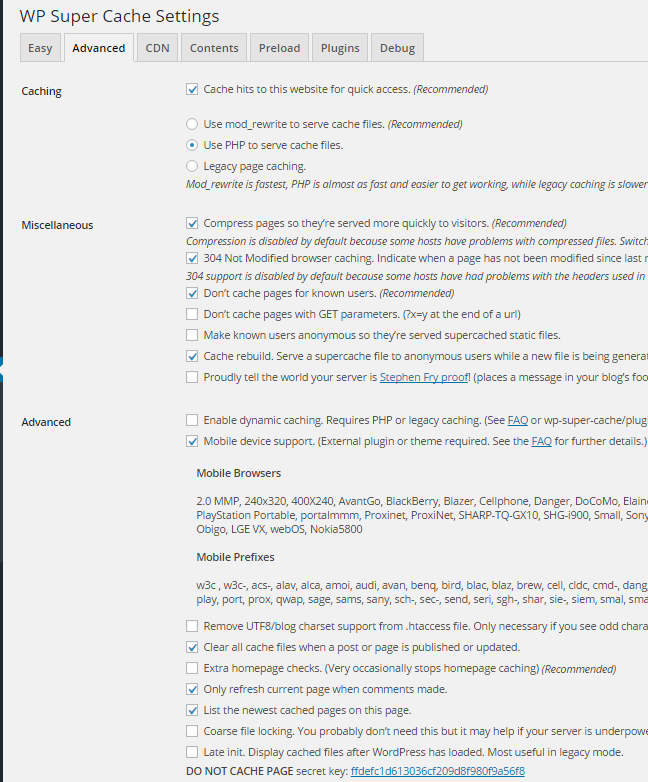
Thank you for your answer
Bogdan B. Please disable all plugins except visual composer, clear cache and reset cdn files. Then delete your current social counter and install the one provided in the main theme package you can download from envato.
Thank you!
Catalin Hello mRelby,
As you can see, if you will test our demo on iPad, you will notice that the sidebar will be sticky and work as properly. I suspect your issue happens due to your theme settings. Try to disable all the active plugins, leave use Visual Composer to active, clear all your caches and install only the plugins that come bundled with the theme packet and rule out any conflicting plugins. Also, if the problem is still there, you should make a new fresh install via FTP only with required plugins and check the results. Notice that if it goes on our demo, it should work on your side.
Thanks for your understanding!
Catalin Hello pacoesni,
I have tested on my side, with the default state of theme and the paragraphs seem to work as properly as you mention here -> https://www.screencast.com/t/3otuRxflk I suspect this problem happens due to your website configuration, sorry! Please try to disable all the untested plugins, if you are using something like this, leave just Visual Composer to active, clear all your caches and install only the plugins that come bundled with the theme packet and rule out any conflicting plugins. Also, if you have some additional customization through the code you should remove all of them and the theme should work in the default state.
Also, if the problem is still there, you should make a new clean install from scratch via FTP, only with required plugins and check the results.
Hope this helps and let us know how it goes!
Thanks of r your understanding!
 Videnciastral
 Good afternoon,
I answer him:
I have not installed any plugin that comes by default in the template configuration.
I do not have any cache component in wordpress.
Please can you help me?
Also I try to activate Visual Composer and I could not. Attachment Screen Capture
https://drive.google.com/file/d/0ByMa6xO4xXEMTEMxZG5oVEZrVUE/view?usp=sharing
Thanks!!
-
This reply was modified 9 years by
Videnciastral.
Bogdan B. Hello,
same as the previous reply. Disable the plugins as this sounds more and more like a plugin conflict:
please disable all plugins except visual composer, clear cache and reset cdn files if you use it. Please also check any custom code you might have added to the theme panel or the theme files. If you use a child theme, please switch to the main theme to make sure it does not affect the proper functionality of the theme.
Thank you!
Bogdan B. Hello,
Please disable all plugins except visual composer, clear cache and reset cdn files if you use it. Then install the mobile theme before any other plugins and check to see if it works properly.
Thank you!
Catalin Hello Videnciastral,
I have checked your website and I saw that you are using a lot of untested plugins which can interact with the theme core files and cause a lot of unknown issues. Try to disable all of these, leave just Visual composer to active, clear all your caches and install only the plugins that come bundled with the theme packet and rule out any conflicting plugins.
If you do not have any access to load media in your media library, please make sure that you have set them all the permissions for upload folder in your Cpanel/FTP. Also, check your system status parameters to be higher increased according to our documentation here -> https://forum.tagdiv.com/system-status-parameters-guide/
Also, if the problem is still there, please try to make a new clean install from scratch via FTP and check the results.
Thanks for the message!
 AndroidKosmos
 Hey, yes now it works? Mabye it was a problem with the opcache.
Thank you
Catalin Hello Digitally,
Please keep in mind that you want to change the structure of the date for modules, you will have to edit the corresponding files according to your block used by you. For example, if you are using the Block 3 you will have to edit the modules which make up this block, like module 1, like this -> http://screencast.com/t/whTutD5OFRyy
You will have to use the following snippet of code, like this ->
<?php echo human_time_diff( get_the_time('U'), current_time('timestamp') ) . ' ago'; ?> in the core file, like this -> http://screencast.com/t/ZZYWvi253eL1 Clear all your cache and check the results.
Hope this helps!
Thanks for the message!
Catalin Hello Kraljsin,
It is strange…sorry! Please notice that our theme update does not influence your databases and you should not have to happen to you so. If you are using some untested plugins, you should try to disable all of them, leave just Visual Composer to active, clear all your caches and install only the plugins that come bundled with the theme packet and rule out any conflicting plugins. It is possible that your untested plugins used by you to interact with the theme core files and cause these unknown issues.
Thanks for your understanding!
Bogdan B. Hello,
This should have nothing to do with your previous theme.
Please make sure your host meets the newspaper theme requirements: https://forum.tagdiv.com/requirements-for-newspaper/ and make sure you increase the system status parameters like so: https://forum.tagdiv.com/system-status-parameters-guide/
Plugins can also affect the theme so please disable all plugins except visual composer, clear cache and reset cdn files if you use it.
Thank you!
 ayra03
 Thank you. I use main theme, no child. I disabled all plugins,deleted custom code, cleaned cache, and did all you have told but nothing happened. I still cannot update when I put block in Visual Composer in main blog page.
Maybe there is problem because I use this options within your theme: https://s24.postimg.org/fd319zp1x/image.png (I have to choose something) My main blog “Novosti” is set as static blog page.
When I go to Visual Composer I have to add block to filter categories. So, there isn’t same as your M10 (article display) so I use this https://s23.postimg.org/wymttca57/image.png
Then I can filter categories: https://s30.postimg.org/jrcweclip/image.jpg
But when I click on update https://s30.postimg.org/41i8cof9t/image.png all what I did is deleted and I get this:
https://s28.postimg.org/ckh317yal/image.jpg (like in the beginning).
In my “second blog” I don’t have this problems, probably because it’s not set as main blog.
However, if I cannot do anything I leave as it is. Thank you one more time for patient and great help!
Bogdan B. Hi,
It could be your host. You should check with them. The theme does not add any restrictions on plugin install.
Please contact your host and disable any hosting related cache and only use wp super cache.
Thank you!
Bogdan B. Hello,
This could be a plugin conflict so please disable all plugins except visual composer, clear cache and reset cdn files if you use it. Please also check any custom code you might have added to the theme panel or the theme files. If you use a child theme, please switch to the main theme to make sure it does not affect the proper functionality of the theme.
Thank you!
Bogdan B. Hello,
This seems the theme was not installed properly.
Please use this guide to properly install it via ftp and follow each step properly: https://forum.tagdiv.com/install-via-ftp/
If the install was done properly, there should not be any error. If there is one, please disable all plugins except visual composer, clear cache and reset cdn files if you use it.
Thank you!
Bogdan B. Yes but the plugin was updated since then. It was a temporary issue in the version that was working at the time. Since then wp super cache has been updated and the issue was resolved.
I did not say to disable the plugin , I just told you about the issue it had at the time
Thank you!



