
- TutorialstagDiv Social Counter Tutorial
 Calin
Calin Hi dkempdesigns,
Let’s try to take each subject in turn:
To change the background color for some rows, select the row and check the css tab – https://i.imgur.com/OJ8d9Kl.png – for element menus colors you can check in style tabs (if elements have this tab).
‘Also I can create menus but the menus that are already there are what I want to access. I need to know what their names are as the names in the theme do not edit the existing menus I sent you pictures of.‘ – the menus are made in appearance > menu – https://i.imgur.com/MoqB5OQ.png from there you can edit the current element from the menu (add/delete) or you can make new menus.
Now to assign the menu on your website you need to edit it with tagDiv Composer the header, this can be done from the homepage – https://i.imgur.com/DVOZkt7.png select the menu and choose the menu you want to use – https://i.imgur.com/eDeupRH.png
‘ The blog page still does not have the sidebar (I chose the template with a sidebar) and the paragraph is shrunken and not full width under the featured image. I did include pictures and explain that I have used all your documentation. Please state clearly what each menu is called and where it is edited. State clearly why the template with sidebar for individual blog posts is not loading properly.‘ – I believe you are referring to this https://gjz.5cc.myftpupload.com/sharon-steele-unapologetic/ here you have a default post template that will use the widget sidebar elements, just make sure that you have elements in the widgets sidebars – https://i.imgur.com/FvnKPfB.png also you can use a single post template from the cloud and you can edit it using the tagDiv Composer.
‘I did not ask to remove image from footer, I asked why the default footer would not load properly on new pages when it was assigned specifically.‘ – I believe this is a plugin conflict, usually this is happening when you are using cloud templates and wpbakery plugin, we recommend to not using them together.
If I miss something, please let me know!
Thank you!
 mcdv01
Hello,
1. We wanted to create a PAGE cloud template. Our expectation is that whenever we create a PAGE then it would use this template.
2. I cannot create a BLANK cloud page template. How to do this?
3. I try to import a template from the CLOUD template but not all that appears are able to be selected.
4. I imported a cloud page template then I removed everthing so I can create my custom PAGE TEMPLATE. However, there is no option to set it GLOBAL.
How can I create a page template so that when I create pages it would have the look of the page template?
Let us know.
Thanks,
Marco
 partycaribbean
 Hi Calin,
This “There are possibilities to play audio directly in the block without opening the article, you just need to set the audio format for that post – https://i.imgur.com/3Ot7vM0.png you can import from the cloud the blocks for podcasts – https://i.imgur.com/BJ2KUF7.png” DOES NOT WORK EVER!
Our media library is in AWS S3 and we use WP Offload Media, our objects load perfectly across audio/media players but NOT in the theme.
We can try “The javascript in our theme can be set in the theme panel – https://i.imgur.com/BeRp5o3.png” but this will not address EVERY object media file from every post. We have over 600 media files, doing this individually will be frustrating.
None of these will work because it cannot be implemented in the flex box 1 element of the theme. “The javascript in our theme can be set in the theme panel – https://i.imgur.com/BeRp5o3.png or using tagDiv Composer in column text or text with title in text zone – https://imgur.com/xn721m6 -> https://imgur.com/D475ZN0 (but this method does not guarantee that it will work no matter what js code)”
What other suggestions do you have?
I need this fix to be work with the flex 1 block element.
Thanks,
Justin.
Calin Hi partycaribbean,
There are possibilities to play audio directly in the block without opening the article, you just need to set the audio format for that post – https://i.imgur.com/3Ot7vM0.png you can import from the cloud the blocks for podcasts – https://i.imgur.com/BJ2KUF7.png
The javascript in our theme can be set in the theme panel – https://i.imgur.com/BeRp5o3.png or using tagDiv Composer in column text or text with title in text zone – https://imgur.com/xn721m6 -> https://imgur.com/D475ZN0 (but this method does not guarantee that it will work no matter what js code)
Thank you!
 Anamaria
 Hello,
Yes, you need to stretch each row on the pages; for the cloud template, you need to edit only once each template.
Thank you!
Anamaria Hello,
Please activate the tagdiv Cloud Library plugin.
So, on this website on the home page is used Flex Block 1, some blocks you can import from tagdiv Cloud Library -> https://i.imgur.com/RgIh7kK.png -> https://cloud.tagdiv.com/#/single/page/Blocks/2020 you can customize the blocks as you want.
Thank you!
Anamaria Hello Raj,
Maybe you have used a Single Post Template, and for this, you need to change the font using tagdiv Composer, edit the Single Post Template, and select the Single Post Content.
This is a video about how to change the fonts => https://www.youtube.com/watch?v=rbkYVyj1__Q also, you can use global font from Manager(Website Manager) -> Global fonts -> https://i.imgur.com/iY0bh4Y.png
Thank you!
 mita
mita Hello Anamaria,
We tried the Flipbook with that plugin disabled and saw no improvments. There’s something else responsible for the slowness of the render. To replicate the issue you must access the pdf/flipbook in a mobile and zoom in. It takes to much time to render when you set the zoom to maximum magnification. Please try that.
Can you also check why are we getting errors when trying to import cloud templates? Some templates fail to get upload in the cloud template panel but I can find them in Pages. If you open one of those templates they are full of erros like in here. We haven’t edit them.
https://jornaldoalgarve.pt/?page_id=275221&preview=true
https://jornaldoalgarve.pt/?page_id=275215&preview=true
Thanks
-
This reply was modified 3 years by
mita.
 heathcliff
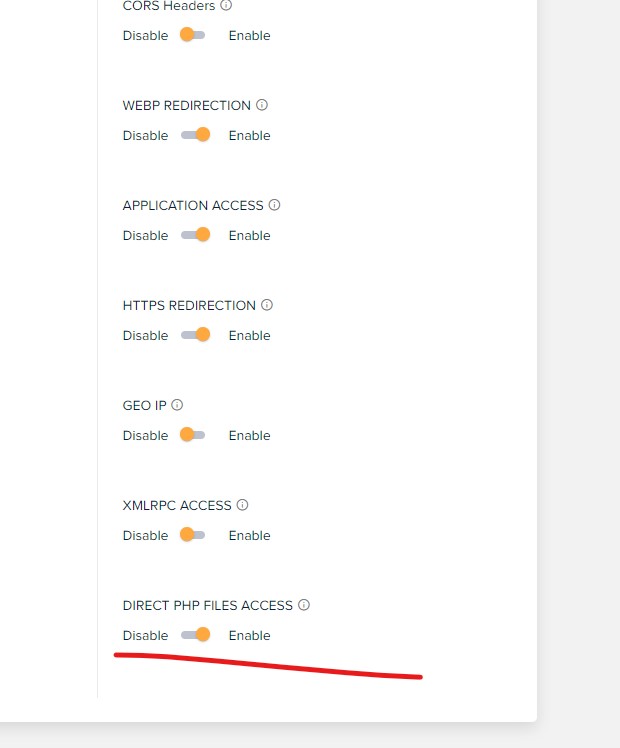
If you have exhausted all options and the editor is still not working enable “DIRECT PHP FILES ACCESS” (under application settings). This solved my problem with the editor but I am not happy I need to enable this for security reasons. So I suggest to enable it when you want to edit with the composer and disable it when finished.
 matamilenial
Hello
I have a category page using a cloud template and it uses 2 post loops inside and when I use the post offset feature the backend changes https://prnt.sc/MeYzRkycr9h0 and the display on the front end is not the same as the backend view https://prnt.sc/p7Bc0KBJyk3r .
Can you help me?
Calin Hi Felipe Moretti,
Unfortunately, there isn’t a general option that once is enabled the entire website is stretched to the desired width. This needs to be manually done on each page you want to change the layout width. Now for cloud templates, you need to edit the cloud templates that you are using and stretch the rows and all posts/categories/tags that are using that template will have that layout.
Also, if you have set a background color or image in the theme panel is also possible that the option for the boxed layout to be enabled. Please check the settings from the theme panel, normally to can stretch the rows the boxed option should be disabled – https://i.imgur.com/Vdqh54S.png
You can get more details about background color and image and boxed version from this guide – https://forum.tagdiv.com/background-introduction/
I hope this will help you!
Calin Adding multiple authors to your articles
Content
In this tutorial we will show you how to implement multiple authors to your posts using the Co-Authors Plus plugin.
We will make the implementation in the child theme so it will be easier to manage on theme updates. You will need to install and activate the Co-Authors Plus plugin first.
Adding the multiple authors is a three step process.
- Step 1 – Adding the required functions in your child theme functions.php file.
We created 2 custom functions for the author and for the author box which we can then call on the post styles and not have to use the entire functions each time.
Add these functions in your Child theme functions.php file: https://pastebin.com/ciYrSZvQ These will create the custom implementation to add the co-author and the author box for each co-author in particular.
- Step 2 – Adding the single post templates to your child theme.
In your main child theme folder, you will need to create the following folder structure:
Newspaper-child/parts/single
Then, under the “single” folder add both the single-template and the loop-single files for each of the post styles you use on your articles.
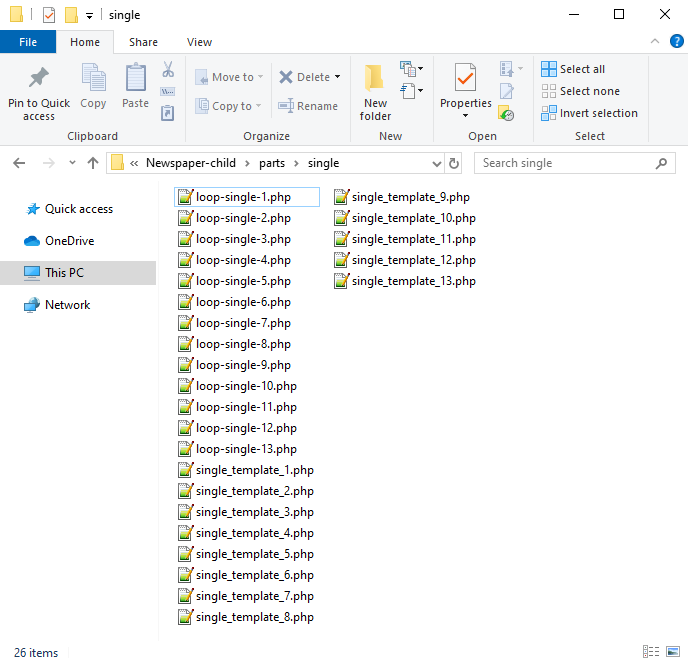
Now you will have to identify where the author is being called in each post style.
For styles 1, 5, 9 and 10 you will find the author code in the loop-single files while for styles 2, 3, 4, 6, 7, 8, 11, 12 and 13 the code is fount under the single_template files.
Edit the files corresponding to the style you want to apply the co-authors to and then call the functions added at step 1. Replace the default author and author box codes:
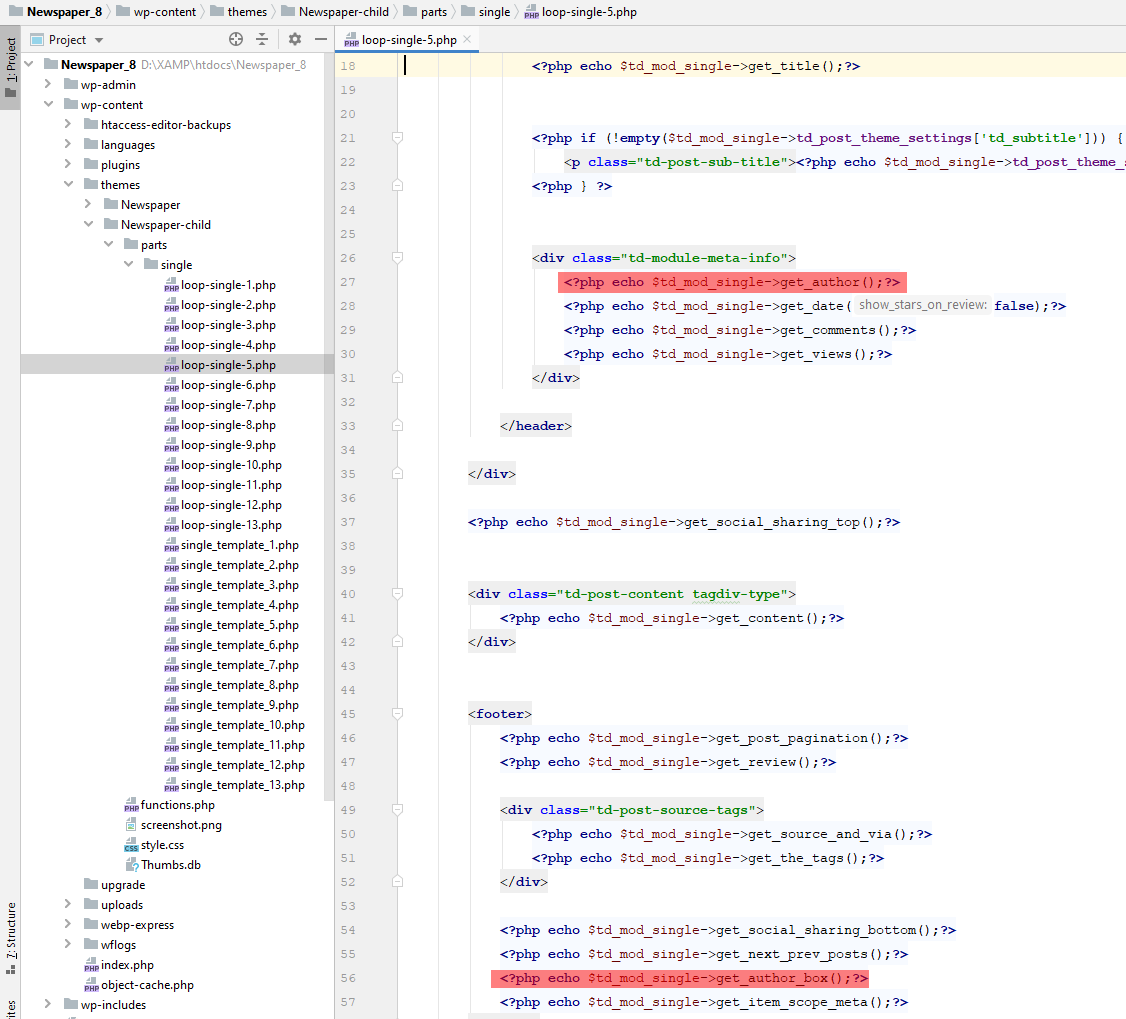
Replace the highlighted code with the following codes:
<?php echo td_get_post_coauthors();?>
and
<?php echo td_get_post_coauthors_box();?>
Maintain the codes position in the .php file though for proper results. \
- Step 3 – CSS styling
In order for the co-authors to position properly we also need a bit of CSS code to ensure proper styling so please add the following CSS code in the the theme panel under custom code-> custom CSS:
https://pastebin.com/dRaStewQ
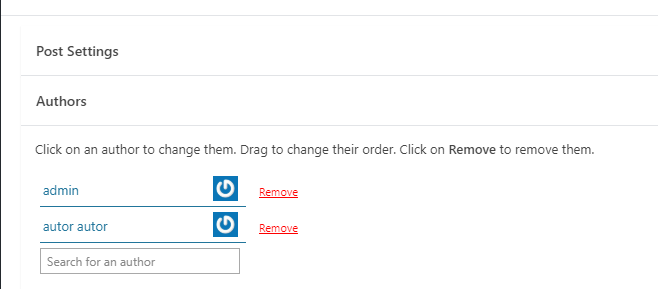
Now you simply need to edit your post and add multiple authors using the plugin author field:
Anamaria Hello,
You can assign a template for subcategories. Also, you can add a flex block on that category and filter it to a specific category -> https://forum.tagdiv.com/cloud-library-category-templates/ -> https://forum.tagdiv.com/flex-block-settings-guide/
Thank you!
 shivamsdesk
After installing the theme on wordpress I cant use headers or footers as it asks me to choose from cloud template, and there it shows an error saying Envato key is missing, please register your theme using a valid key. Please reply asap, as this website is an assignment and I have to submit my assignment at the earliest.
 Antonio Palacios
 Yes, but it still doesn’t work. I tried deactivating all plugins (except the TagDiv ones), reinstalling Cloud Library and Tagdiv Composer and clearing the cache.
It was as of the last update.
Thanks
 Bettina
 Hello!
Please check the console and let me know which errors you encounter there.
Make a test and deactivate ALL plugins except tagDiv ones, also if you are using a cache plugin, deactivate it, clear all cache and try again.
Also, you can try to reinstall Cloud Library and the tagdiv Composer plugins.
Thank you!
Anamaria Hello,
Please make sure that you have a cloud header set up -> https://i.imgur.com/0C2QsfT.png
Also, please provide some screenshots to help you efficiently.
A solution for sending a screenshot/video is this:
Download, capture, and send: https://www.techsmith.com/jing-tool.html
After making the screenshot, you will have a link; paste it here.
Thank you!
Antonio PalaciosGood afternoon,
Since a few days I am experiencing some problems with my Cloud Library templates.
When I try to edit some of them, a new tab opens but does not finish loading (https://ibb.co/WxCyg9b).
This is my website: https://www.padeladdict.com/
What can happen?
Thank you.
 dc1
dc1Hi,
This is related to this ticket: https://forum.tagdiv.com/topic/the-events-calendar-filters-break-when-tagdiv-cloud-library-is-active/. It’s about a compatbility issue between The Events Calendar and Newspaper, the filters do not appear. Earlier this month you released an update fixing the issue, however… the issue isn’t fully fixed.
The filters now appear, however the Event Category and Tag filters have no content. See screenshot (it also shows the data in the DOM). This issue only occurs when tagDiv Cloud Libary is active.
I trust this issue will be solved soon, as it is part of an existing issue.
Thanks.
Anamaria Hi,
For Cloudflare we have only this guide https://forum.tagdiv.com/cloudflare-cdn/
There are many optimization guides provided by our users here in the forum, some made by us; you could check some of them
– https://forum.tagdiv.com/cache-plugin-install-and-configure/
– https://forum.tagdiv.com/how-to-make-the-site-faster/
– https://forum.tagdiv.com/topic/high-number-of-ajax-request/
– https://www.infophilic.com/get-almost-100-pagespeed-newspaper-theme/
– https://forum.tagdiv.com/topic/score-100100-pagespeed-with-newspaper-wordpress-theme/
– https://www.andraware.com/wp-rocket-for-newspaper-theme/
– https://spraythemes.com/newspaper-theme/how-to-speed-up-the-newspaper-wordpress-theme-using-wp-rocket/
– https://forum.tagdiv.com/topic/page-speed-guide-for-2023-beginners-and-advanced/
– https://forum.tagdiv.com/topic/newspaper-theme-speedify-your-website/
– https://forum.tagdiv.com/topic/tutorial-chriss-custom-optimizations-for-functions-php-etc/
– https://forum.tagdiv.com/cloudflare-cdn/
– https://forum.tagdiv.com/topic/theme-causing-high-cpu-usage-2/
– https://forum.tagdiv.com/topic/sql-querys-high-cpu/
– https://forum.tagdiv.com/topic/newspaper-theme-slow-to-respond/
– https://premium.wpmudev.org/blog/optimizing-your-wordpress-database-a-complete-guide/
– https://underconstructionpage.com/optimize-wordpress-database/
– https://crunchify.com/better-optimize-wordpress-database-all-in-one-guide/
Also, pagespeed is not covered by support -> https://forum.tagdiv.com/newspaper-theme-support/
Thank you!
 drvarun5179
 For me, your homepage reflects two columns. Did you check it in private browsing?
Open the browser, and go incognito. Switch to responsive and refresh. That will show you live results. Also, if you are using Cloudflare, set it to development mode so the cache is not rendered for the testing period.
I am sorry, I have not toyed with mobile theme plugin codes. I did switch to custom mobile pages after deactivating the plugin, but it was disastrous and caused much damage to the search engine results already.
If you are looking to increase the number of posts on the homepage, this can be done by Theme panel> Mobile theme plugin> Grids.
One last thing, you have so many ads on your site. I will suggest not cluttering them together, almost 4 of them appear together covering 30% of the page. Try to set view limits to them.
Anamaria Hi,
There are many optimization guides provided by our users here in the forum, some made by us; you could check some of them
– https://forum.tagdiv.com/cache-plugin-install-and-configure/
– https://forum.tagdiv.com/how-to-make-the-site-faster/
– https://forum.tagdiv.com/topic/high-number-of-ajax-request/
– https://www.infophilic.com/get-almost-100-pagespeed-newspaper-theme/
– https://forum.tagdiv.com/topic/score-100100-pagespeed-with-newspaper-wordpress-theme/
– https://www.andraware.com/wp-rocket-for-newspaper-theme/
– https://spraythemes.com/newspaper-theme/how-to-speed-up-the-newspaper-wordpress-theme-using-wp-rocket/
– https://forum.tagdiv.com/topic/page-speed-guide-for-2023-beginners-and-advanced/
– https://forum.tagdiv.com/topic/newspaper-theme-speedify-your-website/
– https://forum.tagdiv.com/topic/tutorial-chriss-custom-optimizations-for-functions-php-etc/
– https://forum.tagdiv.com/cloudflare-cdn/
– https://forum.tagdiv.com/topic/theme-causing-high-cpu-usage-2/
– https://forum.tagdiv.com/topic/sql-querys-high-cpu/
– https://forum.tagdiv.com/topic/newspaper-theme-slow-to-respond/
– https://premium.wpmudev.org/blog/optimizing-your-wordpress-database-a-complete-guide/
– https://underconstructionpage.com/optimize-wordpress-database/
– https://crunchify.com/better-optimize-wordpress-database-all-in-one-guide/
Also, pagespeed is not covered by support -> https://forum.tagdiv.com/newspaper-theme-support/
Thank you!
 Marian
 Salut,
Revin cu cateva precizari si inca alte cateva puncte pe care as vrea sa le ating cu tema dumneavoastra, pentru ca am vazut ca se mai discuta in Romana si pentru a ma face si mai bine inteles, doresc sa va explic in romana, ceea ce doresc sa fac, si in cazul in care se poate sa gasesc raspuns aici.
1. Pentru a face meniul sticky blurry, doresc un css pentru versiunea stock a temei si nu pentru un alt template din cloud templates, acest lucru din cauza faptului ca am reusit sa customizez pe plac fara a mai avea nevoie de alte elemente de header. CSS-ul il voi baga in custom code. De asemenea doresc ca acest efect sa apara si pe mobil. In trecut foloseam jnews iar codul era “/* Make Sticky Header Blurry and Transparent */
.jeg_header_sticky .jeg_stickybar {
backdrop-filter: saturate(180%) blur(20px); /* Blurry */
background: rgba(255,255,255,0.7); /* White Opacity 70% */
}
/* For Mobile */
.jeg_navbar_mobile {
background:unset;
}
.jeg_navbar_mobile .jeg_mobile_bottombar {
backdrop-filter: saturate(180%) blur(20px); /* Blurry */
background: rgba(0,0,0,0.1); /* Black Opacity 10% */
}”
Doresc acum pentru aceasta tema, dupa cum am aratat mai sus, ceva in stilul site-ului de la apple https://www.apple.com/ro/.
2. Vreau ca marginile imaginii reprezentative sa atinga marginile in varianta mobila, precum in imaginea atasata, iar pe desktop sa ramana asa cum este acum. Am cautat sa fac setarea asta dar nu am reusit. (https://i.imgur.com/L2sw5Of.jpg)
3. Doresc sa pun un buton de “follow on google news”, care sa fie inline cu butoanele de share atat pe mobil cat si pe desktop. Se poate seta inline pentru “inline text” si sa pun codul html, insa din pacate pentru share post buttons nu. Am incercat din tab-ul “CSS” sa selectez in loc de “show”, “inline”, insa nu a functionat pe mobil. (https://i.imgur.com/IdNc5wt.jpg).
Acestea sunt modificarile pe care doresc sa le aduc site-ului pentru un aspect mai modern si de lunga durata. Sper ca ma puteti ajuta.
Va multumesc!
drvarun5179Hi,
My posts page is showing full-length posts rather than excerpts. I have enabled excerpts and also set the home page static. This is the posts page though.
I searched through the forum and saw this is fixed by Theme panel> Template settings> Blog and Posts template.
The issue is, there are no settings at all for the same. Here is a screenshot: https://imgur.com/a/eEe9OOk .
I have disabled Tag div Standard Pack as it is deprecated. Can this be the reason? If so, how can I set “read more” or excerpts on the blog post page rather than full posts using cloud templates? I believe the page cannot be edited using td composer anyway.
Thanks!
 mcneillmedia
URLs to my author pages are going nowhere. I have the them templates set to go to the Author Cloud template that I created. But when I click on an authors name in a post it goes blank. Also noticed the URLs do not contain the author’s names. They are going to a #
https://floriologydm.wpengine.com/?author=4
Can’t figure out where to edit this. I do not have any other plugins set up that would be causing a conflict. Just the TagDiv ones that came with the newspaper theme.
Any ideas?



