
- TutorialsFrom WPBakery to tagDiv Composer
- TutorialsDefault Block Settings Guide
- TutorialsOffset Feature
- TutorialstagDiv Social Counter Tutorial
- TutorialsHow to Update the WPBakery Page Builder plugin
 lavozdelfestejo
 Hello Bettina,
Thank you for your previous assistance. I have successfully resolved the earlier issues. However, I am now facing new challenges and would appreciate your guidance on the following matters:
Website Translation Plugin Recommendation: I am seeking an effective plugin to translate my website into multiple languages. Previously, I tried GTranslate, but it did not meet my expectations. Could you recommend a reliable translation plugin that integrates well with the tagDiv Composer and provides a user-friendly experience? Additionally, I would appreciate instructions on how to implement the recommended plugin.
Event Calendar with Map Integration: I have a category named “Calendar” where I intend to list various events, each associated with a different location. I would like these events to be displayed on a calendar and marked on a map within the same page. Could you advise on the best approach or plugin to achieve this functionality, ensuring compatibility with the tagDiv Composer?
Countdown Timer Implementation in a Template: I aim to add a countdown timer to a specific category template. While I managed to insert a countdown in a post using Gutenberg, I am unsure how to replicate this within a category template using tagDiv Composer. Could you provide detailed instructions or recommend a suitable method to implement a countdown timer in a template?
Your assistance with these matters would be greatly appreciated.
Best regards
 Anamaria
 Hello,
You need to add the content from Gutenberg in the element column text from composer, to be able to edit with Composer. Yes, you can not edit the pages created in Gutenberg with tagdiv Composer. You can save the elements from single post template with right-click. Please note that some elements can be used only on the single post template, and it cannot be used on other templates or pages.
Thank you!
Anamaria Hello,
You need to edit with tagDiv Composer, select the element modal popup and there is that setting.
Thank you!
 renzosm
Hi, as soon as i enable tdcomposer on the site, the server CPU goes up to 100% on all cores, and the website crashes/slow how can I fix this? i am running a 16core, 64gb server this cant be happening lol
 mikisan
 Thanks. The main issue I have is knowing how to manage the content I already have in pages I already created in the Gutenberg editor. I can’t edit them properly in Composer as the content I created in Gutenberg does not seem to be contained in any Composer element:
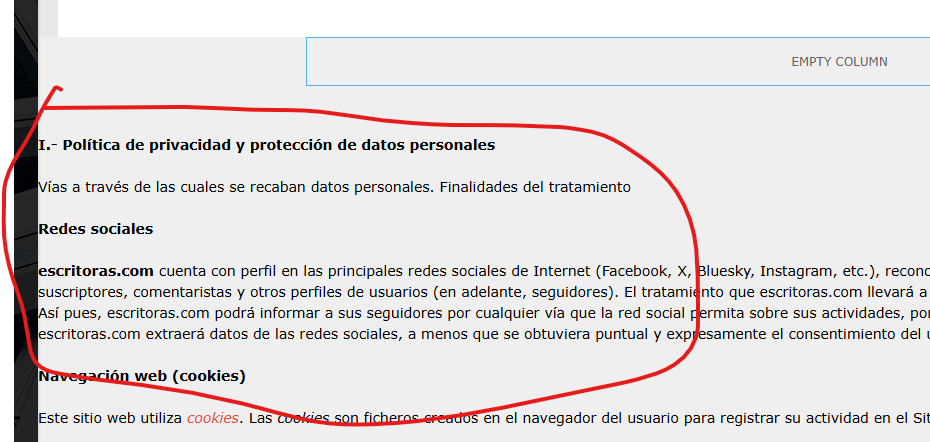
I can, of course, open Composer and copy the content that’s outside any element and paste it inside a Composer Column text element, but then, I guess, I won’t be able to keep using Gutenberg to edit that page (is that it?).
Plus, since I can’t use a single post template for pages, but I want the pages to look like posts, is it the best way to copy element by element from a post template to a new page? or is there a better way, like duplicating or copying an entire single post template, or something like that?
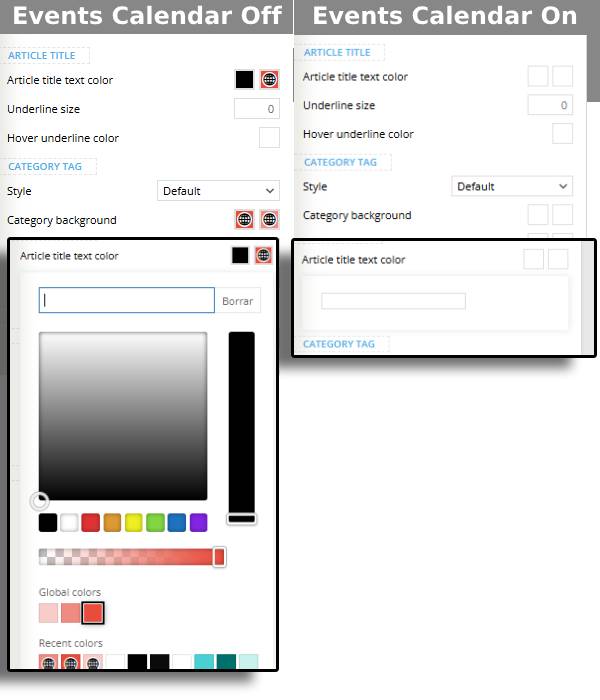
mikisan The “color picker issue” happens with the Events Calendar plugin when activated:
 Bettina
 Hello!
Ensure you’ve added a category to your menu https://app.screencast.com/u2dpUEXs2ccyk and not a custom link. Make sure there is no plugin conflict or a caching issue.
You can build a sidebar with the TagDiv Composer. Steps:
1. Insert one new row (or delete an existing one).
2. Divide into two columns (2/3 + 1/3).
3. You can add whatever element you want from the tagdiv Composer to the second column and consider it a sidebar
You can assign or duplicate multiple templates. See https://forum.tagdiv.com/topic/different-logo-in-categorypage/ for more information.
More documentation about the cloud templates is here:
– https://forum.tagdiv.com/cloud-library-templates/
– https://forum.tagdiv.com/design-post-pages-using-cloud-library-templates/
– https://forum.tagdiv.com/cloud-library-category-templates/
Add multiple shortcodes. Check this guide: https://forum.tagdiv.com/weather-widget/
You can build your own block with any title by using a flex block 1 instead with any filter or sort ordering as presented here: https://forum.tagdiv.com/flex-block-settings-guide/
Thank you!
Bettina Hello!
These shortcodes can be found in the tagdiv Composer while you edit a post assigned a cloud/pro single template.
Thank you!
Anamaria Hi,
Did you add the Page login/register shortcode from tagdiv Composer to your page https://i.imgur.com/TYn737n.png ?
Thank you!
Anamaria Hi,
You should check the errors from the console (CTRL + right-click -> Inspect -> Console) while it is loading so you can see which errors you encounter there.
Please check the steps from here: https://forum.tagdiv.com/topic/unable-to-edit-text-with-title/ and also another possible issue as here: https://forum.tagdiv.com/topic/403-error-on-tagdiv-composer-when-trying-to-use-wp-editor-wpedito-php/
Please check your .htaccess file: https://www.screencast.com/t/MJ78SDZr4Gl -> https://forum.tagdiv.com/general-options-may-interfere-newspaper-theme/
Let me know the results!
Thank you!
Anamaria Hello,
No, you can not use a single post template like a page template. The page templates can’t be global on each page, and it is not working as a single template, for example.
Create a new page in Dashboard -> Pages, press the publish button, and view. Edit it with the TagDiv Composer: https://prnt.sc/gGw1zq0zdf3r and start customizing it as you like to add text, using the element column text, image using the elements from tagdiv Composer. You can import from the Cloud Library sections, blocks, etc. already designed. Also, you can save the elements from your page with a right-click and use them on the other pages.
You can create a sidebar like in this guide https://forum.tagdiv.com/sidebars-tutorial/
Thank you!
lavozdelfestejo Additional Information:
I am considering creating a calendar page that lists events in chronological order, with each event linked to its location on a map (e.g., Google Maps). Is it possible to implement this feature? If so, how should I approach creating this page? Should it be a new standalone page?
Additionally, I am interested in knowing if “The Events Calendar” plugin is compatible with TagDiv Composer, as I have encountered issues with other event calendar plugins causing conflicts with the composer.
I appreciate your prompt assistance with these matters, as I am aiming to launch the website in 8 days.
Thank you very much.
 robbyyy
Hi there – The popular SEO plugin RankMath is telling me that the following CSS and JavaScript files are not minified:
/wp-content/plugins/td-subscription/assets/css/tds-front.css?ver=1.6.2
/wp-content/plugins/td-composer/assets/fonts/font-awesome/font-awesome.css?ver=def8edc4e13d95bdf49953a9dce2f608
/wp-content/plugins/td-composer/legacy/Newspaper/js/tdPostImages.js?ver=12.6.8
Could you please let me know how I can minimise them individually. Everything else is minified.
Thanks in advance.
Thanks in advance.
lavozdelfestejoHello,
I am facing several issues and have many doubts. I urgently need your help, as I am planning to launch my website, http://www.lavozdelfestejo.com, in just 8 days, and I am encountering many problems. This is very important:
1. I created the header using a blank template, but now the main menu is not visible on the category pages. What should I do to resolve this? (I have attached screenshots).
2. I want to include a plugin or feature in the header that allows users to select the website’s language. I installed the GTranslate plugin, but it only lets me add it to the sidebar, not the header as I would like.
3. I need to customize the sidebar design for each category. Do you recommend creating individual pages for each category? Currently, they are set up within the main page and do not have a specific template (I have attached a screenshot).
4. The category links are not working. I have reviewed everything, and they appear to be correctly configured. However, whether I click on a category from the main menu or on the summary block on the homepage, the links do not work. This issue is inconsistent, as some links work while others do not, even though they all follow the same pattern.
5. Each category corresponds to a different city. Is it possible to add a custom weather widget to the sidebar for each city? Alternatively, could a widget rotate between the cities represented in the categories?
6. I have created 108 posts divided into the website categories, all using the classic editor. However, galleries added in the classic editor are not displaying correctly. How can I customize these posts and design them using TagDiv Composer? I believe there are templates for posts, but I don’t know how to access them. Currently, I can only use the composer for the homepage. I also need to customize the sidebar for the posts (similar to the issue with the categories).
7. Is there a way to hide the follower count in the social media block? I would like the social media icons to display with a “Follow” or “Like” button but without showing the number of followers.
8. In the “Popular Categories” section, the number of posts published is displayed next to the category name. I would like only the main categories to appear here and not the subcategories. For example, “San Fermín” should appear, but “San Fermín 2023” or “San Fermín 2024” should not.
Please help me fix these issues as soon as possible. It is very urgent.
Thank you so much for your assistance.
Kind regards
 Ruteris
 Hi,
I’ve tried the steps provided, including disabling the plugin cache and adding the Single Post Views element in tagDiv Composer, but the post views counter still isn’t working. Could you please take a look? See links https://prnt.sc/gPyUITCOff3chttps://prnt.sc/gPyUITCOff3c https://prnt.sc/AnZuk1JeyLx7 https://prnt.sc/QzXvRs-8h42q
Thank you!
 lavozdelfestejo
Dear tagDiv Support Team,
I am currently designing my website using tagDiv Composer from scratch, starting with a blank template and not utilizing any pre-built templates. I have successfully customized the headers and posts for each category. However, I am encountering several issues and have some questions that I hope you can assist me with:
Menu Links Not Redirecting to Categories:
When I click on a menu link, it does not redirect me to the corresponding category page. I have checked the menu configuration both within tagDiv Composer and under Appearance > Menus in the WordPress dashboard, and everything appears to be set up correctly. The website is currently in maintenance mode, but I believe the links should function regardless. Could you provide guidance on resolving this issue?
Creating and Customizing Category Pages and Sidebars:
I am uncertain whether I need to create a separate page for each category or if my current setup is appropriate. Currently, there are no specific templates associated with each category. I aim to customize the sidebar for each category but am unsure how to proceed. Could you advise on the best approach to achieve this customization?
Configuring Multiple Locations in the Weather Widget:
Is it possible to configure multiple locations within the Weather Widget? Additionally, I woul
Mobile Version Configuration for Categories:
I am experiencing difficulties configuring the mobile version of categ
Setting Up “Recommended Articles”:
I would like to know how to configure the “Recommended Articles” section on my website. Could you provide detailed instructions on setting up this feature?
I appreciate your assistance with these matters and look forward to
Best regards
 Raunak Pathak
 Trying to update header logo using tagdiv composer selecting viewport as phone but it is not updating the logo. What should i do?
Raunak PathakHi,
I installed this theme yesterday with newseekpro template. The site is not loading on mobile devices properly. On ios, the site is responsive but the newsweek theme is not visible. On android, the site is not responsive at all. I have installed tagdiv mobile theme plugin and checked on the Mobile+Amp in the mobile settings section on themepanel Also, updating logo with tagdiv composer is really painful. Site’s url is timesofstartups.com
Thanks
 Adam Muiz
Each time i change configuration in Theme Panel,
https://unduh.org/wp-content/uploads/2025/01/Screenshot-2025-01-06-114512.png
it is stuck infinite loading and unable to save apply.
Sometimes reinstall TagDiv Composer Help, But do i need to do this each time change settings in Theme Panel
mikisanI am using Newspaper theme 12.6.8 with the Mintyside PRO demo as a base.
I can’t find a way to delete empty inner columns nor the column that contains them. When I hover there is no trash bin icon and the contextual menu shows the delete option as disabled.
https://imgur.com/a/7WbphBY

Is there any other way to delete them?
Thanks :o)
mikisanI am using Newspaper theme 12.6.8 with the Mintyside PRO demo as a base.
The Mintyside PRO demo does not seem to include a Pages template, so to create a Terms & Conditions page I go to WP admin and write the text on a new Page, then I open it and edit it with TagDiv Composer.
The thing is, I would like it to look like the Mintyside PRO Single Template for posts, is there a way to duplicate that template and assign it to all Pages I create? even if it is on a page by page basis? I know I could design a page from a blank template, but I can’t find how to insert the content of a WordPress Page inside an element, plus, I am not sure I would be able to replicate in a Mintyside style (maybe this is easier than I think), for instance the basic structure, the main container to hold all the elements.
Thanks :O)
mikisanI am using Newspaper theme 12.6.8 with the Mintyside PRO demo as a base.
I can’t get the Pinterest element to work, what am I doing wrong?
I input “user/board_id” => “welovecuteanimals/we-love-animals/” but get an error.
pinterest data error: Pinterest data is not set for <em>welovecuteanimals/we-love-animals/</em>, please check the <em>user/board_id</em>

I’ve tried with multiple users and boards to no avail.
Thanks :o)
mikisanI just installed the Newspaper theme 12.6.8 and started customizing it. I used the Mintyside PRO demo as a base.
I just want to share the issues I encountered just in case someone else faces them; specially if anyone finds that images do not load on the frontend, or some things don’t seem to work in TagDiv Composer.
The Events Calendar Plugin interferes, at least, with the color picker in the TagDiv Composer. Since, so far, I haven’t seen any problem on the frontend, I just disable the Events Calendar Plugin before using the TagDiv Composer; so,
in my case, it is not a problem, just an inconvenience.
The AMP Plugin interferes, with the TagDiv Composer and the frontend javascript; the search form does not open, neither the hamburguer menu and it prevents the lazy loading from loading any image. Since this plugin it is not really valuable nowadays (contrary to popular belief neither AMP pages nor the official plugin are deprecated; it’s just that it looks like AMP pages will not be of any importance from now on), I just deleted it.
 Hopeful_Times
 After some heavy digging I discovered a function in wp-content\plugins\td-composer\legacy\common\wp_booster\td_module.php called get_image that I had to modify to display my meta images, but I am not sure how long is this legacy folder going to be supported? Also my changes will get wiped after an update, so it is not ideal solution…
 jkfriends99
 Hi Bettina, I do have the widget enabled and the standard pack plugin activated. It did not solve the issue. If the page builder page can show up correctly and only the sidebar is lacking, why can’t it be shown?
I have closer to 500+ pages with page builder control in it and it will take many months to do the conversion. I cannot switch to tagDiv composer right away. I need to get the sidebar shown correctly.
-
This reply was modified 1 year by
jkfriends99.


