
- NewsmagtagDiv Composer Tutorial
- NewsmagHow to use the Visual Composer plugin
- NewsmagHow to update a plugin
- NewsmagWhat’s included in Newsmag theme package
- NewsmagRequirements for Newsmag
- NewsmagInstall via WordPress
- NewsmagInstall via FTP
- NewsmagBlock settings tutorial
- NewsmagtagDiv Social Counter tutorial
- NewsmagHow to update the WPBakery plugin
- NewsmagPage Menu
- NewsmagCustom ad spots
- NewsmagSmart sidebar
- NewsmagVideo playlist
- NewsmagPage templates
- NewsmagHomepage – How to build and set it
 Simion C.
 Hi,
On phones the sidebar content will drop below the comments at the bottom. The sidebar cannot be disabled just for mobile, only in general. Hiding the sidebar would be an option with CSS or in the composer with the responsive options, but it does not apply here because there is an Adsense ad in the sidebar (Adsense ads should not be hidden with CSS).
Also having an Adsense in a sidebar when sticky could potentially be a violation of Adsense rules
– https://www.screencast.com/t/WgVg3S0S2fyt
– https://www.screencast.com/t/aztyvtdGZCiU
– https://support.google.com/adsense/answer/48182?hl=en
Only when the mobile theme plugin is used the sidebar will not be displayed on phones
– https://forum.tagdiv.com/the-mobile-theme/
Thanks
 balochistanpost
I currently have version 8.0 installed, can I directly upgrade to version 8.8 by following the tutorial on tagdiv?
From my past experience with other themes, it was not possible to directly upgrade to the latest version, if you had a very old version.
I have made many CSS changes, which reading from the forum I know will disappear after the upgrade but would it also reset the structure of the main page that I have created with TD Composer.
 worldofmaya
Hi!
I’m trying to updated an existing site from version 8.1 to 8.8.1 without success. Everything loads fine in v8.1. As soon as I use the new theme none of the posts have any content (td-post-content ist empty).
– I tried to reset everything via theme panel
– I disabled all plugins
– only disabled td-composer
– installed Demo content
Nothing helped.
Last thing I did was enabling wp debug which displays the following error:
Fatal error: Uncaught Error: Call to undefined function get_featured_image_copyright() in /usr/www/users/testsd/wp-content/themes/Newspaper-child/includes/wp_booster/td_module_single_base.php:166 Stack trace: #0 /usr/www/users/testsd/wp-content/themes/Newspaper/loop-single.php(47): td_module_single_base->get_image('td_696x0') #1 /usr/www/users/testsd/wp-includes/template.php(688): require_once('/usr/www/users/...') #2 /usr/www/users/testsd/wp-includes/template.php(647): load_template('/usr/www/users/...', true) #3 /usr/www/users/testsd/wp-content/themes/Newspaper/single.php(28): locate_template('loop-single.php', true) #4 /usr/www/users/testsd/wp-includes/template-loader.php(74): include('/usr/www/users/...') #5 /usr/www/users/testsd/wp-blog-header.php(19): require_once('/usr/www/users/...') #6 /usr/www/users/testsd/index.php(17): require('/usr/www/users/...') #7 {main} thrown in /usr/www/users/testsd/wp-content/themes/Newspaper-child/includes/wp_booster/td_module_single_base.php on line 166
Do you have any clue why this happens?
 Rok111
 I got same problem with TD Composer….
 Catalin
 Hello satwell,
You can check the following topic from here -> https://forum.tagdiv.com/topic/getting-an-bindviewsmodelswrappers-in-tagdiv-composer/ and try to fix this problem.
Thanks for your understanding!
Catalin Hello reflector,
Check the following topic from here -> https://forum.tagdiv.com/topic/getting-an-bindviewsmodelswrappers-in-tagdiv-composer/ and try to fix the problem.
Hope this helps and let us know how it goes!
Thanks.
 diadoraz10
 I’m getting the same error when trying to open TD Composer:
(“my site name appears here”) didn’t send any data. ERR_EMPTY_RESPONSE
I’m running wordpress 4.9.6 and Newspaper v8.8.1
I’ve uninstalled/re-installed WordPress a couple times as well as the theme. This error appears no matter if I create a page, edit a page (tried loading one of your demo’s) etc.. Below is the URL given when I click the TD Composer button:
Simion C. Hi,
That would be a sidebar, sidebars can be edited depending on how they are added to the page. If for example the sidebar is creating by simply adding elements top it with the composer, it can be modified by editing the page
– https://www.screencast.com/t/qmyUJ01ut
If a widget sidebar is used, then the sidebar can be edited in Appearance->Widgets
– https://www.screencast.com/t/4M5lk6fsYp1R
– https://www.screencast.com/t/gvDrti5Oec5
These are some useful guides that you can read
– https://forum.tagdiv.com/tagdiv-composer-tutorial/
– https://forum.tagdiv.com/block-settings-guide/
Let us know if you have more questions, we will try to help you.
Thanks
 Mpburgus
 So, I have now uploaded it via ftp like you suggested and now the TD composer is not an option on the front end like it was before. I tried to install the plugin from the zip file provided and from the themes menu and still nothing.
 satwell
When I try to edit my Posts page with TD Composer, I get the following error:
Errors happened during tdcIframeData.init() -> bindViewsModelsWrappers()!
Suggestions?
 Allshethings
 Hi, I updated my theme and the plugins as well. Still, the ‘publish’ or ‘update’ buttons on the post are not working. When I deactivate the tagdiv composer plugin, they work fine though.
 reflector
I created a homepage with the composer but when I try to open the page to edit the page with the composer I get a tdcIframeData.init() -> bindViewsModelsWrappers()! error.
Catalin Hello squallhajime,
Sorry but please notice that Visual Composer has not been tested on post pages and we do not recommend something like this, unfortunately! Notice that we have a cloud library and from there you have an option to create your own post template using the TD Composer. Please check our documentation from here -> https://forum.tagdiv.com/tagdiv-cloud-library-plugin/
Thanks for your understanding!
 delivite
 Please, mark this thread as resolved. I updated the tagdiv composer plugin from the theme setup options and it works now.
Thanks again.
deliviteHi, I recently updated my Newspaper theme and found that my blog had lost all the settings I made to the homepage. I tried to redesign the page but TagDiv Composer would not work. I have tried to activate the plugin and redo my homepage but this has not been possible. I need your help pls, ASAP.
Thank you.
Simion C. Hi,
It seems there is some design coming from Visual composer, this is overriding the theme margin bottom set for the block title
– https://www.screencast.com/t/wMgeTh3FhnH
Blocks in sidebars do not seem to have this problem however, in posts or category pages.
I tested his with the same block even, in a Visual composer page
– https://www.screencast.com/t/d8oRjQx9
For me the theme margin bottom applies to the block title as it should. First you could try to clear your cache, check if this has any effect. If that does not do anything, I could give you a code to restore the margin
– https://www.screencast.com/t/ZXwng4KJp8i
.block-title {

margin-bottom: 26px!important;

}
Thanks
 squallhajime
 Thanks for the reply the error is gone now. But is there any way to activate visual composer on post module? As for some of the posts, I need to create them like this: https://backlinko.com/mobile-seo-guide. While others will just be default one.
I tried using the cloud library, it feels more like creating a template than creating a post.
Thanks
-
This reply was modified 8 years by
squallhajime.
Catalin Hello sk_rocks,
If you want to use these settings you should use only Visual Composer functionality because our TD COmposer does not have these options, sorry! -> https://www.screencast.com/t/3dhph13Vj Use only Visual Composer for that page if you do not want to get some errors.
Thanks for the message!
 josinc
 I received following message in inbox. But I can’t see this in the forum.
Catalin wrote:

Hello josinc,

For problem 1, notice that you should check the Excerpts section from Theme panel and switch the option by Letters or Words like this -> https://www.screencast.com/t/v8DUvrGU For problem 2, it seems to be a bug in our theme, sorry! I have added to our list of improvements and we hope to solve it as soon as possible.

Thanks for your message!

Post Link: https://forum.tagdiv.com/topic/odd-behavior-of-blocks-in-tagdiv-composer/#post-239461
I tried between words and letters in Excerpts panel.
Still excerpt length change doesn’t affect block 16 in the mentioned page.
-Josin
-
This reply was modified 8 years by
josinc.
Simion C. Hi,
Be sure to install the theme properly as a first step
– https://forum.tagdiv.com/install-via-ftp/
– https://forum.tagdiv.com/install-via-wordpress/
The most recommended and most reliable method is by FTP. Deactivate and remove all the plugins that belonged to the previous theme and install the ones from the Newspaper theme (tagDiv composer is requried).
Also be sure to check the theme requirements guide
– https://forum.tagdiv.com/requirements-for-newspaper/
Let us know if there is still a problem.
Thanks
 Adaras
Hi,
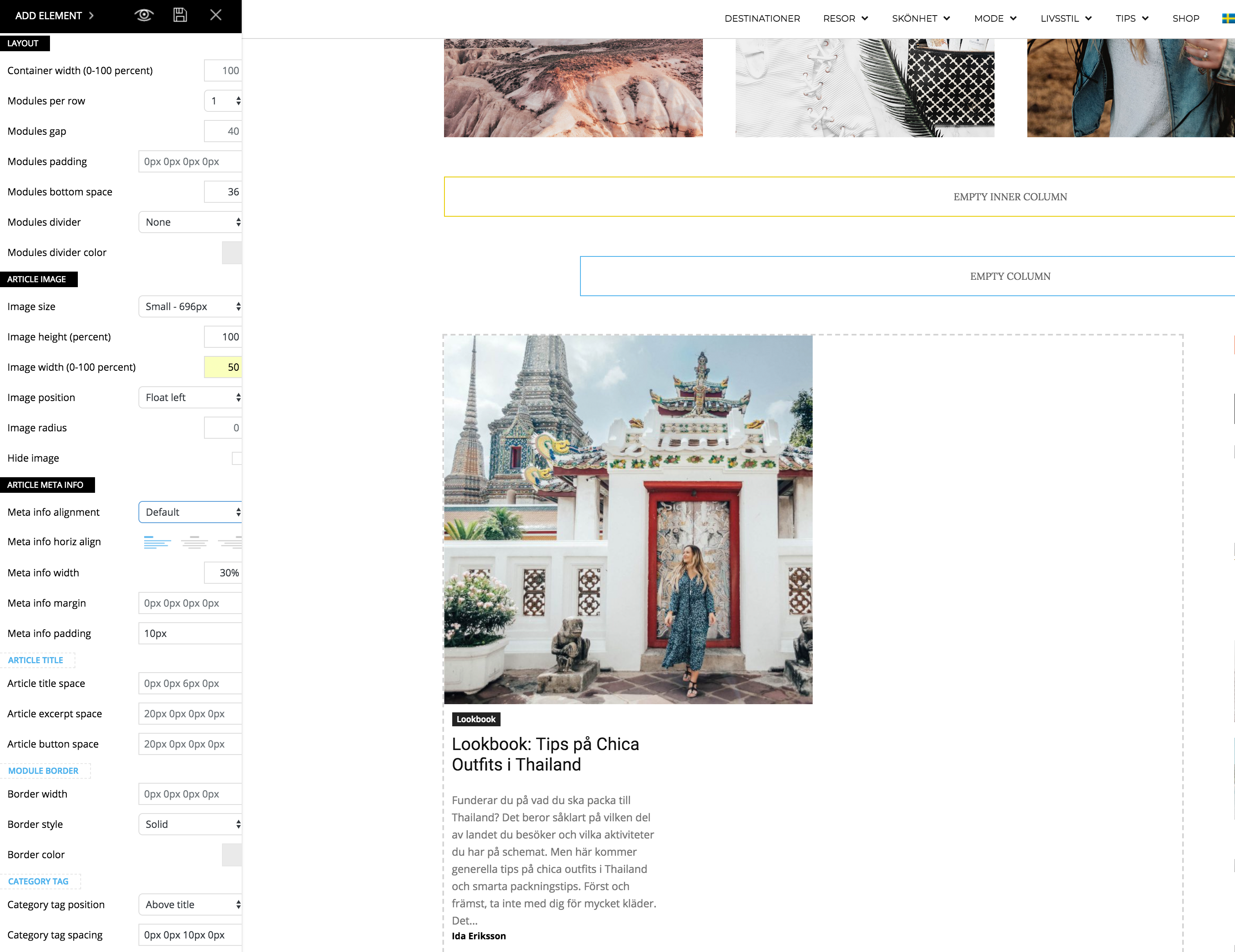
I just updated to the newest version of the theme and noticed a problem when I’m trying to make my flex block as the example for “2 modules per Row here”: https://demo.tagdiv.com/newspaper/flex-block/
I can’t get my meta description to show next to the photo. It’s position below or above the photo, no matter what I do.
When I inspected the elements I see that the difference is that my .td_module_flex_1 .td-module-container has flex-direction: column. And if I change it to “row” like in the example it works. But how do I get it right with only the TD composer?
Catalin Hello squallhajime,
Notice that you can create your own post template from Cloud Library and customize it with TD COmposer as you wish. For more information about this setting, please check our documentation from here -> https://forum.tagdiv.com/tagdiv-cloud-library-plugin/
Thanks for your understanding!
Simion C. Hi,
Seems there is no theme stylesheet loaded, try to reinstall the theme. Use FTP if possible, this is the most reliable and recommended method to update a theme
– https://forum.tagdiv.com/how-to-update-the-theme-2/
Be sure to check if the composer has been updated automatically, update it manually if it is not. Also update the other theme plugins.
Thanks
 Bogdan B.
 Hello,
For page content elements, you can use the tagdiv composer ( https://forum.tagdiv.com/tagdiv-composer-tutorial/)
The latest articles section is controled from the post loop settings: https://forum.tagdiv.com/page-templates-2/
The footer content is different as there are footer templates that provide predefined content. In order to change this content, you will have to use an empty footer template and place widgets in the footer section by using this guide: https://forum.tagdiv.com/footer-templates/
Than you!
Simion C. Hi,
A 404 errors would mean that the requested resources are not found on the server. The first one refers to a child theme and a font file it seems, try deactivating the child theme temporarily.
The second error is provided because a file is not found it seems. But the unusual thing is that there is no such file in the main theme folder. Maybe you made some modifications to the theme files, or file additions. Or maybe a plugin is doing it. You could investigate these first and check if there are still errors.
Deactivate the child theme, deactivate all non-theme plugins, remove theme modifications or code added in the theme files. Check if the errors are still present. Ultimately re-install the theme by FTP
– https://forum.tagdiv.com/install-via-ftp/
If the errors are gone and there is still a problem review the theme requirements
– https://forum.tagdiv.com/requirements-for-newspaper/
Also these similar topics know to solve composer loading issues
– – https://forum.tagdiv.com/topic/javascript-error-td-composer-wont-load/
– https://forum.tagdiv.com/topic/gray-page-tagdiv/
Let us know what you find.
Thanks
