
- NewsmagtagDiv Composer Tutorial
- NewsmagHow to use the Visual Composer plugin
- NewsmagHow to update a plugin
- NewsmagWhat’s included in Newsmag theme package
- NewsmagRequirements for Newsmag
- NewsmagInstall via WordPress
- NewsmagInstall via FTP
- NewsmagBlock settings tutorial
- NewsmagtagDiv Social Counter tutorial
- NewsmagHow to update the WPBakery plugin
- NewsmagPage Menu
- NewsmagCustom ad spots
- NewsmagSmart sidebar
- NewsmagVideo playlist
- NewsmagPage templates
- NewsmagHomepage – How to build and set it
 Bettina
 Hello!
You can disable it and delete the element from the TagDiv Composer.
Thank you!
Bettina Hello!
If you assign them to the post template, you can have a different header and footer for each post.
Edit a post template with the TagDiv Composer, click on Website Manager, and select the right header and footer (do not select global).
Thank you!
 Anamaria
 Hi,
You can import a page, design it with tagdiv Composer, and you can disable the header and footer -> https://imgur.com/yWx8ZRR
Thank you!
 Calin
Calin Hi mepeita,
The Newsmag theme doesn’t have the option to add the ads in that place. You can add the ads only in the sections from the theme panel and on pages you can set the ad box – https://i.imgur.com/o6lk9AH.png with tagDiv Composer.
Thank you!
 syed2023
The webpage at https://g-technews.com/wp-admin/post.php?post_id=313&td_action=tdc&tdbTemplateType=footer&prev_url=https%3A%2F%2Fg-technews.com%2Fwp-admin%2Fadmin.php%3Fpage%3Dtdb_cloud_templates might be temporarily down or it may have moved permanently to a new web address.
ERR_HTTP2_PROTOCOL_ERROR
The theme is not editing with the plugin tagdiv composer. We encounter same error while editing header footer and whole theme
Anamaria Hi,
Various factors can influence page speed, including server response time, network latency, image optimization, caching, and more. While the PHP version itself may not directly affect page speed, it can impact the web application’s performance, which in turn can affect page speed. For example, newer versions of PHP often have performance improvements that can speed up the execution of code and reduce server response times. There are many optimization guides provided by our users here in the forum, some made by us; you could check some of them
– https://forum.tagdiv.com/cache-plugin-install-and-configure/
– https://forum.tagdiv.com/how-to-make-the-site-faster/
– https://forum.tagdiv.com/topic/high-number-of-ajax-request/
– https://www.infophilic.com/get-almost-100-pagespeed-newspaper-theme/
– https://forum.tagdiv.com/topic/score-100100-pagespeed-with-newspaper-wordpress-theme/
– https://www.andraware.com/wp-rocket-for-newspaper-theme/
– https://spraythemes.com/newspaper-theme/how-to-speed-up-the-newspaper-wordpress-theme-using-wp-rocket/
– https://forum.tagdiv.com/topic/page-speed-guide-for-2023-beginners-and-advanced/
– https://forum.tagdiv.com/topic/newspaper-theme-speedify-your-website/
– https://forum.tagdiv.com/topic/tutorial-chriss-custom-optimizations-for-functions-php-etc/
– https://forum.tagdiv.com/cloudflare-cdn/
– https://forum.tagdiv.com/topic/theme-causing-high-cpu-usage-2/
– https://forum.tagdiv.com/topic/sql-querys-high-cpu/
– https://forum.tagdiv.com/topic/newspaper-theme-slow-to-respond/
– https://premium.wpmudev.org/blog/optimizing-your-wordpress-database-a-complete-guide/
– https://underconstructionpage.com/optimize-wordpress-database/
– https://crunchify.com/better-optimize-wordpress-database-all-in-one-guide/
If you use Wp Rocket, you can try to exclude the following files
/jquery-?[0-9.](.*)(.min|.slim|.slim.min)?.js
/jquery-migrate(.min)?.js
/wp-content/plugins/td-composer/legacy/Newspaper/js/tagdiv_theme.min.js
tdBlocksArray
Thank you!
Anamaria Hello,
You can enable this option on the blocks -> https://i.imgur.com/DYXykP6.png
With tagDiv Composer, you can add the element Single Post Modified Date in Single Post Template and
you can change the additional text in “Last updated on” => https://www.screencast.com/t/EvfUQMfzkd, and the Single Post Modified Date will show you the last time you edited that post => https://www.screencast.com/t/j74uz43paZj
-> https://forum.tagdiv.com/single-post-shortcodes/
Thank you!
 maraaa
 Hello,
I am having the same issue: tagDiv Composer tab/button is not visible.
Interestingly, this is not the first time that I am reinstalling this theme, and it was happening before – but not every time.
In most cases, reinstalling the theme and the plugins would restore the button. But now, nothing happens even after several attempts in a row. Of course, I’ve tried to reinstall the plugin individually, without any luck.
By the way, none of the third-party plugins were active during that process.
Also, the problem was present before and after the last update (V 12.3). Everything else seems to be up-to-date.
Hope that you can help me with this issue.
Thank you in advance,
M.
 ninjaray
We are having an issue that seems to be common on the forum where when editing on a tagDiv Composer page, we’re unable to get the WP Editor screen to load, it just spins. We have disabled all but tagDiv plugins, cleared cache, checked .htaccess and other suggestions proposed in other posts but the problem seems to persist. Linking a video so you can see the behavior here (with all plugins deactivated except tagDiv) and another video so you can see the console errors being thrown. You mention this issue in other posts, suggesting that ModSecurity is a problem. Disabling ModSecurity for the entire site sounds dangerous. Are there any specific rules within there that would resolve the conflict, if that’s what’s causing it? Screenshot here with options we may have to customize ModSecurity.
Would appreciate any other suggestions or advice. Thank you!
 negmstar75
 Hi, I have problem that tagDiv Composer doesn’t show in my user interface as it should be on the top or the side menu even though the plugin is active…any help?
Anamaria Hello,
Please deactivate, delete and reinstall tagDiv Composer from Newspaper plugins => https://www.screencast.com/t/OrzLvR2j and clear all cache.
Thank you!
Anamaria Hi,
I saw that you use elements that need to be edited with tagDiv Composer, and for other elements, you need to do the changes in Theme Panel.
This is a video about how to change the fonts => https://www.youtube.com/watch?v=rbkYVyj1__Q also, you can use global font from Manager(Website Manager) -> Global fonts -> https://i.imgur.com/iY0bh4Y.png
Thank you!
Bettina Hello @Rosemarie !
Edit the homepage with the TagDiv Composer, click on the logo and check the settings: https://prnt.sc/gIgclg5HnM6p
Thank you!
 marvinschaap
Hello,
We currently have several news websites running on the Newspaper platform. However, whenever we want to update the theme, the ‘tagDiv Composer’ and ‘tagDiv Cloud Library’ plugins are automatically deactivated after this update. As a result, we experience problems with the websites because we have to check every website after such an update.
We are currently working on several new websites for which we want to use this theme. To make a good choice, we think it is important to know whether we can somehow circumvent this, and to ensure that the plugins remain active after an update.
Can you help me with this?
 danna
danna Hello,
i didn’t ad the code in the TagDiv Composer, i added it directly into the Post (Gutenberg):

After that the ad is displayed in Desktop and in the mobile theme. Everything works perfect. But on Desktop i don’t want the ad to be displayed in the post, because i have it in the sidebar. So i use a filter from advanced ads to just display it on mobile devices:
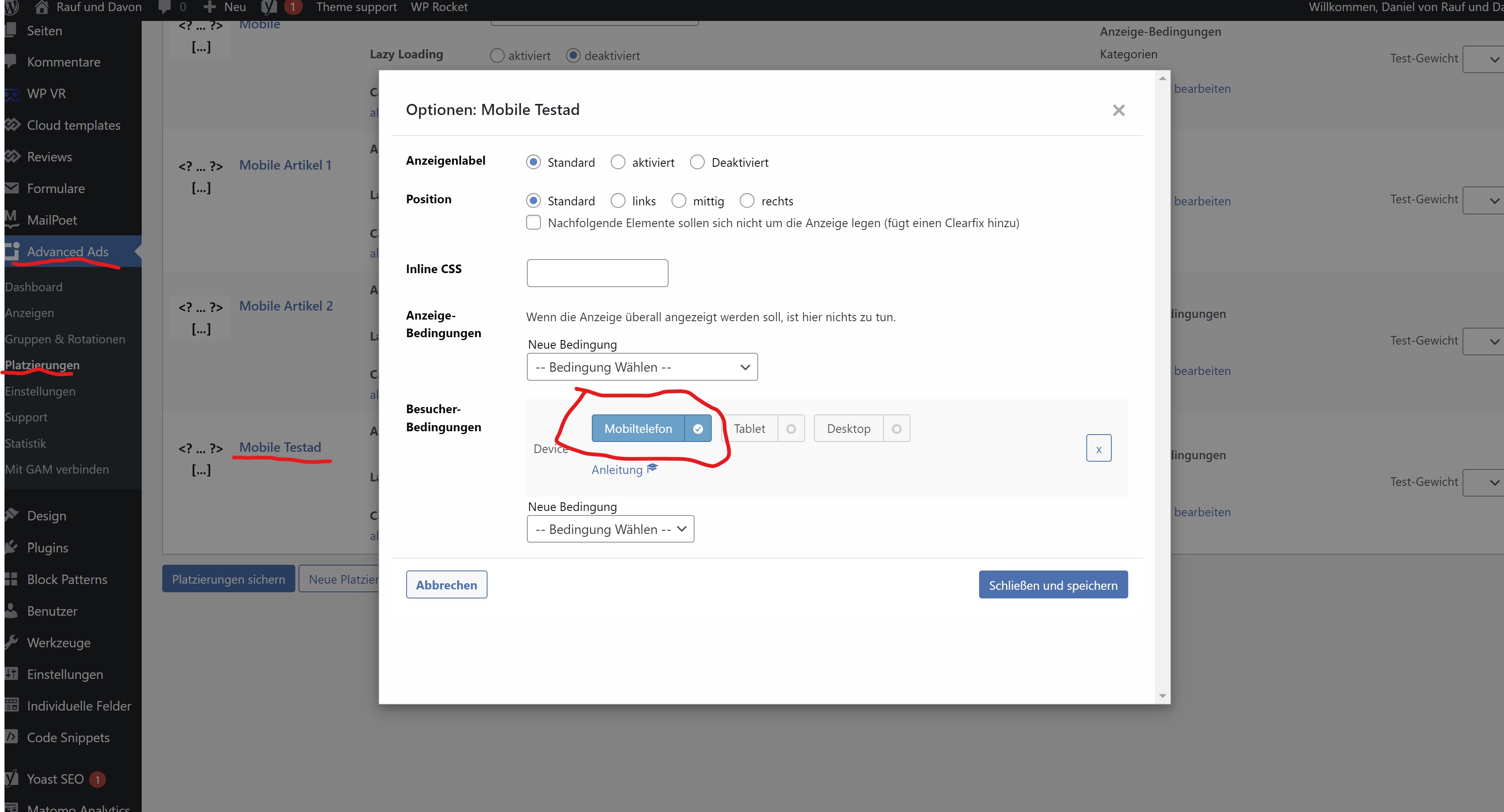
After the filter is applyed, the ad is still displayed in the DevTools (there i can load the mobile theme):
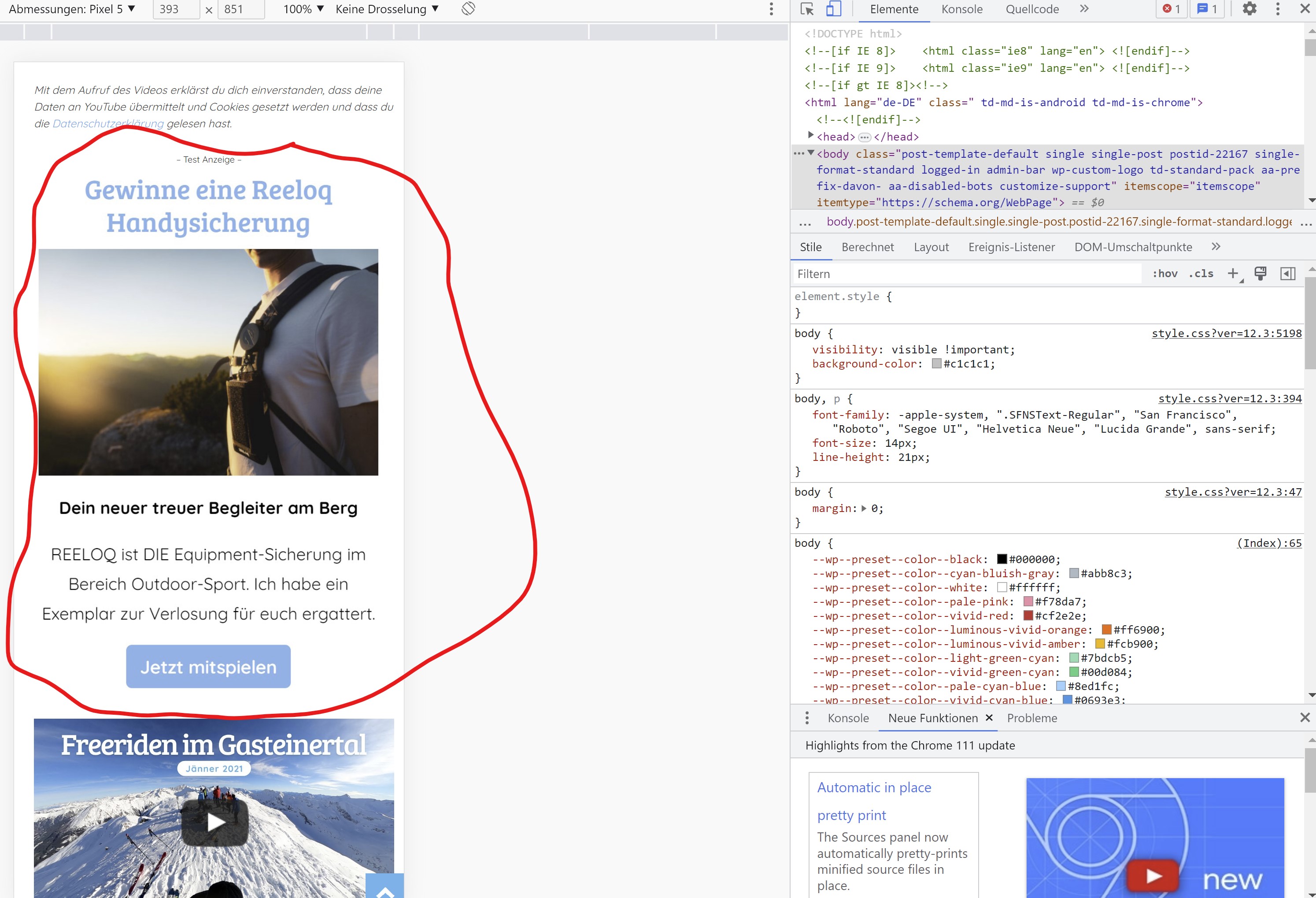
So it is displayed in the mobile theme but for some reason it’s not displayed on a real mobile device.
You can check it our here: https://rauf-und-davon.at/freeriden-gasteinertal-2023/ – the ad should appear between the two Vidoes.
All the best,
Daniel
-
This reply was modified 3 years by
danna.
Bettina Hello Daniel!
If you added the ad code in the TagDiv Composer, then the mobile layout will override the cloud template and display its layout. So, the ads won’t work in the mobile viewport.
If you use an extra plugin, then there could be a plugin conflict between them.
Thank you!
Anamaria Hi,
Those are the resolution for each device -> https://i.imgur.com/icMGBnC.png
So, if you want to edit them, you can do it in this path -> wp-content/plugins/td-composer/legacy/Newspaper/assets/css/td_legacy_main.css
But you do not need to edit the file; you need to copy the code, edit it as you need, and set it to the Theme Panel -> Custom Code -> Custom Css -> https://i.imgur.com/wYQ4ZrH.png or you can set it in the child theme in css file.
Thank you!
 sadviser
I am using the Tag-div composer to place a shortcode into a mobile page. I am doing this through a content text element however, when I save, it does not appear to actually save. Is there some additional step I need to do?
The steps I take are:
1. Press Edit Content
2. Add content to WP Editor popup
3. Press Save content – content saved side tag appears
4. view page – nothing appears
Is there some additional save button to press on the WP Editor that I cannot see on my screen for instance?
I can see that several people have asked the same question, each with a slightly different outcome. All my plugins are up to date.
Bettina Hello!
Edit the page from the modal with the TagDiv Composer and customize it.
Thank you!
Anamaria Hi,
If you don’t see the button edit with tagDiv composer in the top bar, then please check if you have this option enabled in the jetpack plugin, please disable it -> https://i.imgur.com/VFb1Oj7.png https://forum.tagdiv.com/general-options-may-interfere-newspaper-theme/
Thank you!
Anamaria Hello,
To remove the sign-in/join from the header you can do it with tagDiv Composer => https://www.screencast.com/t/Y5j6ArY8Ug , select the element and with right-click, you can delete it => https://www.screencast.com/t/GshM3Q3nwDv
Thank you!
Anamaria Hello Ken,
You can edit the Single Post Template as you want with tagdiv Composer -> https://forum.tagdiv.com/design-post-pages-using-cloud-library-templates/
Thank you!
Anamaria Hi,
To change the logo please edit with tagDiv Composer,select the header logo and change it => https://i.imgur.com/cR7F0v4.png -> https://www.youtube.com/watch?v=HXQQygkCCJo -> https://forum.tagdiv.com/add-logo-newspaper/
Thank you!
 mcdv01
 Hi Anamaria,
I only need the cloud template for the header.
Do you expect this to happen for the fonts?
I have no other plugins active. Only Newspaper Theme, Tagdiv composer, tagDiv Standard Pack, tagDiv Cloud Library
However, when I go to Newspaper -> Theme Panel -> Theme Fonts -> Google Font Styles and enabled the BOLD 600 and 700 it fixed the FONTS issue on the single page
Do you think this is ok and will not have complications?
negmstar75 Hi, I have problem that tagDiv Composer doesn’t show in my user interface as it should be on the top or the side menu even though the plugin is active…any help?



