kadams1970
Hi all
Not off to a great start – installed Newspaper on to my site and purchased the extended support. Unfortunately the TagDiv composer element simply won’t run from the box, and I’m a little disappointed to see that the documentation on site just points to me needing to ‘clean the code’. Doesn’t really tell me a lot.
The error message I get is ‘Error at zones: 6(models) : 0(dom). The model does not match the content Current state has involved an issue. You could try an UNDO operation (CTRL+Z / CTRL+SHIFT+Z)’ regardless of what I try and edit through Composer.
Can someone point me in the right direction please?
 Patrick93
Hello,
I have worked with Tagdiv Builder for many years and currently will not do so again.
I would like to give feedback and justify my decision.
You guys really do a good job and with the forum I got help very often. Unfortunately the support has developed negatively.
Often they try not to solve the problems, but send the customer to the partner agency. In my opinion, this is not the purpose of a help forum.
In addition, I unfortunately came to my limits with the Tagdiv Composer. It was no longer possible for me to fulfill everything according to my wishes and I think that the strategy has to be changed here in the future. Systems like TagDiv Composer are no longer up to date. The future looks different. There are much more flexible solutions. Fairerweiße I do not want to name any competitors here.
All in all I was very satisfied with TagDiv Composer and in my opinion it is the best of its kind. But as I said, there are other better solutions.
Maybe one day I will come back, who knows.
Thanks a lot!
 Breinblik
Hi!
I’ve been busy building a new website (based on an old one) and both websites use the Newspaper theme.
The new website is now ready to go live but just one more thing, migrating al the posts from the old website to the new one. When i use the WordPress importer to import the XML all seems to be going fine but the Featured images for every post won’t show. How do i fix this? I tried the plugin “regenerate thumbnails” but no effect. Could it have perhaps something to do with the old website using WP Bakery page builder and the new one TagDiv composer? Seems unlikely because it only concerns the featured image for every post that is not showing.
The new website can be viewed Here
Thanks for your help!
-Jacco
 stpke
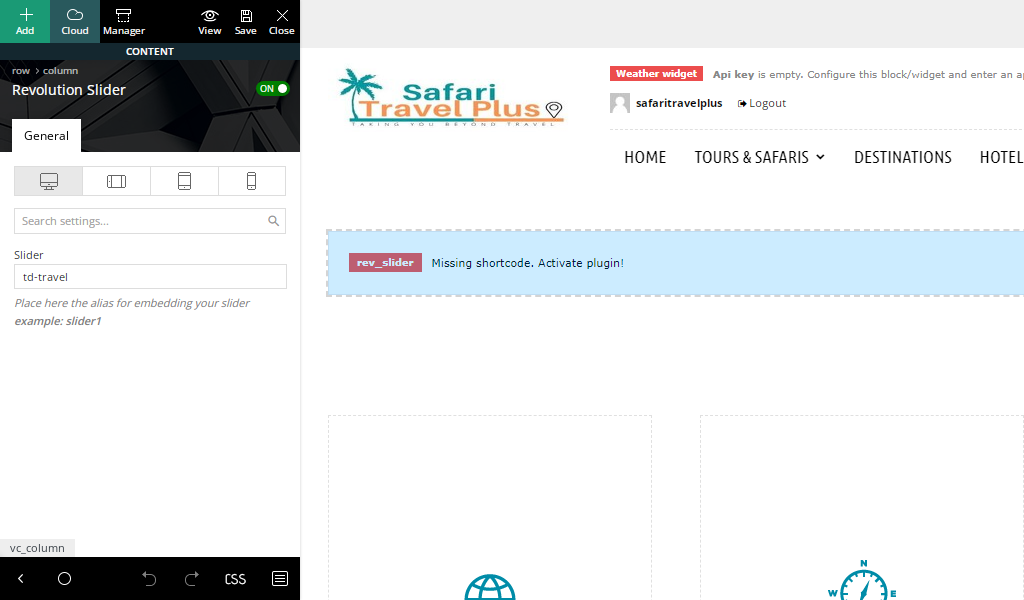
stpke I have managed to remove the instagram thanks but for the revolution slider im trying to get it to work not delete it.
When i try and edit with tagDiv composer im not able to figure out how to add images.
Whats confusing me is that with the revolution slider i have used in the past you get to add images on the dashboard area then paste that code where you want the slider to be displayed.
For this one i cant see the slider plugin on my dashboard so wondering how you add or remove photos.
 Bettina
 Hello!
A shortcode can be inserted in our theme only by using the element called “Column text” or “Text with title”. Now, it’s possible to be a plugin conflict there, but you can make a test on a test page.
“Column text” and “text with title” elements have a button called “edit content” and if you click on that button, the WP Editor will open and you can add some text/code/shortcode there. Close the WP Editor from X, save the changes from Composer and view the page to see the changes.
If you mean anything else, then please provide more information about this issue or what you need to achieve, screenshots or a video and your website link, so I can understand better and help you efficiently.
A solution for sending a screenshot/video is this:
Download, capture, send: https://www.techsmith.com/jing-tool.html
After making the screenshot, you will have a link, paste it here.
Thank you!
Bettina Hello!
A responsive version of your website is looking similar like on desktop, edit the page with TagDiv Composer, click on the mobile viewport: https://www.screencast.com/t/XDQJedlggSB ; there you can see your mobile version and you can edit the elements there or adjust them to look better. It is a logo text there: https://prnt.sc/F6J6wV118XQv
Thank you!
Bettina Hello!
Access your article in your frontend, edit it with the TagDiv Composer, click on those elements and delete them. There is actually a recycle bin basket for every element https://www.screencast.com/t/wFYdqgpo6pT
You can hide them also from the CSS tab of the element: Display: HIDDEN.
Thank you!
Bettina Hello!
Make a test and deactivate ALL plugins except tagDiv ones, also if you are using a cache plugin, deactivate it, clear all cache and let me know the results!
Check this guide also: https://forum.tagdiv.com/general-options-may-interfere-newspaper-theme/
This issue with the error from Composer has been already discussed here: https://forum.tagdiv.com/topic/errors-at-columns-elements-5/
Please make sure you did all the steps which I mentioned here: https://forum.tagdiv.com/topic/errors-at-columns-1models-0dom-the-model-does-not-match-the-content-curr/
Thank you!
 Anamaria
 Hello,
Please edit with tagDiv Composer, select the row or element and delete it with right-click ->
https://i.imgur.com/elkFvYp.png
To remove follow us please go in Theme Panel -> Footer -> Instagram Settings -> https://i.imgur.com/Jwb6lz6.png and delete the information and disable it.
Thank you!
Anamaria Hello @speakmeister,
As I said in your topic please check the row -> https://i.imgur.com/nxf7g6e.jpg – https://i.imgur.com/yb3j5Lt.png
Also, there is no scroll bar, if you have a mouse with the scroll you can use it to scroll in tagDiv Composer.
Thank you!
 Prateek
 Hello!
I use this theme very actively and observe and analyze it very closely. I hope these points do not get ignored and find someplace in your checklist. If possible, please have someone from your development staff have a look at this. I’d be grateful. Also, this would make more sense to them. Some of the points that I want to make are—
1.) On news websites that write about the entertainment industry like celebrities, movies, TV, etc, you will see there are multiple types of taxonomy in the same place. What I mean by that is we normally put tags at the end of the content and it only displays one type of taxonomy that is tags or categories, but on some entertainment news websites a new taxonomy is sometimes created, for example, “People” or “Celebrities” to display names of celebrities at the end of content along with tags in the same line. Suppose, you write an article about the top five action movies and you have created a non-hierarchical custom taxonomy called “Movies“. And you put the names of the movies mentioned in that article into the “Movies” taxonomies and use “top movies” as a tag. But now you cannot display both of these taxonomies at the end of the article in a single line using a single shortcode. You have to place two shortcodes in two lines(it looks messy). To get a clearer understanding, you can see at the end of this article, there are quick links. You can see by hovering the mouse over them on the desktop that “Chelsea” is put into the “Team” taxonomy and “Jules Koundé” is put into the “Player” taxonomy. You’ll see the URL in the corner upon hovering. They are all different taxonomies but display in one line as a single element. With the Newspaper theme, it’s not possible. I know it sounds too complicated but I have a suggestion regarding the workaround. I write it below:
a.) The shortcode named “Single Post Taxonomy” can allow multiple comma-separated values for the “Taxonomy” field so that all the taxonomies can be displayed in one place. A new field named “Taxonomy Type” with values “hierarchical,” “non-hierarchical,” and “Both” can also be created for more ease and better UX. I say this because the hierarchical taxonomy shortcode like the one for the categories does not allow background color, border, padding, etc. for the additional text as the shortcode for tags does. This new shortcode after the update can be named something like “Single Post Taxonomies” or “Single Post Multiple Taxonomies”
—————————————————————————————————————
2.) A feature to display all the posts in a custom post type would be fantastic. A way to design custom post-type archives using cloud library templates and TD Composer. For example, I am using this Web Stories plugin by Google. It’s used to create Instagram-like stories on your website and shows in Google Discover and Search. But I cannot customize the archive page for my stories because it is a custom post type.
3.) I loved the new update. Especially, for its support for custom taxonomies, post types, and fields. One can easily create an archive template for the custom taxonomy but these templates still have very limited support for the custom fields. I’ll try to explain with an example. A tag has a “Name” field for the name of the tag, a “Slug” field for the URL, and a “Description” field for the explanation, which are all default fields. Suppose, I create a new taxonomy called “Celebrities” and I put “Justin Bieber“, “Lady Gaga“, “Tom Cruise“, “Kevin Hart“, and “Beyonce“, in the “Name” field. Now I want to add a custom field “Occupation” in the “Celebrity” taxonomy to explain the profession of the celebrity like “Singer“, “Actor“, “Comedian“, etc. In the Newspaper theme, there is no option to display this custom field information on the archive page of the custom taxonomy. Posts can display custom field information but archive pages cannot. A website called Screenrant has created a “Game of Thrones” tag. But the archive page for this tag displays a lot of information like Cast, Rating, Directors, etc., which are all custom fields. Have a look.
4.) There should also be a feature to show related posts based on custom taxonomies. There is an option to show posts based on categories and tags but no option for custom taxonomies. Suppose, I have written a post about Michael Jackson and I am using a custom taxonomy called “Celebrity” and “Michael Jackson” as a custom taxonomy tag. It would be great if it shows related posts with “Michael Jackson” used as a tag. You can say this can be done with default tags. But in tags, there is a lot of stuff, like topics, celebrities, and other keywords. A custom taxonomy provides more organization to content and it can make related posts more relevant if they show accordingly.
5.) There are three options(screenshot) in a post template to show taxonomies. a.) Single Post Categories, b.) Single Post Tags, and c.) Single Post Taxonomies. I experienced inconsistencies in the sizing convention of these elements meaning they look different with the same paddings.
For example, take a look at this screenshot.
6.) From three of the taxonomy shortcodes that I mentioned in the above point, one of them is Single Post Taxonomy(screenshot) which I only found in the latest update. I realized that it can be used to display any type of custom taxonomy. But it has the same sizing issue. It follows the “Single Post Category” shortcode’s styling. It even shows the same data fields like Tags Order, Tags Limit, and Additional Text. The only difference is you can put any taxonomy in the “Taxonomy field.” Please tell the developers to make the sizing more consistent for similar elements.
I have some more points that I’ll share tomorrow in the same post. For now, this is all. If you want more details on these points, please don’t hesitate.
Thanks.
 viralvdoz
giving following error
Error at zones: 6(models) : 5(dom). The model does not match the content Current state has involved an issue. You could try an UNDO operation (CTRL+Z / CTRL+SHIFT+Z)
 PIF21
PIF21 Thank you very much for the information and recommendations. I currently have both Mobile and Amp turned on. I was able to edit the site within TagDiv Composer’s phone viewport. When I’m editing in TagDiv’s phone viewport, while also having Mobile & Amp turned on, am I using the “responsive” theme or the “Mobile” theme?
 Laurie Lawrence
Dear team,
we are trying newspaper 11 with the standard pro theme prebuilt. we intend to use a js script on one post page of our site, however the entire script output is displayed below the entire footer area, at the very bottom of the page. Any tip how to fix this? we tried also to build it using the tagdiv composer using a RAW HTML element, but same result.
the code we use is the standard form embed script of Hubspot and looks like below. the same code worked normally on our previous wordpress site but not with newspaper theme for some reason. anything we missed?
http://3.123.197.229/newsletter
Thanks!
Laurie
 ngospelmedia
Hello please your theme latest update is not compatible with this wordpress plugin: “AdSense Integration WP QUADS” when this plugin is active, Tagdiv Composer does not open to edit cloud template. on less the plugin is deactivated before tagdiv composer will open…
PIF21How do I view my mobile pages? The only way I see is to open up a page with Tagdiv Composer, then click on the “phone viewport” option. But I cannot see how category pages or post pages look in the mobile viewer because those pages are not made with the TagDiv Composer. What is the best option to see all mobile pages?
Thank you.
Bettina Hello!
1. It is a custom design, so you need to access wp-content\plugins\td-composer\legacy\Newspaper\includes\demos\history_pro\demo_style.php and change the yellow color.
2. The font size can be changed from the TagDiv Composer, first column from here: https://prnt.sc/iJpJM4gjA-W-
Thank you!
Bettina Hello!
If you use a cloud template, please edit the page with the TagDiv Composer and check the settings there too.
Documentation here: https://forum.tagdiv.com/tagdiv-social-counter-intro/ -> https://forum.tagdiv.com/social-counter-styles-on-newspaper/ -> https://forum.tagdiv.com/tagdiv-social-counter-tutorial-2/
Thank you!
Prateek To demonstrate this, I have created a new sample post. And this post is using default post template that I created through cloud library using tagdiv composer. You will see when I try to edit the post template, it opens with the new post that I created, not dummy data.
Edit: Please also note that when I click on “view” instead of “edit template with td composer”, it opens with dummy data. After that I can click green edit button from the top bar and it opens in TD Composer with dummy data.
Please see this video.
-
This reply was modified 4 years by
Prateek.
Bettina Hello!
Please check the steps from here: https://forum.tagdiv.com/topic/problem-with-the-update-in-td-composer/
Hope that helps you!
Thank you!
Bettina Hello!
1. Please access the page in your frontend, edit the page with the TagDiv Composer and set a link in a button or an inline text element: https://www.w3schools.com/tags/att_a_href.asp
2. Unfortunately, they appear only when you click on an element.
Thank you!
 dra_proba
Please, two questions about the tagDiv Composer editor.
1. When I use page editing in tagDiv Composer, which element should I use to add simple text with a link?
2. Can I see all grid lines for rows and columns in editor (the grid lines appear only when I click on an element)?
Bettina Hello!
1. Please check the settings from the homepage and apply them for the other pages too.
2. You can copy paste the elements in the other page as well.
3. There is only 1 element displaying on 2 rows. So, you can limit the flex block at 4 posts and add other flex block with limit 4 and offset 4.(or copy paste it). For more information about the settings, please check this guide: https://forum.tagdiv.com/flex-block-settings-guide/
4. You use the Mobile Theme plugin, so you can not modify that because there are only some settings in the Theme panel -> Mobile theme.
We have 3 options of mobile versions that you can use:
1. Responsive version: A responsive version of your website is looking similar like on desktop, edit the page with TagDiv Composer, click on the mobile viewport: https://www.screencast.com/t/XDQJedlggSB ; there you can see your mobile version and you can edit the elements there or adjust them to look better.
2. Mobile pages: https://tagdiv.com/newspaper-10-3-7-update-brings-customizable-and-fast-mobile-pages/
3. Mobile theme plugin: The Mobile Theme is a performance optimized theme included in the Newspaper main theme and it loads only for mobile devices. It comes with its own templates/design for page, post, category, etc so your current templates from the desktop theme will get converted to the mobile theme layout. For more details, please take a look here: https://forum.tagdiv.com/the-mobile-theme/ and https://forum.tagdiv.com/mobile-theme-introduction/
A full explanation you can find here: https://www.youtube.com/watch?v=SpGkOnJeNZY
You can choose to use which one is more affordable and useful for you.
5. Please check this guide: https://forum.tagdiv.com/social-sharing/
6. Use a responsive version and all you need to do is to uninstall the Mobile Theme plugin.
Thank you!
Anamaria Hello,
You can achieve this using the page menu and set it for the menu, for example, this header template contains a page menu -> https://forum.tagdiv.com/page-menu/ https://demo.tagdiv.com/newspaper_music_life_pro/header-template/
Also, you can do changes with tagDiv Composer -> https://i.imgur.com/D6AIXXL.png
Thank you!
Bettina Hello Trilochan Bhattacharya!
You need the Standard Pack plugin if you use the default templates. Otherwise, you can uninstall it.
We do not encourage you to use the Standard Pack plugin with the default template.
We recommend to use cloud/PRO templates in order to have the possibility to edit them with the TagDiv Composer which contains a lot of functions and features, please check our tutorial here: https://forum.tagdiv.com/tagdiv-composer-tutorial/
Documentation here:
– https://forum.tagdiv.com/cloud-library-templates/
– https://forum.tagdiv.com/design-post-pages-using-cloud-library-templates/
– https://forum.tagdiv.com/cloud-library-category-templates/
Check also our video tutorials here: https://www.youtube.com/c/tagdivThemes/videos
Thank you!