
- TutorialsFrom WPBakery to tagDiv Composer
- TutorialsDefault Block Settings Guide
- TutorialsOffset Feature
- TutorialstagDiv Social Counter Tutorial
- TutorialsHow to Update the WPBakery Page Builder plugin
 mojemazowsze
 tagDiv Support via email:
The option from the theme panel is used only for default headers https://i.imgur.com/BpI1Tss.png and for the mobile menu from responsive, because you have a cloud header that is editable with tagDiv Composer. Also if you are using the mobile theme plugin the option needs to be disabled from theme panel> mobile theme settings.
 Bettina
 Hello!
Please check our documentation here:
https://www.screencast.com/t/74zVnbbqQL -> https://forum.tagdiv.com/tagdiv-composer-tutorial/
Thank you!
Bettina Hello!
You can delete “ – Advertisement – ” if you edit the page with the TagDiv Composer, click on the posts loop element and follow this video : https://www.screencast.com/t/lotYAiKP5Vy
Thank you!
 cemalozcelik
Hello,
I want to create different rows with has different views and types. For example i want to chance background color but full width on screen like as footer or header. I want to ad my wide pictures on a row’s background as fullwidth. How can i do that? There is a lot of bug on CSS tab in composer. When you set a color on anywhere while using CSS tab in composer, you can’t see your last settings when you check out to here again later.
Your tutorials about the theme panel but I want to create special pages for my new products. Like this: https://www.insta360.com/product/insta360-go2/
How can I learn completely control the background of the pages?
Thanks for helps…
 Saint Epondyle
 Hi there,
Same problem here, I have a 403 error in console when trying to load the wp editor in “text with title” tagdic composer. But no cache, security nor server firewall is activate on site.
Any help ?
 Anamaria
 Hello,
You can add in Single Post Template, Single Post Date and Single Post Modified Date from tagDiv Composer -> https://i.imgur.com/xx8BEYH.png
Thank you!
 Mijo
Mijo Hello, here is my screenshot 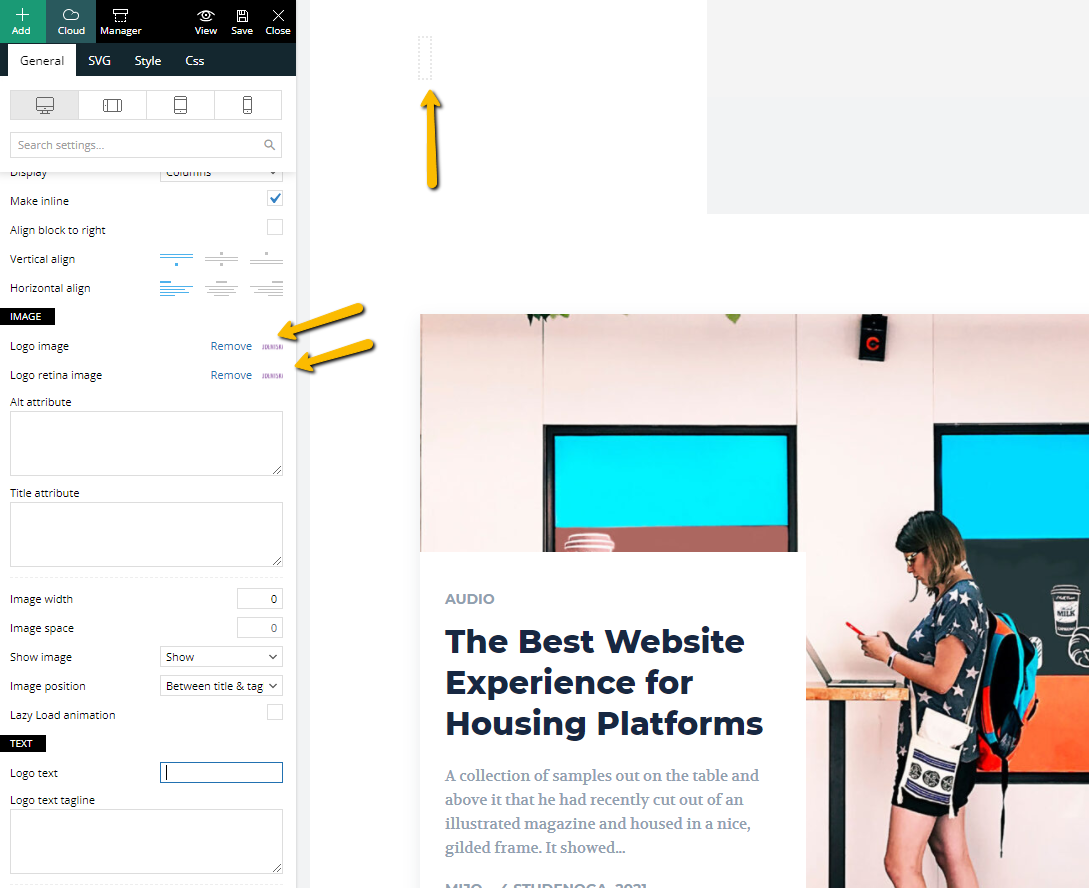 , and I add my logo with tagDiv Composer but still logo not showing.
Anamaria Hello,
You have a pro prebuilt website, so you need edit the templates with tagDiv Composer.
Also, on our channel https://www.youtube.com/channel/UCOT1RiNysIPCTPSnVZskwtQ, you can find more videos that can help you and documentation https://forum.tagdiv.com/newspaper-theme-documentation/ and you can ask us here on the forum if you have any questions.
Thank you!
MijoHello, I am using this demo (https://demo.tagdiv.com/newspaper_gadgets_pro/) on a fresh install of WP, when I try to add my logo or change colors nothing happened, changes are not visible on the frontend. I am using the latest WP and your latest theme, can you help me with this? Even if I use your tagDiv Composer still can not change the logo.
Anamaria Hello,
Please use a Flex Block or a Big Grid Flex and you can adjust them with tagDiv Composer.
Also, this article is described for each module which image size use https://forum.tagdiv.com/theme-thumbs/
Thank you!
Anamaria Hello,
Please try to use Single Post Template from Cloud Library, the posts style from theme panel are older design.
You can import a Single Post Template and can edit it with tagDiv Composer, and you can add a flex block and filter it on related articles. Also, on our channel https://www.youtube.com/channel/UCOT1RiNysIPCTPSnVZskwtQ, you can find more videos that can help you and documentation https://forum.tagdiv.com/newspaper-theme-documentation/ and you can ask us here on the forum if you have any questions.
Also, you can check this topic with the same issue https://forum.tagdiv.com/topic/related-articel-withou-author/
Thank you!
Anamaria Hello,
Please let me know what footer you have.
If you have a footer template from Cloud Library, you can edit it with tagDiv Composer on a page and you can make change easy => https://i.imgur.com/hVRwTQn.png select the element and change the text -> https://i.imgur.com/iSBc3Cg.png
If you have a footer from Theme Panel then you can change the text here => https://i.imgur.com/QcZvnS0.png
or is the problem that the changes made are not saved?
Thank you!
Bettina Hello!
Here is a possible solution for your issue mentioned by my colleague: https://forum.tagdiv.com/topic/newsletter-plugin-able-to-add-new-services-activecampaign/
We recommend to use cloud/PRO templates in order to have the possibility to edit them with the TagDiv Composer which contains a lot of functions and features, please check our tutorial here: https://forum.tagdiv.com/tagdiv-composer-tutorial/
Documentation here:
– https://forum.tagdiv.com/cloud-library-templates/
– https://forum.tagdiv.com/design-post-pages-using-cloud-library-templates/
– https://forum.tagdiv.com/cloud-library-category-templates/
Check also our video tutorials here: https://www.youtube.com/c/tagdivThemes/videos
Thank you!
Bettina Hello!
This is possible in our theme, only when you use a cloud/PRO template for your posts.
We recommend to use cloud/PRO templates in order to have the possibility to edit them with the TagDiv Composer which contains a lot of functions and features, please check our tutorial here: https://forum.tagdiv.com/tagdiv-composer-tutorial/
Documentation here:
– https://forum.tagdiv.com/cloud-library-templates/
– https://forum.tagdiv.com/design-post-pages-using-cloud-library-templates/
– https://forum.tagdiv.com/cloud-library-category-templates/
Check also our video tutorials here: https://www.youtube.com/c/tagdivThemes/videos
Thank you!
 Heinky0
I keep getting this error after I updated your theme:
Fatal error: Out of memory (allocated 31457280) (tried to allocate 40960 bytes) in /home/afrinuus/public_html/wp-content/plugins/td-composer/legacy/common/wp_booster/td_util.php on line 2883
There has been a critical error on this website. Please check your site admin email inbox for instructions.
Please assist
 itgrcapitallink
 Hello Bettina,
Sorry for my misunderstanding. What I mean is that I am editing the file
/xxxx.com/public_html/wp-content/plugins/td-composer/legacy/Newspaper/parts/header/td-login-modal.php
but the modal login window doesn’t change with the changes that i have.
the
$users_can_register_link = '' . __td('Create an account', TD_THEME_NAME) . '';
and I change it to
$users_can_register_link = '' . __td('Register', TD_THEME_NAME) . '';
But no changes happened on (Signin / Login – top right) of https://capitallinkshipping.com/
Am I editing the right file???
Thank you.
Bettina Hello!
Let me explain you which options of mobile versions are:
1. Responsive version: A responsive version of your website is looking similar like on desktop, edit the page with TagDiv Composer, click on the mobile viewport: https://www.screencast.com/t/XDQJedlggSB ; there you can see your mobile version and you can edit the elements there.
2. Mobile pages: https://tagdiv.com/newspaper-10-3-7-update-brings-customizable-and-fast-mobile-pages/
3. Mobile theme plugin: The Mobile Theme is a performance optimized theme included in the Newspaper main theme and it loads only for mobile devices. It comes with its own templates for page, post, category, etc so your current templates from the desktop theme will get converted to the mobile theme layout. For more details, please take a look here: https://forum.tagdiv.com/the-mobile-theme/ https://forum.tagdiv.com/the-mobile-theme/
A full explanation you can find here: https://www.youtube.com/watch?v=SpGkOnJeNZY
So, if you need first option (responsive version), then please make sure you have the Mobile theme plugin uninstalled and you do not build any mobile pages.
Thank you!
Bettina Hello!
This issue is discussed already here: https://forum.tagdiv.com/topic/uneditable-block/
We recommend to use cloud/PRO templates in order to have the possibility to edit them with the TagDiv Composer which contains a lot of functions and features, please check our tutorial here: https://forum.tagdiv.com/tagdiv-composer-tutorial/
Documentation here:
– https://forum.tagdiv.com/cloud-library-templates/
– https://forum.tagdiv.com/design-post-pages-using-cloud-library-templates/
– https://forum.tagdiv.com/cloud-library-category-templates/
Check also our video tutorials here: https://www.youtube.com/c/tagdivThemes/videos
Thank you!
Bettina Hello!
If you have WP Bakery plugin installed and active, then here is the problem. There is a conflict between TagDiv Composer and WP Bakery.
So, I gladly recommend you to shift from WPBakery to Composer, because WPBakery is an old builder plugin. Please check our guide to know how to shift from WPBakery to Composer: https://www.screencast.com/t/6xLVMmlsY ; https://www.screencast.com/t/zWHrRmK1LQC ; https://www.screencast.com/t/vuFdT9Stx ; https://www.screencast.com/t/DWbSf3qj ; https://www.screencast.com/t/QuHyGccTK71v
We recommend to use cloud/PRO templates in order to have the possibility to edit them with the TagDiv Composer which contains a lot of functions and features, please check our tutorial here: https://forum.tagdiv.com/tagdiv-composer-tutorial/
Documentation here:
– https://forum.tagdiv.com/cloud-library-templates/
– https://forum.tagdiv.com/design-post-pages-using-cloud-library-templates/
– https://forum.tagdiv.com/cloud-library-category-templates/
Check also our video tutorials here: https://www.youtube.com/c/tagdivThemes/videos
Thank you!
Bettina Hello!
Please make sure you have the latest version of the PHP, WordPress, theme, plugins(11.3.1) and all the requirements are done as you can see here: https://forum.tagdiv.com/requirements-for-newspaper/
If that problem is still there, then please execute these steps:
1. disable TagDiv Composer
2. uninstall(delete) TagDiv Composer
3. clear cache (if cache plugin exists)
4. install TagDiv Composer
5. activate TagDiv Composer
6. clear cache (if cache plugin exists)
Sometimes, the issue can be from a plugin conflict or a cache issue, that’s why, please deactivate ALL plugins except tagDiv ones, also if you are using a cache plugin, deactivate it, clear all cache (also from your browser) and try again.
Hope that helps you!
Thank you!
Bettina Hello!
For cloud templates, you should add the ads when you edit the post with TagDiv Composer in the element called ” Single Post Content ” in the tab ADS or you can use the element called “Ad box” from TagDiv Composer and there you need to add the ads.
Check this video: https://www.screencast.com/t/W3xjp4vJStSW
Documentation here: https://forum.tagdiv.com/ads-adsense-overview/
Thank you!
Anamaria Hello,
Please try to replace block 7 with flex block and then you can change the color with tagDiv Composer.
You can change the color for block 7 using custom code CSS.
Thank you!
 Calin
Calin Hi praveenkumarad, if you have Newsmag v5.1 then the files must be there, the single.php file is on wp-content/plugins/td-composer/legacy/Newsmag and it is use for the default post template -> https://i.imgur.com/iCzWJ52.png for the rest of templates the files will be here wp-content/plugins/td-composer/legacy/Newsmag/parts/single -> https://i.imgur.com/KBtvwhJ.png
Thank you!
 mivzaklive
Error information
===================
An E_COMPILE_ERROR error occurred in line 2743 in /var/www/vhosts/****/****/wp-content/plugins/td-composer/legacy/common/wp_booster/td_wp_booster_functions.php. Error message: require_once (): Failed opening required ‘td_js.php’ (include_path = ‘.: / Opt / plesk / php / 7.4 / share / pear’)
 Tom C
Tom C Hello Bettina,
Thank you. Just please share this thread with the devs so they can see the specific issues for my use case.
Basically,
1. Apple Pay button didn’t show up on my checkout page (in Safari on desktop) due to td-woo-front css.
2. Check boxes were missing on my checkout page (for all Apple devices), also related to css in td-woo-front file.
3. Log in prompt for saved passwords on iOS devices/safari continued to pop up even after being logged in. I changed the mobile-menu.php in the legacy Newspaper folder of the td-composer plugin.
Thank you and have a great day.



