- TutorialsFrom WPBakery to tagDiv Composer
- TutorialsDefault Block Settings Guide
- TutorialsOffset Feature
- TutorialstagDiv Social Counter Tutorial
- TutorialsHow to Update the WPBakery Page Builder plugin
 Bettina
 Hello!
Edit the page normally and there you will find a setting in the right side:https://www.screencast.com/t/nKr3cv2eAdbE Please disable it.
From what you describe it seems you have installed Mobile theme plugin, so please uninstall it. If you created the mobile pages with TagDiv Composer, then when you install Mobile Theme plugin, your pages will be overwritten by the plugin.
The Mobile Theme is a performance optimized theme included in the Newspaper main theme and it loads only for mobile devices. It comes with its own templates for page, post, category, etc so your current templates from the desktop theme will get converted to the mobile theme layout. For more details, please take a look here: https://forum.tagdiv.com/the-mobile-theme/
Thank you!
 Anamaria
 Hello,
Now I understand what you want to get, unfortunately, there is no option in the theme, but if you want you to have to do the implementation in the theme files for mobile wp-content/plugins/td-composer/legacy/Newspaper/parts/search.php and add the code https://i.imgur.com/IdSDtwj.png
Also, the cursor blinked in the search https://we.tl/t-smcJXZ4y9p
Thank you!
 Vlad S
 Hello!
All that can be edited using tagDiv composer as you can see here: https://www.screencast.com/t/EFpzWSWMW In the style tab you will find multiple options.
Thank you!
 Calin
Calin Hi,
You can make the page as in our guide from here https://forum.tagdiv.com/newsmag-homepage-how-to-build-and-set-it/ you can set the elements you want in the page using tagDiv composer.
I hope this will help you!
 jaibharti
 Wild-Wolf
Hi guys.
I have an Problem. I build a new Website Layout.
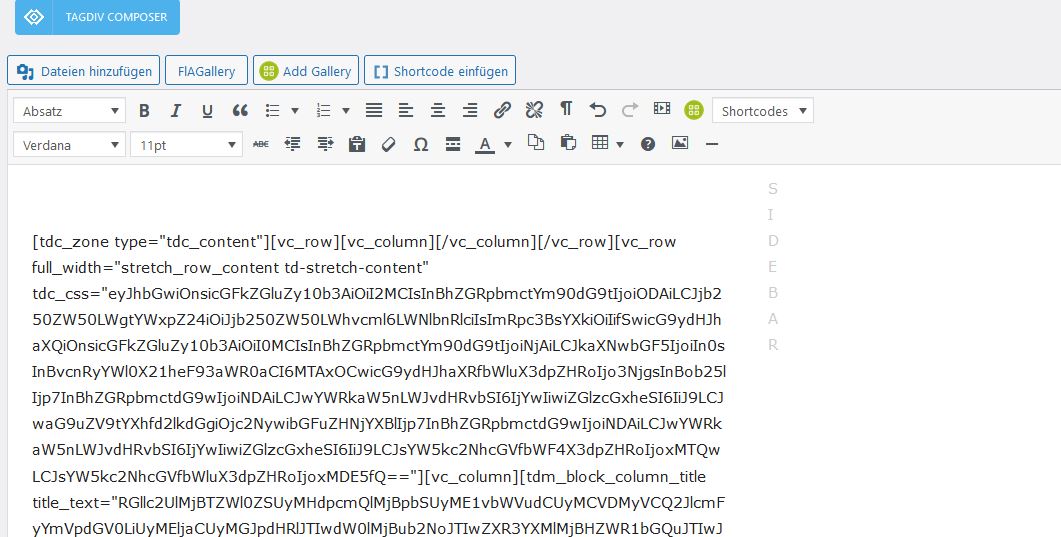
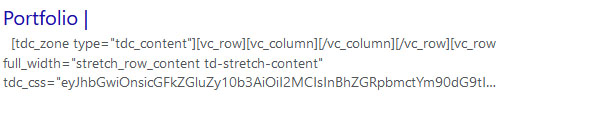
I’m almost done and now I see that my SEO plugin showing the tagdiv code from the editor …
Why is code displayed there and not the content. How do I solve the problem?
That of course also means google and co. index the content like this.
https://s20.directupload.net/images/210606/25d78rve.jpg
https://s20.directupload.net/images/210606/m9tj38fg.jpg
 djawzin
hi..i cant’t use tagdive composer to edit my homepage
it shows me this message “Error at zones: 6(models) : 1(dom). The model does not match the content Current state has involved an issue. You could try an UNDO operation (CTRL+Z / CTRL+SHIFT+Z)”
how can i fix this?
thank u
djawzinhi..i cant’t use tagdive composer to edit my homepage
it shows me this message “Error at zones: 6(models) : 1(dom). The model does not match the content Current state has involved an issue. You could try an UNDO operation (CTRL+Z / CTRL+SHIFT+Z)”
how can i fix this?
thank u
 lulimonteleone
My blog posts are appearing twice on the same page: one in the correct place, the other one underneath all content.
When I look at the single template at the Composer, this does not happen…
lulimonteleoneWhen I am editing at Composer, the header works properly. But on my blog, It does not show the dropdown menu and the search does not work.
 designandtravel3@gmail.com
 I have solved this problem after deleting and reinstalling tagDiv composer.
Thanks!
 sashos
I have this problem with TD Composer – Edit Content button is not working, only loading.
All steps as advised below were preformed:
https://forum.tagdiv.com/topic/td-composer-column-text-edit-content-loading-only/


designandtravel3@gmail.com https://drive.google.com/file/d/1Rt8r9hcu39TDTBZ_6idkRCd6yqqyB8Gk/view?usp=sharing
See above video
I’ve followed the below steps. But text with column shortcodes isn’t working.
1. disable TagDiv Composer
2. uninstall(delete) TagDiv Composer
3. clear cache (if cache plugin exists)
4. install TagDiv Composer
5. activate TagDiv Composer
6. clear cache (if cache plugin exists)
.
 wgtimes
I am using the PULSES PRO theme.
After posting a homepage is changed.
This is normal page. We can see the main menu and others normally.

This is wrong page. We can’t see the main menu and see wrong structure.

When I see wrong page, I have to save the homepage in tagDiv Composer again.

What is reason for the problem.
 commadminmag
 Hello,
I tried deactivating the plugins and TagDiv composer worked but I need to use some plugins like calendar and directory. But they are not working with the theme. Their layout gets disturbed. I tried changing the theme all plugins worked fine with that theme. I purchased this theme because it seems great but what kind of good theme reacts this way with other plugins.
 ndus_wordpress
 I am having the same problem and followed your settings but am still ending up with the admin in the blocks on the homepage. Is there a setting within the tagDiv composer that I am missing?
https://i.imgur.com/6OisZvB.png
https://i.imgur.com/wAfBk4s.png
https://i.imgur.com/hDkvNVK.png
 trebol30
Hello
How can I avoid (using tagdiv composer) that the same article appears in the related articles that is already on the screen. In other words, exclude it from the list of related parties.
See video https://www.loom.com/share/058d75eefebb49f58aa02d421de37d31
Greetings
Bettina Hello!
Please do not create multiple topics with the same problem: https://forum.tagdiv.com/topic/td-composer-warning/
Try to do what I suggested to you, if the problem is still there, then please contact us via email at contact@tagdiv.com and provide the following:
– admin url and credentials
– cPanel url and credentials
– a link to this topic in order to identify you
Our team will take a look!
Thank you!
Bettina Hello!
Try to do these steps as quickly as possible, so your visitors do not notice the process:
1. disable TagDiv Composer
2. uninstall(delete) TagDiv Composer
3. clear cache (if cache plugin exists)
4. install TagDiv Composer
5. activate TagDiv Composer
6. clear cache (if cache plugin exists)
Also, please start looking for a plugin conflict, deactivate ALL plugins except tagDiv ones, also if you are using child theme or cache plugin, deactivate them, clear all cache and try again.
Thank you!
Bettina Hello!
Try to do these steps as quickly as possible, so your visitors do not notice the process:
1. disable TagDiv Composer
2. uninstall(delete) TagDiv Composer
3. clear cache (if cache plugin exists)
4. install TagDiv Composer
5. activate TagDiv Composer
6. clear cache (if cache plugin exists)
After these steps, if the problem is still there, then please send an email at contact@tagdiv.com and provide wp-admin, so we can investigate this issue. Also paste a link to this topic so we can easily identify you.
Thanks!
 Hasankhamis
 I have rechecked the website and checked to disable the plugins and themes. I found that the error is caused due to the codes in the plugin Td-composer used on the website.
Here are the error_logs found:
[04-Jun-2021 05:02:53 UTC] PHP Warning: Use of undefined constant TDSP_THEME_PATH – assumed ‘TDSP_THEME_PATH’ (this will throw an Error in a future version of PHP) in /home1/talebhco/public_html/altaqadomibulletin/wp-content/plugins/td-composer/td-composer.php on line 213
my website https://snipboard.io/HIevC1.jpg
HasankhamisI have rechecked the website and checked to disable the plugins and themes. I found that the error is caused due to the codes in the plugin Td-composer used on the website.
Here are the error_logs found:
[04-Jun-2021 05:02:53 UTC] PHP Warning: Use of undefined constant TDSP_THEME_PATH – assumed ‘TDSP_THEME_PATH’ (this will throw an Error in a future version of PHP) in /home1/talebhco/public_html/altaqadomibulletin/wp-content/plugins/td-composer/td-composer.php on line 213
screenshot: https://snipboard.io/HIevC1.jpg
Anamaria Hello, Martin
The footer template does not have the button to be edited with tagDiv Composer in the backend. Please check this guide:https://forum.tagdiv.com/footer-templates/
If you a Pro Prebuilt Website you can edit with tagDiv Composer the footer template can be edited only from the frontend if it is assigned, edit a page/post template with tagDiv Composer and go down to the footer. => https://www.screencast.com/t/rpfNhfyrF
Also, you can set on a page/template to can edit it => https://we.tl/t-kvaWhdUEC8 that page can be private.
For footer on mobile, if you use a mobile page, then you need to convert the existent footer like this => https://www.screencast.com/t/HrjOBNayd -> https://www.youtube.com/watch?v=SpGkOnJeNZY (03:11 – Mobile Templates & Pages)
Hope this helps you!
Thank you!
Anamaria Hello, Fabrice
You can disable the option the auto loading or you can set the limit posts.
For this, you need to edit the Single Post Template with tagDiv Composer => https://www.screencast.com/t/jyUVNSVHS -> Show site wide settings and set the limit post => https://www.screencast.com/t/niaHM5EMLOM9 or disable the option https://www.screencast.com/t/4RnV1CnxiuA
Hope this helps you!
Thank you!
Anamaria Hello,
Unfortunately, yes, the solution is to hide the button.
You can hide the button with tagDiv Composer => https://www.screencast.com/t/JKhbawk3Hg ->https://www.screencast.com/t/ON5zB4scE
Thank you!