
- NewspaperCreate Custom Code with the browser’s Inspector or the Live CSS Box
- NewspaperScroll Animation
- NewspaperWP Rocket and Newspaper Theme: Optimization Guide
- NewspaperHow to setup Twitch for Social Counter
- NewspaperModal Popup
- NewspaperFlex Block Settings Guide
- NewspaperAutoptimize Plugin – install and configuration
- NewspaperAdding Multiple Authors to Your Articles
- NewspaperDesign your Post Pages using the Cloud Library Templates
- NewspaperBig Grid Flex Settings
- NewspapertagDiv Composer Tutorial
- NewspaperTheme modules and blocks
- NewspaperThe Mobile Theme
- NewspaperCompare theme files – Winmerge tutorial
- NewspaperUsing Other Ads
- NewspaperBlock settings tutorial
- Using custom fonts
- Using typekit fonts
- NewspaperChild Theme Support
- NewspaperHow to Make the Site Faster
 maquinero
Hi,
I have a problem, i had to hide a block usin the display parameter on CSS part os the block on the visual composer, bur the block completly desapeared on the visual composer so there is no way to show it again.
I added CSS code so the block displays again on the web but it is still hidden on the viasual composer so i cant update or modify de block.
Is there any way to show back again a hideen block on the visual composer?
Thanks for helping.
 JohanM1228
 Here’s a screen recording of the second issue. You’ll notice a massive black circle image after I turn off the CSS and then it disappears. I think it’s the site search magnifying glass icon.
https://drive.google.com/file/d/1Qq9BI0F316GGXE0rez50w03rxlP7Alpo/view?usp=sharing
Thanks for explaining the double nav bar.
 Bettina
 Hello!
You don’t need a CSS code for this because we have settings in our theme and I gave you documentation but you did not read it carefully.
If you do not provide more information from the beginning, then I can not help you efficiently how you wish.
We really want to help you, so if you want to solve your issue, then please provide me via email your wp admin, so I can show you how you can avoid those duplicate posts.
Thank you for your kind words!
 E K
E K Hi Bettina,
Many thanks for your prompt reply, it is much appreciated.
I think I did not convey too well what I am trying to do here.
First, thanks for confirming that the pics in the gallery are indeed in full size, as per your documentation.
Back to my question; how do I remove the unnecessary grey padding visible on the left and right sides of each pic? Do I need an extra CSS code?
For example, on mobiles, the padding takes up even more UNNECESSARY space making the pics smaller and harder to see.
https://ibb.co/Fnsxh5t
https://ibb.co/W3f2mgm
Best regards,
-
This reply was modified 5 years by
E K.
 actu44
It’s a real shit support.
I try not to have a duplicate article on my page. Who has a CSS code for me because Bettina’s advice is not good. She sends me pages that don’t exist.
Who has a bit of CSS for it? Thank you.
 Anamaria
 Hello, @republicanamerican
Please provide more information about ” lot of CSS info that could be loaded a different way.” also, please let know what version of the theme you have
Thank you!
Anamaria Hello,
Please try this custom code CSS => https://www.screencast.com/t/3Tv9o6UJi
.td_smart_list_2 .td-sml-current-item-nr{

background-color: red;

color: black;

}
Set it in the Theme Panel -> Custom Code -> CSS, also you can set the color you need.
Thank you!
 Calin
Calin Hi,
There will be soon a new theme update for WordPress compatibility.
The color on the set blocks are pre-made in theme files when you install a demo. So for the moment the only possibility is to copy or duplicate the blocks or using custom css.
Thank you for your understanding!
JohanM1228We just want the global nav and logo to appear once on our site
to see the issue: 1) load our page. Turn off JavaScript in the browser. Refresh the page. Then, turn off CSS in the browser and refresh the page. We see both the mobile global navigation, the mobile search bar and the mobile SVG image as well as the desktop global navigation and desktop logo
we want to just see 1 global nav and 1 logo on both desktop and mobile when JavaScript and CSS is disabled in the browser. How do we remove the dupes?
https://drive.google.com/file/d/1jgtFD3n3V3jbKaUpBkG0C4ByudyX3sQk/view?usp=sharing
Second question: When we turn off the CSS on any page to see how Google will read our page, we see the mobile SVG search icon flicker once and disappear. Why does it do that? We don’t want it to appear and thought we had removed it, but we’re concerned that it’s still there somehow because it appears for a split second. How do we prevent this?
 republicanamerican
 I also have the same problem. There appears to be a whole lot of CSS info that could be loaded a different way.
 kjervert
Hi there,
I’ve searched previous articles and found that the most recent instructions for changing the font size of the tagline are from 2017, and some articles that are used for instructions are missing.
I did try to implement the CSS as instructed to change the tagline font size, but nothing seems to work on refresh or preview. I tried clearing my cache and reloading after saving the change in the Theme Panel Custom CSS. This was the code I was using to test it:
.td-tagline-text{
font-size:3em;
}
What am I doing wrong here?
Thanks,
Karin
 vadoingiappone
 Hi Bettina,
thanks for the answer, but this is not the solution.
BG Featured and SP Featured imges are different component and, in some case, can’t be interchangeable. I need’t caption or have a lot of style.
I can have different size for the image with BG Featured too, simply using TagDiv composer configuration, as you see here
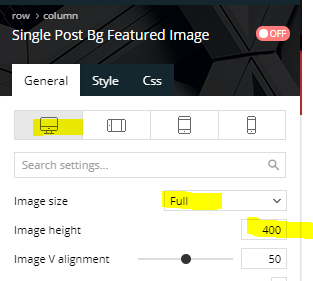
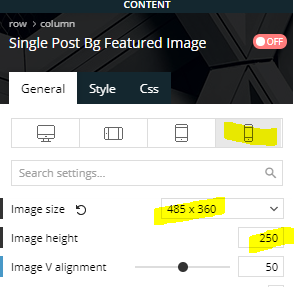
In frontend, tagdiv generate this CSS, that is great:
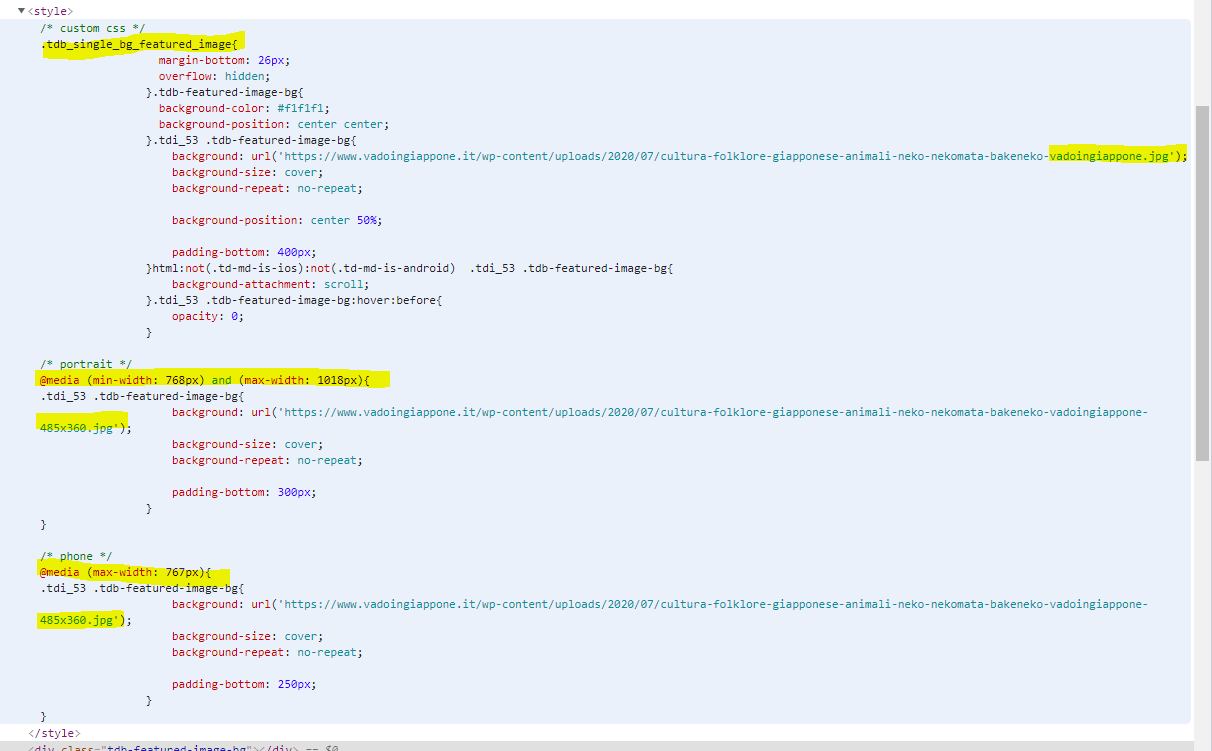
Now, css background image is not the best for LCP, because all CSS must be evaluated before start download the image, so, if the theme can attach a “link preload” in head tag, all could be best.
The theme has all the info to create a Preload with “imagesrcset” attribute, because it already to this with CSS.
Thanks a lot
Fabrizio
Calin Hi,
That background color can be change only with custom css, you can try this code
body .td-container .block-title .td-pulldown-size{

    background: blue;

}
Set it in the theme panel > custom code> css, also you can set the color you need.
Thank you!
Calin Hi,
What you can do is to use this custom css -> https://i.imgur.com/xnCSUCy.png
I hope this will help you!
Let me know the results!
Bettina Hello!
Unfortunately, there is no setting in our theme to achieve that. Only if you will write a custom CSS code in order to achieve what you want.
Check this topic too: https://forum.tagdiv.com/topic/justify-post-text/
Thank you!
Anamaria Hello,
Please try this custom code CSS, hope this help you
.td-module-container:hover .td-thumb-css {

transform: scale3d(1.1, 1.1, 1);

-webkit-transform: scale3d(1.1, 1.1, 1);

}

.td-module-container .td-thumb-css, .td-module-container:hover .td-thumb-css {

transition: transform .5s ease;

}

.td-module-thumb {

overflow: hidden!important;

}
This will apply to all blocks from your website.
You need to set the code in Theme Panel -> Custom Code -> custom CSS.
Thank you!
Bettina Hello!
The CSS code you need to add in Newspaper -> Theme panel -> Mobile Theme -> Custom code:
.td-category-siblings {

    display: none;

}
Hope that helps you!
Thank you!
Bettina Hello Andre!
CSS Analyzer works on pages, articles and categories. You can not run it on the Mobile Theme. For example, you can enter on a page and if you see the white button(Tagdiv CSS Analyzer text) up, that means is running also on that page.
Thank you!
 alan3wang
 Thank you, is there custom CSS I can add to the mobile theme section to remove the blocks?
Anamaria Hello,
Unfortunately, for standard the change need to be done using custom code CSS, so please make sure you use the same smart list and please send the link where is set it.
Thank you!
 khnalsaroj083
 please help me with all block I need this on all block please give me CSS code I will put on custom CSS
 itictmedia-nl
 Hello Anamaria,
Thank you for answering, but as stated in my first message, I already tried doing this, but even with only the tagdiv cloud library, tagdiv composer, tagdiv opt-in builder and tagdiv standard pack plugins active the CSS analyser does give the same results, only a white screen for a short time.
The issue is at: https://itexecutive.nl
Huub
Anamaria Hi,
Most of the time this problem was caused by untested plugins, please make a test and see if the CSS Analyzer is working if you use only tagDiv plugins.
Let me know the results!
Thank you!
 celhil
Hello,
does the CSS Analyzer works only for the startpage of the desktop-website?
I want to use it on my mobile theme version of the site too and on the page-template. Is that possible?
Thank you and best regards
Andre
 bobjung
I was able to remove the text that says “create a Menu”, but the placeholder is still there. It’s not so bad on deskyop or ipad, but on phone, there is still the three-line option on the left and the search on the right. So when a use clicks on them, the screen displays some weird pink flower screen with things I don’t want. I just want to get rid of ALL that extra stuff, and only have my typeform on the site. I realize there is more to the theme than I need, but at this point I don’t want the features. How do I get rid of those things? CSS? Thanks!

