
- NewspaperCreate Custom Code with the browser’s Inspector or the Live CSS Box
- NewspaperScroll Animation
- NewspaperWP Rocket and Newspaper Theme: Optimization Guide
- NewspaperHow to setup Twitch for Social Counter
- NewspaperModal Popup
- NewspaperFlex Block Settings Guide
- NewspaperAutoptimize Plugin – install and configuration
- NewspaperAdding Multiple Authors to Your Articles
- NewspaperDesign your Post Pages using the Cloud Library Templates
- NewspaperBig Grid Flex Settings
- NewspapertagDiv Composer Tutorial
- NewspaperTheme modules and blocks
- NewspaperThe Mobile Theme
- NewspaperCompare theme files – Winmerge tutorial
- NewspaperUsing Other Ads
- NewspaperBlock settings tutorial
- Using custom fonts
- Using typekit fonts
- NewspaperChild Theme Support
- NewspaperHow to Make the Site Faster
 Simion C.
 Hi,
Hiding it with CSS would not be recommended, this is a violation of Adsense terms. For non-multi purpose header styles there would be a way for a long term solution, by setting a condition in the header in a child theme. But the multi-purpose header styles files are in the composer plugin.
One way would be to use a cloud library 404 template, there are some designed by us, but you could design your own – https://cloud.tagdiv.com/#/load/404
Then in that 404 template create a new header (with header builder elements) or import one
– http://prntscr.com/n4j5q7
That header will then only be used in the 404 pages. So this would be a solution.
Thanks
 Catalin
 Hi,
All the custom CSS code is added in the Custom Code area from Theme panel. Do you mean this section?
Thank you!
 sentiersduphoenix
 I set AMP like in documentation and I don’t have any custom CSS.
This is note the solution of my problem.
Regards,
Julien
 Calin
Calin Hi,
Please make sure that you set the AMP like in our documentation -> https://tagdiv.com/amp-newspaper-theme/
Also if you have some custom css set in Newspaper>Theme panel>Mobile theme>Custom css please remove it, clear all cache and try again with validator.
Thank you!
 888civil
 Seems no css set.
 Azalea HoCatalin
 Hi,
Please notice that you have the possibility to use the header template only at your desired pages do not affect the rest of your pages if you do not want this. You do not need to set up this template to be general.
Regarding the second request, I have checked your website and I saw that it’s an incorrect CSS in the paragraph. Try to use the code below and place it in Theme panel -> Custom CSS area and check the results.
.page-template-default .wpb_text_column p:last-child {

margin-bottom: 0px!important;

}
Now, are looking fine, as you can see here -> https://www.screencast.com/t/abFyUTaQh0
Thank you!
 Abeidblogs
 Also can you please write a CSS code to not to display category for block 21. Thanks.
AbeidblogsI need help with the header of block 21.
I wrote the following CSS code to change the header style for block 21.
.td_block_21 .block-title span {
background-color: #f1f1f1;
text-decoration: none;
color: #ffffff;
}
However, there is a line that displays and I cannot edit the line with the css. I’m currently using the Block header 1-Default.
The page I need help with is https://abeidblogs.com/
 Anonymous
 Hi Catalin, I have updated the theme and now I see that functionality, I have selected “Header Template 20 – News Week”. So now I can edit the cloud template.
I also selected from the theme options to use that particular header template on all pages.
If I edit the header on any page template, the modification will be reflected on all pages, that’s confusing.. I think this header template needs to be edited only on the cloud templates section, this makes sense?
Another question, I have a difference on css on some URL’s and they are all using the same header, see please the space between the menu and the banners:
-on page templates there is some space between (http://temposdixital.gal)
-on archive templates there is no space, this is what I have set up, no padding or margin bottom (http://temposdixital.gal/categoria/destacadas/)
Thank you!
Calin Hi,
Unfortunately this is the only way to do it for pages ( if you force with css the blocks will break ).
For article/post and category you can use some template from TagDiv Cloud Library stretch the template and apply that single post template on post ( global in the panel -> https://www.screencast.com/t/Ni3iAlcwjf7 ) and all post/article or category which will have that template set will be stretch.
If you stretch the content you need to use flex blocks or full blocks, only those will stretch to full with that you set.
Thank you!
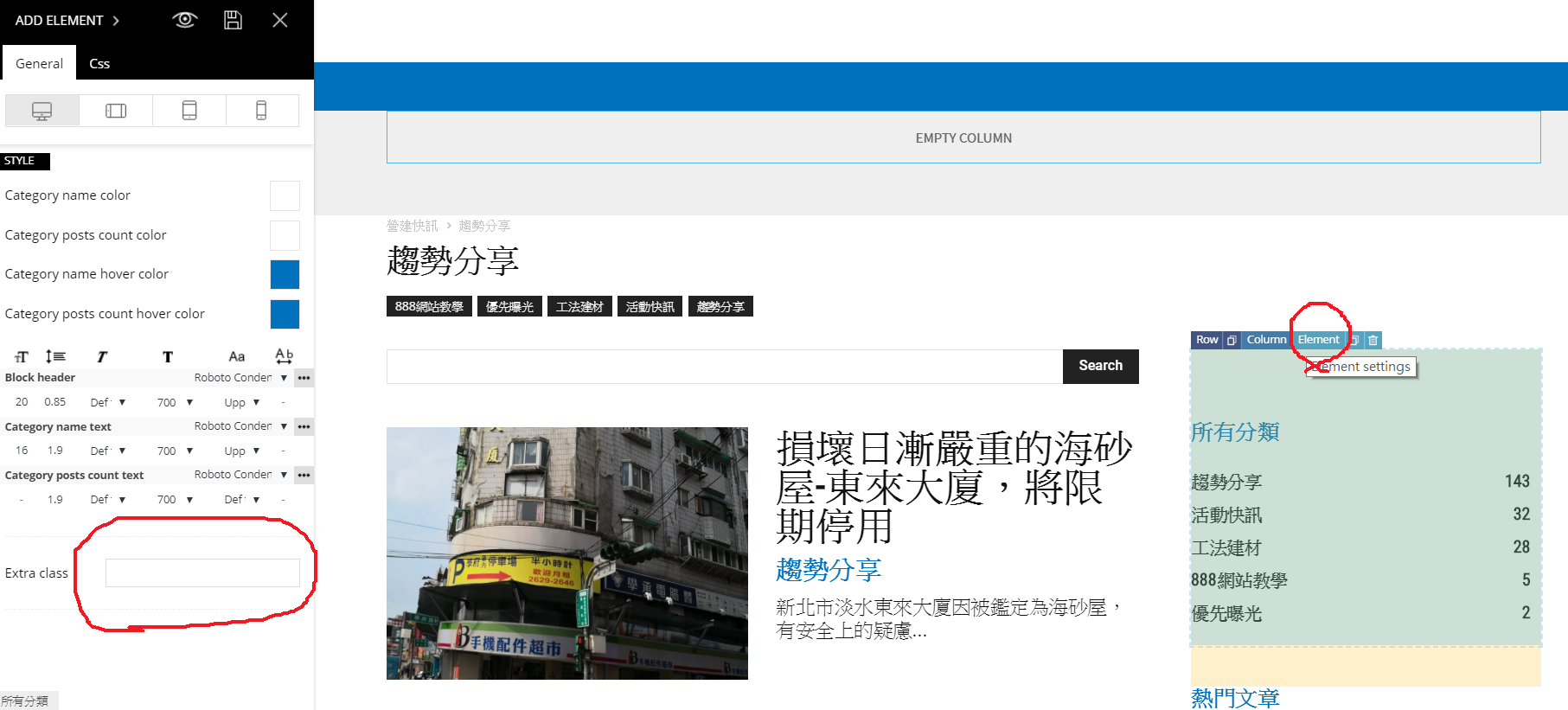
Simion C. I think I know where it is coming from. Edit the category template with the tagDiv composer, then click on the popular categories element and check if there is a padding set in the CSS tab
– http://prntscr.com/n43z18 it could be coming from there. Let me know.
Calin Hi,
All pages have set padding top 48px , what you can do is to edit those pages using tagDiv Composer and set a margin top “-48” -> https://www.screencast.com/t/jobzSZkhFRk
Or you can use a custom css -> https://www.screencast.com/t/OsDnHT52g
.page .td-main-page-wrap {
    padding-top: 0px;
}
Set the code in Theme panel>Custom code>Custom css
Thank you!
Catalin Hi,
If you want to disable clickable images, you need to use a bit of CSS code for that. As a hint, you need to use the pointer-events:none; functionality as example. For a more accurate response, please provide oyur website URL and show me where exactly you want to make this change so I will be able to provide a more accurate response.
Thank you!
 cdavies
 Hello:
I have put the css code that you tell me and adjusts the first two columns but the third one goes down, as if I had sidebar and did not have more space. It is a page of the whole width without sidebar .
https://www.revistamision.com/prueba-contact-form7-con-columnas/
THANKS for yor help
 valerioagolino
 Hi Calin,
thanks for the answer!
there is any way to set the 1400px as row stretch “Default”, so I dont have to change any row in any page I already did?
and what about the articles? (i modified die CSS .td-container, .tdc-row {width: 1400px;})
other options?
Big Grid 3 is not resizing is that normal?
http://fabridea-test.de.fc-host61.de/entrepreneurs-club/
thanks a lot
Valerio
-
This reply was modified 7 years by
valerioagolino.
 pargat
Every page has spacing which is neither the part of header, nor the page
– https://www.codebrew.studio/company/our-work/
And it’s not on all pages, the issue is not on
– https://www.codebrew.studio/our-blog/
– https://www.codebrew.studio/technology/how-to-create-a-mobile-app/
That makes it complex to solve with Additional CSS to make the padding zero.
Do assist for this please
 orrorea33giri
 Hi
the elemnt in the TD Composer is called “Single Post Tag” in the CSS the reference is class=”tdb-tags”
https://www.orrorea33giri.com/myron-floren-disco-polka/
Thanks
Simion C. Hi,
So the fields should be one below the other? try splitting the row and enter the form in a 1/3 column for example – http://prntscr.com/n3onzl
I could also give you a CSS code for it – http://prntscr.com/n3op1h
.wpcf7-acceptance-as-validation .su-column-size-1-3 {

float: none;

}
Let me know if I misunderstand.
Thanks
Simion C. Hi,
In some cases that effect may be visible, this is how CSS loads. First the default colors will be loaded, then the colors set in the theme panel or with custom CSS will be loaded, replacing them. Sometimes the transition between the colors is noticeable
– http://prntscr.com/n3o9qx
The default color for that header is here – http://prntscr.com/n3oa9q you could remove that code or change it to how you want it there.
This custom code you are using – http://prntscr.com/n3obqv will also load after the theme stylesheet is loaded. You could try and enter custom code directly in the theme stylesheet for a faster load. These should fix the issues.
Another solution is to create your own header (blank template), or import one design by us and modify it if needed – http://prntscr.com/n3ocst
The cloud library plugin is needed for this, also theme version 9.5 and above
– https://forum.tagdiv.com/tagdiv-cloud-library-plugin/
– https://tagdiv.com/whats-new-in-newspaper-theme-9-5-update/
– https://tagdiv.com/newspaper-theme-customize-the-header-manager/
These don’t have predefined design as the default header styles, what you set in the composer will apply.
Let me know if you have more questions.
Thanks
Calin Hi,
You can remove that space using tagDiv Composer click con the about overklass row and check the css section -> https://www.screencast.com/t/lmlWpDVIo2 if there is some margin bottom set it 0, if this is not enough set margin bottom with ” – “.
Thank you!
Simion C. Hi,
For default post templates (not cloud) you could either hide it with CSS, or disable it my making a modification in the code – https://forum.tagdiv.com/topic/remove-more-from-author-from-the-related-articles/
Anything that is removed (not hidden) from a page would have an impact on loading speed.
I should note that in cloud post templates the related articles and more from author are separate elements, so you can place only one if needed – http://prntscr.com/mzgjfm
Thanks
Catalin Hi,
If you want to do this, you need to use a bit of CSS code. Provide your website URL and the exact location where you need to make this change.
Thank you!
Catalin Hi,
1)I have checked oyur website and I saw this -> https://www.screencast.com/t/FsayUwX6G
2)If you want to hide the category tag only for a certain section, you need to use such a custom CSS code for that because the theme does not have any such an option that allows you to disable the category tag only for a certain area.
Thank you!
 shelmes@liebertpub.com
I have the unique articles function running on my website’s homepage, and I want it to run, however I have one content block that I have set to only display on mobile devices (it is set to hidden via your TD Composer CSS panel for desktop and tablet devices but set to show on mobile phones). I want this content block to show the same article as what I show on desktop, but because I have unique articles functionality running it doesn’t allow it. How can I override the unique articles function just for this one content block on the homepage?
The use case is on desktop we like our featured story to show using one content block style, but on mobile phones we like a different content block for showing the featured story which is why we have it only show on mobile phones. I want the same latest featured story to show in both the desktop featured content block and mobile featured content block with unique articles still turned on the homepage.
