
- NewspaperModules Builder in Newspaper Theme
- NewspaperIntroduction to CPT and ACF with Newspaper Theme
- NewspaperHow to edit modules for Flex Block X
- NewspaperStripe Setup
- NewspaperPayPal Setup
- NewspaperAdd Cryptocurrency Price Ticker Widget
- NewspapertagDiv Shop
- NewspaperDesign your post pages using the Default Templates
- NewspaperTheme modules and blocks
- NewspaperUsing the Theme Translations with WPML
- NewspaperHow to Set the Image Avatar
- NewspaperNewspaper theme documentation
- NewsmagInstalling pre-built websites
- NewsmagIntroduction
- NewsmagSmart Lists
- NewsmagTheme thumbs
- NewspaperSmart Sidebar
- NewspaperBreadcrumbs
- NewspaperFooter Builder
- NewspaperMain Menu
 Sotiris
Hi all!
I am a new happy user of NEWSPAPER Theme and i need your help 🙂
I’m trying to set up the theme on a existing content (in a demo server). We have thousands of images uploaded and as you understand is too difficult to regenarate all of them (Considering time need and hard disk space).
Also as i understand when i upload a new image there is no need to generate all those new images (13!) except from the featured image. Correct?
Plz let me know:
a. If i can regenerate only the featured images from the old contet
b. If i can generate images only for the featured image for the new content and not for all the other uploaded.
c. In wordpress -> Settings -> Media -> Sizes i deactivated all dimessions (S,M,L) because this is a job of Newspaper. Is this correct?
Thank you in advance!
Sotiris
 beenish
 thanks for the info
 Lucian
 Hi,
Sorry for the delay. I have checked your site and noticed that you use the Homepage with background template so the big slider from the top of the page doesn’t have any posts because you don’t have any posts in your featured category, you need to add posts into featured category which will show up in the slider.
Thanks
beenishHi, could anyone please tell me how to show the posts in the slider on home page. It is showing empty right now. url is- http://theflowercrowd.co.uk/
 alexheikel
 GREAT! THANKS
 Steven
 @Ecofame i think these codes only work on “homepage blank” from the templete settings because mine work fine with out any issues,but i just think it’s only for the homepage with blank and that’s what i’m using,i build my homepage my self not from the theme demo…oh well wait till tomorrow and see what fix the staff can give you because they know more about the theme then us,we are just gussing here…
check my site @ http://jahliveradio.com/ and see for ur self what i’m talking about…
 Shashank Shekhar
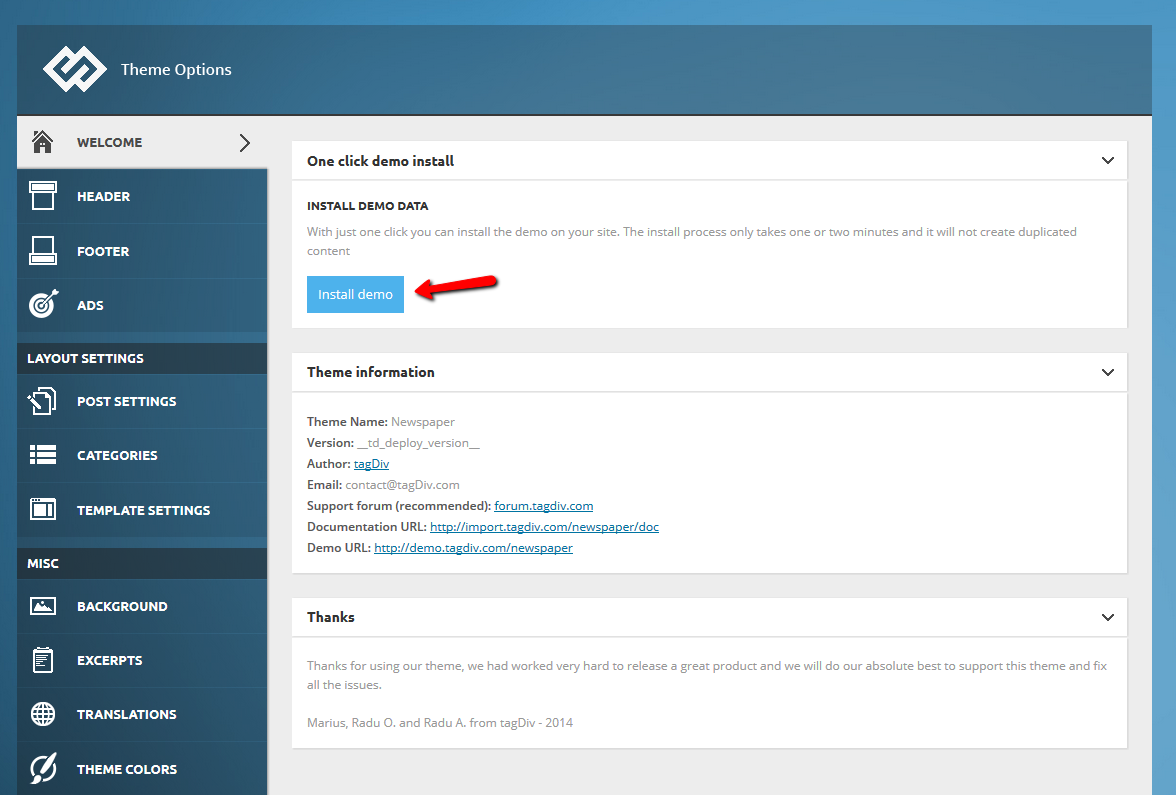
 This image should help. 😛
 Ecofame
 Hi heMediumUTM,
Thank you for your support.
Yes, you have write. They are puplishing a lot of content on the site. Newspaper is pretty theme. But what I like or thinking its intresting is the design that the site has. And I hope the newspaper team will develope a demo page that is similar with that site.
I found another site that is similar with newspapers theme. You can visit it here:
http://se.msn.com/
I pasted the code but nothing is happining.
Maybe I am pasting the code in a wrong place. Could you pleas let me knw where is the right place to paste?
Have a nice day!
Ecofame
 TheMediumUTM
 ^
But to be a little more in the spirit of the support forum… 😉
Theme panel -> Install demo. First button you see
Shashank Shekhar alexheikelHi, how can I have my newspaper web setup as the newspaper demo? http://demo.tagdiv.com/newspaper/
After that it should be easy to edit and customize as i need
 mehedi
Hey guys,
I have been working on a social sharing plugin for the Newspaper theme. Since the social sharing buttons that comes with the theme isn’t pretty great and all the other famous plugins are full of bloat-ware, I decided to make it as clean as possible.
So, I tried Bootstrap and Font Awesome to make the buttons. It worked properly but then I found out that the theme has custom version of Bootstrap, meaning that it conflicts with the stock-version of Bootstrap. Christopher,(the man who supports almost everyone at the forum ;)) suggested me to change the classes. So, I did but didn’t work.
Then I decided to move it to PureCSS and it worked. Here is how it looks like:

Features:
-
Its ridiculously responsive
WordPress 4.0 (just released) ready
Based on Font Awesome and PureCSS (faster loadtime)
Upcoming Features:
Share counts.
Yes, it is a lot like the RRSSB plugin but the plugin doesn’t play well with the Newspaper theme.
If you want, you can download my plugin from here.
I have added the plugin to WordPress.org and it is under review; I will update the thread as soon as it is approved.
P.S: TagDiv, if you think I am self-promoting, delete the thread but please don’t “ban” me. I just wanted to share it with the other users 🙂
So what do you guys think?
 swiesbrock
 I’m seeing the same delay with the infinite scroll that was mentioned above. I even see it on your demo page: http://demo.tagdiv.com/newspaper/homepage-infinite-scroll/. It started with the 4.0.1 update.
On scroll, one additional block set loads then loading stops. I can’t get more articles to load unless I scroll up the page and back down again. I see this in Chrome, FireFox, IE9, and iPhone 5c. I tried commenting out the smooth scroll starting at line 684 of site.js but that had no effect.
 Steve
SteveI’ve installed this theme into a clean install of WP 3.9.2 for a new site and whenever I change anything with the in Theme Options panel it hangs – I just get the endless spinning cursor.
I suspect it may be related to the host, which is digitalpacific.com.au, as I created another brand new install on the same host to check and got the same result.
I’ve added all of the required plugins referenced by the theme but doesn’t help.
Also added the demo content which installed ok but didn’t fix the problem.
Where do I start fixing this issue?
Thanks
TheMediumUTM First, to set a page as your homepage, do this:
1. Create a page and call it “Home” or something.
2. Go to WordPress’s “Reading” settings and set it to use a static page. Then you can choose the page you made.
Then you can customize your homepage by editing that page you made.
If you edit it and see the normal WordPress editing screen, click the blue “Backend Editor” button, which will take you to Visual Composer’s editing view.
From there, you will see the rows and columns that make up your homepage. If you want, set the homepage template at the right, from one of tagDiv’s basic ones. Then you can click on the + icons to add an element. For example, a slider, a Big Slider, a Revolution Slider at the top.
Then the main part of your homepage is usually made up of block elements. The demo homepage is made of blocks set to show their categories. When you edit a block’s settings, that’s when you would make them show your categories — and many other options.
Hope this is helpful! Post again if anything’s unclear.
 piotrkoltek
Hello!
I have a question.
Home page: I do not know how to do to display them my categories .
Where to change the settings?
Currently displaying categories demo.
Regards
Piotr
 esmus
esmus The demo blog page images do not have alt tags. Screenshot: https://s3.amazonaws.com/fvd-data/notes/175774/1409565612-d4Wu4R/screen.png
I have checked the td_module_blog.php and it is OK. But, my homepage ( http://goo.gl/03ArrE ) images still do not have alt tags. Actually there are alt tags like alt=””. I think these are empty alt tags because I did not entered alt tag info manually. Howevery I do not want to enter alt tag info for each image manually. I want it to be automatic just as the title tag. So, in order to do this, do I have to change code below?
Find this:
alt="' . $featured_image_info['alt'] . '"
Replace with this:
alt="' . $featured_image_info['title‘] . ‘”
Lucian Hi,
Can you please send an URL so I can inspect this? I have tried to recreate this but haven’t found an issue like that, you can check our demo: http://demo.tagdiv.com/newspaper/how-to-make-people-love-you/ resize the window to mobile screen width and notice that the image it’s resized well or you can open it on mobile screen, same result: the image looks good: http://screencast.com/t/EdVmVgIR
This may happen due to some plugin and from CDN plugins especially, please disable all plugins, including CDN if you use any and empty server cache then try uploading the feature image and setting it back then check again.
Hope this helps!
Thanks
 tomashley
I’m having a problem with mega menus. I create categories and make a menu with them. Then I make sub-categories and put them inside my category mega menu but the links to them are showing at the bottom of the mega menus instead of to the left like in the demo. Here is a screenshot of my problem: http://screencast.com/t/u2fPTQ84T
As you can see it is correct in the demo but my sub-links are showing up at the bottom rather than to the left. I want them on the left like in the demo.
Thanks
Lucian Hi,
It’s not easy to prevent the search engines to get the date from posts, you would have to locate all tags from the theme files and WordPress also, you could get a freelancer to do this for you or you could try to find a solution online.
Also I’m not sure if not showing the date of your posts it’s an Google call, you could do a search on this for more info. Also you can use this tool to check what Google gets from your site.
This is an example for our demo site, you can see that it dose not show the date even though we hadn’t made any changes to prevent that. http://screencast.com/t/61gpPqkjzxc
Hope this helps!
Thanks
Lucian Hi,
You can import predefined style from theme panel, like this:
1. http://screencast.com/t/Us6q7Vt2
2. http://screencast.com/t/nHcE7kTrBp
If you want those settings only for menu then go to theme colors and set the colors for the menu like this: http://screencast.com/t/XXGDdkaC6 and to custom typography and set the menu like this: http://screencast.com/t/IxWpjvXTQ or you can inspect the demo page and find all settings.
Hope this helps!
Thanks
TheMediumUTM Here it is and here’s how I got it:
1. Copied and pasted your child theme functions code
2. Copied and pasted the function td_load_css from the parent theme’s functions code
3. Changed the name from td_load_css to my_td_load_css
4. Changed the line you mentioned to include ‘&subset=latin,latin-ext’
5. Copied the two extra lines I mentioned in my first post and pasted them at the very end
See if this works:
/* ----------------------------------------------------------------------------
WordPress booster framework - this is our theme framework - all the content and settings are there
It is not necessary to include it in the child theme only if you want to use the API
*/
if (!defined('TD_THEME_WP_BOOSTER')) {
include TEMPLATEPATH . '/includes/td_wordpres_booster.php';
}
function my_td_load_css() {
//google fonts
if ((defined('TD_DEPLOY_MODE') and (TD_DEPLOY_MODE == 'demo' /*or TD_DEPLOY_MODE == 'dev' */)) or defined('TD_SPEED_BOOSTER')) { //on demo and dev we load only the latin fonts
//modify this collection if you want to optimize the fonts loaded
//collection url -> : http://www.google.com/fonts#ReviewPlace:refine/Collection:PT+Sans:400,700,400italic|Ubuntu:400,400italic|Open+Sans:400italic,400|Oswald:400,700|Roboto+Condensed:400italic,700italic,400,700
wp_enqueue_style('google-font-rest', td_global::$http_or_https . '://fonts.googleapis.com/css?family=PT+Sans:400,700,400italic|Ubuntu:400,400italic|Open+Sans:400italic,400|Oswald:400,700|Roboto+Condensed:400italic,700italic,400,700&subset=latin,latin-ext'); //used on menus/small text
// Above line has been modified in child theme to include '&subset=latin,latin-ext'
} else {
$td_user_fonts_list = array();
$td_user_fonts_db = td_util::get_option('td_fonts');
if(!empty($td_user_fonts_db)) {
foreach($td_user_fonts_db as $td_font_setting_key => $td_font_setting_val) {
if(!empty($td_font_setting_val) and !empty($td_font_setting_val['font_family'])) {
$td_user_fonts_list[] = $td_font_setting_val['font_family'];
}
}
}
if(!in_array('g_438', $td_user_fonts_list)) {//'g_438', //Open Sans
wp_enqueue_style('google-font-opensans', td_global::$http_or_https . '://fonts.googleapis.com/css?family=Open+Sans:300,400,600,700&subset=latin,cyrillic-ext,greek-ext,greek,vietnamese,latin-ext,cyrillic'); //used on menus/small text
}
if(!in_array('g_617', $td_user_fonts_list)) {//'g_617', //Ubuntu
wp_enqueue_style('google-font-ubuntu', td_global::$http_or_https . '://fonts.googleapis.com/css?family=Ubuntu:300,400,500,700,300italic,400italic,500italic,700italic&subset=latin,cyrillic-ext,greek-ext,greek,latin-ext,cyrillic'); //used on content
}
if(!in_array('g_453', $td_user_fonts_list)) {//'g_453', //PT Sans
wp_enqueue_style('google-font-pt-sans', td_global::$http_or_https . '://fonts.googleapis.com/css?family=PT+Sans:400,700,400italic&subset=latin,cyrillic-ext,latin-ext,cyrillic'); //used on content
}
if(!in_array('g_445', $td_user_fonts_list)) {//'g_445', //Oswald
wp_enqueue_style('google-font-oswald', td_global::$http_or_https . '://fonts.googleapis.com/css?family=Oswald:400,300,700&subset=latin,latin-ext'); //used on content
}
if(!in_array('g_521', $td_user_fonts_list)) {//'g_521', //Roboto
wp_enqueue_style('google-roboto-cond', td_global::$http_or_https . '://fonts.googleapis.com/css?family=Roboto+Condensed:300italic,400italic,700italic,400,300,700&subset=latin,cyrillic-ext,greek-ext,greek,vietnamese,latin-ext,cyrillic'); //used on content
}
if(!in_array('g_639', $td_user_fonts_list)) {//'g_639', //Vollkorn
wp_enqueue_style('google-vollkorn', td_global::$http_or_https . '://fonts.googleapis.com/css?family=Vollkorn:400italic,700italic,400,700'); //used on quoates classic
}
}
//add the google style link for fonts used by user
$td_fonts_css_files = td_util::get_option('td_fonts_css_files');
if(!empty($td_fonts_css_files)) {
wp_enqueue_style('google-fonts-style', td_global::$http_or_https . $td_fonts_css_files);
}
//bootstrap - custom built - it was generated via compilation of /external/bootstrap-master/less/bootstrap.less
$responsive = td_util::get_option('tds_responsive');
switch ($responsive) {
case '980_responsive':
wp_enqueue_style('td-bootstrap', get_template_directory_uri() . '/includes/wp_booster/external/bootstrap/td-bootstrap-980-responsive.css', '', TD_THEME_VERSION, 'all' );
break;
case '980':
wp_enqueue_style('td-bootstrap', get_template_directory_uri() . '/includes/wp_booster/external/bootstrap/td-bootstrap-980-not-resp.css', '', TD_THEME_VERSION, 'all' );
break;
case '1170':
wp_enqueue_style('td-bootstrap', get_template_directory_uri() . '/includes/wp_booster/external/bootstrap/td-bootstrap-1170-not-resp.css', '', TD_THEME_VERSION, 'all' );
break;
default:
wp_enqueue_style('td-bootstrap', get_template_directory_uri() . '/includes/wp_booster/external/bootstrap/td-bootstrap.css', '', TD_THEME_VERSION, 'all' );
break;
}
//main theme style - set the TD_DEBUG_USE_LESS flag in /includes/app/td_config.php and the theme will load the less files and compile them for you
if (TD_DEBUG_USE_LESS) {
wp_enqueue_style('td-theme', get_template_directory_uri() . '/td_less_style.css.php', array('td-bootstrap'), TD_THEME_VERSION, 'all' );
//wp_enqueue_style('td-theme', get_template_directory_uri() . '/style.less', array('td-bootstrap'), TD_THEME_VERSION, 'all' );
} else {
wp_enqueue_style('td-theme', get_stylesheet_uri(), array('td-bootstrap'), TD_THEME_VERSION, 'all' );
}
}
remove_action('wp_enqueue_scripts', 'td_load_css');
add_action('wp_enqueue_scripts', 'my_td_load_css') nicoms91
Hello, I wold like to know how to configure to show the full menu bar, like in the “newspaper sport demo layout”.
Here a example pic: http://screencast.com/t/wwq18QkscLH
Thanks in advance!
 Radu
Radu Hi,
I’m more familiar with APC and that’s what we use on our demo because we’re running php < 5.5 . From 5.5 they ship a opcode cache.
Lucian Hi,
Please make sure you have set the header ad like this from theme panel: http://screencast.com/t/Ruod2gmNl
Also, please make sure you add the ads into this div tags like explained in the demo:
* http://screencast.com/t/Ruod2gmNl
* https://forum.tagdiv.com/ads/
Of you don’t want that the ad to be shown on mobile make sure you add it for tablets and desktop and enable it to show on tables and desktop only from theme panel and leave it not top be displayed on mobile.
Hope this helps!
Thanks

