
- NewspaperHow to Make the Site Faster
- NewspapertagDiv AMP Plugin Tutorial
- NewspaperNewspaper Theme Support
- NewspaperCustom ad spots
- NewspaperRequirements for Newspaper
 Calin
Calin Hi umarfarooq195,
Maybe you already do the steps from our guide, but in case that you miss it, please try all the steps from here -> https://forum.tagdiv.com/how-to-make-the-site-faster/
I hope this helps you!
Calin Hi,
Please check our guide form here https://forum.tagdiv.com/how-to-make-the-site-faster/ -> https://i.imgur.com/nZmOT5v.png
I hope this will help you!
Calin Hi limitlessv,
We tested only the WP Super Cache plugin. Now we can not say that this is the beset and you can not use other cache plugin, but for this one we can provide the settings that need to be done to work properly.
Also, for pagespeed you can use our guide from here -> https://forum.tagdiv.com/how-to-make-the-site-faster/
Thank you!
 Anamaria
 Hi @star.dgtl,
Unfortunately, there is no option to make the scroll to top faster.
Thank you for your understanding!
Calin Hi Lane18,
1. The mobile theme plugin is just an alternative to make the mobile version faster, you can also use the responsive version or the mobile page, both of theme can be edited with tagDiv Composer. Now the header ad and the background header are different because the mobile header is not the same as the one from desktop, but you can edit it by selecting the view port -> https://i.imgur.com/fjRJrRe.png also you need to add an ad box in mobile menu zone.
Thank you!
Calin Hi DamianSiecz,
The pagespeed do not depends only by the theme, there are a lot of elements, like page elements, external resources…
As I see on your website, there are no theme problems, but maybe you can optimize better the pagespeed for your website:
https://forum.tagdiv.com/how-to-make-the-site-faster/
https://forum.tagdiv.com/cache-plugin-install-and-configure/
https://forum.tagdiv.com/cloudflare-cdn/
https://forum.tagdiv.com/autoptimize-install-configuration/
I hope this will help you
Calin Hi,
The mobile theme plugin is used for the mobile version, but the amp is a little different:
AMP is an open source HTML framework developed by the AMP Open Source Project. It was originally created by Google as a competitor to Facebook Instant Articles and Apple News. AMP is optimized for mobile web browsing and intended to help webpages load faster from google results.
So the amp is used when you search from mobile on google and you find some results. If those have an amp version, this will be stored on google and it will delivered faster.
The mobile theme plugin is referring on hot it looks your mobile version and it make the mobile version faster then responsive -> https://forum.tagdiv.com/mobile-theme-introduction/
Now we offer the possibility to use them together, what that means? it means that the amp layout will be the same with the mobile theme layout. -> https://forum.tagdiv.com/tagdiv-amp-plugin-tutorial/
Therefore, you can use both of them or only the mobile theme plugin.
Thank you!
Calin Hi navindesigns, for me it does!
This also deepens on the internet connection that you have and how fast your website it is the loading (here is a screen record https://we.tl/t-nw8ydJXNhd ). I have 500M/s so for my it take around of 3 seconds, but this don’t means that for you is not take longer or less.
Also, did you try my above suggestions? Did you try to see how is working the mobile menu using the mobile theme plugin and mobile page ?
From our tests those are faster then responsive version.
Thank you!
Calin Hi,
The page loading speed can depend on many factors, and each website is unique from this point of view. Let me explain some of these factors and maybe they give you some starting points for optimizing your website.
External factors: server speed, if you are using CDN or not, the external resources loaded by your website like ads, fonts, tracking scripts like Facebook Pixel, Google Analytics, Twitter analytics, Hotjar and so on.
Internal factors: the number of elements on the page, image size, image formats, if you are using mobile optimized layouts, console errors, if you are using the Standard Pack plugin on not, if you are using PRO demo or a standard one.
What I recommend is to make a full backup to your website and install a pre pre-build website, after that disable tagDiv Standard pack, in this way you load some les resources and increase the some speed.
Also, please check our guide from page speed -> https://forum.tagdiv.com/how-to-make-the-site-faster/
Thank you for your understanding!
Calin Hi,
I just checked your website and the mobile menu and for @navindesigns the mobile menu seems to work quite good it take like 3s it looks that in that time all needed data is loaded. So for you to make the website mobile menu faster is if you can make your website to load faster. Another solution will be to use the mobile theme plugin or the mobile page.
For @brianlamb looks that the mobile menu is not working at all, is just like something is interfering with the theme js https://i.imgur.com/Bsqv4nA.png in this case it can be a plugin conflict, so please make a test using only the theme plugins.
Thank you for your understanding!
Calin Hi,
I just checked your website and this is now loading faster, I think that you have now set a cache. If you want to check some pagespeed indications, you can check our guide https://forum.tagdiv.com/how-to-make-the-site-faster/
About generate critical css, from what is see in the screen that you provided seems to be some js problems. It can be because a plugin conflict, if you want, you can make a test only with tagDiv plugins, the problem should no longer persist. In case that the problem persists, please let me know.
Thank you!
Anamaria Hello Andre,
Normally the should be faster if you don’t have to set a custom CSS to make it slow.
Please try to use this custom code CSS
body

{

scroll-behavior: auto!important;
}
The code need to be set in the theme panel > custom code> custom css.
Thank you!
 celhil
Hello,
the website is currently in build (with password protection), so I cannot show you the live site. I have used a prebuild website as template.
At the top-menu I have set an anker to the services on homepage like this: https://ibb.co/9TztS11
When I click on the menu entry “services” it works fine, but the scrolling is too slow.
Please watch the video: https://youtu.be/PIrSTqWrAaY
How I can made the scrolling faster?
Thank you and best regards
Andre
Calin Hi,
I just checked your website, but I didn’t find a post with infinite loading and the screens that you provided are blocked for me https://i.imgur.com/Pk5K5TJ.png so maybe in this case it will be better and faster if we have login access and more details. If you agree, please provide them in private at contact@tagdiv.com please include wp-admin access and make sure that you have a full backup for your website.
Thank you!
Calin Hi,
1. I see, unfortunately, for the moment there is no option to disable the mobile theme from the woocommerce pages, sorry! The only solution that is see is to disable the mobile theme plugin or use it only for amp and for pagespeed you can use a mobile page template -> https://i.imgur.com/NEwAMx8.png
2. Yes, the mobile theme will apply a simple design to make the content faster, please make a test, disable the plugin and check with responsive version and in case that you need pagespeed just use the mobile page template.
3. According to our guide when you are using the mobile theme plugin the pages content need to be created using the mobile editor only -> https://i.imgur.com/l1UARk4.png
Thank you!
Anamaria Hello,
No, is not necessary, only if you want to use it.
AMP is faster and works better only with the Mobile Theme plugin. If you’ll use the Mobile theme plugin, then you can not edit the pages with tagDiv Composer.
You have only some settings for this layout, which you can find in Theme panel -> Mobile Theme. The same thing for AMP plugin too.
Also, you can check our documentation here:
-> https://forum.tagdiv.com/tagdiv-amp-plugin-tutorial/
-> https://forum.tagdiv.com/the-mobile-theme/
Thank you!
Calin Hi,
If I’m right the error can be from the footer template, is possible that this can not be saved.
Please make a test and create a new mobile page and save it to see if is working or you have the same problem. If is working, then the problem is from some setting that you made on the mobile page with the problem.
In case that the problem persist, please make a full backup for your website and contact us at contact@tagdiv.com and provide wp-admin access. We’ll check it as soon as possible. Also, include the link of this topic to can identify you faster.
Thank you!
 Bettina
 Hello @samstrat!
AMP is faster and works better only with Mobile Theme plugin. If you’ll use Mobile theme plugin, then you can not edit the pages with TagDiv Composer.
You have only some settings for this layout, which you can find in Theme panel -> Mobile Theme. The same thing for AMP plugin too.
If you really want to change the way it’s working and looking, then this will require custom work which is not covered by the support team.
If you use default templates, then please make sure you have Standard pack plugin installed and active.
Thank you!
 mesutayvali
Hello,
I have updated my website from 8.7 to 11 for Newspaper theme. Since i have understood that Tagdiv composer slightly faster than tagdiv standart pack, i have started to use tagdiv composer. However, my question is related to the sidebars. From the Apperance => Components menu, i’m having limited options on the components as stated on the . I would like to know how i can add blocks of tagdiv where i have seen in the cloud templates without using tagdiv standart pack plugin.
Thanks in advance,
Kind Regards.
Mesut
mesutayvaliHello,
I have updated my website from 8.7 to 11 for Newspaper theme. Since i have understood that Tagdiv composer slightly faster than tagdiv standart pack, i have started to use tagdiv composer. However, my question is related to the sidebars. From the Apperance => Components menu, i’m having limited options on the components as stated on the 
Thanks in advance,
Kind Regards.
Mesut
mesutayvaliHello,
I have updated my website from 8.7 to 11 for Newspaper theme. Since i have understood that Tagdiv composer slightly faster than tagdiv standart pack, i have started to use tagdiv composer. However, my question is related to the sidebars. From the Apperance => Components menu, i’m having limited options on the components as stated on the
Thanks in advance,
Kind Regards.
Mesut
 nwnuyhs
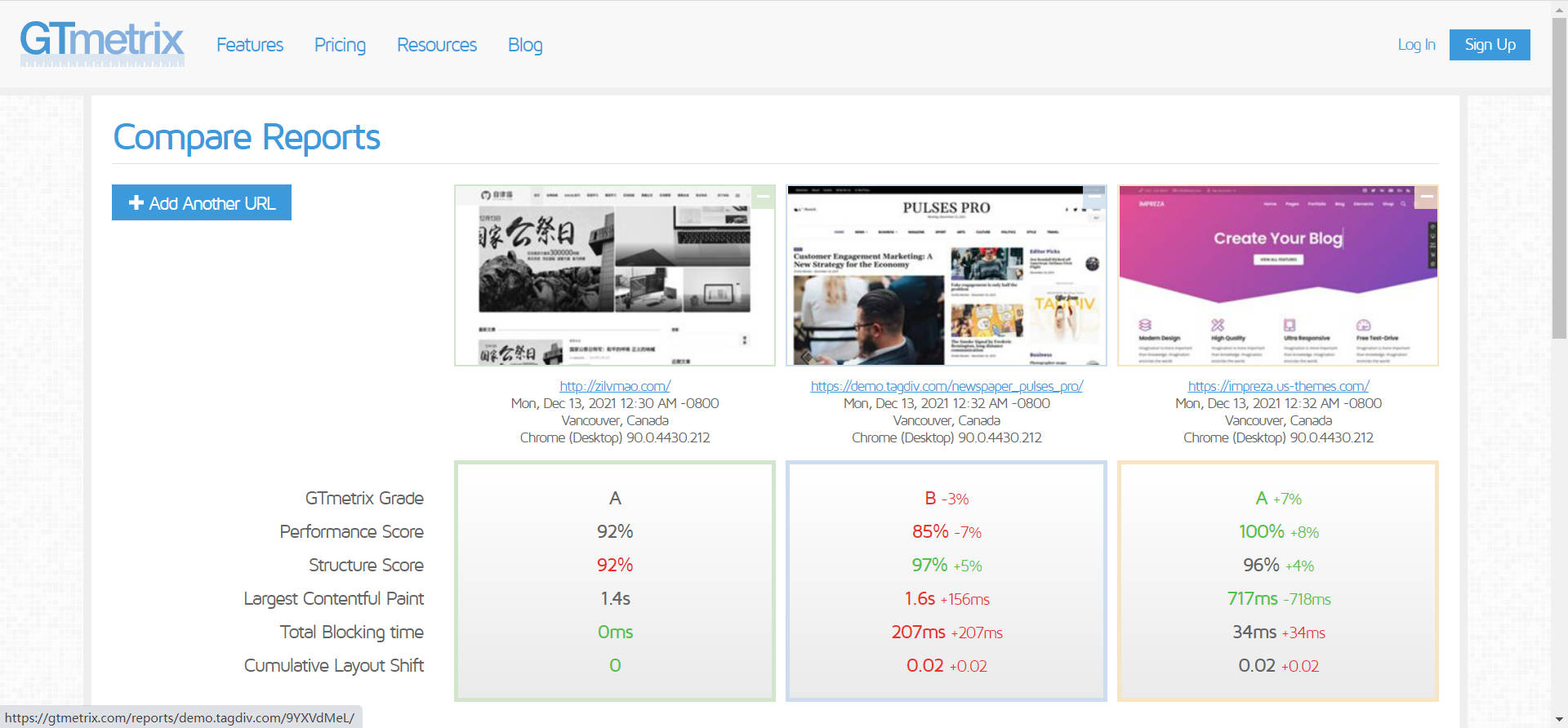
I compared several mainstream themes and found that the newspaper theme is really the slowest, second only to the avada theme, which is a disaster.
I hope tagdiv team can optimize the theme speed, you can learn from impreza theme and soledada theme, these two themes are much faster than newspaper theme without any optimization plugins.
The newspaper theme is already quite perfect in terms of functionality, optimization really needs to be improved!
 norbiQue
 Hey @AnaMaria
Only your theme creates a different url when creating a mobile site.
Of course this version is faster, by the way you can set a smaller image size, which your theme doesn’t allow in the responsive version, which is a shame :(.
Anyway, layout for phone vs computer is nice when it is different, if only for better communication for the user.
That’s why I would like to ask how to solve the problem with new url’s created after mobilej page creation?
Norbert
Calin Hi Mark Gilbert, I just checked your website and I see that the AdSense code need a long time to load, over 1s -> https://i.imgur.com/1sYVgxN.png
The pagespeed depends on a lot of elements, like page elements, external resources…
As I see on your website, there are no theme problems, but maybe you can optimize better the pagespeed for your website:
https://forum.tagdiv.com/how-to-make-the-site-faster/
https://forum.tagdiv.com/cache-plugin-install-and-configure/
https://forum.tagdiv.com/cloudflare-cdn/
https://forum.tagdiv.com/autoptimize-install-configuration/
I hope this will help you!
Calin Hi,
Please check our guides for pagespeed:
https://forum.tagdiv.com/how-to-make-the-site-faster/
https://forum.tagdiv.com/cache-plugin-install-and-configure/
https://forum.tagdiv.com/cloudflare-cdn/
https://forum.tagdiv.com/autoptimize-install-configuration/
I hope this will help you!



