
- NewspaperFlex Block Builder and Flex Loop Builder
- NewspaperHow to use the Flex Blocks cache option
- NewspaperHow to edit modules for Flex Block X
- NewspaperFlex Block Settings Guide
- NewspaperBig Grid Flex Settings
- NewspaperSingle Post Excerpt
- NewspaperWP Rocket and Newspaper Theme: Optimization Guide
- NewspaperSearch setup for custom post type
- NewspaperBookmark – Save For Later
- NewspaperModules Builder in Newspaper Theme
- NewspaperFilters and sorting for taxonomies
- NewspaperHow to insert a block inside the content of a post
- NewspaperCustom Post Type Support
- NewspaperMeta Info on Modules and Blocks
- NewspapertagDiv Composer Tutorial
- NewspaperSocial Counter Styles on Newspaper
- NewspaperCloudflare (CDN)
- NewspaperPage templates
- NewspaperFeatured Posts
- NewspaperTheme Colors Introduction
 olaf-bebrave
Hi,
I’ve been using the Newspaper theme for a bit, but I have had some major issues.
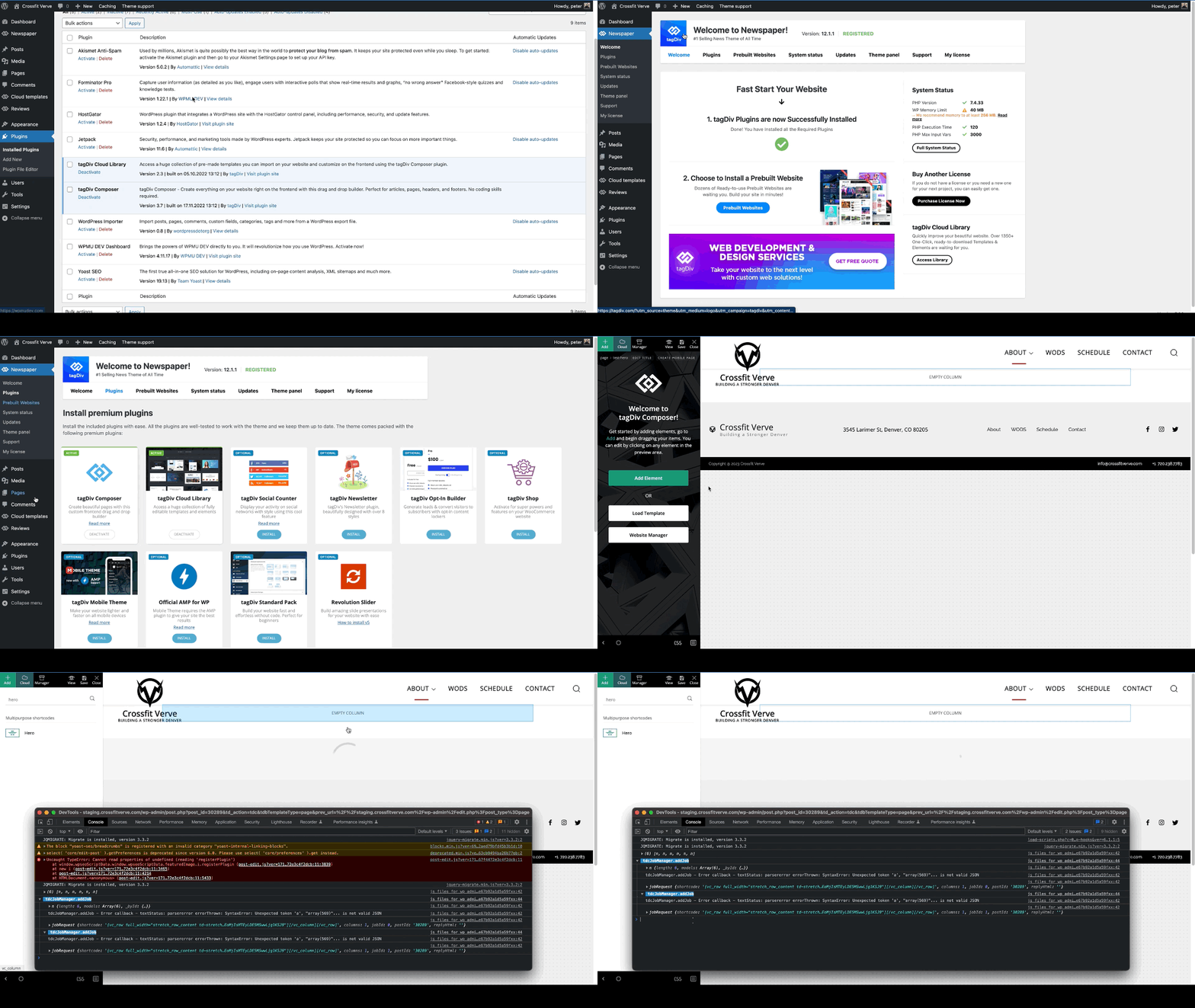
First of all, if I add the Hero Banner it just keeps spinning (i’ve seen the problem here on the forum before).
And if I add Flex Blocks, the articles are showing but no titles are showing. However if I use one of the preinstalled pages it works without an issue. I have tried to copy/paste it, but that did not help.
Can someone help me please
 lindakhoury
how to show all posts in big grid flex not only one row?
 Calin
Calin Hi,
I just made a test on v12.2 RC version and for me seems to work correctly with the flex loop.
This theme update will be the next week and then this problem should be resolved.
Thank you!
 Anamaria
 Hello,
For the category template, if you have set a posts loop then will display all posts in this category or you can use Flex Block/Big Grid Flex and set the filter to “Category -Current category” => https://i.imgur.com/7P99qx0.png
Thank you!
Anamaria Hello,
I recommend you to use a Single Post Template from tagdiv Cloud Library, and you can design it with tagdiv Composer.
To display the related articles or more from author, you can use Flex Block and filter it https://www.screencast.com/t/SEmxo13Fo2X -> https://i.imgur.com/YIg3nPP.png
if you want to keep those templates the only way to remove the “more from author” tab is to use a custom CSS like this one:
.single .td-related-right{

 display: none;

 }
Set the code in Theme Panel ->Custom code -> Custom CSS
I hope this helps you!
Thank you!
Anamaria Hello,
1. If you using the Flex Block or Big Grid Flex in the layout are the options “Show author”, “Show date” and you can choose to hide => https://www.screencast.com/t/6UPXQbiTO2
For mobile theme version to remove the author name on the blocks, please go in Theme Panel -> Block Settings -> Meta Info on modules/blocks and disable the author => https://www.screencast.com/t/5w5CxkcU
2. You can’t change the layout and customize the mobile theme version. There are some settings in the Theme panel -> Mobile Theme and Dashboard -> AMP only.
Thank you!
 sco
sco Nevermind… I changed my mind… this is not flexible enough to be used for the aimed purpose.
Regards.
 phubner
When trying to add a hero modules to pages I am getting the following error. This is happening on multiple sites of mine.
I created a simple test page that was blank and just tried to add the hero module. The page just has the spinner and never completes adding the hero module. In the console this is logged
tdcJobManager.addJob - Error callback - textStatus: parsererror errorThrown: SyntaxError: Unexpected token 'a', "array(569)"... is not valid JSON
jobRequest ...
shortcode
:
"[vc_row full_width=\"stretch_row_content td-stretch-content\"][vc_column][tdm_block_hero title_text=\"SGVybw==\" title_tag=\"h3\" title_size=\"tdm-title-bg\" description=\"V2VsY29tZSB0byB0aGUgZnV0dXJlIG9mIGJ1aWxkaW5nIHdpdGggV29yZFByZXNzLiBUaGUgZWxlZ2FudCBkZXNjcmlwdGlvbiBjb3VsZCBiZSB0aGUgc3VwcG9ydCBmb3IgeW91ciBjYWxsIHRvIGFjdGlvbiBvciBqdXN0IGFuIGF0dGVudGlvbi1jYXRjaGluZyBhbmNob3IuIFdoYXRldmVyIHlvdXIgcGxhbiBpcywgb3VyIHRoZW1lIG1ha2VzIGl0IHNpbXBsZSB0byBjb21iaW5lLCByZWFycmFuZ2UgYW5kIGN1c3RvbWl6ZSBlbGVtZW50cyBhcyB5b3UgZGVzaXJlLg
I did verify that I could add other modules, Author box, Flex grid, Client list, Image info box … etc.
site : staging.crossfitverve.com
Newspaper Version : 12.1.1
plugins : tagDiv Composer, tagDiv Cloud Library, YOAST SEO, Forminator Pro, Jetpack, WPMU DEV Dashboard
Anamaria Hello,
You can reduce the space only using a custom code css
.td_flex_block_4.td_block_template_14 .td-block-title

{

margin-bottom: 4px;

}
Set the code in Theme Panel -> Custom Code -> Custom CSS.
Thank you!
Anamaria Hello,
I recommend you to use a Single Post Template from tagdiv Cloud Library, and you can design it with tagdiv Composer.
To display the related articles or more from author, you can use Flex Block and filter it https://www.screencast.com/t/SEmxo13Fo2X -> https://i.imgur.com/YIg3nPP.png
You can set the ads in Single Post Template from tagDiv Cloud Library and you can set top ad, 3 inline ads set after x paragraphs and bottom ad, please check this article -> https://forum.tagdiv.com/article-ads/ and video https://www.youtube.com/watch?v=biTpVVlr8j8
Thank you!
Anamaria Hello,
Blocks 1 to 25 or Big Grid are from the standard pack plugin, which is deprecated, But you can obtain the same design using Flex Blocks and Big Grid Flex. Those types of blocks are more flexible.
You need to have the show category -> https://i.imgur.com/YW7rEzq.png
Thank you!
scoHi,
When I add an element flex block 1 and if I use the following configuration, no featured post is displayed. Same post is always displayed (last post) and it is not a featured one.
Configuration of the flex block 1 :
– limit post number : 1
– filters tab:
* everything is left blank except sort order and category filter
* category filter : — all categories —
* sort order : Featured
Is there a bug here, or what am I doing wrong. I know how to define a featured post and the way I do it matches your online documentation.
Looking forward to your reply,
Thanks for your help.
 VeriArtem
Hello
Flex block 4 > Header template: Block Header 17
How to decrease massive empty space between header 17 and the block?
Regards
Alex
sco Hi,
Thank you for your reply. I already use a flex loop listing for the search template… but it doesn’t work. Live search and search page results do not match as when we press enter or click the search button from the live search bar, we are redirected to an url with ?post_type=post.
The only way to solve this problem is I think to change the url to ?s=search-entry whenever post_type is left blank.
Calin Hello sco,
This situation can be easily resolved, all you need to do is to edit the search cloud template and replace the post loop element with a flex loop element and let the filter empty – https://i.imgur.com/bL0rGQk.png this should resolve the problem.
Let me know the results!
Thank you!
 richelo
In a Flex Block 1, when I select filter, and I select a sub-category which DOES have posts, the page just shows: No Posts.
It is clearly NOT reading the sub-category. When I select a main category, it works just fine.
Anamaria Hello,
You need to select a dimension for rows, or you can import other pages from tagdiv Composer.
You can find more details here
-> https://tagdiv.com/flexibility-rows-columns-newspaper-theme/
-> https://tagdiv.com/how-to-add-delete-and-duplicate-row-newspaper-theme/
Thank you!
 justrealmoms
Hi Anamaria, thank you once again for ALL your help. We’re unifying our content website with our subdomain (which is currently Newspaper), and making it all in Newspaper (yay!), so countless issues are appearing.
Our content website is: https://www.justrealmoms.com.br
Our subdomain we use Newspaper is: https://guia.justrealmoms.com.br
So, what is happening now is: We now have TWO types of Post Formats we have to create:
1) Normal Blog Posts (for the content website/blog)
2) Pages of Suppliers part our our Supplier’s Guide with a curation of brands – which is created as a type of Blog Post
Once again, this Supplier’s Guide is what we’ve created using Newspaper (https://guia.justrealmoms.com.br).
The Supplier’s Page have specific fields and functionalities we need. Here is a page for your reference: https://guia.justrealmoms.com.br/mooui.
It has:
1) A right sidebar where each supplier has their contact infos (WhatsApp, Email, Social Channels, embedded Map)
2) The body – where we create as a normal Post (since we need to use Yoast, the filters, categories, etc)
3) A left sidebar with more general infos from the website.
We’ve created a copy of the website and we’re working on it: https://r22.861.myftpupload.com.
The issue is that for the Supplier’s Pages we had to create a new Taxonomy, since we needed it to be featured separately and differently on the website (ex: on the homepage) – here we used Post Loops for the Blog Posts (where there is NO FILTER option), and for the Suppliers Flex Block 1 (where there is filter and we also identified the Post Type as “Guia” (where all Supplier’s Guide pages/posts are set as, separated from the normal Blog posts).
So, the current problem is ONLY when we need to create the Supplier’s Page for each brand. They are all created currently here: https://guia.justrealmoms.com.br, BUT when we copied them to https://r22.861.myftpupload.com where we’re unifying both BLOG SITE + SUPPLIER’S SITE, it LOST the RIGHT SIDEBAR.
Remembering, we had to create a new Taxonomy. For EACH Supplier (on the current website – https://guia.justrealmoms.com.br), we had to create a separate Cloud Template, so each one would have their own set of contact infos on the Right Sidebar – SUPER IMPORTANT FUNCTIONALITY. And also for the SINGLE BACKGROUND IMAGE, if I’m not mistaken since each one has a different header image.
In the Cloud Templates, there are SINGLE TEMPLATES, which is what we used for each Supplier’s page. BUT, since we had to create a new Taxonomy to separate Blog Posts from Supplier Posts/Pages, we can’t now create a SINGLE TEMPLATES in Taxonomy.
So, the RightSide bar which is the most crucial information we need in the page – and in the mobile format it’s supposed to appear first – can’t be created and edited in TagDiv anymore.
Sorry for the MASSIVE text, but this is hard to explain, so I tried to be very detailed.
Also, do you guys offer Zoom assistance – even if it’s paid?
Thank you and keen to hear from you on this, as it’s probably the most importante feature on the website for UX.
Anamaria Hello,
You can add the sidebar like this https://forum.tagdiv.com/sidebars-tutorial/. You can add the sidebar in the inner row and after you can save it and use it where you want.
Thank you!
Anamaria Hello,
You can stretch the row -> https://i.imgur.com/0wXVt9V.jpg
You can find more details here
-> https://tagdiv.com/flexibility-rows-columns-newspaper-theme/
-> https://tagdiv.com/how-to-add-delete-and-duplicate-row-newspaper-theme/
Thank you!
Anamaria Hi,
We do not recommend setting two posts loop on the same page/template, please use a flex block or another block, because most of the settings from the first loop element will be set for the second one.
Also, make sure this issue is not from a plugin conflict.
Thank you!
Anamaria Hello,
You can create a sidebar like in this guide -> https://forum.tagdiv.com/sidebars-tutorial/. You can add the block with tagdiv Composer or the widgets.
If you want to have pagination, you can use Flex Block 1 and set the pagination -> https://forum.tagdiv.com/flex-block-settings-guide/
Thank you!
 northendagents
I’m working on my category template page. I have a Post Loop set to Latest but it’s showing yeas-old posts that seem to be the same as popular posts (in another Post Loop above it). The Flex Grid at the top of the page is also set to Latest and is working properly. I just updated everything – theme, plugins, WP core, etc. The offset is set to 2 so the first post should be the same as the first small block in the Flex Grid.
Anamaria Hello,
You can stretch the row -> https://i.imgur.com/0wXVt9V.jpg
You can find more details here
-> https://tagdiv.com/flexibility-rows-columns-newspaper-theme/
-> https://tagdiv.com/how-to-add-delete-and-duplicate-row-newspaper-theme/
Thank you!
 Bettina
 Hello @sco!
If you leave the field empty, then the search will only show pages and posts.
Unfortunately, we do not have filters in this search functionality. We have some filters on the search page, as well as a template in the element as a posts loop or flex blocks.
Thank you!



