No search results were found in Documentation!
 Anamaria
 Hello,
You are probably uploading the whole theme package. You have to upload only the theme zip file, not the whole package which contains other items
– https://help.market.envato.com/hc/en-us/articles/202821510-Theme-is-missing-the-style-css-stylesheet-error
Install via WordPress -> https://forum.tagdiv.com/install-via-wordpress/
Install via FTP -> https://forum.tagdiv.com/install-via-ftp/
Requirements for Newspaper => https://forum.tagdiv.com/requirements-for-newspaper/
After installing the theme and activating it you will find in the Prebuilt websites all the theme demos and you can import whatever demo you want => https://www.screencast.com/t/6rf5g0Dxc0K
Thank you!
 MonkeyByte
 Hey Anamaria,
It looks like I have a very old version of Newspaper (V 8.1.1) and it makes sense it is out of touch.
Do you recommend an FTP update? Or, would we be better served purchasing a more recent version, deleting the theme we have now and installing a newer version outright?
I feel like I should purchase a new upgrade. Your themes have been amazing for us and I want to give some back too.
Anamaria Hello,
In most cases, this problem occurs because you have the latest version of WordPress with an older version of the theme.
Please use the last version of WordPress 6.1.1 with the last theme version Newspaper 12.2 (if you have a theme version older, then tagDiv Composer does not work) and check to see if the problem persists.
If you need to make an update, before please make a full backup to all files and the database, in case something goes wrong. => https://forum.tagdiv.com/how-to-update-the-theme-2/
Here you can find information about the changes that have occurred in each update over time https://tagdiv.com/newspaper/
I recommend that you update the theme manually https://forum.tagdiv.com/how-to-update-the-theme-2/ via FTP/cPanel/File Manager, also if possible disable extra plugins during the theme update to avoid any problems that may arise and make sure that you have activated the tagDiv Standard pack plugin to keep the website’s look. You can try to update the theme on a staging website.
After you update the theme, you need to update the theme plugins too.
In the worst cases, the settings in the theme panel may be lost (there have been isolated cases), in these cases, after the theme plugins that were previously used are activated, you will have to use a backup for the theme panel -> https://forum.tagdiv.com/import-export-theme-settings/
Also, make sure that all the settings are like in our requirements, please follow the guide carefully: https://forum.tagdiv.com/requirements-for-newspaper/
and please increase all requirements that are lower, and follow all steps.
Also, if the problem persists please check if you do not have a plugin conflict, please deactivate ALL plugins except tagDiv plugins, also if you are using a child theme or cache plugin, deactivate them, clear all cache (also from your browser) and try again.
Let me know the results!
Thank you!
 NickSi
 Edit: I deactivated all the plugins and switched the theme, the latest posts are showing, i switched back to newspaper with all the other plugins deactivated, the posts are not showing.
I re installed the td plugins and theme from ftp, nothing changed, i downloaded a new cloud template, not worked. I downgrade to an older version, and yet didn’t work!
The homepage and some widgets are updating just fine, the archive pages not, no matter what
 Bettina
 Hello @jacosky!
Download the theme again. Please try to install the theme via FTP, following all the steps: https://forum.tagdiv.com/install-via-ftp/
Thank you!
Anamaria Hello,
If you want to update the theme, you should download the latest version of it from Theme Forest account and download it.
Please make a full backup to all files and database => https://www.youtube.com/watch?v=LAJXrSI-dDA
Here you can find information about the changes that have occurred in each update over time https://tagdiv.com/newspaper/
I recommend that you update the theme manually https://forum.tagdiv.com/how-to-update-the-theme-2/ via FTP/cPanel/File Manager, also if possible disable extra plugins during the theme update to avoid any problems that may arise and make sure that you have activated the tagDiv Standard pack plugin to keep the website’s look. You can try to update the theme on a staging website.
After you update the theme, you need to update the theme plugins too.
In the worst cases, the settings in the theme panel may be lost (there have been isolated cases), in these cases, after the theme plugins that were previously used are activated, you will have to use a backup for the theme panel -> https://forum.tagdiv.com/import-export-theme-settings/
Thank you!
Anamaria Hello,
If you want to update the theme, you should download the latest version of it from Theme Forest account and download it.
Please make a full backup to all files and database => https://www.youtube.com/watch?v=LAJXrSI-dDA
Here you can find information about the changes that have occurred in each update over time https://tagdiv.com/newspaper/
I recommend that you update the theme manually https://forum.tagdiv.com/how-to-update-the-theme-2/ via FTP/cPanel/File Manager, also if possible disable extra plugins during the theme update to avoid any problems that may arise and make sure that you have activated the tagDiv Standard pack plugin to keep the website’s look. You can try to update the theme on a staging website.
After you update the theme, you need to update the theme plugins too.
In the worst cases, the settings in the theme panel may be lost (there have been isolated cases), in these cases, after the theme plugins that were previously used are activated, you will have to use a backup for the theme panel -> https://forum.tagdiv.com/import-export-theme-settings/
Also, if you want, you can contact our custom work team here and they can help you to update the theme safely: https://tagdiv.com/premium-customization-services/
Please note that we don’t recommend you use WP Bakery anymore since there can be conflicts between TagDiv Composer and WP Bakery; also WP Bakery can’t edit the tagDiv Composer templates. You can use the cloud library and directly import a homepage template if you want: https://forum.tagdiv.com/homepage-how-to-build-and-set-it/
Hope this help you!
Thank you!
Anamaria Hi,
Unfortunately, we can’t help you in this situation, you must contact the Envato team to help you https://envato.com/contact/
If you want to update the theme, you should download the latest version of it from Theme Forest account and download it.
Please make a full backup to all files and database => https://www.youtube.com/watch?v=LAJXrSI-dDA
Here you can find information about the changes that have occurred in each update over time https://tagdiv.com/newspaper/
I recommend that you update the theme manually https://forum.tagdiv.com/how-to-update-the-theme-2/ via FTP/cPanel/File Manager, also if possible disable extra plugins during the theme update to avoid any problems that may arise and make sure that you have activated the tagDiv Standard pack plugin to keep the website’s look. You can try to update the theme on a staging website.
After you update the theme, you need to update the theme plugins too.
In the worst cases, the settings in the theme panel may be lost (there have been isolated cases), in these cases, after the theme plugins that were previously used are activated, you will have to use a backup for the theme panel -> https://forum.tagdiv.com/import-export-theme-settings/
Also, if you want, you can contact our custom work team here and they can help you to update the theme safely: https://tagdiv.com/premium-customization-services/
Please note that we don’t recommend you use WP Bakery anymore since there can be conflicts between TagDiv Composer and WP Bakery; also WP Bakery can’t edit the tagDiv Composer templates. You can use the cloud library and directly import a homepage template if you want: https://forum.tagdiv.com/homepage-how-to-build-and-set-it/
Hope this help you!
Thank you!
Bettina Hello @gorka!
Check this thread: https://forum.tagdiv.com/topic/license-12/
Examine some other potential interfering factors: https://forum.tagdiv.com/general-options-may-interfere-newspaper-theme/
Or try to update the theme via FTP: https://forum.tagdiv.com/how-to-update-the-theme-2/
Thank you!
Anamaria Hi,
Please make a full backup to all files and contact us via email at contact@tagdiv.com and provide the following:
–wp-admin URL and credentials
-FTP/cPanel URL and credentials
– a link to this topic in order to identify you
Also, during the investigation know that we will disable the other non tagDiv plugins.
Thank you!
Anamaria Hi,
Please make a full backup to all files and contact us via email at contact@tagdiv.com and provide the following:
–wp-admin URL and credentials
-FTP/cPanel URL and credentials
– a link to this topic in order to identify you
Also, during the investigation know that we will disable the other non tagDiv plugins.
Thank you!
 Calin
Calin Hi dkempdesigns,
Let’s try to take each subject in turn:
To change the background color for some rows, select the row and check the css tab – https://i.imgur.com/OJ8d9Kl.png – for element menus colors you can check in style tabs (if elements have this tab).
‘Also I can create menus but the menus that are already there are what I want to access. I need to know what their names are as the names in the theme do not edit the existing menus I sent you pictures of.‘ – the menus are made in appearance > menu – https://i.imgur.com/MoqB5OQ.png from there you can edit the current element from the menu (add/delete) or you can make new menus.
Now to assign the menu on your website you need to edit it with tagDiv Composer the header, this can be done from the homepage – https://i.imgur.com/DVOZkt7.png select the menu and choose the menu you want to use – https://i.imgur.com/eDeupRH.png
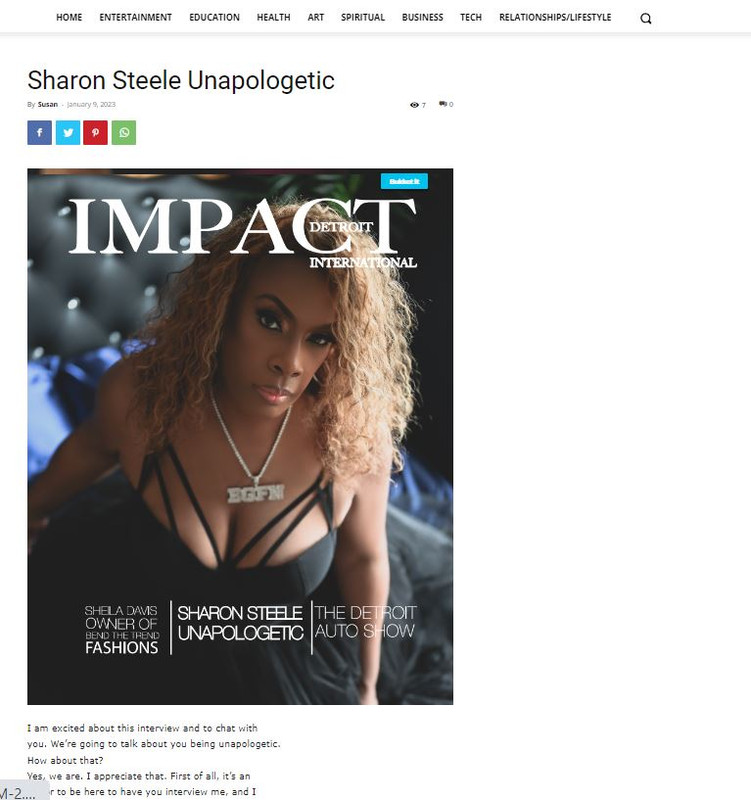
‘ The blog page still does not have the sidebar (I chose the template with a sidebar) and the paragraph is shrunken and not full width under the featured image. I did include pictures and explain that I have used all your documentation. Please state clearly what each menu is called and where it is edited. State clearly why the template with sidebar for individual blog posts is not loading properly.‘ – I believe you are referring to this https://gjz.5cc.myftpupload.com/sharon-steele-unapologetic/ here you have a default post template that will use the widget sidebar elements, just make sure that you have elements in the widgets sidebars – https://i.imgur.com/FvnKPfB.png also you can use a single post template from the cloud and you can edit it using the tagDiv Composer.
‘I did not ask to remove image from footer, I asked why the default footer would not load properly on new pages when it was assigned specifically.‘ – I believe this is a plugin conflict, usually this is happening when you are using cloud templates and wpbakery plugin, we recommend to not using them together.
If I miss something, please let me know!
Thank you!
Anamaria Hello,
The only solution is to upload the images via FTP, and use only Flex Block, and set the image size to full https://i.imgur.com/md94FTV.png
Thank you!
Anamaria Hi,
Please make a full backup to all files and contact us via email at contact@tagdiv.com and provide the following:
–wp-admin URL and credentials
-FTP/cPanel URL and credentials
– a link to this topic in order to identify you
Also, during the investigation know that we will disable the other non tagDiv plugins.
Thank you!
 dkempdesigns
Cannot find areas to change top and bottom menus, background colors and elements. Default footer appears on home page but when I create a new page and select default footer, it does not work. On blog post single page, I cannot get sidebar to load and the post is not page width. Pics will show all. https://gjz.5cc.myftpupload.com/
Currently working on staging site.
https://i.postimg.cc/yx08YSnL/footer-new-pages.jpg
https://i.postimg.cc/WbnsWVyq/footer-want.jpg
https://i.postimg.cc/52KbJ3bx/blog-post.jpg
https://i.postimg.cc/hGHnztX6/top-menu.jpg
https://i.postimg.cc/D0c3MQx3/bottom-menu.jpg
Have used the tagdiv editor and theme panel and still cannot find solutions.
Thank You
Anamaria Hello,
You are probably uploading the whole theme package. You have to upload only the theme zip file, not the whole package which contains other items
– https://help.market.envato.com/hc/en-us/articles/202821510-Theme-is-missing-the-style-css-stylesheet-error
Install via WordPress -> https://forum.tagdiv.com/install-via-wordpress/
Install via FTP -> https://forum.tagdiv.com/install-via-ftp/
Requirements for Newspaper => https://forum.tagdiv.com/requirements-for-newspaper/
After installing the theme and activating it you will find in the Prebuilt websites all the theme demos and you can import whatever demo you want => https://www.screencast.com/t/6rf5g0Dxc0K
Thank you!
Anamaria Hi,
You can add the top bar if you use a header template -> https://www.screencast.com/t/YqnngRKe or you can import a header template that is precisely like header style 1 -> https://i.imgur.com/EAothGC.png -> https://cloud.tagdiv.com/header-template-1/ and this way you can customize each element like logo -> https://forum.tagdiv.com/add-logo-newspaper/ , with tagDiv Composer -> https://forum.tagdiv.com/tagdiv-composer-tutorial/.
Please check this video about how can create a website from scratch https://www.youtube.com/watch?v=SoGQ0d5kIBg
You can import a footer template here https://forum.tagdiv.com/footer-templates/
If you want to update the theme, download the latest version from the Theme Forest account and download it.
Please make a full backup to all files and database => https://www.youtube.com/watch?v=LAJXrSI-dDA
Here you can find information about the changes that have occurred in each update over time https://tagdiv.com/newspaper/
I recommend that you update the theme manually https://forum.tagdiv.com/how-to-update-the-theme-2/ via FTP/cPanel/File Manager, also if possible disable extra plugins during the theme update to avoid any problems that may arise and make sure that you have activated the tagDiv Standard pack plugin to keep the website’s look. You can try to update the theme on a staging website.
After you update the theme, you must also update the theme plugins.
In the worst cases, the settings in the theme panel may be lost (there have been isolated cases), in these cases, after the theme plugins that were previously used are activated, you will have to use a backup for the theme panel -> https://forum.tagdiv.com/import-export-theme-settings/
Thank you!
Anamaria Hi,
We can look at this and investigate why it is not working for you. Contact us via email at contact@tagdiv.com and provide the following:
– wp-admin URL and credentials
– cPanel/FTP access
– a link to this topic to identify you
Also, during the investigation, know that we will disable the other non-tagDiv plugins.
Thank you!
Anamaria Hi,
Yes, please contact us via email at contact@tagdiv.com and provide the following:
– wp-admin URL and credentials
– cPanel/FTP URL and credentials
– a link to this topic in order to identify you
We will take a look and let you know what can be done there!
Thank you!
Anamaria Hi,
If you want to update the theme, you should download the latest version of it from Theme Forest account and download it.
Please make a full backup to all files and database => https://www.youtube.com/watch?v=LAJXrSI-dDA
Here you can find information about the changes that have occurred in each update over time https://tagdiv.com/newspaper/
I recommend that you update the theme manually https://forum.tagdiv.com/how-to-update-the-theme-2/ via FTP/cPanel/File Manager, also if possible disable extra plugins during the theme update to avoid any problems that may arise and make sure that you have activated the tagDiv Standard pack plugin to keep the website’s look. You can try to update the theme on a staging website.
After you update the theme, you need to update the theme plugins too.
In the worst cases, the settings in the theme panel may be lost (there have been isolated cases), in these cases, after the theme plugins that were previously used are activated, you will have to use a backup for the theme panel -> https://forum.tagdiv.com/import-export-theme-settings/
Also, if you want, you can contact our custom work team here and they can help you to update the theme safely: https://tagdiv.com/premium-customization-services/
Please note that we don’t recommend you use WP Bakery anymore since there can be conflicts between TagDiv Composer and WP Bakery; also WP Bakery can’t edit the tagDiv Composer templates. You can use the cloud library and directly import a homepage template if you want: https://forum.tagdiv.com/homepage-how-to-build-and-set-it/
Hope this help you!
Thank you!
 Max
MaxHi,
I installed the theme manually via FTP, I disabled the various cache plugins, I cleared the cache, I changed the browser, I tried in anonymous mode, I cleared the cache again, I manually uploaded the plugin … nothing, always error critical of the tagDiv composer plugin, how can I fix it?
E_COMPILE_ERROR è stato causato nella linea 167 del file /home/bnewdimw/public_html/wp-content/plugins/td-composer/td-composer.php. Messaggio di errore: require_once(): Failed opening required ‘css-analyze/css-analyze.php’ (include_path=’.:/opt/alt/php74/usr/share/pear’)
Thank You
Max
Anamaria Hi,
I recommend that you update the theme manually https://forum.tagdiv.com/how-to-update-the-theme-2/ via FTP/cPanel/File Manager, also if possible disable extra plugins during the theme update to avoid any problems that may arise and make sure that you have activated the tagDiv Standard pack plugin to keep the website’s look. You can try to update the theme on a staging website.
After you update the theme, you need to update the theme plugins too.
In the worst cases, the settings in the theme panel may be lost (there have been isolated cases), in these cases, after the theme plugins that were previously used are activated, you will have to use a backup for the theme panel -> https://forum.tagdiv.com/import-export-theme-settings/
Thank you!
Anamaria Hello,
If you have a child theme, please use the main theme to do the update.
I recommend that you update the theme manually https://forum.tagdiv.com/how-to-update-the-theme-2/ via FTP/cPanel/File Manager, also if possible disable extra plugins during the theme update to avoid any problems that may arise and make sure that you have activated the tagDiv Standard pack plugin to keep the website’s look. You can try to update the theme on a staging website.
After you update the theme, you need to update the theme plugins too.
In the worst cases, the settings in the theme panel may be lost (there have been isolated cases), in these cases, after the theme plugins that were previously used are activated, you will have to use a backup for the theme panel -> https://forum.tagdiv.com/import-export-theme-settings/
Thank you!
 darknorth
 Hi,
I was using 10 Web Booster Caching, I have disabled its caching feature only and instead installed wp super cache.
The Plugins I have now
10Web Booster
410 for WordPress
Auto Image Attributes
Cloudflare
EWWW Image Optimizer
Head & Footer Code
Instant Indexing
Loginizer
MC4WP: Mailchimp for WordPress
NicheTable
Rank Math SEO
Really Simple SSL
Simple Social Icons
Site Kit by Google
Spectra
tagDiv
UpdraftPlus
WebP Express
WP Super Cache
I am testing with the WP Super Cache, so far no problem, but a new thing happend today. when I opened the main domain in browser it kept opening a blog post (just like redirect). I tried incognito and same blogpost was opening so I deleted the cache 🙂 and the homepage is now visible/working.
This site needs a doctor lol.
Anamaria Hello,
I would like to take a look and see what can be done there. Please make a full backup to all files and contact us via email at contact@tagdiv.com and provide the following:
–wp-admin URL and credentials
-FTP/cPanel URL and credentials
– a link to this topic in order to identify you
Also, during the investigation know that we will disable the other non tagDiv plugins.
Thank you!