
- NewspaperHeader Builder
- NewspaperHeader ads
- NewspaperHeader styles
- NewspaperSearch setup for custom post type
- NewspapertagDiv Composer – Website Manager
- NewspaperBookmark – Save For Later
- NewspaperWooCommerce: Happy “Add to Favorites!”
- NewspaperModal Popup
- NewspaperFlex Block Settings Guide
- NewspaperPosts Loop Element
- NewspaperHow to Add a Logo in Newspaper
- NewspaperDefault Category Settings
- NewspaperWhen tagDiv Composer is Not Working
- NewspapertagDiv Cloud Library Plugin
- NewspapertagDiv Composer Tutorial
- NewspaperUsing the Theme Translations with WPML
- NewspaperInstagram in Newspaper WordPress Theme
- NewspaperWeather Shortcode
- NewspaperThe Mobile Theme
- NewspaperLogin – How to Enable User Registration
 erfahrungsguru
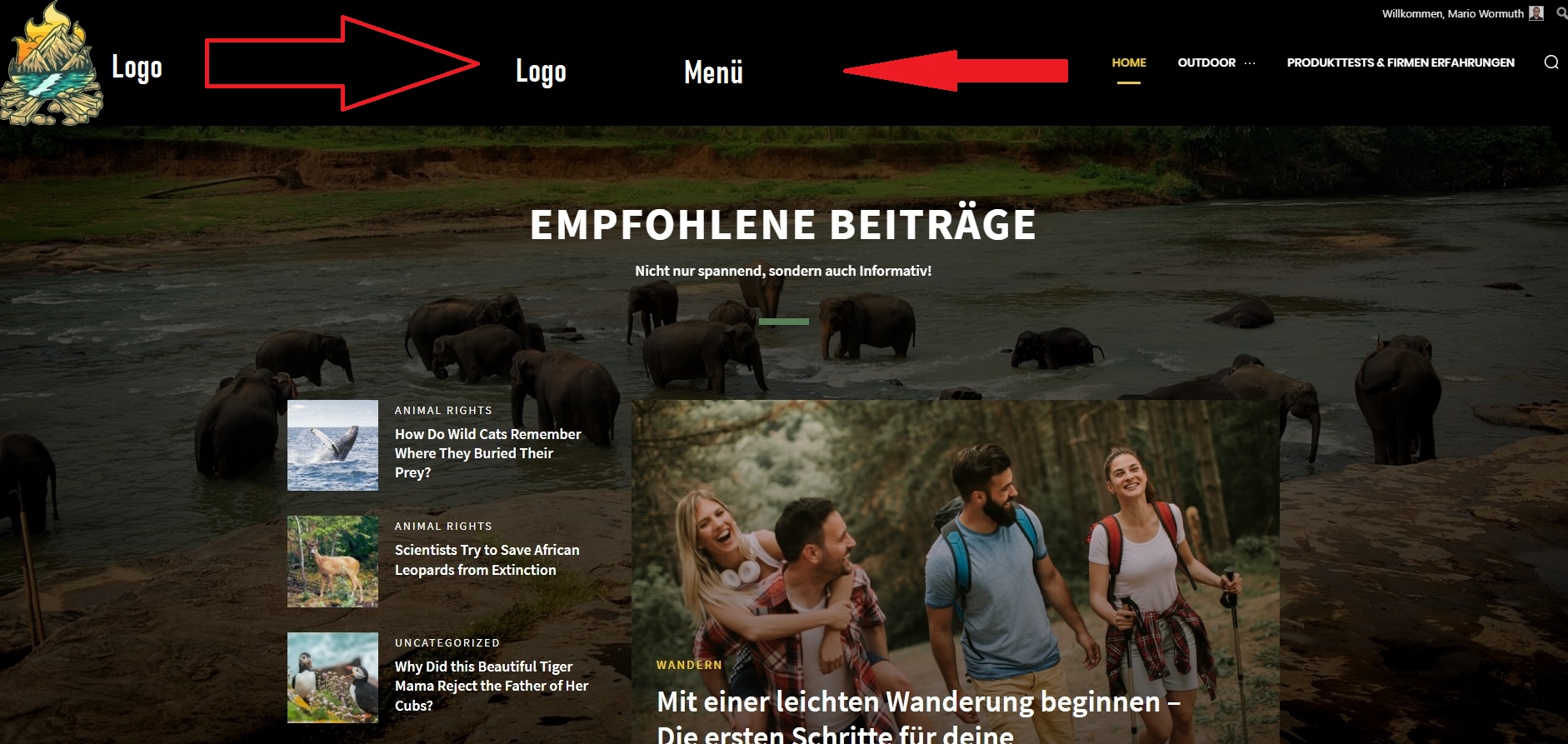
Hey, how can i change the position of the header?
The logo is very left and the menu is very right.
I want to get both near the center. how can i change this – only with css or is there a better way?
 News Door 24
 But if this is the main issue why it is affecting only header ads else every ads are working properly
 Bettina
 Hello!
1. The imported elements comes with their colors and fonts and they don’t affect other elements already there.
2. Please give more details.
3. Yes, the global colors and fonts can be seen in the Website Manager or if they are not set, then there is a setting in the theme panel. In the theme panel, if you access Theme colors -> General theme colors, then there is a setting called ” Theme accent color ” which changes the hyperlink text color and also various other elements which use that color: https://forum.tagdiv.com/theme-colors-introduction/
Please note that the link color for cloud templates can be changed individually on each page from the TagDiv Composer.
4. Yes, you can set a global header and footer for your whole website, also from the Cloud Templates. If you set a global template, then when you modify something in that header, it will appear on every page that use that template. Make sure you do not add any elements in the header zone instead of the content zone.
Thank you!
 Calin
Calin Hello,
The header logo can be set using the tagDiv composer on the header section, just like in our guide -> https://forum.tagdiv.com/header-manager/
The Gadgets PRO demo can be edited like this -> https://i.imgur.com/CeiKg3w.png select the logo, then set to show the image -> https://i.imgur.com/ve11Fwt.png also you can remove the icon from SVG tab -> https://i.imgur.com/mLjUuMV.png
I hope this will help you!
Calin Hi,
I understand. For COV-19 Italy Report PRO, the above method is working -> https://i.imgur.com/clNe5xQ.png you need to be sure that you have set a background color and the boxed layout to be disabled -> https://i.imgur.com/jDBhghW.jpg then only the header and footer need to be adjusted, for that edit the homepage -> select the row and clear the Background gradient -> https://i.imgur.com/SQHu7oE.jpg after that you can do the same thing for header and footer zone, for this select an element from header and click on the Hader menu -> https://i.imgur.com/q555XxF.png then in css tab click on clear for the background color -> https://i.imgur.com/u7LWKEL.png the results should be like this -> https://i.imgur.com/nSXqG6F.jpg
I hope this will help you!
Calin Hello,
You can not see the second menu because you are checking only the main header. You need to check the sticky header too (for this you need to scroll down in page, or you can use the e header manager).
Thank you!
 Anamaria
 Hello,
If you have the mobile responsive please edit with tagDiv Composer, select the viewport on phone, select the header logo and change it => https://i.imgur.com/cR7F0v4.png https://www.youtube.com/watch?v=HXQQygkCCJo -> https://forum.tagdiv.com/add-logo-newspaper/
Thank you!
News Door 24 I have Tried everything but still i am not able to get my ads on header and posts….
 ronv
ronvI think I understand the design the functionality of this theme but there are a couple of questions that the online documentation doesn’t explicitly make clear, at least for me. If anyone can answer this, I’d be very appreciative.
1. How does Theme Layout affect imported Headers and Footers? Are the colors and fonts of imported elements independent of the theme layout settings? The way it seems, is that the Theme Layout colors only affect attributes from building a website from scratch? Is this right?
2. If I use a themed template, can I no longer use the Theme Layout to change say, a page?
3. If I import a theme, say Metropolitan Pro. Where exactly are the global colors for active links, hover, and default fonts for that header, pages, and footer? Are they, located in the Manager only if you click on either the header, pages, and footer?
4. Is clicking on the header and footer from any page, truly a global change if you specify in the Manager that the template for that specific header and footer is global? It seems like it is but I don’t want to rely on luck that something I did works globally because I modified something on a page and sure enough, it wasn’t a global change. So, that theory seems to go down the drain.
I sort of have a working site and I’m asking these questions as both a confirmation and precaution for modifying elements. I have seen things happen where elements disappear and get rearranged by accidentally clicking somewhere on the screen. Fortunately, I have been saving often and close without changes when something like that happens. I just don’t want to break something right now that everything seems to be working. I can experiment later on dummy pages to learn the ins and outs.
Thanks and sorry about the noob questions.
 duck1970
Hello, I ask you how I can delete a column that appears in the header of my Home. I select it but I don’t see any option to delete it. How can I remove it?
Here I leave a link with image capture and my url.
I hope your help Thank you
https://www.radiomarcabarcelona.com/goodnews-design/column.png
https://www.radiomarcabarcelona.com
 Hispanic L.A.
For HispanicLA.com I am using Newspaper 11. One of the pages listed in the header’s menu is a List of authors (“Autores”).
For it I use the Authors Avatar widget in the “Widgets for Shortcodes” area.
It creates the shortcode
[do_widget id=td_block_authors_widget-3]
(I have the Classic Widgets plugin activated).
I inserted the shortcode in a Page.
https://hispanicla.com/lista-de-autores
It works nicely for the desktop version, even though I would prefer a more horizontal display.
Then I inserted the shortcode in the Mobile Editor area in the page so I could show the list in mobile with a link to the page in the footer.
But is does not work in the mobile version. The page is shown empty.
I also tried the shortcode
[do_widget "Author Avatars"]
with the same result. Thank you,
Gabriel
 nerdsimple
Greetings –
I’ve just installed the theme and am using the GadgetPro theme. I have my logo, retina logo and favicon set – but when customizing the header, only text shows up and the logo values are blank. Even if I set the logos to the same logos linked in the theme panel, the logos still do not show up.
I have screenshots, but I can’t see how to post those here.
Calin Hi,
When you try to edit the header element you have the page open in tagDiv Composer, but since that is a standard header can not be change with the theme builder, what you need to do is to add a cloud header. You can do this using our guide from here -> https://forum.tagdiv.com/header-manager/
I hope this will help you!
Calin Hello pistacio,
Normal if you set an element in header this will be display in all those view ports -> https://i.imgur.com/dxryzD0.png if you set it on mobile view port then will be display only there -> https://i.imgur.com/z65NMdk.png
Now if you want to set it only on portrait -> https://i.imgur.com/lnmv5CP.png then you need to hide it on the rest of the view ports -> https://i.imgur.com/0ctIHdp.png (you can hide the elements on view ports).
I hope this will help you!
Thank you!
 bilalvohra
I am not a tech person and thought this theme would be drag and drop but it seems tougher.
I applied the theme and on header I have this ugly menu block which I am unable to remove. I try to edit it and it says, “this type of header is not editable with tagdiv composer, please use cloud header template”
Now i wanna do just that, but i cant seem to find an option to remove this from my homepage.
Website Link – secondlastsupper.com
News Door 24 My Ads was already approved and you can see in some parts on my website ads is showing but not on every parts….
I have Added code to header, Sidebar, Article ad and Custom ads but not showing in any of these four,
 raikouchu
 Hey. I have the same problem today. I am after installing the latest version of the template. When entering Cloud Library, it also cannot import things (header, authors; posts, footer and others)
 tenacemente
How to remove Top bar from the header. Thank you
 anthonyblfc
Hello can someone please help me. I have been trying for many of hours now with no joy. I am creating my post fine and everything is great. My problem is my post are only appearing on my home page. I want different articles to also appear in different pages in my pages section in my main menu in the header. For example I have Football as a page in my header menu. I have wrote a football blog article and want my visitors to be able to click on football at the top of my website and all post that have been categorised football to appear in the football section. I feel like I have tried everything and nothing is working. The only way I have been able to do it so far is by using the category as a main menu topic instead of having a dedicated page. But I don’t want it set up like this I would like to be able to set it up as each blog to appear in to each section of football, tennis boxing etc. Really hope someone can help me so I can move on thank you
 pistacio
Hello,
is it possible to display the mobile header menu (the button with 3 lines) also for tablets with 768×1024 resolution?
Anamaria Hello,
We have ReCaptcha v3 implemented for login and comments.
“reCAPTCHA v3 returns a score for each request without user friction. The score is based on interactions with your site and enables you to take appropriate action for your site.” -> https://developers.google.com/recaptcha/docs/v3
You can set the score in Theme Panel -> header -> Sign in -> https://i.imgur.com/nlSrIpP.png
Thank you!
 Beaker
My site is here:
I just started developing the site. I installed the child theme included in the download and it seems to be working properly, but when I make changes to the child theme CSS they won’t show up on the site.
Troubleshooting so far:
–If I navigate to https://redstateroundup.com/wp-content/themes/Newspaper-child/style.css in a browser the changes are there.
–The CSS is valid: It works when I test it in the CSS panel in Console, in the WP Customize tool and in the CSS field in Theme Panel > Custom Code.
–When I look at any page’s source code there’s no link to the child theme CSS.
–I checked functions.php to make sure the enqueue function is there.
–I deleted and reinstalled the child theme from scratch but it didn’t help.
–I flushed the cache in my browser and on my host (IONOS).
–I tried hard-coding a link to the child theme CSS in header.php but that didn’t help. The hard-coded CSS link doesn’t show up.
–When I make file changes and check in my FTP client (CyberDuck) the file changes and date modified time update.
As far as I can tell I’m doing everything right, but the site won’t write any child theme changes even though the files seem to be right where they belong.
I can use the Custom Code in Theme Panel if I have to, but also I need to modify PHP files in the child theme.
Any help greatly appreciated!
anthonyblfcHello Ive only just started designing my website but I want to be able to select for my header and logo to be sticky when scrolling. I dont see the option for this to be selected in the theme panel like on old videos. But I have seen it can be done in the Tagdiv composer plugin. I have the plugin installed and activated but cant see it being an option anywere on my panel.
My second problem is how do i install the revolution slider plugin been trying for a few days now thank you
 housenest
Hello,
I’d like to know how to make header menu underline size sync with menu categories.
If the menu category has more letters then the underline doesn’t cover all it’s size.
As example i’ve attached pictures below:
https://imgur.com/a/HJBfJ1N
https://imgur.com/a/HMUfd6b
As you can see in the 1st picture the underline is perfectly aligned however on 2nd picture it’s too short.
I hope there’s way to make them all equal in sync with menu titles.
Thank you!
Calin Hi,
For the cloud templates you need to identify the cloud templates type (header, footer, single …) that you edited and copy the content from them -> https://i.imgur.com/RHdIFNh.png (one by one) from staging -> https://i.imgur.com/Wo4yp58.png and pasty it in the same cloud template type (header, footer, category..) in your live website.
Also if you edited pages on staging, then you need to do the same with them to get the changes on live website.
Also if you added new images, make sure that you add theme on the live website.
I hope this will help you!



