
- NewspaperHeader Builder
- NewsmagHeader styles
- NewsmagHeader ads
- NewspaperHeader ads
- NewspaperHeader styles
- Apitd_api_header_style::delete
- Apitd_api_header_style::update_key
- Apitd_api_header_style::update
- Apitd_api_header_style::add
- ApiAPI – Header style – Introduction
- NewspaperSearch setup for custom post type
- NewspapertagDiv Composer – Website Manager
- NewspaperBookmark – Save For Later
- NewspaperWooCommerce: Happy “Add to Favorites!”
- NewspaperModal Popup
- NewspaperFlex Block Settings Guide
- NewspaperPosts Loop Element
- NewspaperHow to Add a Logo in Newspaper
- NewspaperDefault Category Settings
- NewspaperWhen tagDiv Composer is Not Working
 Simion C.
 Hi,
After investigating this problem deeper it seems there is a problem with this Header style in the latest version. Thank you for signalling this, I will pass this issue to the developers and a fix will be made available as soon as possible.
Thank you for understanding!
 Aleksandar
 Hello Catalin,
This is the website where i’m trying to change background color: http://thehouseestate.com/ As you can see i was able to change background color for header and i would like to have the same color instead this white in posts/pages and widgets: http://thehouseestate.com/facilities/
Thank you
 Richard
Hi
I’ve tried everything but I’m having trouble changing the color of block titles in the footer to red. They appear as black as in the attached jpg file. The site is http://www.womensgolf.com
Simion C. Hi,
I have selected Block header style 13 – https://www.screencast.com/t/5mBzOxDdJCL then added a block on a page and entered the required information – https://www.screencast.com/t/4a9kob5lOe and everything is working as intended – https://www.screencast.com/t/2GBksE1x
I do not see any problems with this block header style. If you are experiencing difficulties when using the same settings, maybe you have a plugin or plugins that could be interfering with this since this is working properly. I suggest you try as a test to disable all your plugins except Visual composer, clear any installed caches then try again.
Thanks
 Bogdan B.
 Hello,
The code still works for the main content wrap but the header and footer have been changed to fit the new grid and the box shadow solution will not work on those containers properly. You will have to search for a different implementation. maybe with :before or :after pseudo-elements.
Thank you!
Simion C. Hi,
I believe that is the way the logo behaves in Header style 8, you can try removing the theme background color so the website will not be boxed anymore. Or if you would like I can give you some css to make it centered under certain conditions and screen sizes – https://www.screencast.com/t/YZW95WGHAd
Thanks
 Ross MacLane
Block Style 13 is not working properly on our test site…it is showing up like style 12.
https://filemakerconnect.com/ look at the block styles…they are set to style 13 but show up like style 12…this may be a bug.
Any assistance with this would be appreciated, this is the first time I have ever asked for help…love your template and will be buying several more copies for clients.
Ross
 MrOrsh
 That’s not really what I meant 🙂 More how to target the header and footer divs as well as the conent one.
Have been playing around with this and it seems with the new version of the theme there is no div surrounding the actual content (as the old td-boxed-version was doing). The new surrounding dog is instead always 100% of the browser width, making it useless for the shadow borders I want to achieve.
As far as I can see there is no way anymore to get the shadow edges on the boxed version of the theme, since there is no boxed div to assign them too.
Am I correct or am I missing something? Would be too bad if it wasn’t possible anymore since it made for a great design element having the “shadow borders” 🙁
MrOrsh Works perfect, except the footer and header does not get the effect :-/
Can I add any more content-wraps to include them as well?
 Catalin
 Hello dahlnewpage,
Notice that you can add your own headers from Theme panel->Header Ads. For more information about this section, please check here -> https://forum.tagdiv.com/header-ads-adsense/
Thanks for your understanding!
 robert
The date format on posts seems hardcoded to the English format “MONTH DAY, YEAR”.
My site is in another language and I need to customize that format. How can I do it?
Is there an option similar to the Header -> Top Bar -> Date Format setting?
Thanks
 dahlnewpage
For the various header styles samples, there is a banner in black with a picture of a woman and the text says:
The most popular NEWS MAGAZINE WordPress Theme. Experience the Change. Buy Now.
How do I insert my own banner here?
thanks
Catalin Hello Owlcomics,
Try the theme panel settings from here -> https://www.screencast.com/t/hGhnU5gjMXK or also, you can use the code below and place it in Theme panel->Custom CSS code.
The code is ->
.td-post-template-3 .td-post-header .entry-title{

color:green!important;

}
Thanks for the message!
Bogdan B. Hello,
Thank you for your appreciation.
1) I have tested your site on mac but could not see the line you mention. https://www.screencast.com/t/kHdvVpdbcJUN
2) Our theme has a custom login already which can be accessed on the front-end: https://forum.tagdiv.com/login-how-to-enable-user-registration/ – https://www.screencast.com/t/D0BiMNXRTqyG
3) sorry but there is no gradient color section for the header and footer but you can add a footer background image: https://www.screencast.com/t/rKgVA4TL
For the header it can only be done with custom css.
4) Sorry but only by using the obile theme can you have a separate menu for mobile devices.
5) The quotes can be changed from the fonts option: https://www.screencast.com/t/tcwLRz4daHU
6) and 7) It is ok as there are no restrictions in this regard. It will load all of the elements, yes, but you should not experience drastic loading speed drops. It is recommended to increase your overall loading speed by using this guide: https://forum.tagdiv.com/how-to-make-the-site-faster/ and increase your system status parameters like so: https://forum.tagdiv.com/system-status-parameters-guide/
lease only use wp super cache and these settings: https://forum.tagdiv.com/cache-plugin-install-and-configure/ if you plan on using a cdn server: https://forum.tagdiv.com/cloudflare-cdn/
8) This topic explains how to use speedbooster together with other plugins: https://forum.tagdiv.com/topic/tinymce-advanced-and-other-various-disabling-speed-boster/
9) Please provide an example as the image is not working
10) The validator also provides errors for ALL of the well known sites including google, facebook, Amazon, Yahoo, etc. We have stopped trusting it 🙂
Thanks
Bogdan B. Hello,
You can change the header colors from the thee colors section: https://www.screencast.com/t/DQutdc3XT
Thank you!
Simion C. Hi,
It seems there is a problem with the breadcrumbs not displaying on the post page in this particular demo, and this combined with some header style is causing this issue. I have added this on our fix list and it will get resolved as soon as possible. Please try and use the code provided below as a quick fix for you to use in the meantime, with this result – https://www.screencast.com/t/lfHHGhBGb3jc
.td-blog-beauty .td-post-template-default

.td-crumb-container {

display: block;

}
The code must be entered in Theme panel->Custom Css – https://www.screencast.com/t/Sxtr3nhrnnHd
Thank you for understanding!
Bogdan B. Hello,
I have checked your site but the header is the same on both post and pages. Please provide an example of where the margin is different
Thank you!
Simion C. Hi,
You can enable the weather element to be displayed in the top header menu like this – https://forum.tagdiv.com/weather-widget/ or use it as an widget on your pages and sidebars. If you are trying to use other weather implementations follow the instructions provided along with that plugin or code for the installation. Please note that not all plugins are compatible with the theme, and some may not work properly.
Thanks
 Fidel de Rooy
Hi there!
I recently changed mi block header styles, and since then, some of my block titles are not functioning well. They seem to get cut in half or hidden under the row or something. Please see this two screenshots: http://www.screencast.com/t/Cg8ColYH and http://www.screencast.com/t/82eCP4I8ics.
My site is: http://www.psl.ucr.ac.cr
Thanks a lot for the help!
Fidel
 fenomeno0chris
Hello to the whole Newspaper/Newsmag team!
First I want to say, thank you very much for creating such great themes.
After 3 years I decided with my team to change the overall design of my homepage, by buying Newspaper7. The reaction of our readers and users are mostly positive. So thats a good sign.
Of course such a huge change is not that easy to handle and thats why I still have some problems and question, which should be solved.
All problems occur on the latest version of Newspaper 7.8
1) On my MacBook with the default Safari browser, I often get this annoying and bad looking line through the whole header section. How can I solve the problem?
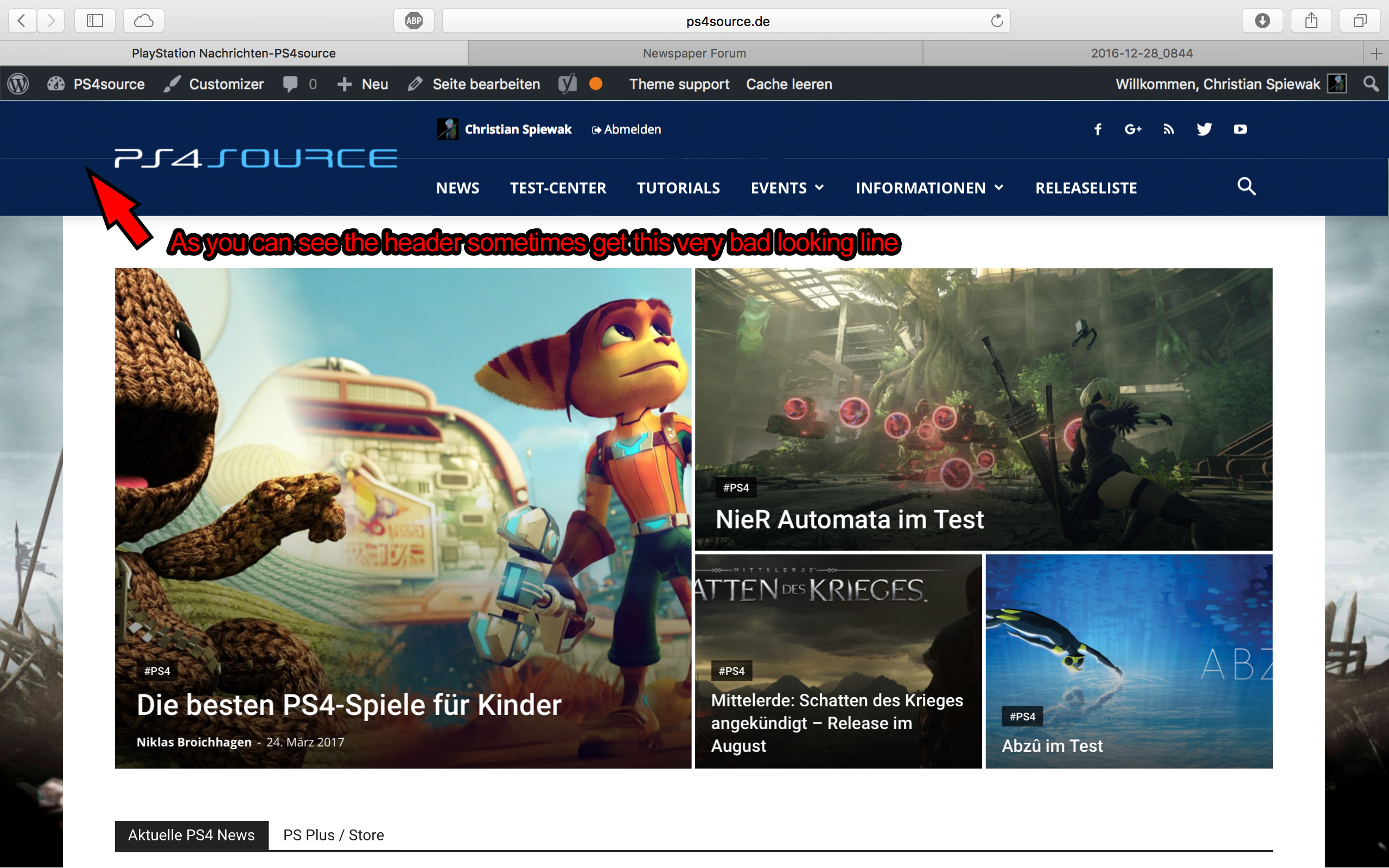
2) Which register plugin should I use? I don’t want to let new users to set a new password on the bad looking interface of WordPress. Im sure you guys know what I mean and have a good recommendation for that. Beside that, what should I use to prevent registrations from bots?
3) Is it possible to have a gradient header and footer, instead of just one color? It looks a bit boring.
4) How can I change the menu just for the mobile page, without using td-mobile-plugin?
5) How can I change the the font style and size of quotes? At default settings it looks way too big (see here)
6) Is it ok too use the responsive options, to create one site with different blocks and grids for mobile and desktop? Im asking cause I don’t know if my site will load much longer, if it has to load information even though there are not displayed. (see details here)
7) My current page speed is a disaster (see here). Why is it so bad, since Im using kraken.io image optimizer and WP Super Cache? How can I improve the score?
8) How can I use td-speed-booster, without uninstalling my plugins? (Disqus Comment System, TablePress, TotalPoll…) I really need those plugins, but I still want to have a fast homepage!
9) If I set [Template Setting->Force Full width->Header Menu] to “No Stretch”, the logo of my site is not at the correct position.

10) validator.w3.org shows, that my page has 33 errors (see here). How can I fix them?
 cornelio70
The theme comes by default with a gray background and the letters of the title white at the top. As I can change the background colors and the colors of the letters of the titles in the header.
cornelio70 Reply To: How can I change the background and the letters on the header colors
 dhincapie
I having big troubles with the users of my website, especially those who are trying to get my webiste with their android devices. Every time they try to open a post from my website they get a fullscreen colored image that do not let them view the content of my web. I assume that image comes from the mobile menu because it has the same colors that the menu. I am looking a way to solve this because i am losing a lot of users because of this. HOW DO I SOLVE THIS? CAN I DELETE DE MOBILE HEADER WITH THE MENU? CAN I ADD OTHER KIND OF PLUGIN AND DELETE DE NEWSMAG HEADER? I would prefer you guys to solve this problem and work with the things that i already paid for. Thanks in advaced
SCREENSHOT 
 hellomondaythailand
 Thank you, It’s work!, but there other problem the margin between header in pages and posts are different.
How can I fix it?
Thank you.
 euw
euwHi,
as we replaced our registration process with a woocommerce register page, we want to replace the “register” URL in the mobile menu (normal webpage, not the mobile theme plugin)
Additionally we replaced the standard wordpress search with the Plugin “WPSOLR”. We want to change the code in the mobile menu for the search page, because the search plugin (WPSOLR) works with an own search page and call, not the wordpress standard.
We already changed the search magnifier on the normal page (which is located in /parts/header/header-menu.php). Could you tell me, where we can find/replace the search code for the mobile menu + the “register” URL?
Thanks in advance!
