
- NewspaperHeader Builder
- NewspaperHeader ads
- NewspaperHeader styles
- NewspaperSearch setup for custom post type
- NewspapertagDiv Composer – Website Manager
- NewspaperBookmark – Save For Later
- NewspaperWooCommerce: Happy “Add to Favorites!”
- NewspaperModal Popup
- NewspaperFlex Block Settings Guide
- NewspaperPosts Loop Element
- NewspaperHow to Add a Logo in Newspaper
- NewspaperDefault Category Settings
- NewspaperWhen tagDiv Composer is Not Working
- NewspapertagDiv Cloud Library Plugin
- NewspapertagDiv Composer Tutorial
- NewspaperUsing the Theme Translations with WPML
- NewspaperInstagram in Newspaper WordPress Theme
- NewspaperWeather Shortcode
- NewspaperThe Mobile Theme
- NewspaperLogin – How to Enable User Registration
 dharma3d
 The problem is that it is not in any of the elements. It’s beneath the header and above the first element.
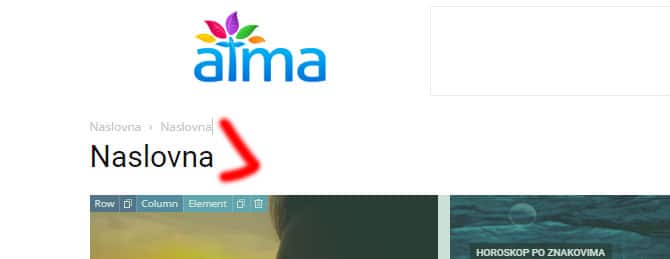
 star.dgtl
 Thank you for help!
Can you also support me with the header as well? It is set to stretch to 1400 pixels in the composer settings, but it doesn’t display correctly when previewing. Any insights or suggestions on how to solve this?
Thank you!
 Bettina
 Hello @newsblaze!
For the default templates, there is an option to deactivate the H1 on pages in the theme panel -> header.
Thank you!
 Anamaria
 Hi,
Can you please provide some screenshots? Because now I checked and is the same header.
Thank you!
 mudiii3
I’ve successfully updated the logo text in the sticky mobile header, and this change is visible on all pages except the homepage. On the homepage, the sticky header still displays the default “town talk” text.
website: https://kashmirdastak.com/
star.dgtlHello everyone,
I’m encountering an issue where Google Fonts aren’t displaying correctly when I preview the website, although everything looks fine when viewed in the composer. Additionally, the header stretch feature is not functioning properly during preview. Has anyone faced a similar problem or has any advice on how to resolve this?
P.S. I’m using Siteground’s staging environment for my work. Could this be contributing to the issue? Also, performing a hard reload seems to fix the titles temporarily, but the font style for article meta information still appears incorrect.
Thanks!
 newsblaze
 How do I “Check in the Tagdiv Composer” for the header?
This is in the header, not in the front page.
I am using the standard Tagdiv “Style1” header.
If there is a way to edit that header, I don’t know how to do it.
 Oktay
OktayHi there,
I’m having some trouble with the header row on Mobile screen only for a newspaper website (gercek.co.uk)
Most of the pages are OK, but the issue is that only on some pages or articles the mobile header is not showing. But only when you scroll, it shows the scroll header version.
I’m hosting on Siteground and I use a cache plugins (Cache Enabler); so I purge Siteground cache, and I also clear site cache with the plugin.
But every time, some random articles and pages (not always the same articles/pages) does not show the initial header.
I cannot understand why it’s happening randomly. I also noticed that the header I did is not universal across the site; every page header seems to be independently controlled. Is this normal?
How to resolve this issue please?
Bettina Hello @newsblaze!
Check in the TagDiv Composer and disable the H1. For example, H1 from logo(header, footer, mobile, sticky): https://forum.tagdiv.com/topic/6-h1-tags-on-front-page-bing-have-deindexed-my-site/
Thank you!
newsblazeBut a few days ago, I notices that I have 2 H1 hags, both for the logo image.
Each one rendered by different code.
I saw that many people have complained about this, without it being resolved.
This file may contain the location of that:
td-cloud-library/shortcodes/header/tdb_header_logo.php
The function render() is called twice and I believe that inserts the two lines below into the HOME page.
I did have a standard logo and a retina logo, but I removed the retine logo because I thought that might be the cause of this, but removing it didn’t help.
One is probably display:none; in the CSS
Isn’t there a better way to do this than to have two complete H1s in the page ?
Some software may see the CSS, but some is not that smart.
For example, RankMath thinks there are 2x H1 tags
I think Google ignores one of them.
But I saw that some people using Newspaper theme had up to 6 H1 tags.
In the rendered page, here are the two lines:
Line 456
<style>.tdb_header_logo{margin-bottom:0;clear:none}.tdb_header_logo .tdb-logo-a,.tdb_header_logo h1{display:flex;pointer-events:auto;align-items:flex-start}.tdb_header_logo h1{margin:0;line-height:0}.tdb_header_logo .tdb-logo-img-wrap img{display:block}.tdb_header_logo .tdb-logo-svg-wrap+.tdb-logo-img-wrap{display:none}.tdb_header_logo .tdb-logo-svg-wrap svg{width:50px;display:block;transition:fill .3s ease}.tdb_header_logo .tdb-logo-text-wrap{display:flex}.tdb_header_logo .tdb-logo-text-title,.tdb_header_logo .tdb-logo-text-tagline{-webkit-transition:all 0.2s ease;transition:all 0.2s ease}.tdb_header_logo .tdb-logo-text-title{background-size:cover;background-position:center center;font-size:75px;font-family:serif;line-height:1.1;color:#222;white-space:nowrap}.tdb_header_logo .tdb-logo-text-tagline{margin-top:2px;font-size:12px;font-family:serif;letter-spacing:1.8px;line-height:1;color:#767676}.tdb_header_logo .tdb-logo-icon{position:relative;font-size:46px;color:#000}.tdb_header_logo .tdb-logo-icon-svg{line-height:0}.tdb_header_logo .tdb-logo-icon-svg svg{width:46px;height:auto}.tdb_header_logo .tdb-logo-icon-svg svg,.tdb_header_logo .tdb-logo-icon-svg svg *{fill:#000}.tdi_10 .tdb-logo-a,.tdi_10 h1{align-items:flex-start;justify-content:center}.tdi_10 .tdb-logo-svg-wrap{display:block}.tdi_10 .tdb-logo-svg-wrap+.tdb-logo-img-wrap{display:none}.tdi_10 .tdb-logo-img-wrap{display:block}.tdi_10 .tdb-logo-text-tagline{margin-top:2px;margin-left:0;display:none}.tdi_10 .tdb-logo-text-title{display:none}.tdi_10 .tdb-logo-text-wrap{flex-direction:column;align-items:flex-start}.tdi_10 .tdb-logo-icon{top:0px;display:block}@media (max-width:767px){.tdb_header_logo .tdb-logo-text-title{font-size:36px}}@media (max-width:767px){.tdb_header_logo .tdb-logo-text-tagline{font-size:11px}}@media (max-width:767px){.tdi_10 .tdb-logo-img{max-width:160px}}</style><div class=”tdb-block-inner td-fix-index”><h1><span class=”tdb-logo-img-wrap”> </span><span class=”tdb-logo-text-wrap”><span class=”tdb-logo-text-title”>AxcessNews</span><span class=”tdb-logo-text-tagline”>Business News Channel</span></span></h1></div></div> </div></div><div class=”vc_column tdi_12 wpb_column vc_column_container tdc-column td-pb-span4″>
Line 470
<style>.tdi_26 .tdb-logo-a,.tdi_26 h1{align-items:flex-start}.tdi_26 .tdb-logo-a,.tdi_26 h1{justify-content:center}.tdi_26 .tdb-logo-svg-wrap{display:block}.tdi_26 .tdb-logo-svg-wrap+.tdb-logo-img-wrap{display:none}.tdi_26 .tdb-logo-img-wrap{display:block}.tdi_26 .tdb-logo-text-tagline{margin-top:2px;margin-left:0;display:none}.tdi_26 .tdb-logo-text-title{display:none}.tdi_26 .tdb-logo-text-wrap{flex-direction:column;align-items:flex-start}.tdi_26 .tdb-logo-icon{top:0px;display:block}</style><div class=”tdb-block-inner td-fix-index”><h1><span class=”tdb-logo-img-wrap”></span><span class=”tdb-logo-text-wrap”><span class=”tdb-logo-text-title”>AxcessNews</span><span class=”tdb-logo-text-tagline”>Business News Channel</span></span></h1></div></div> </div></div><div class=”vc_column tdi_28 wpb_column vc_column_container tdc-column td-pb-span4″>
 Calin
Calin Hi,
Yes, that is the cloud header and indeed most of the time provides better results.
Also you can check the rest of templates, footer, category… and set them from cloud and after that check if you have the tagDiv Standard Pack plugin installed, if you do, then please disable it and check the website if displays shortcodes, if does, then activate the plugin and change those elements (usually are blocks that needs to be replace with flex blocks). If you have the tagDiv Standard pack enabled and you’ll disable the plugin there should be some more improve for the performances.
Thank you!
 FBM
FBMThis error in our Plesk console and it pops up almost every second:
AH01071: Got error ‘PHP message: PHP Warning: A non-numeric value encountered in /var/www/vhosts/***.de/httpdocs/wp-content/plugins/td-cloud-library/shortcodes/header/tdb_mobile_search.php on line 269; PHP message: PHP Warning: A non-numeric value encountered in /var/www/vhosts/***.de/httpdocs/wp-content/plugins/td-cloud-library/shortcodes/header/tdb_mobile_search.php on line 271’
PHP: 8.2.16
Newspaper: 12.6.4.
 Tech Lifestyle
 Now Search Page is not functional.
Here is DRAFT link:
1. http://new.atv-nautica.com/shop/page/5/?product-page=7 – we want Lifestyle from header
2. http://new.atv-nautica.com/shop/page/5/?product-page=19 – Product on white is ok
Tech Lifestyle Hi,
I send you links 🙂
1st Product Group:
Do you see lifestyle image on header on this link: http://new.atv-nautica.com/product/sun-sport-230/
This is tagdiv Product background image element
For this product group (boaats) we want show this element / image in Search
Other product groups:
Do you see Product image after Lifestyle image in header,
http://new.atv-nautica.com/product/900dsx/
For this group, we want to show in search Product image in element tag DIV product element in search.
In short:
– for boats to show lifestyle image of product in Search
– for other products to show Product image on white in Search.
Problem is, that, both group must have Product image on white on Product page, but to show different in search.
Anamaria Hello,
You can use modal popup and you can import a page from cloud https://cloud.tagdiv.com/#/load/Pages and you can see the example here https://demo.tagdiv.com/newspaper_towntalk_pro/header-template-towntalk/?
Thank you!
 newspatron
 Hello thanks for your reply, Bettina!
I checked my website home page, the template, the menu and the headers. I also checked all the pages.
I am not using flex blocks. Therefore none of the blocks feature an Ajax filter or any of the mega menus are also not being used.[that have subcategory filters.]
Is there still an alternative to troubleshoot this?
Amit Kumar
 masc
mascWe had an old newspaper theme, got malware
we upgrade wordpress to 6.4.3
and tried to upgrade newspaper them, but we start getting these errors
Uncaught Error: Class ‘td_util’ not found in /var/www/html1/wp-content/themes/Newspaper/includes/wp-booster/wp-admin/tagdiv-view-header.php:19
Stack trace:
#0 /var/www/html1/wp-content/themes/Newspaper/includes/wp-booster/wp-admin/tagdiv-view-theme-plugins.php(59): require_once()
#1 /var/www/html1/wp-content/themes/Newspaper/includes/wp-booster/tagdiv-wp-booster-functions.php(499): require_once(‘/var/www/html1/…’)
#2 /var/www/html1/wp-includes/class-wp-hook.php(324): {closure}(”)
#3 /var/www/html1/wp-includes/class-wp-hook.php(348): WP_Hook->apply_filters(”, Array)
#4 /var/www/html1/wp-includes/plugin.php(517): WP_Hook->do_action(Array)
#5 /var/www/html1/wp-admin/admin.php(259): do_action(‘newspaper_page_…’)
#6 {main}
thrown in /var/www/html1/wp-content/themes/Newspaper/includes/wp-booster/wp-admin/tagdiv-view-header.php on line 19
[05-Mar-2024 20:03:34 UTC] PHP Parse error: syntax error, unexpected ‘)’ in /var/www/html1/wp-content/plugins/td-composer/legacy/Newspaper/includes/td_config.php on line 9062
 Vincent-01
actuwebtech.com
 KevinLeclerc
 Hi Calin, thank you for your reply.
Sadly I think I use the cloud header, which is better for the performance than the tagDiv Sandard Pack, can you confirm ?
https://prnt.sc/tTUftvy5MWKb
Since 2018, have you developed a feature to exclude the 3rd category level in the mega menu? I imagine this must be a regular request from your customers. Edited content/plugins/td-cloud-library/shortcodes/header/tdb_header_mega_menu.php after each theme update can’t be an option
Best,
Kevin
 oqt
oqtHello,
I have a button on header template named Subscribe. I wish that once clicked, a modal is opened with subscription or custom content displayed in the popup.
Do you have any ready example of this process to follow it?
thank you vm
 hagalil
 Hi,
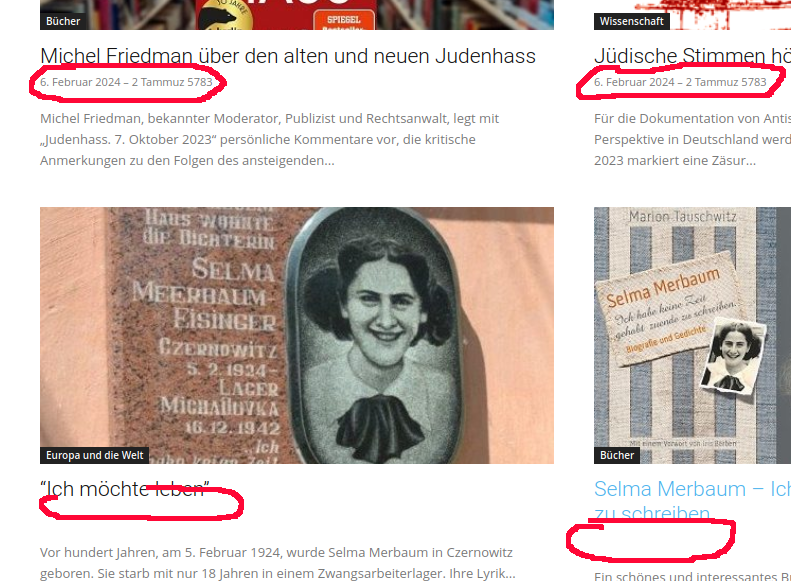
I think we have the same or a related problem on our website : The articles on the first page show dates underneath the article headers but there are no dates displayed when a user scrolls down and the next page is shown. The website is
hagalil.com
In the LayoutEditor “Show Date” is set to “Show” and “Show modified date” is disabled.
Thanks!
…and a screenshot :
 ncompass
Hi there,
I am trying to resolve an issue with a membership plugin (Paid Memberships Pro) we use for our news site.
The membership plugin filters content during “the_content” filter in order to hide content to non members. However there seems to be an issue with the page based mega menu that uses the_content filter to render shortcodes etc. The menu can get filtered when it is shown on or near membership content (the_content doesnt have any identifying features e.g. page ID).
I have reached out to the membership plugin developer and they have been trying to work on compatibility with your theme — they are asking for a hook they could use, so they can unhook their filter during megamenu rendering, and then rehook once it is complete.
Here is there message to me:-
“I managed to replicate this issue with both the category and page ID method for mega menus. The code you shared definitely helps us, however it seems there’s no easy hook to disable the_content while in the menu item or location by the looks of it.
To help speed up support, please can you reach out to the Newspaper support team to provide us with hooks to unhook the_content temporarily while in the header menu item. I wasn’t able to find the right hook within their plugin or theme, but I am still going to look into this further.
The idea to the solution would be to unhook the_content while in the menu location and add it back once the menu is finished rendering which should help.
Thank you for your patience and understanding.”
I can find the problem line on Line 205 /td-composer/legacy/common/wp_booster/td_menu.php
Is this something you would kindly help with?
Kind Regards
Jeremy Stone
Tech LifestyleDear All,
we have next situation:
1. Displaying product images in search
In Woo Product Pages we have 3 different templates for 3 different product groups.
All three groups at the top of the visual have:
– Woo Product background Lifestyle image in the header, then
– Woo Product product image on a white background
1. For the 1st group, we want the Lifestyle photo to appear in the search,
1st Product group Template http://new.atv-nautica.com/product/sun-sport-230/
2. and for other groups of products, that a photo of the product on a white background appears in the search
2nd Product group Template http://new.atv-nautica.com/product/900dsx/
Do you have a recommendation for a solution?
2. Displaying product links from a group / series on the product page (a bit complicated)
This product exists in several versions.
http://new.atv-nautica.com/product/df-300-apx/
Each of these products has a separate page. I wouldn’t be able to define them as variations because they don’t just differ in color (Or maybe I’m wrong):
– same photo
– Same initial model designation (DF 300), with different ending (apx, apxx, btx)
– different specification
– different price
Example:
a. DF 300 APX – basic model
b. DF 300 APXX
c. DF 300 BTX
1. We want only the basic model to appear in the search
2. On the page of the basic model (DF 300APX), we want to have the option to “click to see” other versions of the model, e.g.
“See other versions: DF 300 APX / DF 300 APXX / DF 300 BTX”
Anamaria Hello,
Now, you have the mobile theme plugin enabled.
For the Mobile Theme plugin, you can make changes from Newspaper -> Theme panel -> Mobile theme -> Header and for color and fonts from Newspaper -> Theme panel -> Mobile theme -> Theme colors/ theme fonts https://i.imgur.com/S8UQjVs.png
Also, to change the color for category please check here https://i.imgur.com/ivb0r38.png
This is a video about Responsive Newspaper Theme, AMP & Mobile Theme, Mobile Pages & Templates -> https://www.youtube.com/watch?v=SpGkOnJeNZY.
Thank you!
Calin Hi,
The new path top that file is – wp-content/plugins/td-composer/legacy/Newspaper/includes/shortcodes/td_block_mega_menu.php but this will work only for a standard header, if is a cloud header the path is a different one wp-content/plugins/td-cloud-library/shortcodes/header/tdb_header_mega_menu.php unfortunately this file can not be set in a child theme, it will be need to be edited after each theme update or it will be need to make a plugin with a similar shortcode in tagDiv Composer.
Thank you!


