No search results were found in Documentation!
 Anamaria
 Hi,
Is possible to have a plugin that redirects the author to the homepage, I SAW YOU HAVE RANK MATH WHICH HAS THIS OPTION -> https://wphowknow.com/how-to-fix-author-page-redirecting-to-homepage-issue-wordpress/ -> https://wphowknow.com/how-to-fix-author-page-redirecting-to-homepage-issue-wordpress/#fix-author-page-redirects-to-homepage-rank-math
Also, for color overlay, you need to change the opacity -> https://i.imgur.com/LJW9sYE.jpg
Thank you!
Anamaria Hello,
For the problem with the author links, maybe the author archives are disabled in the Yoast plugin, if they are author links will be redirected to the homepage. Check if that is the case: http://prntscr.com/mbwwuk -> https://forum.tagdiv.com/general-options-may-interfere-newspaper-theme/ after that clear all cache, purge CDN(if you are using) and check the results.
Let me know the results!
Thank you!
 Calin
Calin Hi,
Is this problem happening only when you try to edit the homepage ? https://www.politicamagazine.it/wp-content/uploads/2022/01/errore.jpg if yes, it can be from some custom settings that were made on that page, in this case you can use the revisions.
Another similar case is if you are using mod security on your host and this is enabled.
Also, please check our guide about: When tagDiv Composer is not working -> https://forum.tagdiv.com/tagdiv-composer-not-working/
In case that the problem is still persisting, please make a full backup and provide wp-admin and cPanel access via email, at contact@tagdiv.com, we’ll check it as soon as possible.
Thank you!
Anamaria Hello,
So, if you want to have the mobile responsive version, you can simply disable the mobile theme plugin on the homepage https://imgur.com/OTAJQSS
Also, please check this topic where I explained each mobile version -> https://forum.tagdiv.com/topic/mobile-version-not-working-properly-2/ and choose what mobile version you want.
Thank you!
 digitaldevil
The Thumbnail images on the homepage or any other pages are not showing. Kindly help me to solve the issue
WEBSITE: https://muzaffarpurwala.com/
 bishar
there is an error with one of your plugins i contacted to my hosting services and they send me the error cause .. when i try to login to wordpress it shows the homepage of my website but not the admin dashboard and this is the error file they send to me can you please check ..
[22-Dec-2021 14:53:28 UTC] PHP Warning: include_once(): Failed opening ‘/home1/kavengmy/public_html/wp-content/plugins/td-cloud-library/includes/tdb_template_import.php’ for inclusion (include_path=’.:/opt/cpanel/ea-php73/root/usr/share/pear’) in /home1/kavengmy/public_html/wp-content/plugins/td-cloud-library/includes/tdb_functions.php on lin
Calin Hi,
If the problem is only when you are not logged, then it is from a cache that is still delivered, is possible that you or your host to use some plugin that is cached the homepage -> https://i.imgur.com/X4D2px0.png, so if the changes are visible after one day, that means that after one day that cache is cleared.
Thank you!
Calin Hi gasthis,
Did you made the mobile page only for a page (homepage)? or you made for each pages and cloud template ? If you made for only a page, then the mobile page will be only when you are on that page.
The mobile page can be edited with tagDiv Composer like this -> https://prnt.sc/26byi6a on cloud templates -> https://prnt.sc/26byio6
I hope this will help you!
 33ParkMedia
https://smallcapexclusive.com/
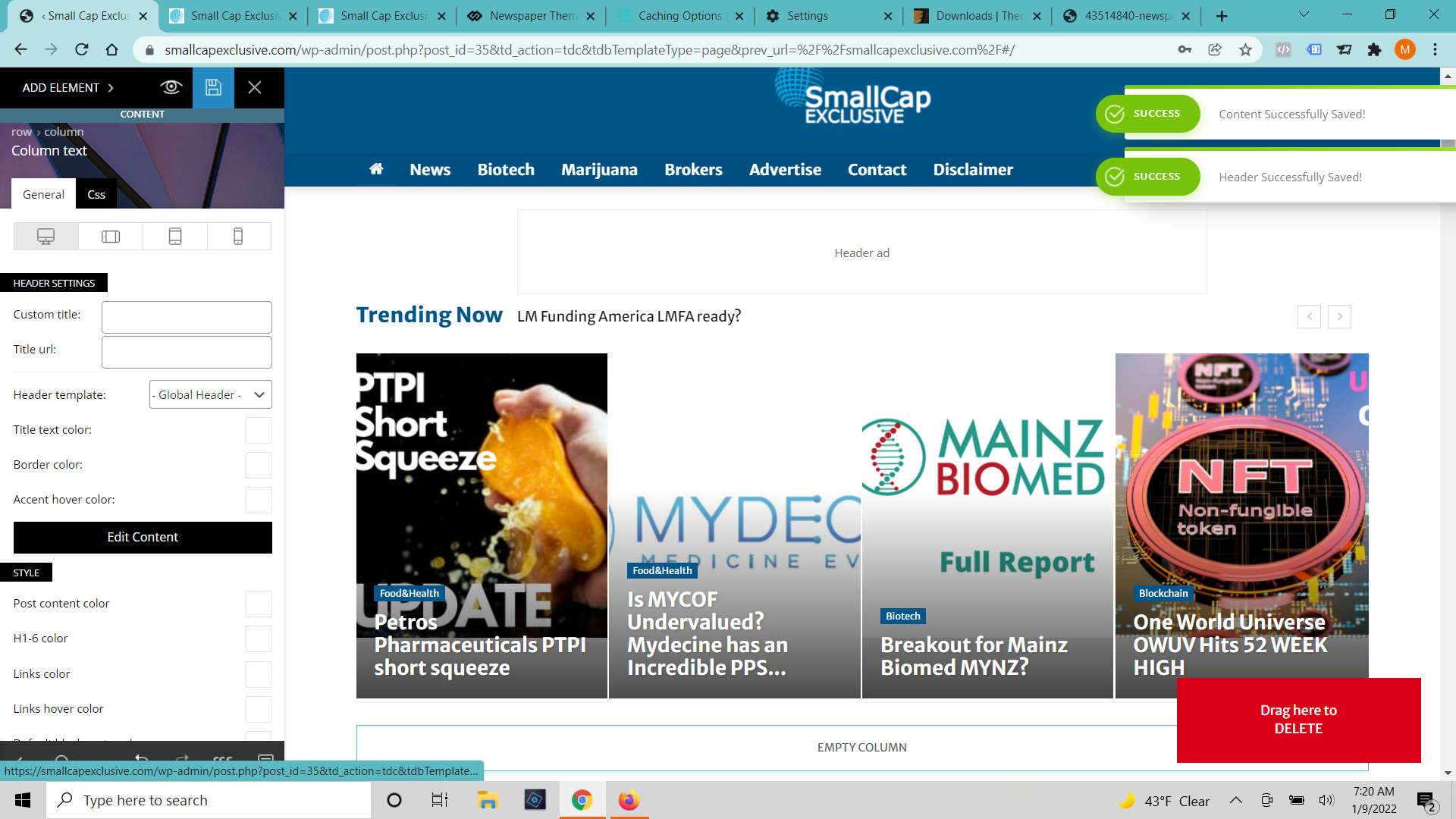
A few days ago our homepage started showing up out of sorts (built with tag div composer). I have edited it and got it looking correctly again (6 or 7 times). When I press save it says that the changes were successfully made but none of the changes show up. I’ve cleared cache on the browser and server. I’ve tried incognito windows and different browsers. I’ve waited 12 hours. (https://smallcapexclusive.com/wp-content/uploads/2022/01/Tag-Div-Saved-Changes.png)
When I click on the page to edit with TD Composer again It shows the old version of the page and gives an error message that the model doesn’t match the content and to press the undo button. (https://smallcapexclusive.com/wp-content/uploads/2022/01/Tag-Div-Saved-Changes.png) When I press the undo button it fixes the margins a bit but not any of the content and it still won’t save.
 ChandlerBing1985
Hi,
I have created the mobile homepage from tagdiv composer (site http://www.contra-ataque.it) but if I log in from mobile it always shows the basic version of the mobile theme. How can I disable this to make the homepage created with tagdiv composer appear?
 Benedict Paramanand
Hello All,
Domain is https://sustainabilitynext.in/
The sidebar on desktop is in correct position, but the same on mobile shows in some other place.
Is there any help to get it to the top position? Please help me in this matter.
A screen shot on desktop is attached to show which one I need to get on top.

Benedict ParamanandHello All,
Domain is https://sustainabilitynext.in/
Don’t know for what reason it appears correct while I browse through the desktop or laptop. But if I tried to browse through the mobile there is a gap between the header ad and the homepage. Please help me to correct this.
I have attached the screenshot of desktop and also mobile for your reference.


 evelienbruins
Dear Sir/Madam,
I would like to change the color of the white block behind the title on my homepage. It seems to be padding but I’m not sure how to change the color? It will have to be either completely transparent, or partially transparent (I’ll have to see how it looks). Or maybe a dark purple color, I’d like to experiment with this, if you could point out out to me how to change the color, that would be so wonderful.
This is my website: http://voordeliefstemoeder.nl
Thank you very much! ?
Kind regards from Rotterdam
Evelien (I’m not sure how to post an image here? I hope you can see what I mean on the website, it’s about the titles in the top slider)
 vidweb
Hi,
I imported a Cloud Section to my homepage.
But, I can’t seem to position it to the place where I want it to be. I have tried click and drag but, that is not working.
How do I reorder the rows or sections on my page?
Please take a look at this video I created to explain.
https://drive.google.com/file/d/1cVQhJiajztPcNz3Fz1WsYGwbiv0Ian9p/view?usp=sharing
Thanks for your help,
Ken
 gimmydagar
 Hi, thanks for quick update.
So, Should I create Single post template first?, Actually I am using default one.
URL – https://www.placementoffer.com/
can you please guide me, how to create and apply without changing the layouts for other pages like Homepage or Menu/ categories.
 Atithya
Hi, every time I open my website electronicsforu.com on mobile it is opening in the desktop version.If I have selected amp+mobile why the desktop version is opening.
Please check electronicsforu.com on mobile.
 Lane18
 Hello Calin:
Happy New Year! Thank you so much for your response. I appreciate the information about the mobile page. Can you please also provide information for my second point, which was the following:
2. Secondly, can non-google adsense ads rotate? For example, if we have 10 clients that are interested in placing an ad on our homepage, instead of having to place 10 ads on the homepage, how can the ads rotate in a single ad block? Also, how can each client receive statistics on their ad views, such as the number of times the ad was clicked, etc.?
Thank you so much for your help!
 AndyMoD
 Great thanks Anamaria….one more if I may, on my homepage, I have a Flex Box 1…can I tell it to show a second row of 3 below the top 3?…I see other blocks do but I like this one but can only see the setting for changing the number of columns.
Thanks
Anamaria Hello Bob,
Please set the page on A Static page, and assign a homepage (you need to have a homepage/page that you have created before) from Settings -> Reading => https://i.imgur.com/mwjp18K.png
Also, please make sure your settings are saved.
After that, you can design your homepage with the tagDiv Composer or you can import a template from tagDiv Cloud Library.
Also, on our channel https://www.youtube.com/channel/UCOT1RiNysIPCTPSnVZskwtQ, you can find more videos that can help you and documentation https://forum.tagdiv.com/newspaper-theme-documentation/ and you can ask us here on the forum or email if you have any questions.
Thank you!
 sadiquemannan
 Hi, Problem still exists. The featured images and thumbnails are not loading on the homepage after updating to the latest version of the Newspaper theme.
Here is the screenshot URL:
https://snipboard.io/rc2nzm.jpg
Kindly solve the issue ASAP.
Lane18 Hello Bettina:
I hope that your New Year is off to a great start. Thank you for your previous responses, but I do still have the following questions:
1. I do not want to use a mobile theme, but keep the desktop theme across all devices. However, on cell phones, the header is not displaying as it does on the desktop and tablets. For example, the header ad that is created through the theme panel does not show on cell phones. Also, the background of the header on the desktop is white, but on the cell phones is black.
2. Secondly, can non-google adsense ads rotate? For example, if we have 10 clients that are interested in placing an ad on our homepage, instead of having to place 10 ads on the homepage, how can the ads rotate in a single ad block? Also, how can each client receive statistics on their ad views, such as the number of times the ad was clicked, etc.?
Thank you so much for your help with these matters.

 nockeeee
Hi,
my website experiences a high value of cumulative layout shift. The entire website (homepage, post pages, etc.) shifts first a bit to the right then to the left (to the original position) while loading. This is causing a high value of cumulative layout shift in the google pagespeed test. How can I fix this problem? I checked another website that also uses the newspaper theme and that website has the same shifting problem.
Calin Hi,
You need to make sure that all your templates are from cloud, this can be done easily if you install a pro demo, but before this please make a full backup. (steps to disable the standard pack).
The second method required some more time, but is better. What you need to do is to import the cloud templates from tagDiv Cloud Library and assign them (replace the homepage, category, author posts, header, footer,.. templates ). After all those are done, disable the tagDiv Standard Pack, if there are no shortcode on website, then you replaced all standard elements, but if there are, the set back that plugin and replace that element.
Also you can make those changes on subdomain and when everything is done just transfer theme on live website.
Thank you!
Calin Hi,
For the problem with slow css, we’ll like to take a closer look. If you agree, please make a full backup and contact us via email at contact@tagidv.com please provide wp-admin and cPanel access. We’ll check it as soon as possible.
I think that you are referring to this https://i.imgur.com/hMpDRnH.png this login need to be removed using tagDiv Composer, edit the homepage and use the right click on that element to delete it.
You need to do the same on posts, edit the single post template with tagDiv composer,
select the comments section and using the right lick delete that element.
Thank you!
 radanoid
Hello!
Happy New Year!
Today I updated to 11.4. on this site – zonaburgasbg.
I tried to change the template for a single post with TagDiv Composer and it showed me this – Ooops… Error 404
Sorry, but the page you are looking for doesn’t exist.
You can go to the HOMEPAGE
Error at zones: 6(models) : 5(dom). The model does not match the content Current state has involved an issue. You could try an UNDO operation (CTRL+Z / CTRL+SHIFT+Z)
The same is true of Category Template.
The tagDiv Composer works on the home page.
Best regards!
Ilian Radanov