
- NewspaperHomepage – How to build and set it
- NewspaperHow to edit modules for Flex Block X
- NewspaperGeneral Options that May Interfere with the Newspaper Theme
- NewspaperThe Newspaper Mobile Theme: Introduction
- NewspaperHow to Add a Logo in Newspaper
- NewspapertagDiv Shop
- NewspaperHow to Use tagDiv Cloud Library
- NewspaperDesign your Post Pages using the Cloud Library Templates
- NewspaperHeader Builder
- NewspapertagDiv Cloud Library Plugin
- NewspapertagDiv Composer Tutorial
- NewspaperNewspaper theme documentation
- NewspaperThe Mobile Theme
- NewspaperPage templates
- NewspaperTheme Colors Introduction
- NewspaperFooter Builder
- NewspaperMain Menu
- NewspaperPre-built Websites: Introduction
 busnet
We have this issue, in newspaper theme, Pulse pro demo. We have to change the background color of this div .tdi_135_dd9_rand_style, the style is write inline and the number of the class name change everytime you refresh the page.
We set the color from theme panel but the div continue to be violet, and not light blue like the rest of the site.
Can you help us, please?
 pavel_t
I want to use Slide element from TD Composer on my homepage. But when I put Slide element into layout, when I switch to Mobile viewport, it disappeared! As well as when I save page, on mobile is Slide element really missing. And there is no option how to hide/show element depending on viewport… What is the problem? I thought different viewports are only for us to imagine how it looks on mobile or tablet but why it is erasing elements?
 Vlad S
 Hello !
You have to set your wordpress to display a page as homepage as you can see in this setting: 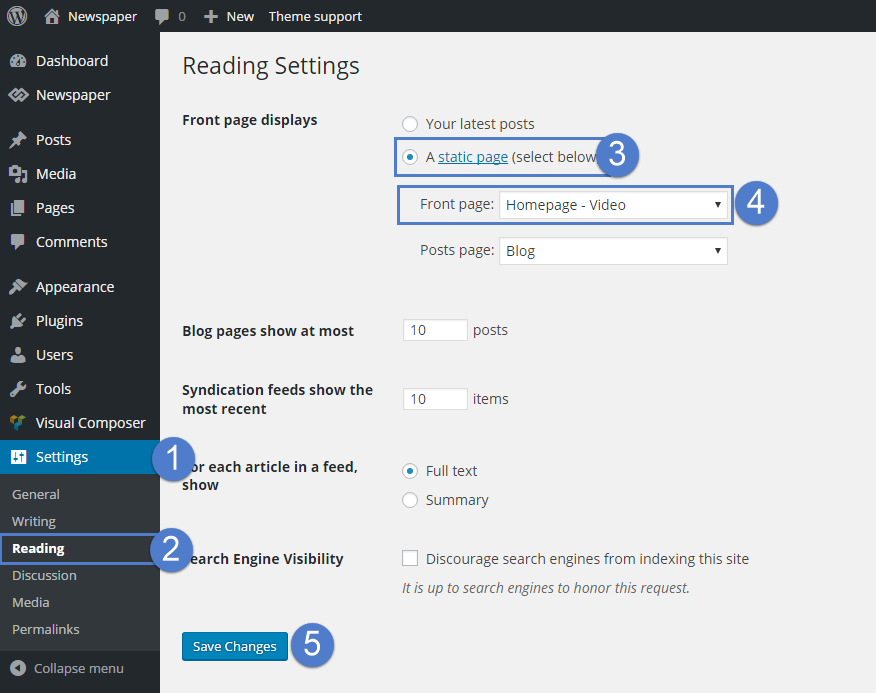
Thank you !
Vlad S Hello !
You have to set your wordpress to display a page as homepage as you can see in this setting:
Thank you !
 ritutiwa
 I don’t want to use homepage like this mysite.com/home , Instead I have to show homepage to main url like this mysite.com (this will be my home page). If is it possible to use mysite.com as homepage?. Because I don’t want any redirect..
Vlad S Hello !
Please make sure that you have your homepage set as you can see here: https://forum.tagdiv.com/homepage-how-to-build-and-set-it/
Thank you !
 andymako
Hi.
I just installed the Newspaper template and configure the homepage of my site, right now there is some articles published.
I want to know how can be enabled the pagination on the homepage?, i cannot see the option.
Thanks.
 Calin
Calin Hi thearrangers,
Just make sure that you are using the same footer template for the entire website, because is look that on one page the footer is different and the code for icon is not there, for this check to have set the footer template as global in theme panel -> https://i.imgur.com/wDNNBRv.png and make sure that you have apply it as global on all pages, for example edit the homepage and the other pages with tagDiv Composer -> https://i.imgur.com/IsbgYXf.jpg click on manager -> https://i.imgur.com/KeVVwBa.jpg and check to have set the global footer template -> https://i.imgur.com/4Cr8O9H.png
Let me know the results!
 phommasy
Hi. please help I use tagDiv Composer to build my homepage when I use Ad box and and insert Image in Image ad Tab on All device, it is not working. cannot insert image in ad box, it show Error: “Invalid data Current state has involved an issue. You could try an UNDO operation (CTRL+Z / CTRL+SHIFT+Z)”
 line77
Hi,
I created a page using flex blocks and other blocks to show various category posts…for soem reason the blocks do nto show the images…..of the posts – and when I set this page as the homepage – the homepage does not show any posts – is this because this is supposed to be a static page???? how do i show all the posts on the main page – like I do on the category pages???
 theincredibleyaya@gmail.com
Whatever I put in the first row on my homepage under the top menu bar gets carried into my blog posts (shows up as header in blog post)
see what I mean here:
https://thecreatecafe.com/2020/09/14/how-to-differentiate-your-jewelry-in-a-saturated-market/
The “email signup” i only want on my homepage. And I added it on the homepage with TD composer. But it got carried into all my blog posts too.
How to fix?
Calin Hi,
Is look that the revolution slider is no longer on you homepage, you can use tagDiv Composer -> https://i.imgur.com/NYebc3j.png ( also you can set the shortcode directly in ca column text in text area). -> https://i.imgur.com/wxruA0T.png
Thank you!
Calin Hi CostaVR, I think that you do not understand, the footer page can be access only from forntend, for example, in your screenshots you have the footer template set global and you can edit the homepage with tagDiv Composer and go down to footer and select the elements you want to change (there is no option for footer template like for the rest of cloud templates to edit it from backend).
-> https://i.imgur.com/Tuw6ahk.jpg -> https://i.imgur.com/myTDRvX.png
Thank you!
 shanekelly
I only have one header menu on my site – but for some reason on the homepage it doesn’t show the updated menu.
We have similar problems on other pages where some users see updated content and other users see old non-updated content.
Calin Hi,
Maybe I do not understand correctly, but we do not have any free theme, we have two themes, one is Newsmag and the other one is Newspaper. Now the Newsmag this is a simple theme where you are limited and you can edit the website using theme panel settings and you can build pages using tagDiv Composer (also this theme do not have pro demos), now the Newspaper theme is a more complex theme that has a lot of options and include tagDiv Cloud templates, these can be edited using tagDiv Composer, therefor you can use pro demos (pro demos are made only with tagDiv Composer and cloud templates, theme panel settings will not affect them).
Now If you are using News mag then you are using only standard templates, therefore you can edit the text from theme panel -> https://i.imgur.com/7K4NxlL.png also the logo has a link to homepage as you say.
If there are still some problem, let me know, also provide some screenshots or a link where I can inspect the problem.
Thank you for your understanding!
 oliviaparis
 Calin, it works now on homepage blocks and categories with a shortcode image. On the menu not totally. I get a result with the shortcode brackets and a word in it: [abonnes]. See in Screenshots.


 fabioweb90
 Hello i have an issue i think..
After post is published i’m not able to see it in homepage immediately but only after page refresh..
What can i do for this?
All cache option are disable and also cloudflare is off..
Here a video https://we.tl/t-4PS1bBNBmd
Thanks
Vlad S Hello !
This goes like this:
If you are using any Cloud library templates or any PRO Demos. They will be fully editable using tagDiv Composer. Any setting made in Theme panel will not work over it.
If you have a normal demo and default templates which you can find for example in Theme Panel – Post settings, those will be only editable using the options that are available in theme panel, like colors, fonts, etc.
In order to use tagDiv Composer I recommend either to install a demo, or you will have to create an homepage as you can see in our guide here: https://forum.tagdiv.com/homepage-how-to-build-and-set-it/
Also for more tips and tricks you can follow our youtube videos here:https://www.youtube.com/user/tagdiv
I hope this was helpful !
Thank you !
 rafaelpetermann
 Any tip to hide that category on homepage also?
 Cara
CaraBuna ziua.
Scriu in romana, sper ca veti intelege, creatorii temei stiu ca sunt romani 🙂
Am o problema legata de setari.
Am instalat tema, dar pana sa instalez vreun demo, am observat ca nu merge sa editez cu TD Composer, pur si simplu nu imi aparea optiunea asta sus in header, atunci cand ma aflam pe Homepage.
Trebuie sa instalez neaparat un demo pt a putea folosi optiunea aceasta?
Pe urma, am o nelamurire legata de setarile temei, din Theme Panel, si setarile din TD Composer.
In Theme Panel am niste setari pt header de exemplu, dar daca intru in TD Composer, dupa ce am instalat in prealabil un demo, acolo am cu totul alt header si alte setari pt acesta.
Mai exista tot in TD Composer si optiunile din Manager, care au si acolo setari pt Header…
Si nu stiu care, cum si cand se folosesc…
Ma puteti ajuta?
Multumesc.
Calin Hi gumball44, I think that this query we can handle only if we have access to investigate the website, only in this way we can see if thee are some settings or something that can interfere with the theme options and cache those elements on homepage and categories.
If you want can send us an email at contact@tagdiv.com and provide admin login and cPanel, also make first a full backup to your website and database. We will take a look. Include a link to this topic in the email.
Thank you for your understanding!
Calin Hi,
Unfortunately for the moment the icons from menu can be set only with custom css or extra plugin.
To have a homepage “Full Post Featured” you need to edit a page with tagDiv Composer and add the homepage post element -> https://i.imgur.com/WKbH0pX.png -> https://i.imgur.com/D61wbYl.jpg
Hope this will help you!
Thank you!
oliviaparis IT developper is working on… I will tell you more once done.
He already succeed on categories and homepage, he is still working to integrate the “icon”(an image) on the mega menu.
And yes your theme has a lot of options and I was too much involved with it, so refund can’t be an option for me.
Olivia
 cachomx
Hi, I’m having the following error on the front page
Error at rows: 9(models) : 11(dom). The model does not match the content Current state has involved an issue. You could try an UNDO operation (CTRL+Z / CTRL+SHIFT+Z)
https://noticiasmanzanillo.com/wp-admin/
user: Carlos
pass: Aragon21!
 xrelmate
 Could you please tell me how to have this homepage “Full Post Featured” option in Newspaper 10?
https://www.dropbox.com/s/yko6adago7n6erd/bandicam%202020-09-29%2022-15-25-294.avi?dl=0
How can I implement it on my existing site?



