
- NewspaperHomepage – How to build and set it
- NewspaperHow to edit modules for Flex Block X
- NewspaperGeneral Options that May Interfere with the Newspaper Theme
- NewspaperThe Newspaper Mobile Theme: Introduction
- NewspaperHow to Add a Logo in Newspaper
- NewspapertagDiv Shop
- NewspaperHow to Use tagDiv Cloud Library
- NewspaperDesign your Post Pages using the Cloud Library Templates
- NewspaperHeader Builder
- NewspapertagDiv Cloud Library Plugin
- NewspapertagDiv Composer Tutorial
- NewspaperNewspaper theme documentation
- NewspaperThe Mobile Theme
- NewspaperPage templates
- NewspaperTheme Colors Introduction
- NewspaperFooter Builder
- NewspaperMain Menu
- NewspaperPre-built Websites: Introduction
 sejpost
 Is there a way to just not show the author image on the featured article on the homepage? If you look on the homepage, there are 5 featured articles, but only the biggest one has the author’s name. Where do I go to remove the author’s name just from showing up on the featured image at the bottom? Thanks!
 eduardo7
Hello guys,
On the default demo template, the homepage have an element news ticker on top of the page, that is like a slider for the breaking news or trending now, I want to know if it’s possible to change this element title, instead of trending now I want to call it Breaking News.
Using TD Composer I’ve not beeing capable to change this title.
Do you guys have any solution that can help me with this?
Thanks.
Eduardo Brito.
 Calin
Calin Hello,
So you are using the a demo like Nature Love demo, you’ll need to edit the homepage with tagDiv Composer -> http://prntscr.com/p3sucr click on the image and look in the css tab -> http://prntscr.com/p3suqd
Hope this will help you!
Thank you!
 thethctimes
The error message in the title is showing up in Google search console. I’ve had a look into what is causing the issue, and when going to inspect element in Google Chrome on my AMP homepage, it’s referencing the AMP page rather than the full homepage.
<link rel=”canonical” href=”https://thethctimes.com/?amp”>
This is only happening for the homepage. Does anyone know what’s causing this?
Thanks
 mimpio
  Vlad S
 Hello !
Demos or any Cloud Library template are fully editable using the tagDiv Composer. If you want to edit your background color on your homepage you can do it by going into Theme Panel – Background and by editing the background color as you can see here, i have clicked on the highlited zone and then edited the background color in CSS tab: https://www.screencast.com/t/jOrkp6gS
Also if your theme panel is not fully functioning, Please make sure that you do not have a plugin conflict, please deactivate ALL plugins except tagDiv Composer, also if you are using child theme or cache plugin, deactivate them, clear all cache and try again.
Thank you !
Calin Hello,
All those can be achieve using the tagDiv Composer , you can check also the Default Block Settings Guide from here -> https://forum.tagdiv.com/block-settings-guide/
Also the ajax category will be display like this in Newsmag -> http://prntscr.com/p3mpom in your example is the Newspaper theme that have a little different layout.
Homepage – How to build and set it
Thank you!
 Yahtzee_Wikilord
I’m talking about the elements right below “Latest Articles”:
https://demo.tagdiv.com/newspaper/
I’d like to temporarily remove these, but I can’t edit them in Tagdiv Composer.
 rsteele6
Hi there.
I’m trying to add some custom CSS to enable me to change the page background color on the homepage, but it looks like the all the custom code fields are disabled since I cannot paste anything into them or interact with them at all. I am a WordPress noob though, so is it possible that I need to enable this functionality somewhere else and I’m just not aware?
Or, better yet, is it possible to accomplish what I’m trying to do WITHOUT adding custom CSS?
 Gbugmenot
 It changes everything to the color but i dont want the menu or the footer color to change, only homepage, post, pages.
Even though i used the same code still the posts page were white, only the homepage, menu, footer got changed.
sejpostFor some reason, the author’s name and dash are not lining up on the homepage image:
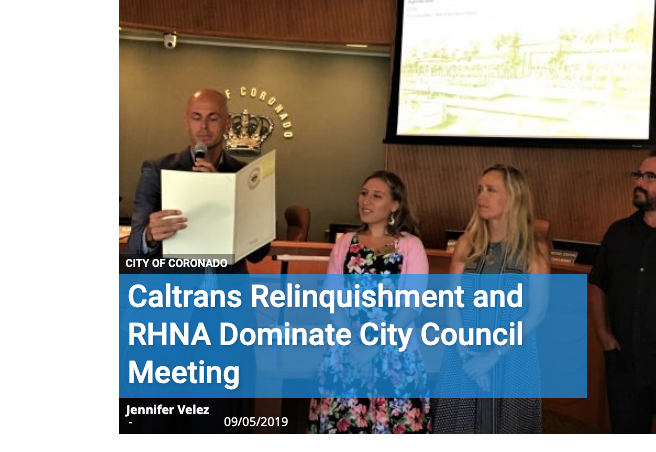
See it live: http://www.coronadotimes.com
How do I fix this?
 Johnny Erens
Hello Thank you for the help with resetting the license
But I have another question I manage brunssumradio.nl however through google search on newspaper template I came across a site that had a different homepage, how can I make the same front page in my template (see the link)
https://bit.ly/2lzJmvM how can I do this the top block where is live and the region info section on front page.
Thanks for the comment.
Calin Hello,
In order to set the Load more button, you’ll need to make a homepage and set on it the posts loop element from tagDiv Composer -> http://prntscr.com/p2jm3g
Thank you!
Calin Hello,
Those are the results from the googles search if you have set a homepage -> http://prntscr.com/p2748d if you want to have the “Blog” in the breadcrumbs then you should have the latest posts set lake this -> http://prntscr.com/p275zt
Hope this time I understand what you mean.
Thank you!
 STEFEN1
 No it doesnt work. Here the link to the homepage: https://www.animalovers.it
these are the latest two poststhat aren’t showing up:
https://www.animalovers.it/preparare-il-cane-allinizio-della-scuola/
https://www.animalovers.it/storia-mastino-tibetano/
Thanks
Calin Hello,
So you have set as homepage the Blog ( Latest posts), this will display all your post, but since you do not have any post there is nothing to display.
-> https://www.screencast.com/t/g7raddKxF3l
-> https://www.screencast.com/t/PEFGTWKpnI
-> https://www.screencast.com/t/xy6jCxLlTd
Thank you!
STEFEN1Hi,
in my homepage i Start with a Big Grid Flex 6 where i have set the filter to show all categories and latest posts. I pubblished two posts but non of the two show in the homepage. They both have proper category settings and i I modify the page and change the order to something else than latest post and then wwitch back again to latest the posts, the new posts show up but when i save the page they won’t show up in the live mode.
I tried with mozilla and firefox in incognito mode but nothing changed, they still dont show up… I tried to delete the cache too.. But nothing happens..
Can you pelase help me?
Thanks
 dreammy
 I understand very well, finally at the moment I can no longer use it it it does not work at home and your support has no solution to bring me.
But apart from that, the Seopress plugin is starting to download more and more and it’s a shame that there is a title bug only on the homepage and there’s nothing we can do about it.
Above all there is also another problem the title taken into account on my page comes from where?
Because the H1 of my page is not the Title taken into account for the homepage.
If I understand correctly there is no possible hook to be able to have a custom title on the homepage of a site using tagDiv Composer?
If at least I can know or modify the title taken into account on the homepage to have a title consistent with my site.
Thank you to you,
Translated with http://www.DeepL.com/Translator
 francescodicandia
Hi there, I’m working with my homepage doing things with the tagDiv Composer, everything’s ok.
But, as you can see here https://nimb.ws/bZ8fhp I’m not able to use tagDiv on the blue section as I can do on the red section.
Can you help me?
Francesco
 hello@gooplus.fr
Hello,
we are not able to find the way to modify H4 tags or any other H tags in our website https://www.vinsocialclub.fr/ .
As you will see on the homepage, block titles are in H4 then article details titles (entry-tilte) are in H3 so our SEO structure is not good.
Can you tell us how to set H tags the way we need?
Thanks
 bdeepu
Hi,
On the homepage of my magazine, I want to stretch the cover story/main story to the full width of the screen like below. At the moment, even if I stretch the image as “full,” it is showing white space to the right and left. Please see the screenshots below.
1. I want to achieve this look:
2. The current look of my site:
Please let me know how to do this.
Thanks!
 Laudess
Hi,
I was activaded the TagDiv Mobile theme.
I would like to custom the mobile homepage but in the theme panel > mobile settings > i don’t have :
– grids & latest articles settings don’t appear
– mobile theme modules settings
Thanks for help,
regards,
Laurent
Gbugmenot nope i want to change the whole website including homepage, posts, pages, tags, category background.
Calin Hello,
You can delete theme like the pages and posts, if those are template then you can find theme in Cloud Template, hover theme and click on trash-> http://prntscr.com/p18wc7 or if you want to delete more templates -> http://prntscr.com/p18wor
If you imported some pages/homepages you need to look in pages -> http://prntscr.com/p18x9y
Thank you!
 fpbs
fpbs I managed to remove two blocks. But there is still a block that does not appear to Appearance – Widgets.
“DERNIERS ARTICLES” The last bloc in HomePage.
