
- NewsmagHomepage – How to build and set it
- NewspaperHomepage – How to build and set it
- NewspaperHow to edit modules for Flex Block X
- NewspaperGeneral Options that May Interfere with the Newspaper Theme
- NewspaperThe Newspaper Mobile Theme: Introduction
- NewspaperHow to Add a Logo in Newspaper
- NewspapertagDiv Shop
- NewspaperHow to Use tagDiv Cloud Library
- NewspaperDesign your Post Pages using the Cloud Library Templates
- NewspaperHeader Builder
- NewspapertagDiv Cloud Library Plugin
- NewsmagtagDiv Composer Tutorial
- TutorialsFrom WPBakery to tagDiv Composer
- NewspapertagDiv Composer Tutorial
- NewspaperNewspaper theme documentation
- NewspaperThe Mobile Theme
- NewsmagNewsmag documentation
- NewsmagMain menu
- NewsmagLogo & Favicon
- NewsmagPage templates
 engrwaseemraja
I accidentally put the wrong meta tag code on the homepage (https://qaqcinconstruction.com) of my website using seo plugin but now I want to change/replace this with the correct one I have tried in theme editor but I failed to replace this please guide me how can i replace this or do it this for me. Thanks
Website: QA QC in Construction
 Nagarig
  seungeok seok
If you visit the homepage and click on the post, the content appears, but the problem is that the same content is repeatedly exposed under the comment window. I don’t know how to edit it here and there to make sure that duplicate posts don’t appear under the comment window. I’m sorry I don’t know how to use the Newspaper theme. Thank you for teaching me.
 Cameleon
I am having problem with overlaping text on different posts/blocks. How to fix it ?, even when i import different homepage template, same situation.

 jdovale
Hello NP, I have updated the main menu using the ‘Default Pro’ prebuilt module and set it as “Global’ but the changes are applying only to the homepage and not to any others pages on the site. See http://www.shoppingflyers.ca.
This is even though across categories it says that it is inheriting the header from ‘Default Pro Global’. Basically it should be the updated header that shows up. What is wrong?
I cannot try to edit these headers one by one as I plan to have many categories and it simply does not make sense.
What is wrong? Please help.
Thanks,
 Jeanbatman
Hi, I’m seeking for a way to improve the line of content on my homepage with the “News ticker” so it can looks better on mobile device.
I’d like to truncate the line of text with the symbol (“…”), mybe using CSS, or if it isn’t possible, place the split arrows before the content.

 Cilene
 Hello Anamaria,
I created a table with WordPress on a specific page, but as the problem occurred, I deleted the page to see if the problem disappeared, but it didn’t solve it, the table is appearing on all pages, including the homepage.
I need to solve this problem to make my website visible.
Many thanks.
 Nickolas Combatente
why with the mobile templeate i can only edit the homepage and not the single templeate?
im have this issue becauase i wanna edit the single templeate, but i cant, and if i use the traditional way of ‘responsive’ a mess will be made
 Rassmy6
Hi, my site is dudedealsdaily.com
On the home page, I’ve set upt he category filter but it’s not pulling in articles connected with many of the filters and just staying blank. What am I doing wrong?
 justrealmoms
 Hi Calin, yes! That is the problem…the issue is that we’re merging two website – the POSTS/BLOG, with the Supplier’s Guide (which is already created in Newspaper).
These pages with problems are from the Supplier’s Guide and since we needed to separate these pages from the Posts (due to different filters, homepage, etc), we had to create a different Taxonomy.
So, the posts are under General (on Cloud Templates, which has the Single Single Cloud Templates Option), and the Supplier’s Guide, which are the pages with problems, had to be created under a new Taxonomy (which in Cloud Templates, does not have the option for Single Cloud Templates).
My first message on this thread explains it all, in case you missed it.
I just need to know how to create Single Cloud Templates, in a new Taxonomy, for each sidebar for each supplier has different Contact infos.
Thanks!
 teslamag
Hello Team,
Happy new year.
Hope you are well.
I would like to have more info about an issue I have. When I click on the author name I am redirected to the homepage. Do you know where to change this setting?
You can try to click on an author name here on this article example: https://www.tesla-mag.com/les-premieres-fisker-arrivent-en-europe/
Also I can’t downlads all leads through the export csv feature. could you please how to do it easily. The export work only on displayed lines.

Thanks,
Armand
 Anamaria
 Hello,
So, the problem is because the settings are not saved, so please do a test using only tagdiv plugins and check the console -> https://forum.tagdiv.com/topic/tagdiv-composer-does-not-save-only-content-of-homepage/
Thank you!
 iamjinnpk
Mobile page not show good page, just show simple page like this https://ibb.co/6XL6Msv, but desktop version show correct page template , so plz solve my issue, how i can fix , show full page template
 vangeorgo
Hello,
I have Social counter installed on my homepage through TagDiv composer and also Social icons in the header with Cloud Library using TD composer. On my homepage Social counter/Social icons are using very weird font on Safari (looks kinda Japanese) and on Chrome there are only squares.
This problem occurs only on my homepage and I cannot find any setting that could possibly cause this. Can you please help me?
Also, how can I change the label in my sidebar that says “Followers” etc.? Thanks
URL with wrong font: https://svetapple.sk (check upper right corner and sidebar)
URL with correct font: https://svetapple.sk/featured/titanova-konstrukcia-nove-tlacidla-aj-vacsia-ram-toto-vsetko-prinesie-iphone-15-pro/
iamjinnpkHi i have an issue , homepage show desktop version good https://ibb.co/zJNqMVq , but mobile mode not working,in mobile mode show just simple mode here is the link https://ibb.co/6XL6Msv
iamjinnpkI will create homepage and categorey, but homepage auto changed to simple https://ibb.co/KFYPShW here is to show simple page, not show customized page show
 darknorth
 Hi,
I was using 10 Web Booster Caching, I have disabled its caching feature only and instead installed wp super cache.
The Plugins I have now
10Web Booster
410 for WordPress
Auto Image Attributes
Cloudflare
EWWW Image Optimizer
Head & Footer Code
Instant Indexing
Loginizer
MC4WP: Mailchimp for WordPress
NicheTable
Rank Math SEO
Really Simple SSL
Simple Social Icons
Site Kit by Google
Spectra
tagDiv
UpdraftPlus
WebP Express
WP Super Cache
I am testing with the WP Super Cache, so far no problem, but a new thing happend today. when I opened the main domain in browser it kept opening a blog post (just like redirect). I tried incognito and same blogpost was opening so I deleted the cache 🙂 and the homepage is now visible/working.
This site needs a doctor lol.
 sushmasmaurya@gmail.com
Hi,
There is multiple canonical tag in the homepage of the website digitalsushma.com, and I am not able to find the exact file to delete the code. Sharing the screenshot link for your reference: https://prnt.sc/3i3HrSn-XQwo
justrealmomsHi Anamaria, thank you once again for ALL your help. We’re unifying our content website with our subdomain (which is currently Newspaper), and making it all in Newspaper (yay!), so countless issues are appearing.
Our content website is: https://www.justrealmoms.com.br
Our subdomain we use Newspaper is: https://guia.justrealmoms.com.br
So, what is happening now is: We now have TWO types of Post Formats we have to create:
1) Normal Blog Posts (for the content website/blog)
2) Pages of Suppliers part our our Supplier’s Guide with a curation of brands – which is created as a type of Blog Post
Once again, this Supplier’s Guide is what we’ve created using Newspaper (https://guia.justrealmoms.com.br).
The Supplier’s Page have specific fields and functionalities we need. Here is a page for your reference: https://guia.justrealmoms.com.br/mooui.
It has:
1) A right sidebar where each supplier has their contact infos (WhatsApp, Email, Social Channels, embedded Map)
2) The body – where we create as a normal Post (since we need to use Yoast, the filters, categories, etc)
3) A left sidebar with more general infos from the website.
We’ve created a copy of the website and we’re working on it: https://r22.861.myftpupload.com.
The issue is that for the Supplier’s Pages we had to create a new Taxonomy, since we needed it to be featured separately and differently on the website (ex: on the homepage) – here we used Post Loops for the Blog Posts (where there is NO FILTER option), and for the Suppliers Flex Block 1 (where there is filter and we also identified the Post Type as “Guia” (where all Supplier’s Guide pages/posts are set as, separated from the normal Blog posts).
So, the current problem is ONLY when we need to create the Supplier’s Page for each brand. They are all created currently here: https://guia.justrealmoms.com.br, BUT when we copied them to https://r22.861.myftpupload.com where we’re unifying both BLOG SITE + SUPPLIER’S SITE, it LOST the RIGHT SIDEBAR.
Remembering, we had to create a new Taxonomy. For EACH Supplier (on the current website – https://guia.justrealmoms.com.br), we had to create a separate Cloud Template, so each one would have their own set of contact infos on the Right Sidebar – SUPER IMPORTANT FUNCTIONALITY. And also for the SINGLE BACKGROUND IMAGE, if I’m not mistaken since each one has a different header image.
In the Cloud Templates, there are SINGLE TEMPLATES, which is what we used for each Supplier’s page. BUT, since we had to create a new Taxonomy to separate Blog Posts from Supplier Posts/Pages, we can’t now create a SINGLE TEMPLATES in Taxonomy.
So, the RightSide bar which is the most crucial information we need in the page – and in the mobile format it’s supposed to appear first – can’t be created and edited in TagDiv anymore.
Sorry for the MASSIVE text, but this is hard to explain, so I tried to be very detailed.
Also, do you guys offer Zoom assistance – even if it’s paid?
Thank you and keen to hear from you on this, as it’s probably the most importante feature on the website for UX.
 Calin
Calin Hi,
You can get a homepage like that using tagDiv composer and adding the slide element https://i.imgur.com/B88RW31.jpg and the block 11.
I hope this will help you!
 leagcooks
Can someone please help how i get this style in the homepage please? i keep trying all the blocks and it doesnt look alike this? 🙁
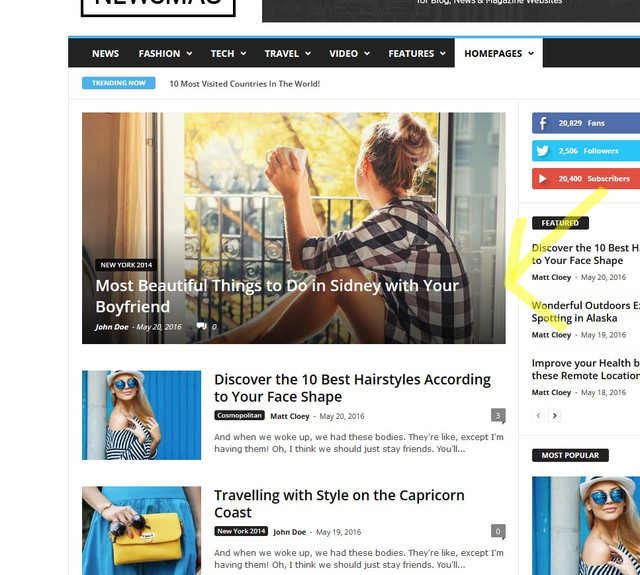
Thank you
 gnpnews
Hello! I’m using the NewsPayer theme 11.5.1. Suddenly, the mobile main page does not scroll. All other pages work normally, but only the main page does not scroll. The homepage is http://gnpnews.org/. I ask for your help.
 Threewide
 Oh and the links to the menu / categories on the homepage are gone too.
Anamaria Hello,
Unfortunately, I do not exactly understand what you mean or your request. Please provide more details about your encountered problem, you can include screenshots.
A solution for sending a screenshot is this:
Download, capture, send: https://www.techsmith.com/jing-tool.html
Using our theme you can choose from 3 mobile versions
-> mobile responsive => https://www.screencast.com/t/oJ2ShOp47
-> mobile theme plugin => https://forum.tagdiv.com/the-mobile-theme/
-> mobile page => https://tagdiv.com/newspaper-10-3-7-update-brings-customizable-and-fast-mobile-pages/
Suppose you created the mobile pages with tagDiv Composer. In that case, when you install the Mobile Theme plugin, your pages will be overwritten by the plugin (the mobile theme comes with its templates for page, post, category, etc so your current templates from the desktop theme will get converted to the mobile theme layout, the page content is made without builders in mobile editor => https://www.screencast.com/t/xbgZG8kH also, the options that are provided to edit the mobile theme version are limited (this keeps the things simple)).
This is a video about Responsive Newspaper Theme, AMP & Mobile Theme, Mobile Pages & Templates -> https://www.youtube.com/watch?v=SpGkOnJeNZY
So, the mobile responsive is what you see then that you select the viewport on phone => https://www.screencast.com/t/matV17hH, so some settings may apply for each viewport(where is the border blue), and others are not(where the border is black).
The mobile page has the mobile templates from Cloud Library => https://www.screencast.com/t/YCcZ8rL8
Mobile responsive version of the theme and the mobile page editor can be edit with tagDiv Composer, the mobile theme plugin not.
For example, you can have the mobile theme plugin activate and use the mobile page/mobile responsive version for the homepage/pages, but for the categories pages/404 page you can’t use the mobile page/mobile responsive version if you have the mobile theme plugin activate.
So, if you want to design the pages with tagDiv Composer, you can use the mobile page or mobile responsive version.
Thank you!
 editor@thegoodnewshub.com
We wish to have different coulours for the category tags on our home page (“Big Grid Flex 1” & “Flex Block 5”) Currently these are hard set within the blocks as you can see here
However on the posts page these Category tags are infact linked to the category colour as you can see here:
How am I able to have this same effect on the homepage/in the tagdiv blocks?

