- TutorialsHow to install Revolution Slider
- TutorialsHow to Install bbPress forum
- TutorialsFrom WPBakery to tagDiv Composer
- TutorialsDefault Block Settings Guide
- TutorialsImport Revolution Sliders
- TutorialsSystem status parameters guide
- TutorialsHow to Update the WPBakery Page Builder plugin
- TutorialsExisting content
 Bogdan B.
 Hi,
If you say it works without plugins, then maybe you have a plugin conflict. Please try to identify the plugin that causes this issue and remove/replace it. Unfortunately I’m not sure what alternative you are looking for. The demos can be installed from the theme panel. There is no other place to install them from and no other means.
Thank you!
 onedaysmarter
Hi I have a problem instaling demos content on a hosted WordPress site with GoDaddy! It seems to work when you disable .htacess and all of the plugins. This is time-consuming to go from demo to demo is there a workaround or fix .
Bogdan B. Hi,
If you have the latest version of the theme, then you can update the visual composer plugin from the theme panel. Please acces your plugins section under installed plugins and remove and delete the visual composer plugin:
http://screencast.com/t/N2y6KwkN0 and then http://screencast.com/t/EMdOXUV3nUp
After you delete the plugin, install the new version from here: http://screencast.com/t/w4yRDbML
I hope this helps.
Thank you!
onedaysmarter Hi I have a similar problem installing demos content on a hosted WordPress site with GoDaddy! It seems to work when you disable .htacess and all of the plugins. Unfortunately this is time consuming to go from demo to demo is their a woraround or fix .
 Boricua1
Hi:
I have your theme (newspaper) already update. I’m not professional so I don’t understand where I can find de VC plugin that you describe in step 4. neither the files in https://forum.tagdiv.com/wp-content/uploads/2015/01/visualc_newspaper.png
Sorry, but I think I need more detailed instruccion. Can you help me?
As I remember the Envato people install your theme (not sure) for me.
Please help
ivonne
 Catalin
 Hello vcandpro,
Please ensure that you have correctly installed the latest version of Visual Composer and our theme. Also, please try to disable all the active plugins, leave just Visual Composer to active, clear all cache and install only the plugins that come bundled with our theme and rule out the conflicting plugins. Also, you can try to make a new install with a new database and check the results.
Hope this helps and let us know how it goes!
Thank you for the message!
 Torgut
 Hi Bogdan,
1) yes, I read in the previous posts that all the links are affected by the theme accent color. That goes for the hover effect. That’s kind of fine, although as you very well pointed out it becomes useless in many cases as it affects other elements. I assumed a theme would handle control over the link / hover color to the user.
2) Actually, not all hover links are affected by theme accent color. I have a WP Recent Posts element where the hover shows a different color from the theme accent color.
3) What I asked was where could I control the global all over the installation color of links, like here, in the theme from which I am trying to migrate:

4) Even if there isn’t a way to establish these global definitions through the interface, I am sure it’s possible to make it editing the CSS file…?
5) Overall I believe it’s vital to offer the user a consistent experience, where all the links look the same in terms of color. That’s what I am trying to achieve, just as I have in all my websites.
-
This reply was modified 10 years by
Torgut. Reason: Tuning up image link
 Xperten
 Won’t it delete all our settings on various pages, if we delete the Visual Composer first and then install the new one to update the plugin?
Catalin Hello unixmen,
I have checked your website and I saw the difference between Ie and Chrome browser. It could be plugin’s issue. Please try to disable all the active plugins, leave just Visual Composer to active, clear all cache and install only the plugin that come bundled with our theme and rule out the conflicting plugins. For more information about our cloud flare configuration, please check our documentation here -> https://forum.tagdiv.com/cloudflare-cdn/
Hope this helps and let us know how it goes!
Thank you for the message!
Catalin Hello routenote,
Please ensure that you correctly installed the theme and also, please make sure that you have the latest version of Visual Composer (4.11.2), otherwise, please try to do it.
Hope this helps and let us know how it goes!
Thank you for the message!
Catalin Hello pippuzzo80,
Please notice that until now we have no reports of this type of error. Please ensure that this type of problem does not come from your untested plugins. Please try to disable all the active plugins, leave just Visual Composer to active, clear all cache and install only the plugins that come bundled with our theme and rule out the conflicting plugins. Also, if the problem is still there after this advice and you need more assistance in this regard, please provide your website URL so I can further inspect the issue and also, so I will be able to provide a more accurate response.
Thank you for the message!
Bogdan B. Hi,
These changes are due to the social networks changing over time. The social counter plugin does not work anymore in your version. You will have to update and set it up according to the new facebook rules. Pleas update your theme to the latest version and also uninstall and delete the social counter and visual composer and install the ones that come with the theme. Please follow these guides to update:
https://forum.tagdiv.com/how-to-update-the-theme-2/
https://forum.tagdiv.com/how-to-update-visual-composer-plugin/
Also set up your new social counter version: https://forum.tagdiv.com/tagdiv-social-counter-tutorial-2/
Things change overtime and you have to keep up with the changes. If you do not update your theme regularly you will not benefit from the improvements and you will have issues as wordpress gets changed, social networks change and so on. Things will start to not work anymore if you do not update the theme.
Thank you!
Catalin Hello travisnw,
I have checked your website and I saw the problem with the fonts and also, I have noticed that you are using a lot of untested plugins which interact with the theme and could cause some unknown issues. Please try to disable all the active plugins, leave just Visual Composer to active, clear all cache and install only the plugins that come bundled with our theme and rule out the conflicting plugins.
Hope this helps and let us know how it goes!
Thank you for the message!
 Andrei L.
 Hi
Please address us ion English as we don’t speak Spanish and it’s hard to understand your requests.
Try to update the theme at current version available on themeforest, V 2.3.6 and also update Visual Composer at V 4.11.2. Here you can check our documentation for more details about the update process: https://forum.tagdiv.com/newsmag-install-via-wordpress/ – https://forum.tagdiv.com/newsmag-how-to-update-visual-composer-plugin/
Thanks!
Andrei L. Hi
@newsguy @iisnet mak sure you’re using latest version of Visual Composer included in theme’s path, V 4.11.2: https://forum.tagdiv.com/newsmag-how-to-update-visual-composer-plugin/ deactivate all plugins except Visual Composer and test again.
@RachelG when you’re using the Envato Toolkit to update the theme you will also get latest version of Visual Composer but will not become active until you activate it. Deactivate and delete the old version of VC, clear all caches then install new plugin’s version from Plugins panel: http://screencast.com/t/S7Jd4CGMi
Thanks!
Andrei L. Hi
The theme don’t translate the date, to achieve that you need to change the language for your wordpress install under Settings > General: http://screencast.com/t/LaP9gz3vpj9Q
Try to change your wp language, clear all caches then test again.
Thanks!
Catalin Hello pruidiaz,
Please ensure that you have correctly installed the theme. Please make sure that you are using the latest version of the theme and also, the latest version of the Visual Composer, otherwise, please try to do it and check after the results.
Hope this helps and let us know how it goes!
Thank you for your understanding!
Catalin Hello alphaifel,
Please ensure that you have correctly installed the theme. I have checked your website and I saw that you have some strange symbols on your side. Usually, this kind of error appears when using CDN or loading fonts from a different source. Please try to use this solution and take a look at this: http://screencast.com/t/AMjW530CSH6 and this: http://screencast.com/t/dLjEUGGwQUZ
The solution to this issue is simple. You will need to add some code to your .htaccess file like this post suggests: https://forum.tagdiv.com/topic/strange-chinese-symbols-replaced-icons-and-arrows/
Hope this helps and let us know how it goes!
Thank you for the message!
Andrei L. Hi
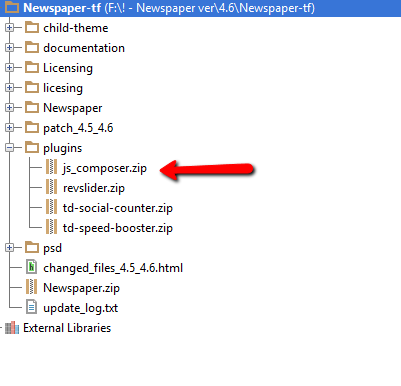
We included in theme’s path V 5.2.4.1 of Revolution Slider plugin, you ca find it in /plugins folder: http://screencast.com/t/gjzr406o9 More details about the install process can be found in our documentation: https://forum.tagdiv.com/how-to-install-revolution-slider-v5/
I hope this helps.
Thanks!
 fitnessfactory
 I also have the problem with the visual composer…
Since the last update Version 6.7.1 I have a problem with the visual composer. The Visual composer isn’t activated anymore. I’d try everything is written in the documentation and this support forum but it doesn’t work.
The versions are 6.7.1 of the theme and version 4.11.2 of visual composer. I installed the visual composer new for 10 times, but no changes.
 deneys
 Good day,
Thank you for your reply.
The option you have mentioned to create a gallery is not available to me.
https://forum.tagdiv.com/gallery-2/

Please can you tell me what is wrong with my installation?
Or is it something I have not configured correctly?
 d8tabyte
Hello – I am having an issue where I cannot save my theme options when configuring. SOME will take, but others, like the global sidebar position will not change back to right positions, after switching to left. I can not delete/remove ads once added. I have tried multiple browsers, tried clearing my cache, disabled my w3 total cache plugin, I am at a loss.
I have had my support team check my vars to be sure I am in the clear as well.
php.ini configuration
Server software
i
Apache/2.4.16 (Unix) OpenSSL/1.0.1e-fips mod_bwlimited/1.4 mod_fcgid/2.3.9
PHP Version
i
5.6.16
post_max_size
i
32M – You cannot upload images, themes and plugins that have a size bigger than this value. To see how you can change this please check our guide here.
max_execution_time
60
max_input_vars
5000
SUHOSIN Installed
SUHOSIN is installed – it may cause problems with saving the theme panel if it’s not properly configured. You have to increase the suhosin.post.max_vars and suhosin.request.max_vars parameters to 2000 or more. To see how you can change this please check our guide here.
suhosin.post.max_vars
50000
suhosin.request.max_vars
50000
 simchris
 Funnily enough, my menus used to work on iPad in where I could click the “main” item and it would work, but no longer do. The sub-menu items work, but not the “main item” on the menu when there is drop-down. This is using Safari in portrait or landscape on iPad. Same behavior in Chrome on iPad as well.
And, I’m actually several versions back on NewsMag, and not yet installed WP 4.5 just because I’m still testing some stuff with jquery.
So, this isn’t specific to the latest version(s) or anything. This change actually came awhile back on iPad, and I decided I was too busy to deal with it. On California Newswire, I started just adding the main menu item again as the first thing in drop down …
e.g.,
POLITICS
> Calif. Politics
so that way the first secondary menu item is the same as the main “short item” label…..
Anyway… point of all that was — yes, the “main” item label doesn’t work as link on iPads with latest iOS version WHEN there is sub-menu. However, it *did* work in prior iOS version. So, go figure.
-
This reply was modified 10 years by
simchris.
 Hugom
HugomI did the installation of the new “js composer” did as the tutorial:
https://forum.tagdiv.com/update-the-visual-composer-plugin-wpbakery/
The question is what they are asking me the license.
What do I do?
 pippuzzo80
Hi,
I install template, but in this days i found error in my search console of google.
Error not found, for example:
486/485-revision-v1/
or
444/441-revision-v1/
and more similar, why this error ?
Thanks.