- NewsmagInstall via WordPress
- NewsmagInstall via FTP
- NewsmagInstalling pre-built websites
- NewsmagUsing the theme translations together with WPML
- NewsmagHow to update a plugin
- NewsmagNewsmag theme support
- NewsmagCustom Post Type Support
- NewsmagImport / Export theme settings
- NewsmagHow to add icons in the menu
- NewsmagRequirements for Newsmag
- NewsmagNewsmag documentation
- NewsmagHow to update the theme
- NewsmagBlock settings tutorial
- NewsmagHow to update the WPBakery plugin
- NewsmagIntroduction
- NewsmagMain menu
- NewsmagFeatured image or video
- NewsmagAuthor card
 duleybr
Hi all, I use google site kit plugin and didn’t insert ANY adsense code into newspaper theme, but when I open the website into desktop browser.
It opens a lot, I mean, A LOT of ads.
Do I have to uninstall site kit and use only Newspaper config?
Please, I need some help on this.
 Bettina
 Hello!
Did you update the theme to version 12.7, and the issue is still there? Please deactivate and delete the tagdiv Composer plugin, clear the cache, and install it again.
Thank you!
 Anamaria
 Hi,
Please tell me how you performed the update. Also, please let me know if you deactivated the extra plugin during the update, and if after installing the new version, you made sure that the TagDiv plugins were installed and activated, just like before the update.
Thank you!
 DavidFHenry
 Okay, I don’t think we’ll be installing WF to bridge the gap, best that we wait and hope nothing happens in the mean time, hopefully not too long.
Bettina Hello Michael!
Go to the Newspaper -> Plugins and ensure you have the Standard Pack plugin installed and active.
Let me know the results!
Thank you!
Bettina Hello!
The mobile theme has settings that can be found in the newspaper -> theme panel -> mobile theme. You should change it from there.
We have three options available for mobile versions that you can use:
1. Responsive version: A responsive version of your website looks similar to the desktop version. TagDiv Composer is used to edit the page. Click on the mobile viewport: https://www.screencast.com/t/XDQJedlggSB. You can see your mobile version there and edit or adjust the elements to look better.
2. Mobile pages: https://tagdiv.com/newspaper-10-3-7-update-brings-customizable-and-fast-mobile-pages
3. Mobile theme plugin: The Mobile Theme is a performance-optimized theme included in the main Newspaper theme that only loads on mobile devices. It comes with its own templates and designs for pages, posts, categories, etc., so your current templates from the desktop theme will get converted to the mobile theme layout. Please see https://forum.tagdiv.com/the-mobile-theme/ and https://forum.tagdiv.com/mobile-theme-introduction/ for more information.
A full explanation is here: https://www.youtube.com/watch?v=SpGkOnJeNZY
If you need to use mobile version 1 or 2, then you need to uninstall the Mobile Theme plugin and AMP.
Thank you!
Bettina Hello Nikki!
Unzip the folder and add only the Newspaper folder. Check the guide here: https://forum.tagdiv.com/install-via-wordpress/
Thank you!
Bettina Hello!
Unfortunately, it won’t work.
We have three options available for mobile versions that you can use:
1. Responsive version: A responsive version of your website looks similar to the desktop version. TagDiv Composer is used to edit the page. Click on the mobile viewport: https://www.screencast.com/t/XDQJedlggSB. You can see your mobile version there and edit or adjust the elements to look better.
2. Mobile pages: https://tagdiv.com/newspaper-10-3-7-update-brings-customizable-and-fast-mobile-pages
3. Mobile theme plugin: The Mobile Theme is a performance-optimized theme included in the main Newspaper theme that only loads on mobile devices. It comes with its own templates and designs for pages, posts, categories, etc., so your current templates from the desktop theme will get converted to the mobile theme layout. Please see https://forum.tagdiv.com/the-mobile-theme/ and https://forum.tagdiv.com/mobile-theme-introduction/ for more information.
A full explanation is here: https://www.youtube.com/watch?v=SpGkOnJeNZY
If you need to use mobile version 1 or 2, then you need to uninstall the Mobile Theme plugin and AMP.
Thank you!
 JamaicaPeople
 Hey Ana,
Thanks so much for your help.
However that template does not give me an option to make it a template. In fact, no options are given with that template.
Secondly, I still need to find the original template that I installed. How do I find that specific template?
 danishjg1
Hi,
I’m not able to assign my license key to my new website https://beemagazines.com/. And I can’t unassign my active old domain.
The staging site has been removed in the meantime, but the license on that removed staging site still shows as active? How is that possible?
The unassign links are not clickable. How to unassign NOW, so I can install the theme on a new staging site?
Please, also see the weird message
“To use a license key on a different domain, you can unassign it from the list anytime after 2025-05-16 20:53:37 UTC + 02:00. If you encounter issues, please get in touch with us at contact@tagdiv.com.”
So I have to wait another 2 weeks before I can use the theme on the Staging site?
See https://ibb.co/XMz14G2 first one is the old staging site live, but the newspaper theme was removed on the old staging site live. The second one is my live site. The third one is the new staging site I want to assign the theme to.
Please solve my issue!
Thank you!
 nikkigaskins
Hi there,
I just recently installed the Newsmag template.
I’m currently facing two dilemmas.
PROBLEM #1: The right side of my posts look so empty right now. (See example: https://www.berkeleyobserver.com/2025/05/02/berkeley-county-enters-drought-as-dry-spell-worsens/) How do I add the widgets that are on my homepage to the posts of my articles?
I attempted to add the widgets to my posts by going to Appearance –> Widgets; however, after uploading this Newsmag, I’m missing A LOT of blocks.
For the homepage, I used the TagDiv Composer to drop/drag the widgets. I don’t appear to have that option with article posts.
PROBLEM #2: Because I appear to be missing a lot of blocks, I believe this is why I also cannot also edit the footer.
Any assistance with these two issues would be greatly appreciated. I have tried to YouTube the solution and Google it, but I’m striking out.
Thank you for your help with this!
Sincerely,
Nikki
nikkigaskinsHi there. I recently installed the Newsmag template for my WordPress website. I need to organize the front end of the website using “drag & drop” with the tagDiv Composer plugin.
However, the plugin does not appear to be working. Even though it is activated, I don’t see where I have the option to use it. Can someone please help?
SEE IMAGE 1:
SEE IMAGE 2 (front/home page which still needs to be arranged accordingly with the plugin):
I’ve already tried to review this:
 Gil Campos
Hello, I purchased a license Newspaper for the Newspaper 12.7.1 theme and installed it on my website https://folhadegoias.info. The activation appears as “successful” in the popup, but then returns to “UNREGISTERED”. I have already updated plugins, PHP and checked the firewall. I need urgent support to register correctly, as I want to import the Newsweek PRO demo.
Português/Brasil:
Olá, adquiri uma licença do tema Newspaper 12.7.1 e instalei no meu site https://folhadegoias.info. A ativação aparece como “sucesso” no popup, mas depois volta para “UNREGISTERED”. Já atualizei plugins, PHP e revisei firewall. Preciso de suporte urgente para registrar corretamente, pois quero importar a demo Newsweek PRO.
 sunsetdaily
 But then again, whomever that person is that works for th9is company is either lazy or stupid in ityself. How do you not know what the word or term uninstall is case in point if you had an upload function, we could send you a screenshot and that way you dont have to waste more of our time. let alone if you read the initial iniqury instead of just blowing it off as if we are doing something wrong, that would help.
Remember everyone, I paid for this crap. How much was this template thing? We paid for this crap.
You should not sell things that may or may not work.
sunsetdaily I understand all of that, but let’s set the volatility aside for now because this thing is incredibly frustrating. I’m on a page right now and, for the life of me, I can’t delete the content in a block. The block is either broken or set up incorrectly, and there’s no way to delete or modify it. This thing is a class-A piece of junk that I unfortunately bought. It’s caused way more trouble than it’s worth.
I’m actually trying to make changes, which is part of the problem too—you can’t even uninstall the thing. It sits there acting as if its uninstalling but it never ends. therfore you have tyo interrup it which is bad. it leaves files and foolders that cause conflict.
If there were a way to show you screenshots, that would really help.
Overall, the point is that it shouldn’t be this hard. When you change a block, it should just delete—boom, end of story. When you switch templates, it should uninstall cleanly so you can move on.
This thing is awful. It really is. Everything is difficult, and on top of that, I have a master’s degree in Telecommunications and Media from Stern/NYU. I manage some of the most complex scripts on the planet. I’ve built everything in my life using open source tools.
Design isn’t my strength—that’s where you come in. You’re supposed to make our lives easier, not harder. You’re supposed to make us look good by building on the solid foundations we bring. This platform doesn’t do that. It’s a total gamble whether something will work or not.
Anamaria Hello,
Unfortunately, I don’t quite understand what you mean by “uninstall the template” — are you trying to install another prebuilt website, or what exactly is the problem? What is not uninstalling?
Also, regarding events, you can’t use the TagDiv Composer to edit the templates. For example, on blocks, you can set the custom post type here to display them, but it also depends on which plugin you’re using for events -> https://i.imgur.com/bzTKr7p.png
Thank you!
Anamaria Hello,
You can use the duplicator plugin https://duplicator.com/how-to-migrate-wordpress-site/
Using the import/export option from the theme will allow you to import only the theme panel settings, the cloud templates go in tool > export – https://i.imgur.com/3Wxk885.png then to import you need to go in tool > import then install the wordpress importer and clink on run import – https://i.imgur.com/tyxoVvg.png
Thank you!
 Simion C.
 Hi,
That is pretty unusual.
First, installing woocommerce doesn’t cause the AMP plugin and our mobile theme to also be installed. These two plugins are optional and have no relation to woocommerce. And the plugins can’t just install themselves.
Second, even if the two plugins are installed, it should be possible to deactivate and delete them, as with any plugin. But if you tried to remove them without success, I will take a look at this as well. Please send us an email at contact@tagdiv.com and provide admin login (user and pass) for the website.
Thank you!
Anamaria Hello,
Do you have any extra plugins installed? If so, please roll back to a backup and try updating without the extra plugins installed.
Also, make sure you don’t have multiple versions of Composer active—please delete all of them and then reinstall them from Newspaper -> Plugins.
Additionally, you can also perform a manual update.
Thank you!
 DashDesigns
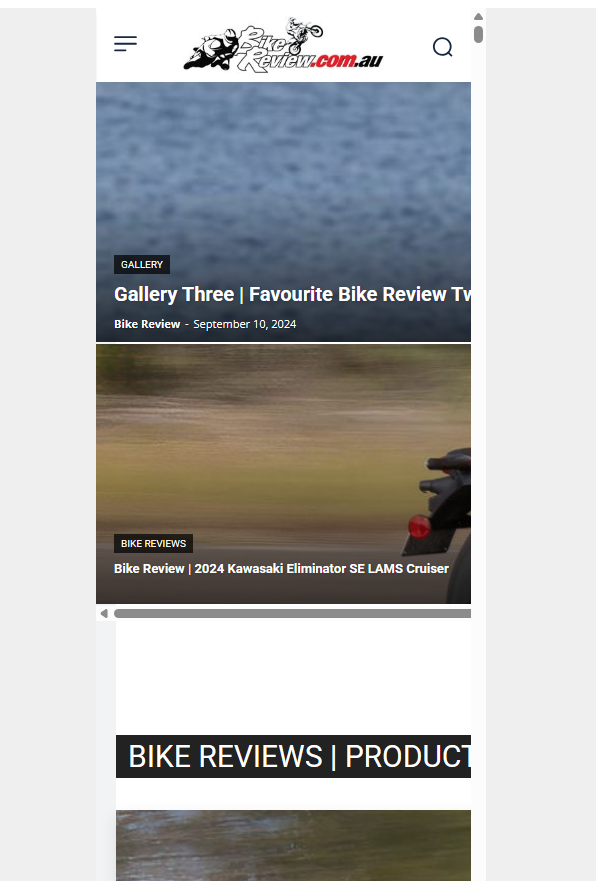
Hi. For some reason when I check the mobile view, this is what I see:
https://bikereview.com.au/images/newspaper-theme-mobile.png
I tried installing the mobile theme plugin, but still the page displays like this in the editor and also if I resize the browser window. Why is it not responsive?
I cannot show you the website as it is not an active URL and you would need to add a record to your HOSTS file to see it.
Please let me know why the mobile view is not working.
JamaicaPeopleGreetings,
How do I restore my original template? Additionally, how do I install this template: https://demo.tagdiv.com/newspaper_pro/category/tagdiv-fashion/
Thanks in Advance
https://jamaicapeople.com/category/entertainment/
 Jareddelre
 I have the same issue, I can not uninstall
 keverix3
https://theindustry.biz I have 7 copies of this theme and was shocked today the I had to reinstall a theme and got a message indicating that I could not add my registration until May 16.Then it referred me to buy a NEW registration? WTH? I need access to my purchased registrations NOW. What is this? In this economy? REALLY?
 petar.dodevski
 Found the issue, somehow the tagDiv Cloud Library plugin uninstalled / deactivated itself.
Now it works fine after installing it.
petar.dodevskiWebsite homepage and most of the page templates are rendering code instead of the actual content after latest update.
Tried to revert to the previous version, still the same.
website: sportmanija.mk