
- NewsmagRequirements for Newsmag
 Calin
Calin Hi,
Most important, please be sure to check the updated theme requirements guide
– https://forum.tagdiv.com/requirements-for-newspaper/
Increase all the parameters if it’s the case.
WP_MEMORY_LIMIT try to increase it to a value of double you already have if possible.
https://www.screencast.com/t/sQswe1SWR
https://www.screencast.com/t/FswObjqqmr7
Thank you for your understanding.
 Catalin
 Hello erval,
The problem could be the memory cache! Did you have cleared this? If not, try to do it and check after the results.
Thanks for your understanding!
Calin Hi,
Most important, please be sure to check the updated theme requirements guide
– https://forum.tagdiv.com/requirements-for-newspaper/
Increase all the parameters if it’s the case.
WP_MEMORY_LIMIT try to increase it to a value of double you already have if possible.
https://www.screencast.com/t/sQswe1SWR
If there is still a problem, you can send us an email at contact@tagdiv.com and provide admin login, as well as cPanel or FTP if possible. We will take a look. Include a link to this topic in the email.
Thank you.
Catalin Hi,
Did you enter this code in .htaccess
https://www.screencast.com/t/ZvHNhdQI
Maybe you need to increase more the wp_memory_limit
Let me know the results.
Thanks.
Calin Hi,
Please make sure that the theme system status is configured as mentioned in the requirements guide. Please follow the guide carefully
– https://forum.tagdiv.com/requirements-for-newspaper/
https://www.screencast.com/t/ZvHNhdQI
Please increase more the wp_memory_limit
Also please make sure that your connection to the internet is good.
Thank you.
 Simion C.
 Hi,
That is quite an an old theme version from which you are updating. Here you can find a changelog for each theme update, to see what has been modified, new features etc
– https://themeforest.net/item/newspaper/5489609 (bottom of the page).
Update guide if necessary here – https://forum.tagdiv.com/how-to-update-the-theme-2/
That error you mention is in most cases related to insufficient memory
– https://www.wpbeginner.com/wp-tutorials/fix-wordpress-memory-exhausted-error-increase-php-memory/
The theme requirements guide has been updated as well, please check it carefully and if necessary ask your hosting provider to increase the values of the parameters mentioned in it
– https://forum.tagdiv.com/requirements-for-newspaper/
For the WP memory we recommend a value of 256M.
After the update, deactivate/delete all the old theme plugins and install the new ones from the theme package plugins folder.
As a side note, the tagDiv composer will be automatically installed and activated after you update the theme. This composer could interfere with specific WPBakery elements or layouts. If that is the case, please disable it.
Also update WPBakery to the latest version if you use it (theme package contains version 5.6)
– https://forum.tagdiv.com/how-to-update-visual-composer-plugin/
The option to edit pages with WPBakery should appear same as before
– https://www.screencast.com/t/ag8uBzu2Hzx
– https://www.screencast.com/t/JhLAoUdzm
After you update clear all the website caches, CDN, browser cache. Let us know if you have problems.
Thanks
 ben.hinc
 Hello Catalin,
I have modified the memory limit and I’m still unable to save pages. The progress spinner just spins and the page is never saved. As I said previously, cloud templates save without any problem.
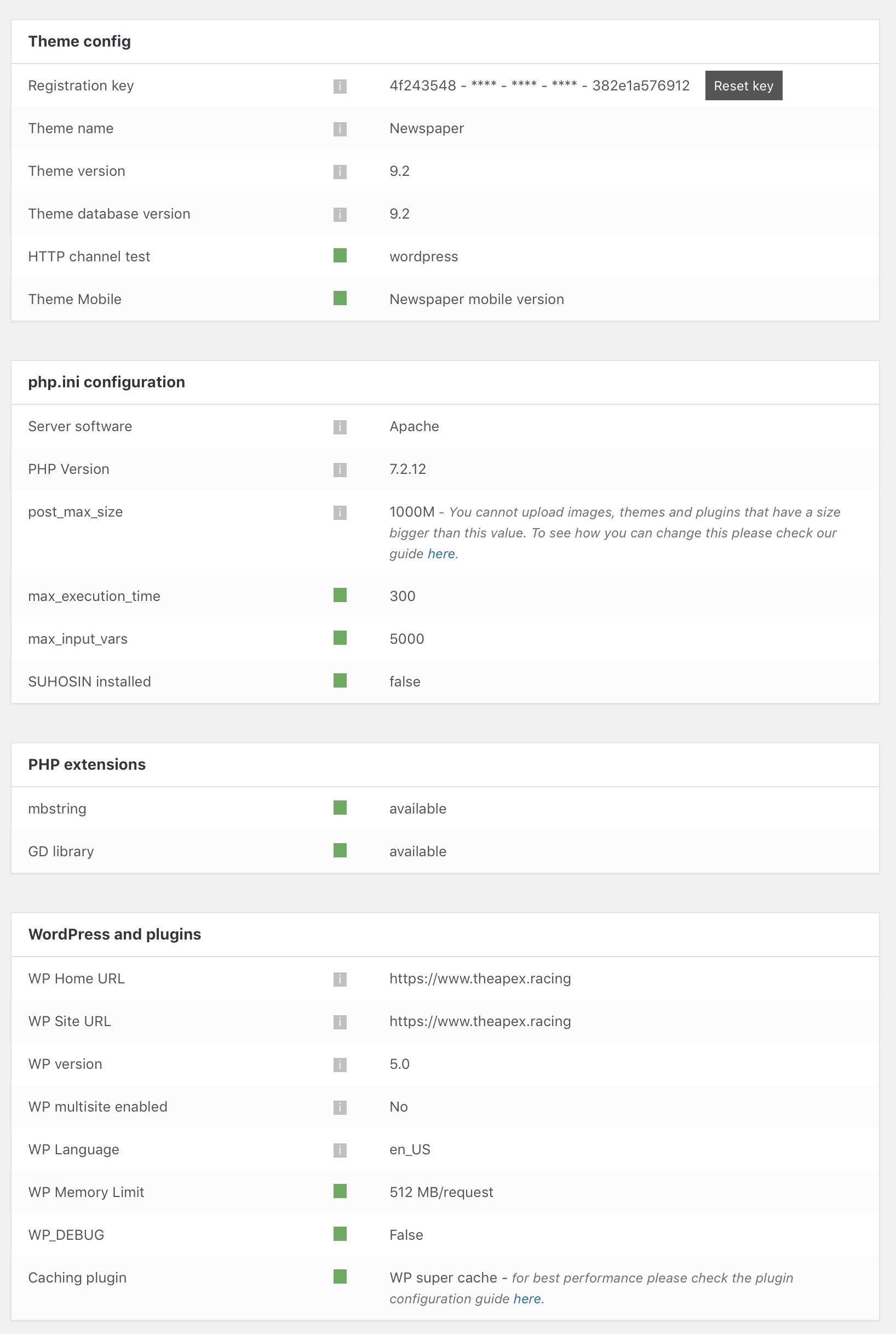
I have verified that everything in the theme status panel is green, which should mean that my site is meeeting all of the requirements as outlined in the link you provided above.
Catalin Hi,
After more further deeper investigations, it seems that problem regarding displaying of images happen due to memory caches. First of all, please remove all of the untested plugins and then, clear all of the caches (browser cache, hosting/server cache, purge CDN files if you are using something like this) and then, check the results.
I have checked your website and the images seem to works as expected.
Hope this helps and let us know how it goes!
Thanks for your understanding!
Catalin Hello,
1)Try to press the CTRL+SHIFT+R and the option will be available. It’s a caching problem.
2)You should use the Cloud Template Library to customize your category and tag pages because using this plugin you can add the Ad Box everywhere you want on the page.
3)You should use the theme core files and change the position of your ads. If you are not aware of the steps which are needed to take, in this case, please consider hiring a freelancer/developer to help you because we cannot provide custom work at the moment, sorry!
4)After more further deeper investigations, it seems that problem regarding displaying of images happen due to memory caches. First of all, please remove all of the untested plugins and then, clear all of the caches (browser cache, hosting/server cache, purge CDN files if you are using something like this) and then, check the results.
5)Clear all the caches, purge CDN files and check the results. If the problem is still there, please provide your website URL so I will be able to provide a more accurate response.
Thanks.
Simion C. If the problem persists even after clearing all caching (browser cache, website cache, CDN etc) you could investigate plugins as well. Ultimately disable the theme lazyload for the time being, in the theme panel.
Please let us know if you should find anything that can help in our investigation.
@mscgluk The out of memory error would mean there is not enough memory, we recommend the values mentioned in the requirements guide
– https://forum.tagdiv.com/requirements-for-newspaper/
– https://www.wpbeginner.com/wp-tutorials/fix-wordpress-memory-exhausted-error-increase-php-memory/
Catalin Hi,
After more further deeper investigations, it seems that problem regarding displaying of images happen due to memory caches. First of all, please remove all of the untested plugins and then, clear all of the caches (browser cache, hosting/server cache, purge CDN files if you are using something like this) and then, check the results.
Hope this helps and let us know how it goes!
Thanks for your understanding!
Calin Hi,
Please make sure that the theme system status is configured as mentioned in the requirements guide. Please follow the guide carefully
– https://forum.tagdiv.com/requirements-for-newspaper/
https://www.screencast.com/t/ZvHNhdQI
Maybe you need to increase more the wp_memory_limit
Also please read this topic -> https://forum.tagdiv.com/topic/520-error-with-td-composer-after-updating-to-newspaper-9-1/
Thank you for your understanding.
Simion C. Hi,
Sorry for the inconvenience, we reply in all topics as soon as possible, following the support hours displayed in the banner at the top of the forum.
So installing the latest version of the theme is breaking the website. I would suggest that you start by checking that all the theme requirements are met
– https://forum.tagdiv.com/requirements-for-newspaper/
The WP memory is recommended to be set to 256M, this is enough for most websites. Insufficient memory can cause many problems. If needed contact the hosting provider and they should be able to increase/activate all the necessary parameters, not just the memory.
The error in the screenshot you provided mentions the social counter plugin. If you cannot login as admin in the website, please disable all the plugins by FTP
– https://www.wpbeginner.com/plugins/how-to-deactivate-all-plugins-when-not-able-to-access-wp-admin/
That should allow you to access the website backend. Then access the theme plugins
panel and reinstall the theme plugins
– https://www.screencast.com/t/8Zr1931EtQ5R
Leave other plugins inactive to see if the problem is fixed. Let us know the results.
Thanks
 maismeh
Hi!
I finally wanted to update my version: 7.6.1 of the theme as you recommended. I first updated the WordPress version and then I followed the instructions and tried both approaches: via backend and via ftp. In both cases it did not work out. Error message:
Fatal error: Allowed memory size of 134217728 bytes exhausted (tried to allocate 1048576 bytes) in /home/.sites/564/site1126821/web/wp-includes/class.wp-dependencies.php on line 209
I checked my server settings – there should be no problem there. I bought your theme a second time and used a later version. There I had no problems updating it.
I had to manually remove the theme on the server and then go back to a backup. I also got several alerts during the process about problems with the mobile theme. My guess is that it is the theme making troubles. Can you recommend how I may proceed.
Visual Composer
Another big problem is that the Visual Composer is not working anymore – it’s simply not on my sites since I updated to the latest Word Press Version. Any idea how I could fix that? Just deleting the Plugin and installing it manually from the latest version of the theme?
Thanks a lot!
Regards, Peter
Catalin Hi,
After more further deeper investigations, it seems that problem regarding displaying of images happen due to memory caches. First of all, please remove all of the untested plugins and then, clear all of the caches (browser cache, hosting/server cache, purge CDN files if you are using something like this) and then, check the results.
Hope this helps and let us know how it goes!
Thanks for your understanding!
Catalin Hello Rhonda,
Turn on again your lazyload effect!
After more further deeper investigations, it seems that problem regarding displaying of images happen due to memory caches. First of all, please remove all of the untested plugins and then, clear all of the caches (browser cache, hosting/server cache, purge CDN files if you are using something like this) and then, check the results.
Hope this helps and let us know how it goes!
Thanks for your understanding!
Catalin Hello,
Please increase the memory limit set to 256MB or 512MB, clear all the caches and check the results. Also, check the theme’s requirements from here -> https://forum.tagdiv.com/requirements-for-newspaper/
Thanks for your understanding!
Catalin Hello all,
After more further deeper investigations, it seems that problem regarding displaying of images happen due to memory caches. First of all, please remove all of the untested plugins and then, clear all of the caches (browser cache, hosting/server cache, purge CDN files if you are using something like this) and then, check the results.
Hope this helps and let us know how it goes!
Thanks for your understanding!
Calin Hi,
Please make sure that the composer is activated
https://www.screencast.com/t/U93cw7D7yxB
Most important, please be sure to check the updated theme requirements guide
– https://forum.tagdiv.com/requirements-for-newspaper/
Increase all the parameters if it’s the case.
WP_MEMORY_LIMIT try to increase it to a value of double you already have if possible.
Also please make a test and deactivate all non theme plugins, clear all cache and try again.
Thank you for your understanding.
Catalin Hi,
Please check the system status parameters to be respected according to our documentation from here -> https://forum.tagdiv.com/newsmag-requirements-for-newsmag/ Increase the PHP memory to be increased according to our recommendation if you want to achieve better theme results.
Hope this helps and let us know how it goes!
Thanks for your understanding!
 max3903
Hello,
I am running WordPress 4.1 for multiple sites. I installed the Newspaper theme and its included plugins:
tagDiv Cloud Library
tagDiv Composer
tagDiv Mobile Theme
tagDiv Newsletter
tagDiv Social Counter
tagDiv Speed Booster
When I activate tagDiv AMP, I get this error message:
PHP Fatal error: Call to undefined function wp_parse_url() in /usr/share/wordpress/wp-content/plugins/td-amp/includes/amp-helper-functions.php on line 35
So I removed it.
Then I tried to activate the theme, I get:
PHP Fatal error: Allowed memory size of 33554432 bytes exhausted (tried to allocate 32 bytes) in /usr/share/wordpress/wp-content/themes/Newspaper/includes/wp_booster/td_util.php on line 1385
My memory limit is at 256MB so I tried commenting those lines in td_util.php:
foreach ( td_fonts::$font_names_google_list as $font_id => $font_name ) {
$list[$font_id] = $font_name;
}
if ( $flip ) {
$list = array_flip( $list );
}
I am able to get to the “You are previewing Newspaper” sidebar with a blank page and the following message in the logs:
PHP Warning: Illegal offset type in /usr/share/wordpress/wp-includes/widgets.php on line 560
[…37 times…]
PHP Warning: Cannot modify header information – headers already sent by (output started at /usr/share/wordpress/wp-content/themes/Newspaper/includes/wp_booster/td_util.php:974) in /usr/share/wordpress/wp-includes/option.php on line 748
PHP Warning: Cannot modify header information – headers already sent by (output started at /usr/share/wordpress/wp-content/themes/Newspaper/includes/wp_booster/td_util.php:974) in /usr/share/wordpress/wp-includes/option.php on line 749
PHP Fatal error: Call to undefined function wp_scripts() in /usr/share/wordpress/wp-content/themes/Newspaper/includes/wp_booster/td_wp_booster_functions.php on line 528
I am wondering if I got the right version of Newspaper for WP 4.1. What am I missing?
Thanks!
Maxime
 mscgluk
 same… need to refresh browser several times and then pictures shows up, but when you go to a post the featured image shows up but if there is blocks in sidebar – no pictures without refresh the webpage – need to do that whenever td blocks are present (even on revisit the page/post) – lasyloss are off. Even dreamhost have seen issues created by wp booster : HP message: PHP Fatal error: Out of memory (allocated 27582464) (tried to allocate 36864 bytes) in /home/XXXXX/DOMAIN/wp-content/themes/Newspaper/includes/wp_ booster/td_util.php on line 1382
ben.hincI have upgraded my site located at https://www.theapex.racing to WordPress 5.0 and Newspaper 9.2.
After the upgrade, I am able to use tagDiv Composer to edit and save custom Cloud Templates. However, I am unable to save any changes made to pages created with tagDiv Composer. After clicking save, it just spins without ever completing the process.
I have checked the updated theme requirements and I am meeting all of them, including having the PHP memory limit set to 128 MB.
 fantabox
Hi everybody (and sorry for my english)
My site doesn’t work, cause every page I try to open, in admin area, give me this error message:
“Fatal error: Allowed memory size of 134217728 bytes exhausted (tried to allocate 122880 bytes) in /web/htdocs/www.11stelle.com/home/wp-admin/includes/menu.php on line 255”..
Somebody could help me please??
Simion C. That may be caused by insufficient memory, in similar cases that was the cause. Please try to increase the WP memory and other parameters according to the requirements guide
– https://forum.tagdiv.com/requirements-for-newspaper/
A value of 256M would be enough for most websites. If needed the hosting provider should be able to do this for you.
If you have other plugins installed, deactivate them temporarily as well.
