
- NewspaperThe Newspaper Mobile Theme: Introduction
- NewspaperThe Mobile Theme
- NewsmagMain menu
- NewspaperMain Menu
- NewspaperHow to Add a Logo in Newspaper
- NewspaperBig Grid Flex Settings
- NewspaperHeader Builder
- NewsmagIntroduction
- NewsmagLogo & Favicon
- NewsmagBackground introduction
- NewsmagTheme colors introduction
- TutorialsWhat is Ajax preloading?
- NewspaperFont Customization
- NewspaperTheme Colors Introduction
- NewspaperBackground Introduction
- NewspaperHow to Install Newspaper via FTP
- NewspaperHow to Install Newspaper via WordPress
 Oliagri7
 ok so I’ve realised that it does actually save the desired menu (even through it doesn’t show that in TD composer when editing the menu template) however it’s loading very slowly or only after a second tap on mobile – is there some setting I’ve got wrong? https://www.asian-agribiz.com/
 srpskiposlovniimenik
 I lose mobile menu and main menu after update pfffffff
srpskiposlovniimenik After update to 11.4.2 I lose header menu and mobile menu is blank
 bmfcdrw
 Hello, same problem here. Disabled all the plugins excluding the newspaper ones. Mobile Menu only works on AMP. Best Regards
bmfcdrw Hello. Same here. With 11.4.2 the mobile menu only works on amp version.
 Calin
Calin Hi Oliagri7, do you have set a header on that page/template? We discovered that there is a problem, when there is no header on the page/template, then the mobile menu remains one -> https://i.imgur.com/Ls6uzGi.png
If is so, then please set a blank header from cloud and set the menu on it (the header can set as global or individual per page/template).
In case that there are still some problems, you can contact us via email!
Thank you!
Calin Hi mgiannelis, please try to not reply multiple times in the topic if possible, this will only delay our response. Replying multiple times will refresh the topic date and move it to the back of the line, we answer from oldest to newest.
Our theme do not interfere with the admin bar, so I think that something else it is causing that problem.
About the mobile header, this is a different menu from desktop, but it can be adjusted using tagDiv Composer.
For example if you are using the responsive version, edit the homepage and set the mobile view port -> https://i.imgur.com/jdvm7qK.png
If you are using the mobile page template, then you can edit it from here -> https://prnt.sc/AkFGijSVZV10
I hope this will help you!
Calin Hi,
I thin that the best solution for the moment will be to use a custom css
.td-menu-mob-open-menu .td-menu-background, .td-search-opened .td-search-background {

    opacity: 0.5;

}
Please set this code in the theme panel > mobile theme > custom code> css.
I hope this will help!
Let us know the results!
Oliagri7 Hi @Bettina
I appear to have a similar issue to @Eighthats. when I select the desired menu for the mobile menu on my site in the tagdiv editor, it won’t save. Other CSS settings for other elements elements in the mobile view, and even other settings under the “General” tab of the mobile menu element save just fine, the issue appears to be isolated to the “select menu” drop down of the mobile menu element. I’ve tried fully disabling my cache plugin and the problem persists.
Any ideas?
Cheers,
Oli
Calin I just checked your website on 2 mobiles using android and for both the mobile menu on amp is without transparency -> https://i.imgur.com/BdNXqzm.png -> https://i.imgur.com/6zXcF5g.png
If for you it looks different, then maybe you have some cache on the mobile browser.
 rafaelpetermann
 Same problem here. Mobile menu doesn´t show up on 11.4.2.
 FrasL
FrasL Hi @Calin,
As discussed with @bettina this has no effect on the transparency and only adjusts the gradient. It’s been set on the theme panel > mobile theme > theme colours at 0.1 but still the menus display without transparency while the gradient seems to change fine.
Is there a separate option make the menus transparent? At the moment, they are NOT transparent as they should be.
Thanks!
 Anamaria
 Hi,
I answered you on this topic https://forum.tagdiv.com/topic/mobile-menu-settings-css-not-saving/ please check it.
Thank you!
Anamaria Hello,
1. For the mobile menu you need to set a menu that you have created -> https://i.imgur.com/8V5VplB.png
For header categories list will display all categories that you have on the website. -> https://i.imgur.com/83iBJa0.png
2. The list is displayed from Posts -> Categories, so you can’t change the list -> https://i.imgur.com/Lpf496f.png > https://i.imgur.com/fkcg524.png
Thank you!
 roc-100
 Hi there,
1. What is the difference between Mobile Menu and Header shortcode Header categories list?
2. How to edit or change the categories list that appears under the shortcode Head categories list?
https://www.screencast.com/t/9dMnsGJ96Qig
-
This reply was modified 4 years by
roc-100.
roc-100 MEGA THANKS… THE MOBILE MENU WORKS PERFECTLY. PLEASE, DISREGARD MY REQUEST ON HAMBURGER MENU.
THANKS
FrasL Hi @Bettina,
This is how it was set, and previously was functioning fine. It appears the mobile theme is using the colour settings from “Mobile theme -> Theme colors -> Mobile menu” as one of the colours was altered a while ago, which is displaying as specified.
The transparency/gradient was already set as default which had never been altered before or after the transparency broke, and was around .6-.7? I’ve since reduced that to .5 in both instances as you suggested, cleared cache, but it’s made no difference.
Website: https://thebetmatrix.win/?amp
Thanks!
 Bettina
 Hello @roc-100!
For this element, there is no setting like that. Add the element called Mobile menu for example. Please provide more information about question 2 via email, so I can check the settings you did there.
Thank you!
Bettina Hello @FrasL!
If you use the Mobile Theme + AMP, then you should set the transparency from Newspaper -> Theme panel -> Mobile theme -> Theme colors -> Mobile menu -> Gradient color: https://prnt.sc/5KQ0rT0Va7l4
Otherwise, you can set the transparency from Newspaper -> Theme panel -> Theme colors -> Mobile Menu/ Mobile Search -> BACKGROUND GRADIENT COLOR.
Thank you!
FrasL Hi,
Exactly the opposite question 🙂 The mobile menu had been transparent, i’m not sure if enabling AMP broke this, but it’s no longer transparent.
Do you have a fix for this?
thanks
 Eighthats
 Hi Calin,
I have disabled all caching on the site, even at the server level, and I am still seeing the issue with the mobile menu. It will not save which menu is selected, and only serves up the default site mobile menu.
 tw144
tw144How can I hide the “Login” link from the Mobile Menu?
https://www.awesomescreenshot.com/image/24005328?key=909c9b96f642df28dcd76d8c0138a9da
Calin Hi,
If the changes are saved but after page refresh old settings are back, then it is possible that the changes to be delivered from an object cache.
Also, some times can be a plugin conflict, so you can also make a test using only tagdiv plugins.
On this post https://www.rcrwireless.com/qualcomm-analyst-day-2022 you have set a different header per single post template and this is also set on the mobile using the same element from desktop and not the mobile menu (you can edit it using tagDiv Composer) -> https://i.imgur.com/qExqf5r.jpg -> https://i.imgur.com/w00kC00.png
Thank you!
EighthatsCurrently, when using the tagdiv editor, changes made to the mobile menu, such as selecting which menu it should use,
do not save when the page is updated.
The mobile menu always pulls up the menu from the main header, even if the menu itself is set to a different menu.
This page is using a different overall header:
https://www.rcrwireless.com/qualcomm-analyst-day-2022
The mobile menu will not retain the settings so we’ve had to leave the horizontal menu layout in place.
I have also been unable to change the CSS on the page. Any changes made are erased when the page is updated.
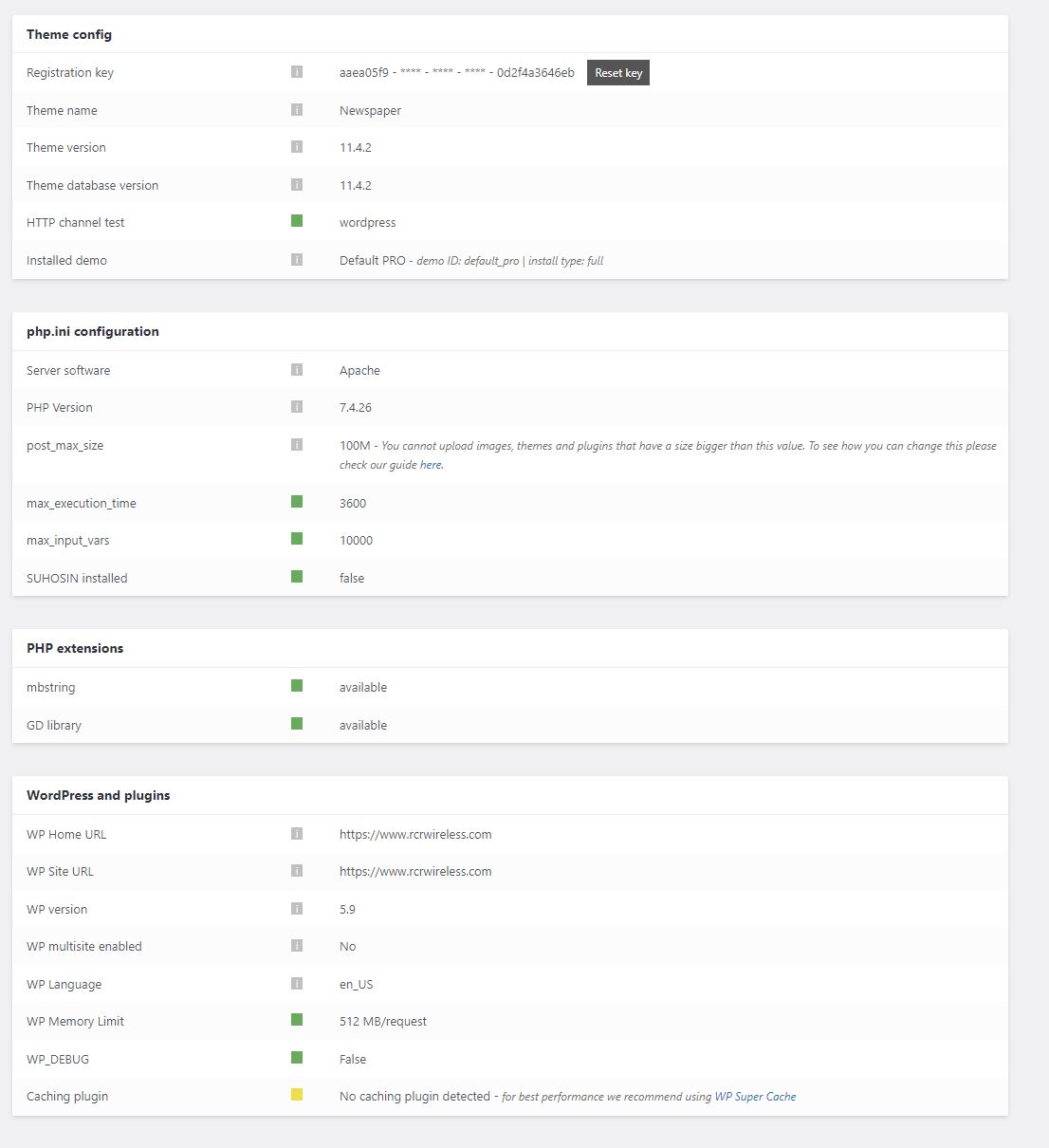
Theme status page:
 PatWire
The mobile menu fails in 11.4.2 – rolled back to 11.4.1 and it works again
There was also a WordPress update today to 5.9
Mobile theme plugin not activated because I don’t use the mobile theme plugin
Thanks



