
- NewsmagSmart list ads
- NewsmagIntroduction
- NewsmagMain menu
- NewsmagLogo & Favicon
- NewsmagHeader ads
- NewsmagSmart sidebar
- NewsmagSharing buttons
- NewsmagCategory tag on modules/blocks
- NewsmagBackground introduction
- NewsmagTheme colors introduction
 Simion C.
 The permalink length is limited by WordPress from what I can find. Like Calin mentioned in this topic
– https://forum.tagdiv.com/topic/mobile-navigation-bar/
Maybe there is more information about it online, could be solutions as well.
Simion C. So the background color when the icons are touched maybe
– https://www.screencast.com/t/hwNnhQ8k
That would only be shown briefly before the redirect to the social is done
#td-mobile-nav .td-menu-socials-wrap a:hover i {

background-color: red;

}
 Calin
Calin Hi @NBO Bangla,
Replay via this topic -> https://forum.tagdiv.com/topic/mobile-navigation-bar/
Hi @Diyar
You can try this fix
#td-mobile-nav {

position: fixed;

}
But also is possible to be others elements broken in RTL
Thank you for your understanding..
Calin Hi,
Unfortunately you can not add widgets in mobile theme ( in this way the content can be load faster).
Sorry for the inconvenience.
Thank you for your understanding.
 Ashby_P
On my site La iglesia de Dios I am having an Epic issue with Instagram.
It is not loading correctly using this account: igldediospanama. But everything loads correctly on this account: profitdaylight.
So profitdaylight is on a sidebar, but even if I put igldediospanama images there appear messed up. And when I put profitdaylight in the footer, everything is OK.
I tought it was the size of the images so I resized one to 600 X 300 (the last image on igldediospanama).
But there is where I confirmed that I have another problem: It is not pulling all my IG images, no matter what.
I have cleared super cache as suggested in this forum post and it doesnt work.
I logged out and back in, I restart my mobile, I cleared cache on the browser itself on my computer (but error appears on Chrome and on Explorer).
If you go into igldediospanama you will see an image with Windows 98 and another one with a rainbow. They dont appear no matter what.
And other images that I deleted from IG are still apearing when I open the website on my computer, no matter how much cache I have cleared.
If it is a matter of riziging, I can do it, but it is not even pulling in the last resized image you see on Instagram (one with a Cross and somebody kneeling down infront)
 pcservis
 Hi, blog post is 6, not 10. And I wrote that it doesnt work every time. What mobile OS and browser have you used?
 ladotg
 Hi, thanks for your answer.
I put code:
.td-big-grid-post-1,
.td-big-grid-post-2,
.td-big-grid-post-3
{
width: 100%!important;
margin-bottom: 3px !important;
margin-left: 0!important;
display: block !important;
}
.td-big-grid-slide {
height: 581px !important;
}
in advanced CSS for mobile in theme panel.
I delete your part of code “.td-big-grid-slide”
Now working fine ;-).
How can I get big picture for post-1 (first row), smaler for post-2 (second row) and two squere for post-3 and post-4 (third row)?
Like https://ibb.co/nFxLme (right picture).
I didn’t update theme to 9.2!
My site is tomislavcity.com.
Thank you!
 teknotel
Not sure what’s causing this can anyone help?
https://i.imgur.com/FWGaFvK.png
On mobile no images seem to be loading.
Thank you
 omrakdeniz
 Mobile menu close
Mobile Menu close Touch
the subject highlight color
Touching gradient color
-
This reply was modified 7 years by
omrakdeniz.
Simion C. I checked this code you mention, it sets a background color for the links in the mobile menu
– https://www.screencast.com/t/PilowF4mG3JS
Maybe you want to set a background color for the top socials and close icon? This would be the code for that
– https://www.screencast.com/t/QcoKqA8N1
.td-mobile-close .td-icon-close-mobile {

background-color:green;

}

#td-mobile-nav .td-social-icon-wrap i {

background-color:green;

}
A screenshot would be very helpful in case this is not helpful, highlight the elements you are talking about and mention how you want to change them.
 Catalin
 Hy,
I have tested your website on mobile and the menu seems to work as expected without any issue! The theme does have any such an option that allows you to display the header image on the mobile theme, sorry! If you want to achieve something like this, you need to make some custom work and if you are not aware of the steps which are needed to take in this case, please consider hiring a freelancer/developer to help you because we cannot provide custom work at the moment, sorry!
Thanks for the message!
Simion C. Sorry for the delay, we try to reply in all topics as soon as possible, within the allocated support hours.
Also as a note, please try not to reply in your own topic multiple times, this will only delay the response from us. So for example this topic would have been among the first in priority without that last reply.
1. The cloud smart list templates display only the smart list itself, the post content element is or should not be present in the template
– https://www.screencast.com/t/PtSK5cwMYM
If you edit a smart list post template you can see that the post content is missing, only the smart list element is there.
So if the post contains other content besides the smart list, it will not be displayed. if that is the case, it would be better to use default post templates.
But that means that in order to display a block in the post page, after the content, you would have to maybe edit the post template files and enter it there, or in the content directly
– https://forum.tagdiv.com/topic/how-to-ad-block-under-the-post/
2. With no AMP and mobile theme plugin, the same smart list template from desktop will be displayed at all times and for all devices.
3. A code like this will do that – https://www.screencast.com/t/9qSmvpF4w
.td-smart-list-pagination .td-icon-right,

.td-smart-list-pagination .td-icon-left {

display: none;

}
4. Maybe like this, with CSS is easiest – https://www.screencast.com/t/6JPPg5La
.td-smart-list-pagination .td-smart-back {

display: none;

}
Thanks
 apod
apodHi,
can I add a widget to activated mobile theme (https://forum.tagdiv.com/the-mobile-theme/), or it is not possible?
Thank you!
 vexx
vexx Disregard that, I had an extension of the mobile browser. It seems to work, but the PageSpeed still shows the page isn’t lazy loaded.
 maismeh
Hi!
I finally wanted to update my version: 7.6.1 of the theme as you recommended. I first updated the WordPress version and then I followed the instructions and tried both approaches: via backend and via ftp. In both cases it did not work out. Error message:
Fatal error: Allowed memory size of 134217728 bytes exhausted (tried to allocate 1048576 bytes) in /home/.sites/564/site1126821/web/wp-includes/class.wp-dependencies.php on line 209
I checked my server settings – there should be no problem there. I bought your theme a second time and used a later version. There I had no problems updating it.
I had to manually remove the theme on the server and then go back to a backup. I also got several alerts during the process about problems with the mobile theme. My guess is that it is the theme making troubles. Can you recommend how I may proceed.
Visual Composer
Another big problem is that the Visual Composer is not working anymore – it’s simply not on my sites since I updated to the latest Word Press Version. Any idea how I could fix that? Just deleting the Plugin and installing it manually from the latest version of the theme?
Thanks a lot!
Regards, Peter
vexx Edit: If I test the site on my mobile device (not emulated), the images are not lazy loaded at all, it loads the full page.
vexx Hey,
I don’t disagree it’s not loading properly for me, but if I do a Google Pagespeed test, besides having a very low grade, it shows that images aren’t deferred. I’m not sure why.
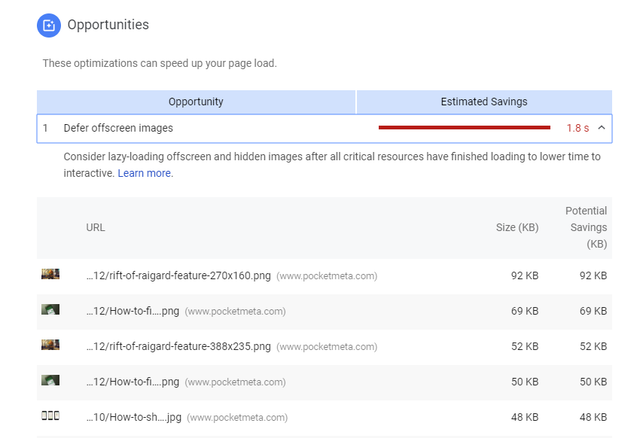
I’m not using the mobile plugin. Also, the mobile grade is slightly higher with lazy load turned off, I’ve did 5 runs to do an average, but since there are too many factors, I won’t blame LAzy for this. However, I don’t understand why it doesn’t show the images are deferred.
 Simion C.
 Hi,
Indeed, the mobile theme plugin is included in the full theme package on themeforest (plugins folder)
– https://forum.tagdiv.com/whats-included/
If you have a problem on mobile, please provide a link to the website so we can take a look.
Thanks
Calin Hi,
I checked your website with my mobile and this time is seems that was working just fine.
But for a better performance please set the blog post show at most 10
https://www.screencast.com/t/lLwGwTmB4z
Thank you for your understanding.
 staticman
 Hi – Just to ensure you fully understand this, when the mobile menu is expanded to show the sub-menu items, the parent menu item has “td-sub-menu-open” added to the classes.
So, by default, in the mobile view we want
Parent menu-item 1
– Sub-menu item a
– Sub-menu item b
– Sub-menu item c
Parent menu-item 2
– Sub-menu item d
– Sub-menu item e
– Sub-menu item f
etc
Thanks!
Simion C. Hi,
Seems I completely misunderstood everything, sorry about that.
The mobile menu will appear after all the page resources are loaded. While the page is still loading the menu will be unavailable. I don’t think there is a solution to speed this up by code.
The included mobile theme plugin is more optimized for mobiles, it will simplify the website and provide a noticeable improvement in terms of speed on mobile. Maybe make some tests with it and check the differences
– https://forum.tagdiv.com/the-mobile-theme/
Thanks
Catalin Hi,
If you want to hide the sidebar for mobile, you need to use a bit of CSS code for that. Use the code below and place it in Theme panel -> Custom CSS area.
@media(max-width:767px){

.td-pb-span4{

display:none!important;

}

}
You can translate this string from Translation Section from Theme panel -> https://www.screencast.com/t/4gh3DYh8sL
Thanks for your understanding!
omrakdeniz hi
.td-mobile-content a:hover {

background-color:green;

}
want to find this code social worker and close employee
 max3903
Hello,
I am running WordPress 4.1 for multiple sites. I installed the Newspaper theme and its included plugins:
tagDiv Cloud Library
tagDiv Composer
tagDiv Mobile Theme
tagDiv Newsletter
tagDiv Social Counter
tagDiv Speed Booster
When I activate tagDiv AMP, I get this error message:
PHP Fatal error: Call to undefined function wp_parse_url() in /usr/share/wordpress/wp-content/plugins/td-amp/includes/amp-helper-functions.php on line 35
So I removed it.
Then I tried to activate the theme, I get:
PHP Fatal error: Allowed memory size of 33554432 bytes exhausted (tried to allocate 32 bytes) in /usr/share/wordpress/wp-content/themes/Newspaper/includes/wp_booster/td_util.php on line 1385
My memory limit is at 256MB so I tried commenting those lines in td_util.php:
foreach ( td_fonts::$font_names_google_list as $font_id => $font_name ) {
$list[$font_id] = $font_name;
}
if ( $flip ) {
$list = array_flip( $list );
}
I am able to get to the “You are previewing Newspaper” sidebar with a blank page and the following message in the logs:
PHP Warning: Illegal offset type in /usr/share/wordpress/wp-includes/widgets.php on line 560
[…37 times…]
PHP Warning: Cannot modify header information – headers already sent by (output started at /usr/share/wordpress/wp-content/themes/Newspaper/includes/wp_booster/td_util.php:974) in /usr/share/wordpress/wp-includes/option.php on line 748
PHP Warning: Cannot modify header information – headers already sent by (output started at /usr/share/wordpress/wp-content/themes/Newspaper/includes/wp_booster/td_util.php:974) in /usr/share/wordpress/wp-includes/option.php on line 749
PHP Fatal error: Call to undefined function wp_scripts() in /usr/share/wordpress/wp-content/themes/Newspaper/includes/wp_booster/td_wp_booster_functions.php on line 528
I am wondering if I got the right version of Newspaper for WP 4.1. What am I missing?
Thanks!
Maxime
 digitalchew
1. After updating to WordPress 5, “Latest Posts” can not be changed.
2. How do I add advertisements between articles, on category pages, and tag pages?
3. How can I add an advertisement underneath the pagination?
4. Images are not appearing on the website. I have used the Regenerate thumbnails but, this is still not working.
5. After I install the Mobile Theme plugin, it appears for all users including desktop users. The grid also is also not being displayed.

