
- NewspaperThe Newspaper Mobile Theme: Introduction
- NewspaperThe Mobile Theme
- NewspaperModules Builder in Newspaper Theme
- NewspaperFilters and sorting for taxonomies
- NewspaperHow to Add a Logo in Newspaper
- NewspaperBig Grid Flex Settings
- NewspaperHeader Builder
- NewspapertagDiv AMP Plugin Tutorial
- NewspaperNewspaper theme documentation
- NewspaperBest Of Forums
- NewspaperCache plugin – install and configure
- NewspaperFont Customization
- NewspaperTheme Colors Introduction
- NewspaperBackground Introduction
- NewspaperHeader ads
- NewspaperPost template ads
- NewspaperCustom ad spots
- NewspaperMain Menu
- NewspaperHow to Install Newspaper via FTP
- NewspaperHow to Install Newspaper via WordPress
 Bettina
 Hello Renato!
We have 3 options for mobile versions that you can use:
1. Responsive version: A responsive version of your website looks similar to the desktop version. TagDiv Composer is used to edit the page. Click on the mobile viewport: https://www.screencast.com/t/XDQJedlggSB. There, you can see your mobile version and edit or adjust the elements to look better.
2. Mobile pages: https://tagdiv.com/newspaper-10-3-7-update-brings-customizable-and-fast-mobile-pages
3. Mobile theme plugin: The Mobile Theme is a performance-optimized theme included in the main Newspaper theme that only loads on mobile devices. It comes with its own templates and designs for pages, posts, categories, etc., so your current templates from the desktop theme will get converted to the mobile theme layout. Please see https://forum.tagdiv.com/the-mobile-theme/ and https://forum.tagdiv.com/mobile-theme-introduction/ for more information.
A full explanation is here: https://www.youtube.com/watch?v=SpGkOnJeNZY
Make sure you do not use Mobile theme plugin, if you use the mobile option 1 or 2.
Thank you!
 janabi
 Hi:) How are you doing today? Hope you are gearing up for a wonderful weekend. I have discovered new issue ?
The problem is with video on mobile devices. So if you open the following url on a desktop there is no problem, but if you open it using a mobile devices you will get error playing the video.
Affected url: https://rb.gy/ku76jo
Screenshot: https://app.screencast.com/IhcnfoFksgrOj
Thanks again, you are the best
Ahmed
 fgarran
Hello,
Our site is showing very different on mobile, how can we create the same version from desktop to be shown on mobile?
Thanks!
Renato
 QamarShafique
Hi Team
I am using Jnews on my blog and my web blog’s speed and core web vitals are perfect. I install newspaper on my friend’s recommendation, it’s the worst theme I’ve installed. My page speed is 16 for mobile and 52 for desktop. Let me know if I can increase the website page speed. I have installed the required cache plugin named super cache etc.
Looking forward to hearing from you
 george921
 It’s not working on my IOS Pro 13. We also have multiple emails from subscribers tellings us they can’t log in. Can you look again? I can send a video if needed. The one thing I noticed on the mobile browser (both Safari and Chrome) is that it doesn’t full load. It seems to keep loading. Any insight is greatly needed
 fashionablyearly
 This is how it’s supposed to look on mobile: https://imgur.com/a/Tu2KA4G
The templates show correctly if you’re signed in as a user on the site. But for anyone not signed in, they do not
fashionablyearly Incorrectly showing on mobile currently: https://imgur.com/a/ilr9TzQ
fashionablyearlyCreated a desktop template and a mobile template for my homepage and for posts. Yet no matter what I try, both templates will not work together at the same time. If the desktop template is working, it’ll show that desktop template when loading in on mobile and desktop. If I clear the cache, the templates will swap and then show the mobile template when loading on both desktop and mobile.
Load the pages: https://www.fashionably-early.com/
or https://www.fashionably-early.com/2023/03/21/splendi-lazy-bones/
and you will surely see our issue.
 danna
danna Hello,
i guess it’s not a problem with the plugin but a problem with the mobile theme.
All the best,
Daniel
 Anamaria
 Hello!
You can disable/enable sticky mobile menu and main menu when you access Website Manager, like this: https://www.screencast.com/t/EdpjIpsBHunx
Hope that helps you!
Thank you!
 gabrielbotezatu
It is simply disapearing when I try to make it sticky:
[video src="https://dobrogealive.ro/wp-content/uploads/2023/03/chrome_SHFE9ssCs6.mp4" /]
danna Hello,
i didn’t ad the code in the TagDiv Composer, i added it directly into the Post (Gutenberg):

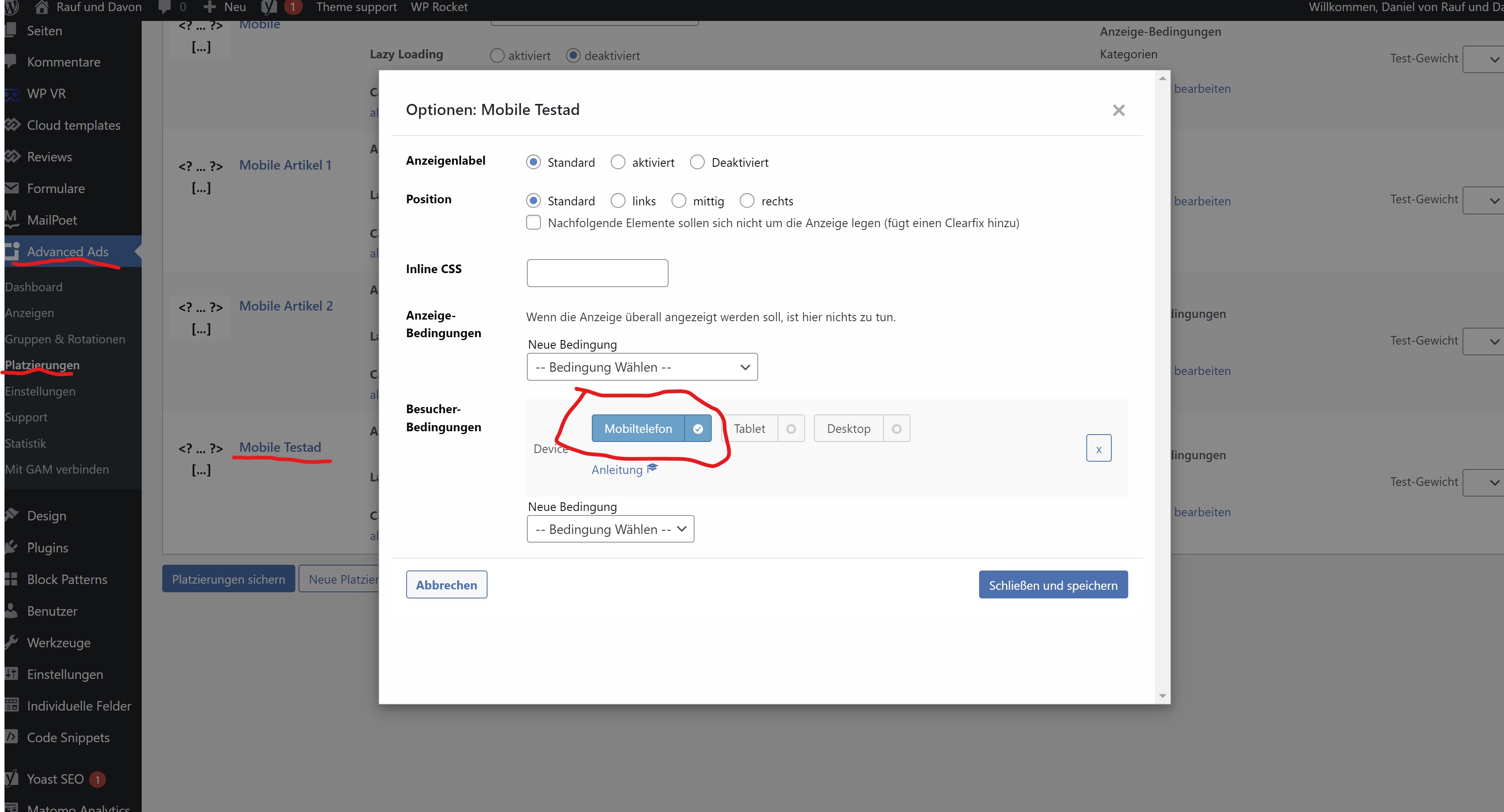
After that the ad is displayed in Desktop and in the mobile theme. Everything works perfect. But on Desktop i don’t want the ad to be displayed in the post, because i have it in the sidebar. So i use a filter from advanced ads to just display it on mobile devices:
After the filter is applyed, the ad is still displayed in the DevTools (there i can load the mobile theme):
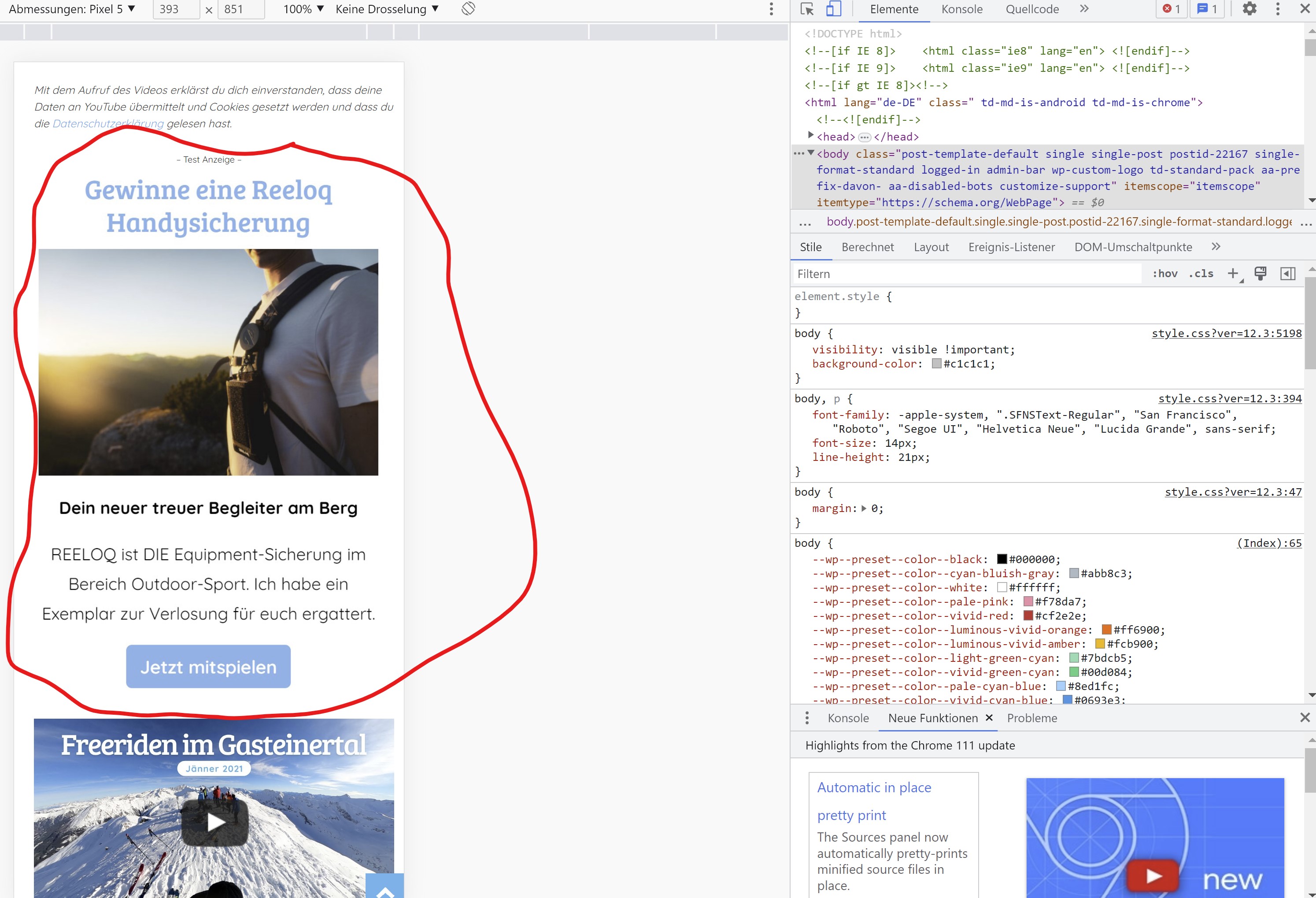
So it is displayed in the mobile theme but for some reason it’s not displayed on a real mobile device.
You can check it our here: https://rauf-und-davon.at/freeriden-gasteinertal-2023/ – the ad should appear between the two Vidoes.
All the best,
Daniel
-
This reply was modified 3 years by
danna.
Bettina Hello Daniel!
If you added the ad code in the TagDiv Composer, then the mobile layout will override the cloud template and display its layout. So, the ads won’t work in the mobile viewport.
If you use an extra plugin, then there could be a plugin conflict between them.
Thank you!
danna Hello,
as i said, i need to show ads on a custom place. I manually inserted the placement-adcode in every single post on a different spot. As long as i don’t use a filter in advanced ads, the ads are displayed on the desktop version AND in the mobile theme. If i activate the advanced ads filter, to only display them on mobile, the ads are not diplayed al all – neither desktop nor mobile.
So generally it works and ads are displayed in the mobile theme. But as soon as i apply an advanced ads filter, the ads are not shown in the mobile theme anymore.
All the best,
Daniel
Bettina Hello Daniel!
As I said, you should add the ads in Newspaper -> Theme Panel -> Mobile theme -> Mobile ads. There, you have the fields for the article ads too. Otherwise, they do not display in the mobile theme layout.
Thank you!
danna Hello,
I don’t want to customize the ads, I just want them do be shown just in the mobile theme. There has to be some solution (at least with some extra code). I mean I put the adcode directly in the posts, so the have to be loaded in the mobile theme, right? And as I said, they are shown in the DevTools (the mobile theme gets loaded there), why aren’t they shown on mobile devices? This feature is really really important for me and my clients (I already bought 8 Newspaper Themes an more to come).
All the best and thanks for the help,
Daniel
Bettina Hello Daniel!
Unfortunately, we do not have settings in order to customize the ads in the Mobile theme.
Thank you!
danna Hello,
thanks for getting back. I know this option but as i want to show the ads on exact spots (there where i put the code into the posts) this doesn’t work for me.
How can i solve the issue with the placement filters from advanced ads as written above? The funny thing is, the ad is shown if i load the mobile theme via Chrome DevTools but not displayed on mobile phones itself.
F. ex. here, the ad between the videos: https://rauf-und-davon.at/freeriden-gasteinertal-2023/
All the best,
Daniel
Anamaria Hi,
Did you check the mobile version or the desktop version.?
Please provide a video.
Thank you!
 sadviser
I am using the Tag-div composer to place a shortcode into a mobile page. I am doing this through a content text element however, when I save, it does not appear to actually save. Is there some additional step I need to do?
The steps I take are:
1. Press Edit Content
2. Add content to WP Editor popup
3. Press Save content – content saved side tag appears
4. view page – nothing appears
Is there some additional save button to press on the WP Editor that I cannot see on my screen for instance?
I can see that several people have asked the same question, each with a slightly different outcome. All my plugins are up to date.
Bettina Hello Daniel!
If you use the Mobile theme plugin, then you should add the ads in Newspaper -> Theme Panel -> Mobile theme -> Mobile ads. There is a special field for the AMP ads if you use that plugin too.
Thank you!
 syed2023
 shokuhinet
Dear support
Our site plan to remove tags list on single post pages of tagdiv mobile theme.
Please tell me css class name or id to do it.
I wrote css to do it as
.td-post-source-tags {
display:none;
}
But it is not working.
Regards
 PLC
PLCHi guys,
Background: I’ve got this website with your Newspaper theme installed which I have not been using or updating for at least two years, and the theme version was probably even older than that.
Since I was updating other websites yesterday (based on other theme) to new WordPress and theme version, I decided to update Newspaper theme (and the whole website) at the same time, cause it’s on the same server.
I had the feeling that making a backup copy before updating after such a long time would be a really good idea, but of course I thought to myself ‘Nah, what bad could happen that I would not be able to fix?’. Well… here we go:
So after uploading the newest Newspaper folder via ftp and replacing the old one, shit hits the fan.
First, I get a fatal error, website crashed.
I googled and this was a known issue with new WordPress version and old themes, I applied a quick fix (change one line code) in class-wp-textdomain-registry.php and hooray! the website ressurects. Happy days? Not really…
Second, the website does not look like before.
In fact, it does not look like a website at all (frontend), nothing works or displays correctly.
I googled and found that you made a major update some time ago and I need to install additional plugin to make old things work as they should (Standard Pack). So I did that and success again – pages and posts load as they should… with one very strange exception…
…the Contact page seems to constantly reload itself in an endless loop (it looks like it’s trying to send the form constantly without any fields filled in?), and the contact form is not visible in mobile version at all (mobile plugin installed), maybe it’s actually good because it’s not reloading endlessly like in the desktop version… This really drives me crazy… BUT! I change browser from Firefox to Chrome and the problem disappears! How come? Any idea what’s wrong? Also seems to be wrong only for logged in members (admins), that’s really strange.
But on mobile the Contact form is not there in any case.
I’d be grateful if you could tell me what is the best way to set everything straight, cause I like to have my websites and server files in good working order and clean, without any messed up code if it’s not necessary, so I’d prefer to reload WordPress and probably upload the newest Newspaper theme from the scratch – but how can I keep all my pages and posts and keep the structure and settings? If I make a normal backup copy with all site details included – will it not replicate the problem after importing it back onto the newly reinstalled WordPress and theme with old plugins, settings etc?
In the (not so) worst case scenario I may fancy rebuilding the website using one of the new templates you provided which look really nice, but I need my original content (e.g. pages, posts and media) to do that.
But if I didn’t want to redesign with new template – what’s the best solution to get everything back to clean and working state (now it’s working, but a bit messy and prone to problems in future, I guess…)?
Thanks.
dannaHello,
i use the tag div mobile theme and the plugin advanced ads. If i create a placement in advanced ads and tell the placement to only appear on mobile devices the ad doesn’t get displayed in the mobile theme. Also the plug in add on where i can set a “maximum browser width” as filter doesn’t work. The ad only appears if i delet all filters.
I put the shortcode of advanced ads directly into my posts on the spots where i want them to appear but i only want to show them on mobile devices – on dektop i use the sidebar to show ads.
Can you help me?
All the best,
Daniel
