
- NewspaperThe Newspaper Mobile Theme: Introduction
- NewspaperThe Mobile Theme
- NewspaperModules Builder in Newspaper Theme
- NewspaperFilters and sorting for taxonomies
- NewspaperHow to Add a Logo in Newspaper
- NewspaperBig Grid Flex Settings
- NewspaperHeader Builder
- NewspapertagDiv AMP Plugin Tutorial
- NewspaperNewspaper theme documentation
- NewspaperBest Of Forums
- NewspaperCache plugin – install and configure
- NewspaperFont Customization
- NewspaperTheme Colors Introduction
- NewspaperBackground Introduction
- NewspaperHeader ads
- NewspaperPost template ads
- NewspaperCustom ad spots
- NewspaperMain Menu
- NewspaperHow to Install Newspaper via FTP
- NewspaperHow to Install Newspaper via WordPress
 NataleMultiservizi
il contatore di visite della versione mobile Amp non funziona, come posso risolverlo? Sto impazzendo per il
mio sito http://www.gomorraweb.com
non mi funziona il contatore visite in versione Amp mobile , come posso risolvere ?? sto impazzendo
le visite che avvengono dal mio sito in versione amp mobile non vengono conteggiate nemmeno da wordpress!!!
NataleMultiserviziil contatore di visite della versione mobile Amp non funziona, come posso risolverlo? Sto impazzendo per il
mio sito http://www.gomorraweb.com
non mi funziona il contatore visite in versione Amp mobile , come posso risolvere ?? sto impazzendo
 thaisan19
Dear Newspaper team,
I got a problem with the site’s side menu when it comes to mobile layout. Please help me fix this ?
 Vlad S
 Hello!
Can you provide more information about what exactly is not working properly ?
I have tested your website on 2 mobile devices + the emulator and everything seems to be working just fine.
Thank you!
Vlad S Hello!
Have you added your adsense code in Theme panel – Mobile Theme – Mobile ads too ? https://www.screencast.com/t/SOj0RNTUqU1
Thank you!
 Umut
Umut Hi
On PC we can see our new article but on mobile it can not be seen.
https://www.screencast.com/t/pDnLodvCuRNp
NataleMultiservizithe mobile Amp version hit counter does not work, how can I fix it? I am going crazy
my site http://www.gomorraweb.com
non mi funziona il contatore visite in versione Amp mobile , come posso risolvere ?? sto impazzendo
NataleMultiservizinon mi funziona il contatore visite in versione Amp mobile , come posso risolvere ?? sto impazzendo
 Anamaria
 Hello,
Please let me know what code is showing on the top, if you have the same error as @zebu59, please check this topic https://forum.tagdiv.com/topic/update-diary-and-worries-mobile-theme/#post-412163
Thank you!
Umut I have loaded previous backup.
İt looks ok now, but new pages does not seen on mobile front page….
I do not understand why mobile is having so much difficulty.
 victorchiq
When I use the header shortcode “mobile live search”, on TagDiv Composer, the on the Search Icon will open a modal for search, like the one from this website: https://screenrant.com/
How can i customize it like de site above did?
Can anyone help me, please?
 Caiaphas
I have a multi-vendor Woo-Commerce website, https://newmexiconomad.com/mercado/
I used one of the Cloud templates for products. The template looks great and works fine on a desktop, but it is generating a critical error on mobile devices and the product photo won’t load. The button still works in terms of redirecting to the affiliate link. I went back to the default product template for now. No issues (other than general aesthetic). However, if anyone has run into this issue and figured out a workaround solution, please let me know. I would prefer to design a product template that matches the branding and has the right header.
 arvind9725
I want to preload cdn.ampproject.org/v0.js into my website for better performance.
1) /applications/rmanupmumc/public_html/wp-content/plugins/td-composer/mobile/amp/functions.php
2) /applications/rmanupmumc/public_html/wp-content/plugins/td-composer/mobile/functions.php
======== my code – start ==========
function dns_prefetch_mobile() {
echo “<link as=script href=https://cdn.ampproject.org/v0.js rel=preload>”;
}
add_action( ‘wp_head’, ‘dns_prefetch_mobile’, 0 );
======== my code – end ==========
I have placed the above code in both above locations but the code is not working. I have put the above code in both the files one by one but js file is not preloaded.
I am using the latest version of the newspaper theme (11.2). can you please help me?
waiting for your response.
 tapan29588
Newspaper theme is installed on my website. My problem is that the AdSense anchor ad does not appear on the mobile device. It looks fine if I open it on the desktop. So please tell us what to do to make AdSense anchor ads appear properly on mobile devices. And AMP auto aids are also not working.
 fahrezy
 I have been update to newspaper Latest Version.
but Website error, if tagDiv Mobile Theme Active.
wp_booster error:
td_api_base::mark_used_on_page : a component with the ID: td_style is not set.
/var/www/html/wp-content/plugins/td-composer/legacy/common/wp_booster/td_api.php
 zebu59
Hello
after performing my newspaper and wordpress update, a weird error appears in this condition:
On the login page, an error code appears if you make a login or password error. This only on mobile phone.
If I deactivate the newspaper mobile theme plugin, I no longer have this error. I emptied the cache and reinstalled the plugin, nothing changes.
Thanks for your help
Here is this error:
Warning: is_readable (): open_basedir restriction in effect. File (/Newspaper-child/theme.json) is not within the allowed path (s): (/ web / zebinfo: / web2 / zebinfo: / home / temporary / upload / zebinfo: / home / temporary / sessions / zebinfo: / tmp: / usr / local / lib / ZFramework: / dev / urandom) in /web2/zebinfo/www/Potager/wp-includes/class-wp-theme-json-resolver.php on line 354
zebu59 I have the same thing. Me concerning the error code appears with the activation mobile theme, during a connection error and on my phone. I don’t know if the problem stays the same even after clearing the cache, it doesn’t change.
Umut Naveen7829
Hi,
When I update the 5.8 WordPress theme it shows some coding on the top. For resolving this I downgrade the WordPress.
 vikramsaiteja
Hey there ,
can you say me how to disable all the previews of featured images in my site when I’m using the tag div mobile plugin , As it is using default pages for home and posts and my content didn’t had any featured images its not looking good .
 shpetimH
Hi all,
I have a WP 5.8 and Newspaper 11.2 version (https://observeri.com/).
Everything is working perfectly fine but I have a complex scenario and I ran into some issues which I will try to explain.
– I have few categories, each of them have different headers and footer (body almost the same to all)
– For all categories I also have different mobile versions (those are working as they should)
– Every Single Posts under certain category have also different layout (those are working fine as well)
– When I try to create mobile templates for Single Posts for different Categories, those are getting overwritten 🙁
For example:
– Category X desktop / mobile is fine
– Single Post under Category X uses header and footer as Category X and both desktop / mobile templates are fine
– When I try to design Single Post Mobile Templates for Category Y, all other Single Posts templates are getting overwritten.
Everything is set to use specific templates to “Theme Panel > Categories” and Desktop version is working perfectly, this is happening only on Mobile Templates.
PS: Every mobile template I create from Template itself using “Create Mobile Template”, and on “Cloud Templates” they seem to be correctly linked for example 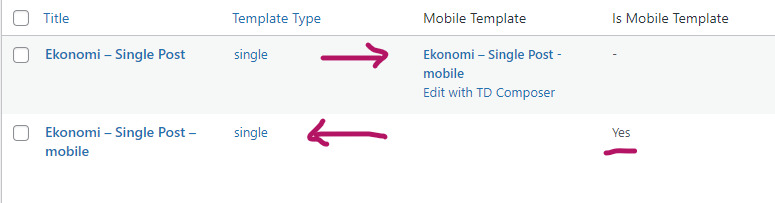
Everytime I create a new single post mobile templates all single posts will start using the latest one!
I would really appreciate any help.
Thanks and regards.
 zarpe77
When I go to the page
https://ticotimes.net/categories/news
on desktop it gives me the mobile view
Can you let me know how to correct that?
 BarbaraZ
Dear Support,
How to avoid the situation that the cloud templates come up in google search instead of the actual pages of the blog created with the Newspaper Theme: http://www.detektywsmaku.pl.
The first search result is this:
Home Mob – Detektyw Smakuhttps://detektywsmaku.pl › home-mob
And it takes you to the template of the mobile version on normal computer…
All the best,
Barbara
 ventamar
Hi, is there a way I can increase the logo background height so that my logo is larger on mobile devices?
 Newsminions
 Hello,
Thanks for the reply, Also according to your suggestions above I have already set it to Amp for mobile theme. Also, I have placed adsense amp code on the header of the site using the insert header and footer plugin. But now also ads are not getting displayed. Help me to resolve the issue at the earliest. I have attached the screenshots of various setting of my site as per your request.
Mobile Theme setting – https://prnt.sc/1jocolv
Insert Header And Footer – https://prnt.sc/1jofbk4
AMP version of my site – https://prnt.sc/1jodqnj
Thanks,
-
This reply was modified 5 years by
Newsminions.
