
No search results were found in Documentation!
 simchris
 Generally, the AMP version has no relation to the main theme as the AMP endpoint is highly mobile optimized and doesn’t support any of the theme features, so kind of pointless to have as “part of the theme.”
But we all have our own thoughts on this.
What if TagDiv abandons the theme on your 100,000 page site, and no longer works with PHP 7.5? You’d need to suddenly change to an agnostic plugin. if you had been using agnostic plugin originally, it would work regardless of “theme.” I prefer that “separate” function, personally, especially if it gets added into something like http/2 as a feature.
I’d like a flying car, too, but not going to hold my breath 🙂
I’m out!
-
This reply was modified 9 years by
simchris.
 fenomeno0chris
Hello to the whole Newspaper/Newsmag team!
First I want to say, thank you very much for creating such great themes.
After 3 years I decided with my team to change the overall design of my homepage, by buying Newspaper7. The reaction of our readers and users are mostly positive. So thats a good sign.
Of course such a huge change is not that easy to handle and thats why I still have some problems and question, which should be solved.
All problems occur on the latest version of Newspaper 7.8
1) On my MacBook with the default Safari browser, I often get this annoying and bad looking line through the whole header section. How can I solve the problem?
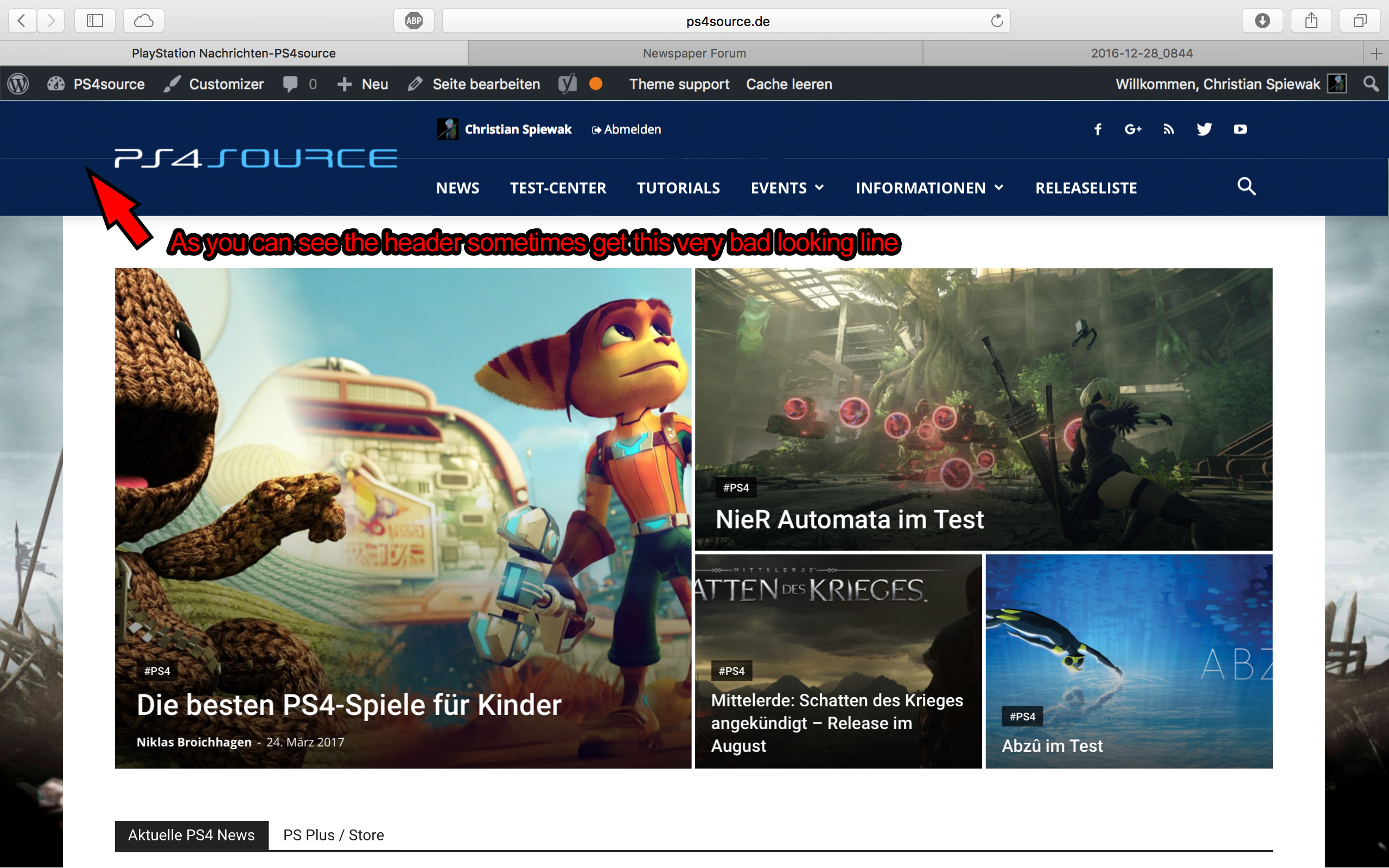
2) Which register plugin should I use? I don’t want to let new users to set a new password on the bad looking interface of WordPress. Im sure you guys know what I mean and have a good recommendation for that. Beside that, what should I use to prevent registrations from bots?
3) Is it possible to have a gradient header and footer, instead of just one color? It looks a bit boring.
4) How can I change the menu just for the mobile page, without using td-mobile-plugin?
5) How can I change the the font style and size of quotes? At default settings it looks way too big (see here)
6) Is it ok too use the responsive options, to create one site with different blocks and grids for mobile and desktop? Im asking cause I don’t know if my site will load much longer, if it has to load information even though there are not displayed. (see details here)
7) My current page speed is a disaster (see here). Why is it so bad, since Im using kraken.io image optimizer and WP Super Cache? How can I improve the score?
8) How can I use td-speed-booster, without uninstalling my plugins? (Disqus Comment System, TablePress, TotalPoll…) I really need those plugins, but I still want to have a fast homepage!
9) If I set [Template Setting->Force Full width->Header Menu] to “No Stretch”, the logo of my site is not at the correct position.

10) validator.w3.org shows, that my page has 33 errors (see here). How can I fix them?
 ben.hinc
 I appreciate your thoughtful response. I think it’s misleading to suggest that AMP “replaces” the mobile theme. It’s offered as an alternative to the mobile theme and with proper implementation, Google will find the AMP version, show it in mobile search results and rank it higher than a corresponding non-AMP (but still optimized for mobile) page. On my site, we use AMP for SEO purposes only and as much as we can, we direct visitors to the regular mobile version of our site because this is the experience we prefer and want our visitors to have.
Just like theme authors keep up with the ins and outs of changes to WordPress and how their themes interact with various plugins, I don’t think it’s too much to ask that they keep up with AMP.
There are many plugins like AMP for WP that take what Automattic is doing with their “agnostic” plugin and greatly enhance it. For example, just in the time that I’ve been using AMP for WP, the authors have added optimizations specific to Newspaper as well as support for plugins that do not display properly with Automattic’s plugin like Tobias Bäthge’s awesome TablePress. This is all done, of course, without breaking AMP validation.
I’m not suggesting that the Newspaper developers start from scratch. Plugin authors like those behind AMP for WP have shown that AMP functionality can be extended using Automattic’s plugin as a base.
My idea would be for tagDiv’s mobile theme plugin to work in the same way — essentially allowing Automattic’s plugin to do the heavy lifting and adding Newspaper-specific design and functionality on top of it.
My website, The Apex, chose Newspaper and continues to use it because of the awesome experience afforded by the mobile theme plugin. However, that experience becomes diluted when the best experience can’t get the best search ranking due to Google’s insistence on AMP compliance.
I have seen very good AMP implementations on other sites that aren’t based on WordPress — so good, in fact, that it was nearly impossible to tell the difference between AMP and non-AMP. This demonstrates to me that it is indeed possible to offer a fully functional and well-designed experience while keeping in compliance with the evolving AMP standard.
Seeing these sites should make it abundantly clear that what is offered by Automattic’s plugin isn’t sufficient. Yes, it creates pages that validate against the AMP standard. But it doesn’t make the THEME compliant with AMP, only the site’s content. I’m doing a disservice to my site’s visitors by giving them a less-than-optimal experience. I want them to use Newspaper’s mobile theme and tagDiv should want them to use it too — but that’s not going to happen as long as AMP pages rank higher than others and tadDiv continues to see AMP as a distraction.
The best news theme for WordPress, which Newspaper undoubtedly is, will not remain the best for long if it cannot deliver a best-in-class AMP experience for its paying customers like me. SEO is critically important for sites that use themes like Newspaper and denying the importance of AMP as well as the experience when viewing an AMP-compliant page is a big mistake. tagDiv should not be content allowing the AMP experience for sites using Newspaper to be dictated by a third party.
The first major news-style theme for WordPress that offers built-in support for AMP with no difference in the experience over non-AMP mobile pages will be a winner in this space. I can’t help but think that tagDiv is missing a huge opportunity here.
 Simion C.
 Hi,
Basically the theme has these requirements as specified here – https://forum.tagdiv.com/requirements-for-newspaper/ in order to get the best results. Some further modifications are recommended to be made according to this guide – https://forum.tagdiv.com/system-status-parameters-guide/
If all these simple conditions are met it is recommended to use a caching plugin and the CDN as mentioned in the previous reply. Also a tutorial about improving page loading speed is available here – https://forum.tagdiv.com/how-to-make-the-site-faster/ meant to help you optimize website speed.
Some of these recommendation are not mandatory and a website can work properly without them. Please note that some plugins can have a negative effect on websites and cause unexpected results, so you should test this using only the latest version of the plugins, provided in the theme package.
Thank you for understanding!
simchris Best solution is to make sure images extremely well optimized, ensure you use opcache with PHP 5.6 or higher (do not use 5.2 or 5.4 .. ooooold!); limit “queries” on each page — such as megamenu images, sidebars, footers, disable XMLRPC, disable track back/ping-backs, etc.
 Catalin
 Hello baburaj.s,
Please notice that the speed booster is an optional plugin which can be activated in the same way as you install a new plugin.
The Speed Booster works only with the tested plugins. If you use other plugins, it will be automatically disabled, and I suggest to check this first in System Status. However there is a workaround to make it also work with other plugins, you can read more here – https://forum.tagdiv.com/topic/speed-booster-not-compatible-with-vaultpress/
Unfortunately, the time doesn’t allow us tot provide any custom and optimization services. We provide support only for the theme related issues based on Envato support policy – https://themeforest.net/page/item_support_policy I suggest to get someone to help you if you want to optimize your site.
Thanks for your understanding!
 HeTo25
Hi
The TagDiv-Gallery works fine on my desktop. On my mobile phone the first part of a gallery is fine too. But if a certain amount of pictures is reached, the slider on mobiles gets slow and viewing a gallery is annoying. It doesn’t make any difference if I switch trough the pictures with my finger or if I use the arrows.
http://bit.ly/2nWWaMy – from picture 14/25 the slider on mobiles doesn’t work smooth. Until picture 13/25 the slider is ok.
http://bit.ly/2nXawN8 – from picture 26/48 the slider on mobiles doesn’t work smooth. Until picture 25/48 the slider is ok.
Did you have other users with the same problem? Is there an option to optimize the gallery-view on mobiles?
Thanks
simchris You can’t use styles inline in modern HTML… even though WordPress encouraged it with the built-in visual editor for centering text for paragraphs or other elements.
e.g.
wrong = <h2 style="align:center">Text</h2>
correct = <h2 class="center-text">Text</h2>
You will need to google many of the articles of the past couple of years on how to optimize WordPress for AMP as styles you’ve used in posts, not part of theme.
Some IMG classes might need to be fixed depending on how used.
 alspa
alspaHi,
we use big grid 3 for one of our pages. When we use a video file (e.g. vimeo) for one of our posts, the automatically generated thumbnails are not fitting in the first “box” of big grid 3.
You can find the screenshot here: https://drive.google.com/file/d/0BxFyc39gVFHrcmd1TUpnVkVZSEk/view?usp=sharing
Is the an option to optimize this?
Thank you and best regards
Alex
 Valley
Hello,
My visit count in the articles of my blog don’t grow. I see that maybe is the cache system. We use SG Optimizer for the caching and I have already activated ajax view count in the theme settings.
Thanks for the support!
 Bogdan B.
 Hello,
You will have to optimize your site as you need to make a few adjustments:
https://developers.google.com/speed/pagespeed/insights/?url=http%3A%2F%2Fcolourfulathletes.com%2F&tab=desktop
Please use this guide: https://forum.tagdiv.com/how-to-make-the-site-faster/
Thank you!
Bogdan B. Hello Ivan,
First let’s start by removing autoptimize. That makes things worse. Please remove any customization you made and revert the theme. Please disable all plugins except the tested and recommended ones: https://www.screencast.com/t/VOeWxr4li6Y
Please make sure you increase the system status parameters like so: https://forum.tagdiv.com/system-status-parameters-guide/
The use this guide to increase your site speed: https://forum.tagdiv.com/how-to-make-the-site-faster/
Make sure you use a caching plugin like so: https://forum.tagdiv.com/cache-plugin-install-and-configure/
Thank you!
Simion C. Hi,
Please note that page speed optimization does not depend entirely on these plugins. There are many factors that can negatively interfere with page loading. Please follow these guides carefully, for the cache plugin configuration – https://forum.tagdiv.com/cache-plugin-install-and-configure/ and for page speed optimization – https://forum.tagdiv.com/how-to-make-the-site-faster/ This should optimize the loading time on your site as best as possible, also please try to make the tests without any plugins except the ones bundled with the theme, for more accurate results, because some plugins could have a big impact in this matter.
Thanks
simchris What did you recently update on your site to break it ?
it *cannot* just break on its own. Technically impossible.
Did you check your pages with F12/Console for errors?
Do you periodically clear transients and clean up dbase with something like wp-optimize?
Did you check your server error log for anything like hack attempt, system errors?
Did you check with your hosting provider for any server issues?
Did you check your website via FTP for any malicious software ‘hidden’ on there?
(( I don’t work here, just some feedback, using TagDiv themes for over 3 years now; and this never happens on our sites! ))
Also, good to check if you have a proper full site backup so you can “go back” to the prior day before it “broke” to repair it.
Catalin Hello jorgeraidel,
Please notice that the speed of your website depends on how well your site is optimized. Notice that is not a simple task and if you do not have any experience in this regard you will do not bring good results for the theme. Also, notice that we have a speed optimization tutorial but this is addressed only to advanced users. So, if you follow the steps which are presented in this tutorial here -> https://forum.tagdiv.com/how-to-make-the-site-faster/ you can increase the page speed loading and if you are not aware of the steps in this regard, please consider hiring a freelancer/developer to help you because the speed optimization services is not covered by our support policy, as you can read here -> https://forum.tagdiv.com/support-policy-2/ Check our documentation here -> https://forum.tagdiv.com/requirements-for-newspaper/ regarding on dedicated server to fit to our requirements.
Please keep in mind that at the moment, we cannot provide optimization services because this task involve time-consuming and we do not afford to do this, sorry! We only can provide support for basic theme settings.
If you are not aware of these steps which are needed to take in this regard, please consider hiring a freelancer/developer to help you because we cannot provide custom work at the moment, sorry!
Thanks for your understanding!
 WebID
WebIDHi,
I have some issues with my site. It loads extremely slow and have some problem with the data base.
I have installed WP super cache, but after the issues start I installed Autoptimize also and made some changes in .htaccess file for gzip compresion and leverage browser caching. I also stop wp-cron job and activate cPanel cron job for the site.
Unfortunately that didn’t help and my site is still slow if load, because sometimes it do not load and give Error in database connection or 500 internal server error…
I contacted my VPS provider and they answered me that it is theme issue.
The theme is written in a way that each time somebody visit the site to perform the calculation of posts due to pagination on the site. The exact MySQL query is:
//
SELECT SQL_CALC_FOUND_ROWS wpvr_posts.ID FROM wpvr_posts INNER JOIN wpvr_postmeta ON ( wpvr_posts.
//
And said that this calculation every time overloading the server.
I thought that it is because I have thousand of posts and on the home page is loading “Recent post” with pagination and that way I have changed Hime page to default template and now I haven’t pagination on home page, but the problem is still exist…
Would you have any idea what is the problem and how to resolve it?
My site is: http://petrichnews.info/
Thank you in advance for your time and assistance!
All the best,
Ivan
Simion C. Hi,
@Chrizze With each update of the theme, new features are implemented in order to optimize the functionality and design. An improvement to the review system could be taken into account in a future update, but I can not say for sure when this will happen. The developers have to decide which feature gets introduced and when existing options will get updated, and the list of suggestions and recommendations is constantly increasing, so it is not an easy task. In the meantime please consider using a free plugin for your needs, if the current default review system is not suited for your project.
Thank you for understanding!
 ttalleur
 Simon:
Thanks. Yes, I’ve optimized the site by deleting plugins and following your suggestions. Problem is, the home page still takes about 20-30 seconds to load the slider. That’s way too long. As you know, a visitor will click off a site after 2 seconds if a page or graphic doesn’t invoke. And they won’t even know this slider is there because they won’t wait around to view it. When I invoke this page … I see white screen space (using 3 different browsers) for about 20-30 seconds.
This is a nice, but practically useless function for my site. I tried it because I wanted to take advantage of theme native features and avoid the overhead of the revolution slider. It looks like I’ll revisit the revolution again. Thanks again for your help. Tom
Simion C. Hi,
I have inspected your site but it seems to be loading fine now – https://www.screencast.com/t/gUCdLSvovUA nowhere near the two minutes you are experiencing. You are right, some plugins could slow down the page speed loading. Please follow the guide I provided above – https://forum.tagdiv.com/how-to-make-the-site-faster/ to try and optimize the loading speed, and hopefully show improvements in this matter.
Thanks
Bogdan B. Hello,
Please use this guide to make sure the theme uses the correct thumbs: https://forum.tagdiv.com/thumbnails-fix-strange-looking-images-on-blocks/
Then please use this guide to increase your site loading speed and optimize images: https://forum.tagdiv.com/how-to-make-the-site-faster/
Thank you!
Catalin Hello svharishtech,
Please notice that the speed booster is an optional plugin which can be activated in the same way as you install a new plugin.
The Speed Booster works only with the tested plugins. If you use other plugins, it will be automatically disabled, and I suggest to check this first in System Status. However there is a workaround to make it also work with other plugins, you can read more here – https://forum.tagdiv.com/topic/speed-booster-not-compatible-with-vaultpress/
Unfortunately, the time doesn’t allow us tot provide any custom and optimization services. We provide support only for the theme related issues based on Envato support policy – https://themeforest.net/page/item_support_policy I suggest to get someone to help you if you want to optimize your site.
Thanks for your understanding!
 SecNews24
 Dear Support,
This theme is absolutely useless for the garbage.
1. Not tested with SEO Tool
Your webpage is using 46 inline CSS styles!
Optimize CSS Delivery /Newspaper/style.css?ver=7.7.1 / demos/black/demo_style.css?ver=7.7.1 …..
a lot of unnecessary code #bbpress-forums li.bbp-header ……
<!–
Theme: Newspaper by tagDiv 2016
Version: 7.7.1 (rara)
Deploy mode: deploy
uid: 58c7e1411afc3
–>
….
2. No useful Blocks with text only / for example
Block16 (Titel + Text – no image)
Block21 (Titel + Text – no image)
M6 (Titel + Text – no image)
M16 (Titel + Text – no image)
It is only colorful but the essential is the text….
3. Always the hint at dashboard, to register the WPBakery Visual Composer module.
Google, Bing etc. offer these tools, because without clean code these search engines do not index the pages and this is essential.
This theme can only be rated with a star, only colorful but without the most important points.
Catalin Hello martinhenych,
Unfortunately, our theme does not have checked with the child theme and speed booster, sorry! The Speed Booster is optimized only for Main Theme. If you want to display more levels in our theme and if you are not aware of the steps which are needed to take in this regard, please consider hiring a freelnacer.developer to help you because we cannot provide custom work at the moment, sorry!
Thanks for the message!
Bogdan B. Hello,
We are sorry to hear about your traffic drops but the theme is not to blame for that. The menu loads fast if you optimize your site properly. As you can imagine, we tested the theme thoroughly and our large user base can confirm there are no traffic drops in normal conditions and on a stable host. Please increase your loading speed and you will see the traffic rise up again. Page speed is the number 1 traffic loss issue and lots of people tend to ignore it. Themes are not the same. Our theme has complex elements that require a bit of optimization for optimal results. Please use this guide https://forum.tagdiv.com/how-to-make-the-site-faster/ and make the proper optimization to your site so users do not get bored waiting for it to load and you do not loose traffic.
Your site loads pretty slow: https://developers.google.com/speed/pagespeed/insights/?url=https%3A%2F%2Fdailytimes.ng%2F
Please consider google’s advice to increase the loading speed.
Also please increase your system status parameters like so: https://forum.tagdiv.com/system-status-parameters-guide/
Another issue you could be facing is opera mini. If a large number of your fans use opera mini then that alone is a big drop as our theme is not compatible with opera mini.
If for any reason you find our theme is not suitable for your project, you cna request a refund here: https://themeforest.net/refund_requests/new and we will provide your money back so you can choose a different theme.
Thank you!
 Amit
Amit Hello,
Enabling lazy load feature in the theme adds an animation for the image load. The effect animation allows you to animate your theme images as you scroll, from top to the bottom. The animation effect is canceled if all the required images are not loaded in 2 seconds.
So, it’s recommended to optimize your images or use CDN so that they can be loaded within desired time.
Thank your for your understanding.
