
- TutorialsFrom WPBakery to tagDiv Composer
- TutorialsDefault Block Settings Guide
- TutorialsOffset Feature
- TutorialsSystem status parameters guide
- TutorialsWhat is Ajax preloading?
- TutorialsHow to Update the WPBakery Page Builder plugin
- TutorialsHow to Install bbPress forum
 random123
 Thank you very much, it worked!
I have one more question.
On mobile, when I click on an article, I would like the article to be displayed and at the bottom there are related articles etc then the footer. However, currently, when I go to the very bottom, it loads and another article is displayed. How can I please stop this?
Thank you!
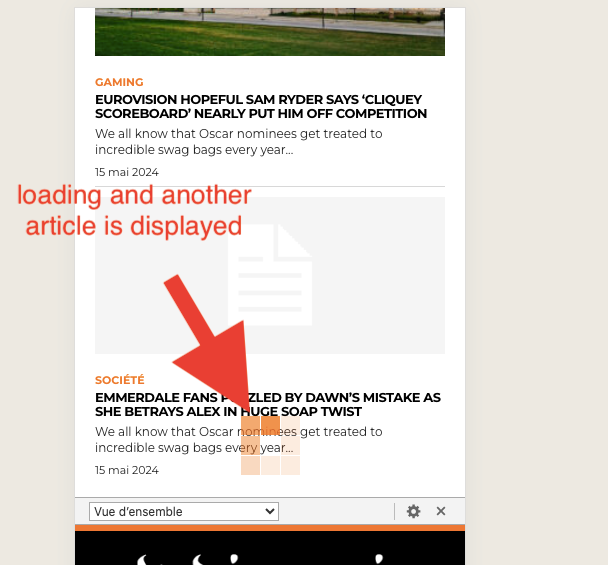
 oposum
Hello, we’re running custom ads by code on 2 websites running newspaper 12.6.x and ads are displaying on demokracij.si, but not on nova24tv.si
Talking about in-article video ads https://app.screencast.com/aLXh4VpAXAos8
For example, video ad appears in the article https://demokracija.si/fokus/evropski-poslanec-milan-zver-iranska-revolucionarna-garda-je-udba-nad-udbo/
But not here https://nova24tv.si/dr-krek-referendum-o-konoplji-se-lahko-zelo-grdo-zlorabi/
Even though ad codes are done the same way via tagdiv composer –> single post content –> ads https://app.screencast.com/XuJdBHo0Y180o
Any help appreciated!
 Sgommo
Hello!
As I already wrote in the title, my ads (Adsense circuit) aren’t displaying after WordPress update 6.5.3..
Placing any code inside “Header Ad” (or any other section in the Theme Panel), is not inserted into the page.
I don’t understand why.
for example:
<!– TEST –> or <div id=”test”></div>
Error: adsbygoogle.js:55 Error: PublisherCodeNotFoundForAma
My blog: https://www.sgommo.it
Thank you and best regards,
Giovanni
 happypeoplepickleball
 Hi! I followed your instructions and added the adsense code inside of a Single Post Template. The ad did not populate, please see attached. Any other ideas? Thank you!
 Anamaria
 Hi,
Unfortunately, other methods don’t exist.
You can try this method https://www.greengeeks.com/tutorials/how-to-add-ads-to-your-post-content-in-wordpress/
Thank you!
Anamaria Hello,
For me, the links load fast, as you can see in the video: https://we.tl/t-JSitFuvM4E . You can use the ad box.
The ad box has 3 sections for ads: using theme panel ads -> https://i.imgur.com/KFa9ibl.png, using images/banners -> https://i.imgur.com/MfAPTaE.png and custom code -> https://i.imgur.com/2rh8SuD.png save it and will appear on the post (you can set a shortcode like a shortcode from adrotate plugin or other plugins).
Thank you!
 newspatron
Hello ! after installing the woo-commerce plugin and the tagdiv shop plugin, i can see that there are two my account pages, one for login and subscriptions and the other for woocommerce related [orders, downloads and such].
However my short term goal is to invite article submissions, registration from the public.
how can i achieve the same?
Can i use both or one of these pages to achieve the same? Ideally i want to invite user generated content that will be displayed as a post, and will be populated automatically “somewhere”, after approval by admin.
Can you please let me know more about this.
 Stuartandel
Hello,
I have tried to create an AdSense ad on my website using the tutorial on tagdiv website (https://forum.tagdiv.com/ads-adsense-overview/). I have created one using step 2 (by writing the AdSense code in custom ad code) and the other one using step 3 (by putting the code in custom ad 1 in Theme panel and then selecting the right content in ad box) but neither of them work.
The first method creates a white empty square while the second method doesn’t show at all. The ads placement can be seen on this website https://bydlenimezipanely.cz in the right column right before the header “bytová družstva”.
Would anyone be able to help and find what is missing when setting up the AdSense ads?
Thank you
Anamaria Hello,
You can have two cloud templates for posts, one with ads for your posts with featured video and one for other posts.
Thank you!
Anamaria Hello,
Usually, the ads in prebuilt websites are set in the element AD BOX, and you can remove it, edit with tagDiv Composer, select the viewport for phone and select the Ad box element and with right-click you can delete it => https://www.screencast.com/t/2GfCVx9BCAw7 or with drag & drop place it into the deleting red zone from the bottom right of the page
The ad box has 3 sections for ads: using theme panel ads -> https://i.imgur.com/KFa9ibl.png, using images/banners -> https://i.imgur.com/MfAPTaE.png and custom code -> https://i.imgur.com/2rh8SuD.png save it and will appear on the post (you can set a shortcode like a shortcode from adrotate plugin or other plugins).
Thank you!
 Arsenio Spadoni
 As you can see in the video, sometimes the correct mobile version is displayed (blue band and Google ads), other times (randomly) the desktop version is displayed (gray band). It’s not clear why. The site uses WP Super Cache.
 dscom
dscomHallo,
we have notice that the div class .tdi_110.td-a-rec:not(.td-a-rec-no-translate) has the property transform: translateZ(0). This creates a conflict not only with the sticky.js library we use but also and with plain css. We have also notice that this property also exists and in other blocks like when we try to add a raw html. If you want you can check the problem in our home page: https://www.travelstyle.gr/ when you inspect the page as smartphone. the complete class of the div that has the property transform is: td-block td-a-rec td-a-rec-id-custom-spot tdi_110 td_block_template_4
Anamaria Hello Dave,
You have a cloud template, so you need to make all the changes using the tagdiv Composer on the front end https://forum.tagdiv.com/tagdiv-composer-tutorial/
SDo, please delete the logo from theme panel and upload it using tagdiv Composer https://forum.tagdiv.com/add-logo-newspaper/
Usually, the ads in prebuilt websites are set in the element AD BOX, and you can remove it, edit with tagDiv Composer, select the viewport for phone and select the Ad box element and with right-click you can delete it => https://www.screencast.com/t/2GfCVx9BCAw7 or with drag & drop place it into the deleting red zone from the bottom right of the page
The ad box has 3 sections for ads: using theme panel ads -> https://i.imgur.com/KFa9ibl.png, using images/banners -> https://i.imgur.com/MfAPTaE.png and custom code -> https://i.imgur.com/2rh8SuD.png save it and will appear on the post (you can set a shortcode like a shortcode from adrotate plugin or other plugins).
You can try to stretch the row. You can find more details here -> https://tagdiv.com/flexibility-rows-columns-newspaper-theme/
-> https://tagdiv.com/how-to-add-delete-and-duplicate-row-newspaper-theme/
Thank you!
Anamaria Hello,
Usually, the ads in prebuilt websites are set in the element AD BOX, and you can remove it, edit with tagDiv Composer, select the viewport for phone and select the Ad box element and with right-click you can delete it => https://www.screencast.com/t/2GfCVx9BCAw7 or with drag & drop place it into the deleting red zone from the bottom right of the page
The ad box has 3 sections for ads: using theme panel ads -> https://i.imgur.com/KFa9ibl.png, using images/banners -> https://i.imgur.com/MfAPTaE.png and custom code -> https://i.imgur.com/2rh8SuD.png save it and will appear on the post (you can set a shortcode like a shortcode from adrotate plugin or other plugins).
Thank you!
Anamaria Hi,
You need to duplicate the single post template and assign the template with the custom ads that you want only on the posts and the other on the posts you don’t want to have. The same steps are for all templates -> https://forum.tagdiv.com/topic/how-to-add-different-sidebare-for-different-posts-with-the-same-category/
Thank you!
 Wriper
As mentoied in other topics with mobile menu i have the same issue.
After tap on it it just keep loading for a very long time, sometimes it loads sometimes it freeze.
Mobile menu is working fine only when no javascript is called in header .
I have tried deffering javascript but it didnt work.
Only thing that worked was delaying until interaction or after few seconds.
Also what worked was switching to mobile theme plugin BUT you are not compatibile with Cloudflare so this is not an option for us.
There is no issue with plugin conflicts this is happening also on clean website without plugins activated.
Website:https://www.zaujimavysvet.sk/
Other topics with this problem:
https://forum.tagdiv.com/topic/hamburger-menu-still-doesnt-work/
https://forum.tagdiv.com/topic/hamburger-menu-not-working-on-mobile/
 dharma3d
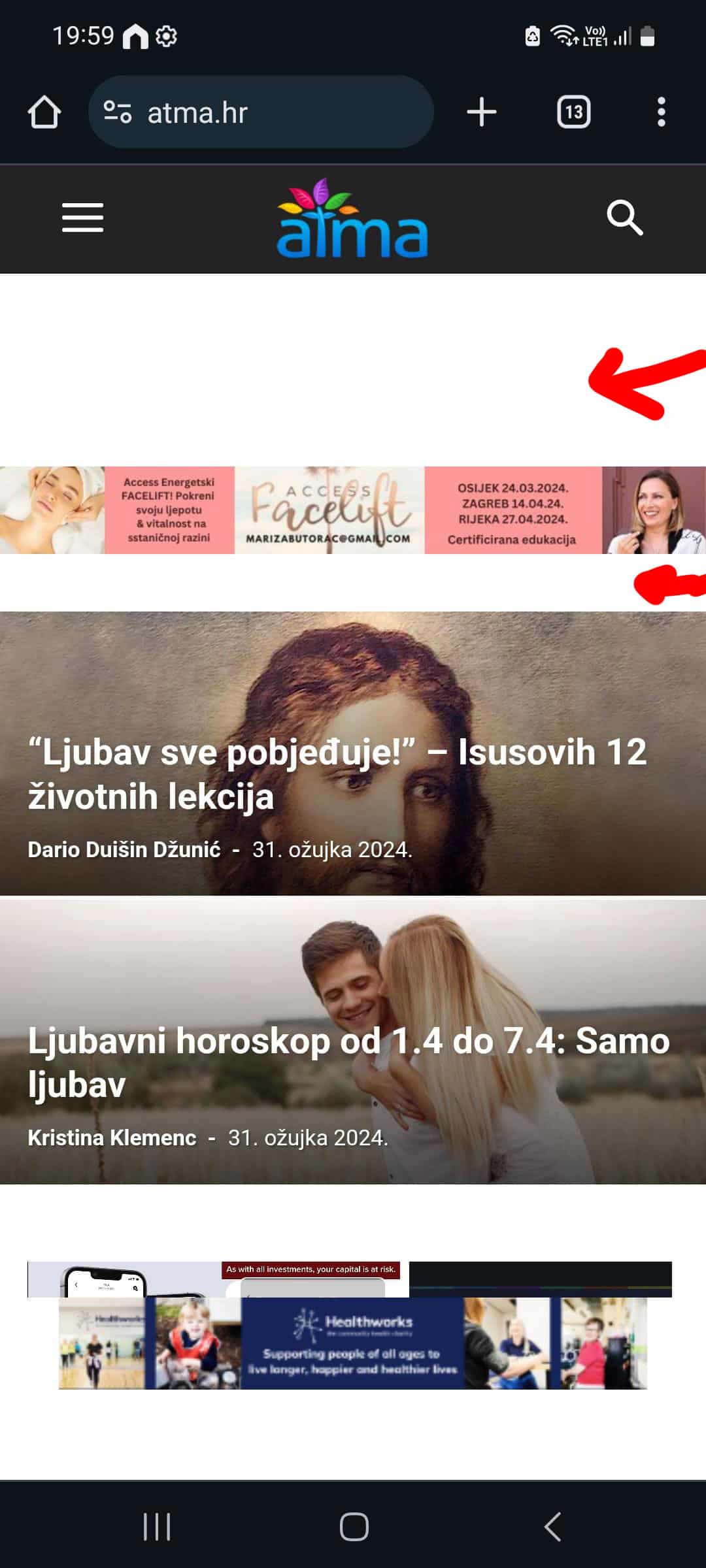
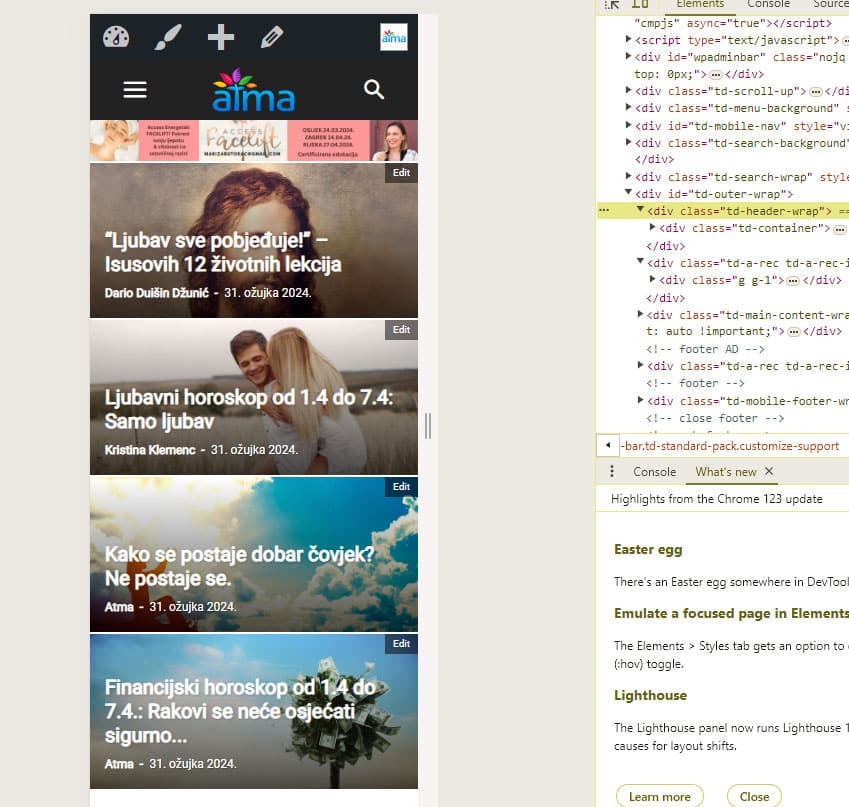
I’m having some undesired spaces in the hearder of my mobile theme, and I’m tryin to resolve that through custom css and that works when I load the mobile theme on desktop but on mobile phone I don’t see those changes.
For example
:
.td-a-rec-id-header_mob {
margin: 0;
}
This is how it looks on mobile phone:
And this is the result is see in DevTools when I switch to mobile view:
Or is there another way to get rid of those spaces?
Thanks!
My site is https://atma.hr/
 elitechronicle
how do I add code between these two? Is there any place I can add it? The header place in the theme panel already contains my adsense header code. I need to add another header code for functionality purpose. Where can I add it?
 IanGJ
IanGJMorning, apologies for long message.
I note that these topics have been covered several times but what is the latest position. Any clear advice or a definitive solution would be handy. The ones we have tried as per some of your suggestions don’t seem to resolve the issue. I have a live site which is using the previous version of Newspaper and a testing/staging site with the latest version 12.6.5. Same issues on both sites. I have the relevant tagDiv plugins installed. Other non tagDiv plugins were deactivated and added one by one to see if there were conflicts with plugins – no conflictions.
Firstly…Is the issue with Save settings something which is likely to be resolved in a future update?
If not and before I try to get someone to help me investigate what’s going on and fix things, the hosting company have asked me to inform you of a few things they found when trying to help – not sure if any of it helps. Their responses are in italics.
Save Settings – Nothing saves, results in Spinning Wheel
Reading through the forum, this got flagged up
Object Cache on Backend
https://forum.tagdiv.com/general-options-may-interfere-newspaper-theme/
Suggestion from tagDiv is that the issue with spinning wheel and settings not being saved ‘could be a situation generated by the object cache on the backend’ ‘this could be either a plugin or it’s a hosting option.’
Contacted hosting company and they have replied as follows:
‘Disabling object caching entirely is not permitted unless it’s for testing purposes only. However, you can contact theme support to inquire if there’s a particular post type, setting, or element for which object caching needs to be disabled.’
So, can tagDiv please advise if there is a specific item that needs to be disabled – many thanks
Another tagDiv option is ‘Plugins – they must be deactivated and the file created by them, named “object-cache.php” must be deleted.
The hosting company and the person who usually does my maintenance wasn’t convinced by the above suggested deletion to deactivate plugins and the file….so to be fair haven’t tried that as yet.
The hosting company also reported that they..
‘noticed in the Envato forum that other users in the past have reported issues with the td_011_settings table, indicating that the theme developer should address and resolve these issues.’
https://forums.envato.com/t/wp-option-set-to-autoload/453841
Is this likely to be anything to do with it?
The hosting company also proceeded to delve deeper and conducted additional investigation, uncovering the following information.
‘I’ve noticed an error or warning message on the dashboard regarding “Excess updates to option td_011_settings blocked.” This could be the reason for the issue.
The error occurred due to a platform configuration on our side. This configuration is designed to prevent site plugins or themes from excessively writing to the database servers and causing overload.
That specific table is where the theme stores backups of the theme panel and other related data. I suggest contacting NewsPaper theme or Tagdiv support to inform them about this issue.
Furthermore, I believe the next step will involve dropping the option that is causing the error.
However, before proceeding with this action, it’s important to contact theme support and inform them of this issue and the subsequent steps, especially concerning the large content in one of the rows related to td_011_settings.
Import/Export Theme Settings
Followed the suggested tagDiv instructions regarding importing and exporting Theme Settings as per this link
https://forum.tagdiv.com/import-export-theme-settings/#
That results in
This page isn’t working…is currently unable to handle this request.
Please advise.Thanks
 Bettina
 Hello @keverix3 !
1. If you upload an image that is smaller than your size from settings, then this could appear blurry and not of high quality. I suggest you upload the images in your Media Library in full size (1920 px): https://prnt.sc/YzxtrT24bGKM
2. Do you have any error? Check out: https://yoast.com/help/how-to-customize-the-sitemap-index/ -> https://forum.tagdiv.com/topic/sitemap-is-not-opening-i-am-facing-sitemap-error/
3. You can also add the ad code in the theme panel and choose from where you like to display the ad in the shortcode Ad box from tagdiv composer using a cloud template.
If you use default templates, then the ad should be displayed if the code is correct.
Check out the documentation here:
– https://forum.tagdiv.com/ads-adsense-overview/
– https://forum.tagdiv.com/article-ads/
– https://forum.tagdiv.com/background-ads/
– https://forum.tagdiv.com/using-other-ads-non-adsense-ads/
I suggest to deactivate ALL plugins except tagDiv ones, also if you are using a cache plugin, deactivate it, clear all cache and try again.
Thank you!
 Craig
CraigThis seems to be a massive issue for this theme. I’ve looked over a number of other posts on this specific topic. The only support that is given is mostly unhelpful and sends people on a wild goose chase. Though the real problem lies with the theme itself.
My question is a simple one, If and when will the theme be updated to meet all the Core Web Vitals criteria?
At this stage I am looking at moving my website over to a different theme, even after using Newspaper for over 4 years. This would be a huge job though it currently seems to be my only option to save my website from Google search death.
My simple post page with no ads currently fails LCP, FCP & TTFB with a mobile score of 38/100
No good at all. A note to anyone else experiencing issues with there Core Web Vitals, WP Rocket (Paid Plugin) will help bring your score up, but will not help you pass Core Web Vitals.
I really like everything about this theme (apart from current issues with CWV) and don’t want to lose it but this could be the end.
Please team give us some real help and update the theme ASAP.
Craig.
Anamaria Hello,
1. You need to create a page where you can set what you want, and after set the page ID for modal -> https://forum.tagdiv.com/modal-popup/
2. You need to set the number of paragraphs here https://i.imgur.com/fMMgw96.png
3. Please let me know the type of ads you use. You can add the ads in Ad Box https://forum.tagdiv.com/ads-adsense-overview/
The ad box has 3 sections for ads: using theme panel ads -> https://i.imgur.com/KFa9ibl.png, using images/banners -> https://i.imgur.com/MfAPTaE.png and custom code -> https://i.imgur.com/2rh8SuD.png save it and will appear on the post (you can set a shortcode like a shortcode from adrotate plugin or other plugins).
Thank you!
 Calin
Calin Hi,
Please make sure that you have apply the code for all devices – https://forum.tagdiv.com/newsmag-using-other-ads/ – https://i.imgur.com/QrGsXTO.png also make sure that you clean and purge all cache.
Thank you!
Anamaria Hello,
Usually, the ads in prebuilt websites are set in the element AD BOX, and you can remove it, edit with tagDiv Composer, select the viewport for phone and select the Ad box element and with right-click you can delete it => https://www.screencast.com/t/2GfCVx9BCAw7 or with drag & drop place it into the deleting red zone from the bottom right of the page
The ad box has 3 sections for ads: using theme panel ads -> https://i.imgur.com/KFa9ibl.png, using images/banners -> https://i.imgur.com/MfAPTaE.png and custom code -> https://i.imgur.com/2rh8SuD.png save it and will appear on the post (you can set a shortcode like a shortcode from adrotate plugin or other plugins).
Thank you!
 SidCowans33
 This was where I started and I used code on top image at https://forum.tagdiv.com/newsmag-using-other-ads/ ……
At first in preview it appeared but once I went to the live site is was gone ….. as it was in any subsequent preview.
I have header style 5, top bar layout style 1, all other top bar options OFF.
-
This reply was modified 2 years by
SidCowans33.
-
This reply was modified 2 years by



