
- NewsmagPage templates
- NewsmagCategory templates
- NewsmagFooter templates
- NewsmagDefault post templates
- NewsmagPost templates
- NewsmagHomepage – How to build and set it
- NewsmagtagDiv Composer Tutorial
- NewsmagCustom Post Type Support
- NewsmagNewsmag documentation
- NewsmagHow to use the Visual Composer plugin
- NewsmagHeader styles
- NewsmagSmart sidebar
- NewsmagCategory grid styles
- NewsmagCategory top post styles
- NewsmagHow category settings work
- NewsmagFeatured images
 terahlynn
Hi-
Is there any way to create a whole new page using the category templates? It does not let me choose the categories templates from the cloud when creating a new page only when adjusting a categories template via the theme panel.
Using the 2 available post loops is not an option as they are too basic.
I need my pages to contain one category with the attractive category templates so that I can SEO them.
Any help is appreciated!
 damir78
 ok, thanks for the answer.
1. do you mean newspaper?
2. ok, maybe do some action for the New Year holidays 🙂
I managed to expand the width of the template to 1200px and on the first P+V website, I got 90 for mobile / 95 desktop on the google page speed test
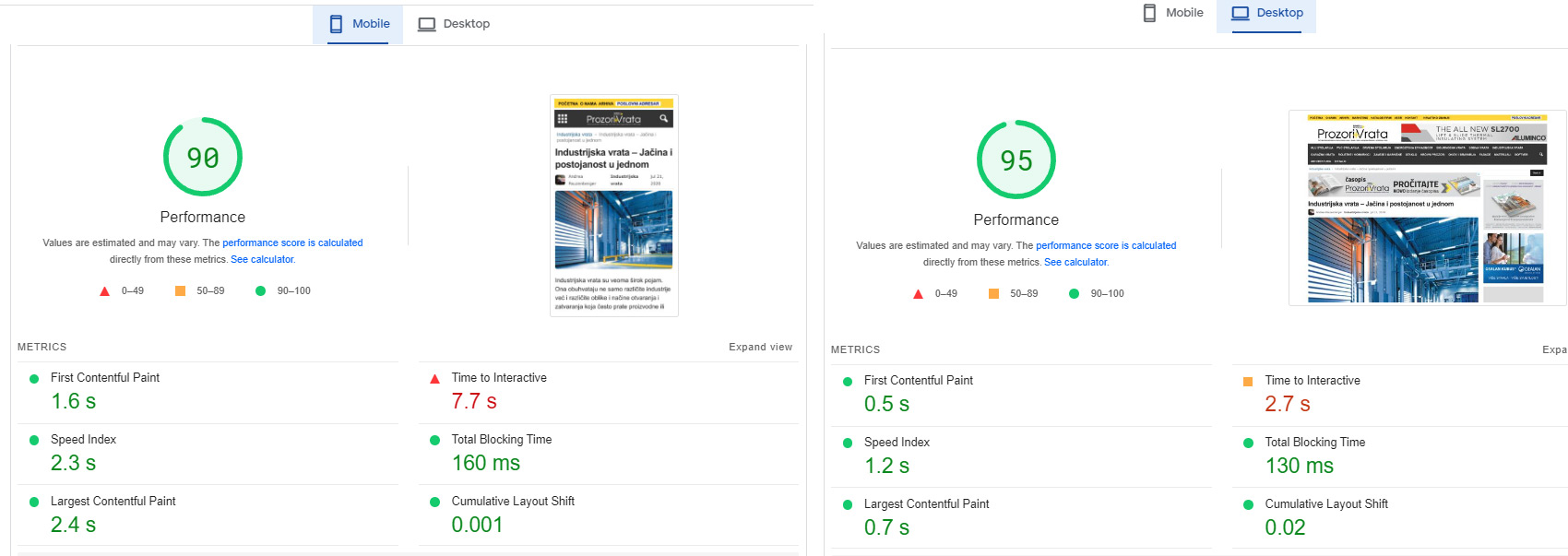
Although it is a huge website with over 20 google dfp banner positions.
I had to modify your Newsmag/style.css and td-composer/legacy/Newsmag/assets/css/td_legacy_main.css a lot
there is still space for reduction and a better rating.
On the other Podovi website, I didn’t change those two files, so far.
I just minified them, I get 83 mobile / 93 desktop
Basically, these two files must definitely be reduced, they are too big and too unused.
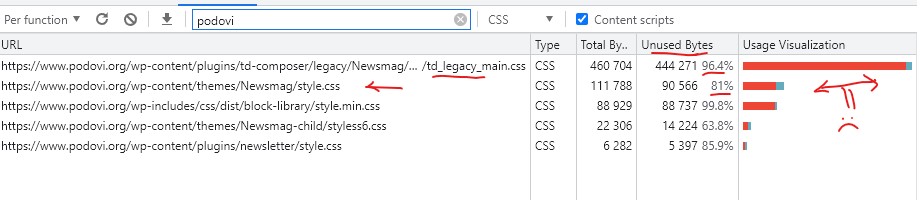
Basically, I am satisfied with the template. I will probably try the newspaper as well, because I am planning to upgrade one of those two web portals soon.
 jose.sa@casadoprofessor.pt
We are using Newspaper template in ecommerce site to sell training courses:
https://casadoprofessor.pt/categoria-produto/formacao-continua-professores/
Everytime a client buys a course he gets registered in wordpress with the “Customer” role.
If I search in Google for a customer name, for example, “Claudia Sofia A M Cruz, there is always an author page result:
https://casadoprofessor.pt/author/claudia-sofia-a-m-cruz/
inspite of the wordpress user profile not having “Author” role. We have deleted the blocks from this template, but google still indexes the page. In Europe this is a violation of GDPR law…
How can we prevent this page from being created at all? There is no place in Theme Panel to disable author template.
Many thanks
terahlynn Hi Calin-
Thank you for your response. I already have the author showing in my post template. So far as the theme panel settings, that does not show on mine.
I need the author name to show on the homepage in the flex blocks however I have the author toggled to “show” and it will not display. Anything else that I toggle works perfectly except for the author name.
I have included two screenshots (if they are able to open)
Any additional insight is appreciated. Thank you!
Photo 1: https://bridgemusicmagazine.com/wp-content/uploads/2022/10/Screen-Shot-2022-10-26-at-9.49.12-PM.png
Photo 2: https://bridgemusicmagazine.com/wp-content/uploads/2022/10/Screen-Shot-2022-10-26-at-9.28.45-PM.png
damir781. Is there a plugin tagdiv css analyser for the newsmag template and how can I activate it?
when I test Google page speed, I get bad results, mostly because of large css and js files.
td_legacy_main.css is almost unnecessary for non-registered users.
2. is there an option for extra payment from newsmag to newspaper template, I see that you update the newspaper more often, it also has a wider template?
or will I have to buy a new license again?
 Mudassir Moin
Hello,
I noticed there are template pages like the following that are causing 404 errors in my website. There is no option to edit the page to remove the links or to disable it from appearing in search engines via Yoast SEO. What should I do?
https://wirefray.com/tdb_templates/single-post-template-metropolitan-pro/
How to remove these from my sitemap?
https://wirefray.com/tdb_templates-sitemap.xml
I don’t want them to disappear, but I do not want anyone other than admins accessing these pages, rendering them incapable of by crawled by search engines.
Regards.
 Bettina
 Hello @RoffyDesignandArtInnovation !
Access Newspaper -> Prebuilt Websites, select “All” -> https://prnt.sc/Vga5V7yzrAkJ and you can find the demo and press install.
Note: You should install a demo without content, so in this case your content won’t be changed.
More documentation about the cloud templates is here:
– https://forum.tagdiv.com/homepage-how-to-build-and-set-it/
– https://forum.tagdiv.com/cloud-library-templates/
– https://forum.tagdiv.com/design-post-pages-using-cloud-library-templates/
– https://forum.tagdiv.com/cloud-library-category-templates/
Check out our video tutorials here: https://www.youtube.com/c/tagdivThemes/videos
For a banner, you can use the element Ad Box and set the element in the zone you need.
Thank you!
Bettina Hello Dilyana !
We have 3 options for mobile versions that you can use:
1. Responsive version: A responsive version of your website looks similar to the desktop version. Edit the page with TagDiv Composer. Click on the mobile viewport: https://www.screencast.com/t/XDQJedlggSB. There you can see your mobile version and edit or adjust the elements to look better.
2. Mobile pages: https://tagdiv.com/newspaper-10-3-7-update-brings-customizable-and-fast-mobile-pages
3. Mobile theme plugin: The Mobile Theme is a performance-optimized theme included in the main Newspaper theme that only loads on mobile devices. It comes with its own templates and design for pages, posts, categories, etc., so your current templates from the desktop theme will get converted to the mobile theme layout. For more information, please visit https://forum.tagdiv.com/the-mobile-theme/ and https://forum.tagdiv.com/mobile-theme-introduction/.
A full explanation is here: https://www.youtube.com/watch?v=SpGkOnJeNZY
If you need to use the mobile version 1 or 2, then you need to disable the Mobile Theme plugin.
This issue with the Mobile version on Desktop has been discussed already here: https://forum.tagdiv.com/topic/mobile-site-displaying-on-desktop-site/
Thank you!
 Anamaria
 Hello,
Those settings are older, now using a cloud template, you have more control over your layout; you can find the layouts here -> https://i.imgur.com/0PHtGac.png and import like this -> https://www.youtube.com/watch?v=6m8-EebnfM0
Please check the documentation
-> https://forum.tagdiv.com/how-use-tagdiv-cloud-library-templates/
-> https://forum.tagdiv.com/cloud-library-templates/
-> https://forum.tagdiv.com/cloud-library-category-templates/
-> https://forum.tagdiv.com/design-post-pages-using-cloud-library-templates/
Also, if you have any questions, you can ask us.
Thank you!
Anamaria Hi,
The mobile theme comes with its own templates for page, post, category, etc so your current templates from the desktop theme will get converted to the mobile theme layout, the page content is made without builders in mobile editor => https://www.screencast.com/t/xbgZG8kH also, the options that are provided to edit the mobile theme version are limited (this keeps the things simple)).
So, if you want to use the cloud templates, then you need to disable the mobile theme and AMP plugins, and then use the responsive version.
You can use cloud templates with AMP.
Also, please check this topic where I explained each mobile version -> https://forum.tagdiv.com/topic/mobile-version-not-working-properly-2/ and choose what mobile version you want.
Thank you!
 FBM
FBMHi there. On our Newssite the author pages are generated with the Cloudpage for Authors.
https://www.personalwirtschaft.de/unser-team/matthias-schmidt-stein/
here is an example.
It seems to work just fine. The images and the description texts are pulled accordingly. Since updating on Newspaper 12 the Name does not appear though anymore. It is replaced by the Admins name.
In the article itself the name appears correct. It must be an issue with the Authors name field in this cloud template.
Also updating to version 12.1. did not solve the problem.
Thank you!
 Redlemon
Hi TagDiv team,
We have a website which uses different templates for desktop, and mobile devices. After migrating from a Litespeed Web Server where we used the LSCWP caching plugin – the caching worked flawlessly there but there were other resources issues – to a new server with Nginx, WP Rocket, and Redis object cache (deactivated and removed the LSCWP plugin too), we started off with the site working surprisingly fantastically. Then after a few hours had passed we discovered that the desktop version was squeezed in to the mobile viewports. We tried all different configuration options in WP Rocket, to no avail.
A couple of years ago, before hosting the site to the former server with Litespeed, we had had it in a different host with Apache, and we had experienced the same behavior there also. The only thing that had worked then, was the W3 Total Cache plugin, which we tried to install in this case as well. However, it appeared like shortly after flushing all caches in that, there would be a conflict between that, and WP Rocket’s files inside of /wp-content/cache directory, where apparently both plugins saved (most or all of) their configuration settings individually.
Kindly note that no two caching plugins were enabled at one time while testing everything. There were no conflicts like that. All conflicts appeared to have some relation to WP Rocket’s configuration files. We made sure to also delete advanced-cache.php from /wp-content/.
What puzzled us most, was that even with WP Rocket deactivated (and all other plugins also, including Cloudflare being in Developer Mode), appending the URL parameter ?nowprocket to the URL had a positive effect, allowing the site to load properly, and work flawlessly in both formats (desktop & mobile). It was time to completely remove WP Rocket from our site.
Even after completely removing WP Rocket from the site it would still not function properly. It was clear it was a WP Rocket left-over thing, because even with it being deactivated, and then deleted, we tested further, and we were still experiencing this issue; applying the ?nowprocket url parameter would allow the site to work correctly still. We made sure to delete all left-overs from the file system; at least all we could discover.
Then we noticed in the Newspaper pages that WP Super Cache was the recommended plugin for the Newspaper theme. We installed that and deactivated everything else, but still, after a couple of minutes, we experienced the same behavior once more.
Digging in the WPSC plugin we discovered that there was an option to explicitly set the caching files directory. We set that to /wp-content/super-cache instead of the default /wp-content/cache one, since at first it did not want to work correctly and ?nowprocket was still doing its thing. Additionally we disabled the Developer Mode in Cloudflare again (effectively enabling CF), and purged all caches there. After a half an hour we have not experienced the unwanted behavior yet.
Kindly note that all tests were performed in a new incognito session every time, to rule out the plausibility of a browser cache conflict also.
Anyway, we would like to kindly request you assist us with the correct configuration settings for WP Super Cache for the Newspaper theme. Please share any warning flags we should keep an eye out for, and point us towards possible other culprits we might have overlooked, which would disallow for the unwanted behavior experience we have described.
Thank you.
Anamaria Hello,
Yes, you can add different ads for posts and pages.
To achieve that, you must duplicate the category template -> https://i.imgur.com/BM1fO2A.png and set different ads.
Also, it depends on the type of ads; if they are auto ads, then the theme doesn’t have control.
Check this topic: https://forum.tagdiv.com/topic/different-logo-in-categorypage/;
Thank you!
 Calin
Calin Hi,
For the mobile version do you use a mobile page template? or you use the responsive version? or maybe for some pages you are using the mobile page template and for cloud templates you are using the responsive version?
You can edit both of theme using tagDiv Composer -> https://prnt.sc/uePdV1qglrHJ -> https://i.imgur.com/pGXRtjA.png and responsive version -> https://i.imgur.com/iZdU8bO.png
Thank you!
 insessionfilm
I built my homepage using the tagDiv Composer, and I like how it turned out, but the structure/style doesn’t carry over to any of my subpages/posts. It’s the “Critic” template and I want to maintain what I built on the home page. How do I do that?
Staging site: https://qxz.c5a.myftpupload.com/
insessionfilmworking on a staging site: https://qxz.c5a.myftpupload.com/
I’m trying to create a new sidebar but I’m having problems. In the Theme Panel, I’ve created a new sidebar under Template Settings. However, if I go to the Widgets page in WordPress the new sidebar isn’t there. Or if I go straight to the website in the tagDiv composer, the new sidebar isn’t there either. Moreover, even after saving my settings, every time I go back to the Template Settings in Theme Panel, my settings never save. The new sidebar is gone every time. What am I doing wrong?
Bettina Hello @danielcasciato !
Unfortunately, you can not disable the latest article there. The mobile theme layout can not be as customizable as the other mobile options.
We have 3 options for mobile versions that you can use:
1. Responsive version: A responsive version of your website looks similar to the desktop version. Edit the page with TagDiv Composer. Click on the mobile viewport: https://www.screencast.com/t/XDQJedlggSB. There you can see your mobile version and edit or adjust the elements to look better.
2. Mobile pages: https://tagdiv.com/newspaper-10-3-7-update-brings-customizable-and-fast-mobile-pages
3. Mobile theme plugin: The Mobile Theme is a performance-optimized theme included in the main Newspaper theme that only loads on mobile devices. It comes with its own templates and design for pages, posts, categories, etc., so your current templates from the desktop theme will get converted to the mobile theme layout. For more information, please visit https://forum.tagdiv.com/the-mobile-theme/ and https://forum.tagdiv.com/mobile-theme-introduction/.
A full explanation is here: https://www.youtube.com/watch?v=SpGkOnJeNZY
Thank you!
 publigiovane
I noticed in the last few days that I can no longer save changes to the theme panel. I am left with the fixed upload icon and the only way out is to exit the page from the template options area.
has it happened to someone?
the theme is updated to the latest version.
site is: urloweb.com
 niceguyitachi
 you missed the point, I have assigned ads thru the template panel, like sidebar ads, in article ads, so it should appear regardless of the single templates right? and even I added ads on the single page, it doesnt appear, see example https://my-juicy.net/2022/10/blacklist-international-reclaims-the-crown-mpl-season-10-champion.html (Plenty of ads), while on this case https://my-juicy.net/2022/10/how-to-claim-you-ephilid.html (not a single ads would appear, even I manually place ads), these have 2 different single post templates
Calin Hi terahlynn,
If you are using a pro demo, then you’ll need to edit the single post template using the tagDiv Composer and add the author element.
The theme panel option will apply only for standard templates -> https://i.imgur.com/tiacAbQ.png
Also, the blocks from pages and cloud templates can be edited using the tagDiv Composer, but those also have a global option in the theme panel -> https://i.imgur.com/1SUQD9t.png
I hope this will help you!
Anamaria Hi,
The mobile theme comes with its own templates for page, post, category, etc so your current templates from the desktop theme will get converted to the mobile theme layout, the page content is made without builders in mobile editor => https://www.screencast.com/t/xbgZG8kH also, the options that are provided to edit the mobile theme version are limited (this keeps the things simple)).
So, if you want to use the cloud templates, then you need to disable the mobile theme and AMP plugins, and then use the responsive version.
You can use cloud templates with AMP.
Also, please check this topic where I explained each mobile version -> https://forum.tagdiv.com/topic/mobile-version-not-working-properly-2/ and choose what mobile version you want.
Thank you!
 gtosnipey
Good Evening. I am trying to make a blog post template and am using “Row Stretch” to extend the row to “Stretch row and 1400px content” which works fine, but the Single Post Content section keeps the text centered with auto margins at max 600px width. I can add a text box to the same row and it has no problem filling the column. But for the “Single Post Content” element the text inside it only goes to 600px. How can I increase this for the template and on the site. I plan to use the “Stretch row and 1400px content” open on my pages to fill them up a bit and just want the text from single post content to fill up it’s column. Thanks!
 thedonatshop
 Hello Bettina,
Thank you for replying. It was this page that led me to believe this was the plugin you recommend and that it would work. On a basic level it does work. But I can’t get it to work within the cloud template elements. See my attachment. So my main questions was to find out if it’s supposed to be possible within the plugin/theme settings.
Or
if there was a trick I need to know of
OR simply it would need to be coded to make the data the author plugin generates to show up in TagDiv elements?
thedonatshopHello We have a newspaper themes WP site. You suggest TagDiv suggest molongui – Authorship plugin to allow for multiple authors to posting. We purchased a license, However we are not able to achieve it to work correctly.
As Newspaper theme is build on cloud templates. we have all pages and templates layed mout with cloud templates. However Authorship plugin is not populating to the templates. It’s bypassing them and populating directly to the native WP elements. So our question is.
Is it possible to have molongui – Authorship plugin populate the cloud template elements? Is it done via settings? If so we could not find documentation for this. If not possible via settings. How do you make it work?
Or is it not possible? thank you I have attached a PDF to illustrate what we are trying to achieve and are not. Green indicated what we want . Orange is the issue. magenta are general notes.
dev site single post with issues
dev site author page
https://author03-singularityhub.pantheonsite.io/author/vbatesramirez/
how it should look.
niceguyitachiHi I’m using different SINGLE PAGE TEMPLATES (per category), I noticed that there’s a certain SINGLE PAGE type not displaying ads



