
- Apitd_api_single_template::update_key
- Apitd_api_single_template::update
- Apitd_api_single_template::add
- ApiAPI – Single Template – Introduction
- ApiPractical example – How to add a new Block and Module
- ApiAPI – Category top section style – Introduction
- Apitd_api_module::update
- Apitd_api_module::add
- ApiAPI – Modules – Introduction
- Apitd_api_block::update
- Apitd_api_block::add
- ApiAPI – Blocks – Introduction
- ApiUsing the Theme API in plugins
 Bettina
 Hello!
If you use default templates, then please make sure the Standard Pack plugin is installed and active.
We recommend to use cloud/PRO templates in order to have the possibility to edit them with the TagDiv Composer which contains a lot of functions and features, please check our tutorial here: https://forum.tagdiv.com/tagdiv-composer-tutorial/
Documentation here:
– https://forum.tagdiv.com/cloud-library-templates/
– https://forum.tagdiv.com/design-post-pages-using-cloud-library-templates/
– https://forum.tagdiv.com/cloud-library-category-templates/
Check also our video tutorials here: https://www.youtube.com/c/tagdivThemes/videos
Thank you!
Bettina Hello!
If you use a cloud template for your articles: https://forum.tagdiv.com/design-post-pages-using-cloud-library-templates/, then you have the possibility to drag and drop the element called ” Single Post Content “, or add other elements for example: https://prnt.sc/g3v0sYob-ojb
You can add the sidebar in the tagdiv Composer. Steps:
1. Add 1 row (or existing one)
2. Split into 2 columns( 2/3 + 1/3 )
3. You can add whatever element you want into the second column and consider it a sidebar.
Thank you!
 sil2
sil2using Version: 11.5.1 on Newspaper on fresh WordPress 6.1
can not assign any templates for pages from cloud templates page (wp-admin/admin.php?page=tdb_cloud_templates). no errors in the console. Page templates box just stays emplty.
I aslo noticed that there is no ‘page content’ element in tagDiv editor list, but just ‘page title’.
Bettina Hello!
An easier workaround could be to use cloud templates and add the custom field as a shortcode. “Column text” and “text with title” elements have a button called “edit content” and if you click on that button, the WP Editor will open and you can add some text/code/shortcode there. To see the changes, save the changes in Composer and view the page.
Thank you!
 studiogip
Hello,
I come to you because I have a display problem concerning my single posts. Looks like there is a CSS connection issue only for single posts. The other pages no problem (home + category pages).
How it looks: https://vu.fr/hPQS
how it should look: https://youtu.be/BJtCmPy7Dr8
I have already checked for WordPress updates, templates and plugins.
Thank you so much for your help.
 Anamaria
 Hello,
Hi,
Please edit the page normally and change the setting for the page into Template: Default template because I think you have there the setting: Pagebuilder + Latest articles + Pagination and these are not editable by the tagDiv Composer plugin.
The standard pack plugin became deprecated, so I recommend using cloud templates.
Thank you!
 Bill Fleak
We would like to display our WP Excerpt fields on our web pages under the post title. We are using the Cloud Templates on our site. We have done some testing with ACF (Advanced Custom Fields) and attempted to use the ACF shortcode to display the text with an entire new WP field. The ACF shortcode does not seem to work with your theme. If we are not able to display Excerpt fields or ACF (using shortcode) what does your team recommend to accomplish this type of request?
Is it possible to migrate the text-only data from the WP Excerpt field or our ACF field and copy this to your Newspapers Themes Subtitle Field? See link. https://www.screencast.com/t/NI0ahv4yR4Q
Please advise ASAP.
 DenverLifeMagazine
 Hello, This issue still seems to be occurring. We have turned off all of our firewalls and even basically all of out plugins at certain points to try and fix this with no luck.
Do you happen to have any recommendation for hosting an Siteground, while using Cloudflare as we can not control the setting you are speaking of in your last message? The SG Optimizer has been disabled and tested, but that has not helped the issue.
Here are the logs that we get from the consol when we try to update the footer in general, or specifically the content on the home page:
jquery.min.js?ver=3.6.0:2          POST https://www.denverlifemagazine.com/wp-json/td-composer/update_footer_template?uuid=cf9125d3-2023-0765-cc3b-64a1ad12198f 403

send @ jquery.min.js?ver=3.6.0:2

ajax @ jquery.min.js?ver=3.6.0:2

s.ajax.s.ajax @ jquery-migrate.min.js?ver=3.3.2:2

updateFooterTemplate @ js_files_for_wrapper.min.js?ver=6ea45b81e47c58269b68289d05535e19x:63

savePostHandler @ js_files_for_wrapper.min.js?ver=6ea45b81e47c58269b68289d05535e19x:75

dispatch @ jquery.min.js?ver=3.6.0:2

v.handle @ jquery.min.js?ver=3.6.0:2

jquery.min.js?ver=3.6.0:2          POST https://www.denverlifemagazine.com/wp-json/td-composer/save_post?uuid=2ffbfc35-ca03-523c-5dc8-c1731bc85110 403
 Mudassir Moin
I changed the logo for my website via the theme panel for both mobile and desktop version. I am using the Aramis template for my website.
However, when I load my website on mobile devices the Aramis logo and text stay behind, but on desktop and tablets it doesn’t.
How to fix this?
Also, can the tagdiv composer be used to edit the mobile theme for different pages like for desktop?
Website Link : https://wirefray.com/
Regards.
Anamaria Hello Zahid,
Our theme is a frontend theme for most of the elements and changes, you’ll need to use the tagDiv Composer to edit the pages and templates for posts/categories, etc => https://i.imgur.com/I3OUYxr.jpg -> https://i.imgur.com/mMrEufY.jpg from the frontend -> https://www.screencast.com/t/LDdokrHPl
The options from the Theme Panel are for the standard template and we recommend cloud templates in order to have the possibility to edit them with the tagDiv Composer which contains a lot of functions and features, please check our tutorial here: https://forum.tagdiv.com/tagdiv-composer-tutorial/
Documentation here:
– https://forum.tagdiv.com/cloud-library-templates/
– https://forum.tagdiv.com/design-post-pages-using-cloud-library-templates/
– https://forum.tagdiv.com/cloud-library-category-templates/
Check also our video tutorials here: https://www.youtube.com/c/tagdivThemes/videos
Also, if you want to use standard templates, then please activated the tagdiv Standard Pack plugin.
Thank you!
 mgiannelis
Hello
I am getting all bascially 100% page speed scores and all greens in other metrics on desktop and mobile now. However, one last thing I cannot work out in the diganostics report is Avoid an excessive DOM size 1,751 elements.
A large DOM will increase memory usage, cause longer style calculations, and produce costly layout reflows. Learn more.TBT
Statistic
Element
Value
Total DOM Elements
1,751
Maximum DOM Depth
January 12, 2022
<time class=”entry-date updated td-module-date” datetime=”2022-01-12T21:34:53+11:00″>
23
Maximum Child Elements
body.home
<body class=”home page-template-default page page-id-10886 home-2 global-block-template…” itemscope=”itemscope” itemtype=”https://schema.org/WebPage”>
Can anyone help or show me to how to fix this one?
 NickDeBaerdemaeker
Hi,
we are rebuilding our header using the tagdiv composer, something which was long overdue.
For this I have installed the header template default PRO via the tagdiv plugin.
We are having some issues getting it right however
1. there is a shadow between the menu and the body of the page which we would like to remove, and replace it with a thick black line. How can we do this ?
2. in the submenu there we wish to replace the blue colour with the standard red that is used through out the site, however I’m having trouble finding this in the “Header – main menu” style tab.
Any help would be appreciated.

Anamaria Hello,
You can use AMP, but we offer support for the mobile version only with mobile theme + AMP plugin and set for AMP -> https://forum.tagdiv.com/tagdiv-amp-plugin-tutorial/ => https://i.imgur.com/1kMs1ds.png and set the AMP for posts => https://i.imgur.com/GLEeeoZ.png, but you can’t customize the layout for AMP with tagDiv Composer.
Also, please check this topic where I explained each mobile version -> https://forum.tagdiv.com/topic/mobile-version-not-working-properly-2/ and choose what mobile version you want.
Also, you can check our documentation here:
-> https://forum.tagdiv.com/tagdiv-amp-plugin-tutorial/ please set the AMP like in our guide.
-> https://forum.tagdiv.com/the-mobile-theme/
This is a video about Responsive Newspaper Theme, AMP & Mobile Theme, Mobile Pages & Templates -> https://www.youtube.com/watch?v=SpGkOnJeNZY
Thank you!
 comms
commsNot sure what went wrong, however before the 11.5* update these were showing up OK. We are having issues with both category and single post templates.
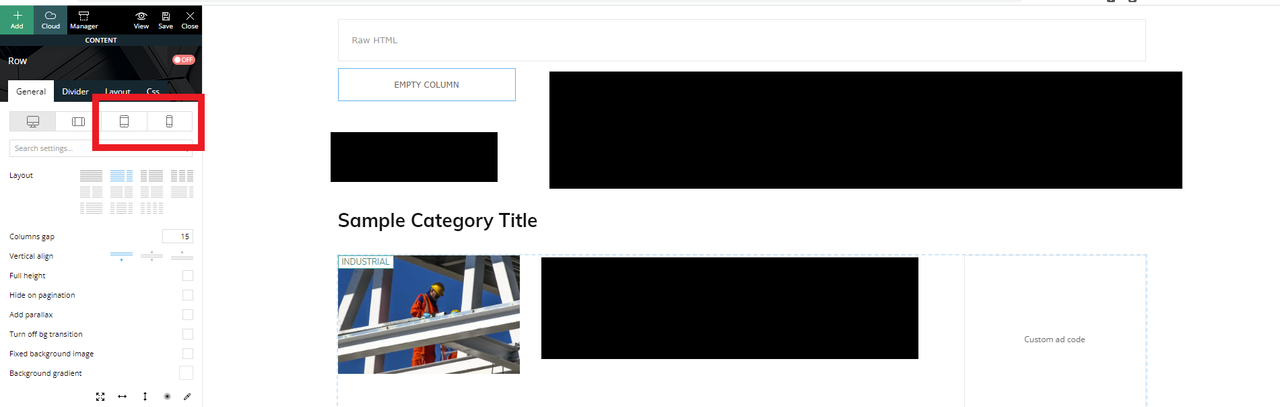
We are using dedicated mobile templates before this, now, it seems whenever I use tagdiv composer to edit a page (desktop mode) I see two more options for mobile views
Example below: (censored some content)
I am editing a Category template (desktop view) – everything looks OK.
However, I see two new options in the panel for tablet/mobile views (which were not in the previous version)
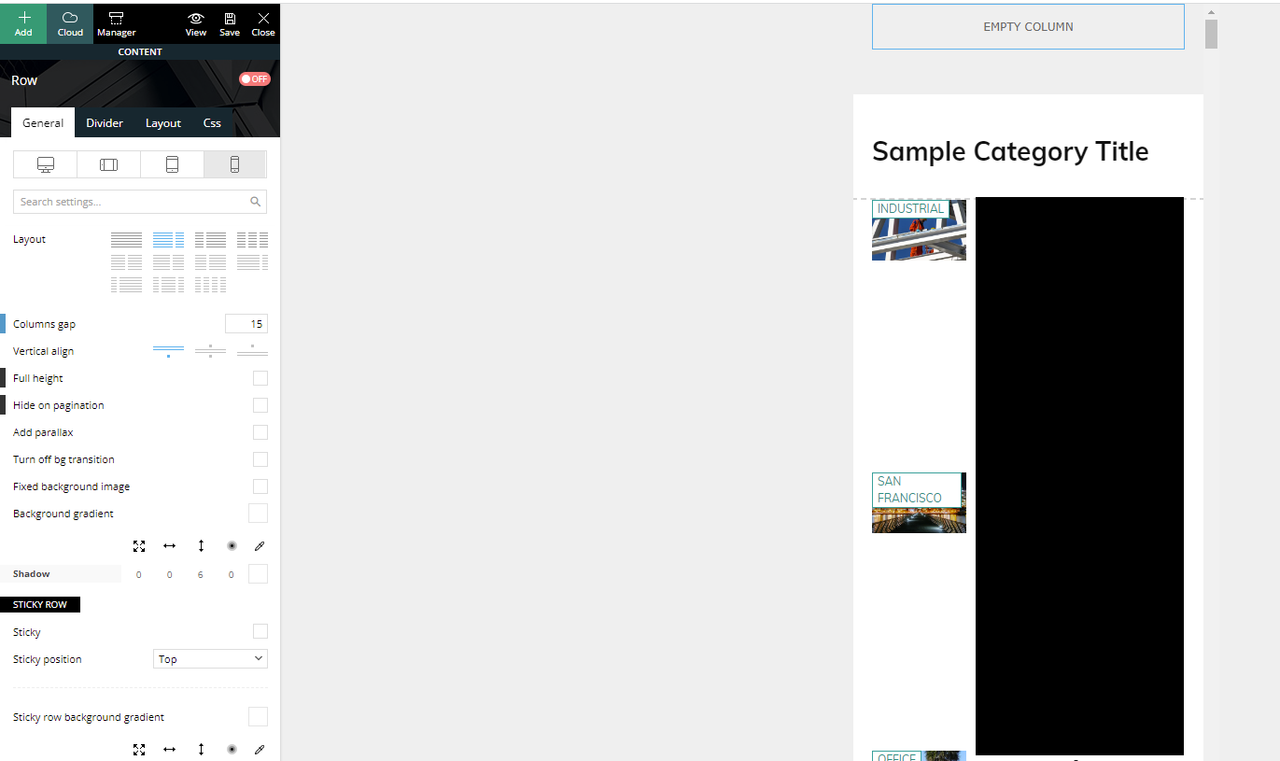
If I click the mobile view, this is what I see and what is actually being displayed if you browse the website in mobile mode.
We have another mobile only template that was created and was working (being displayed) before the update.
If I click on the “Edit the mobile template” from the desktop view takes us to the right mobile template that should have been displayed.
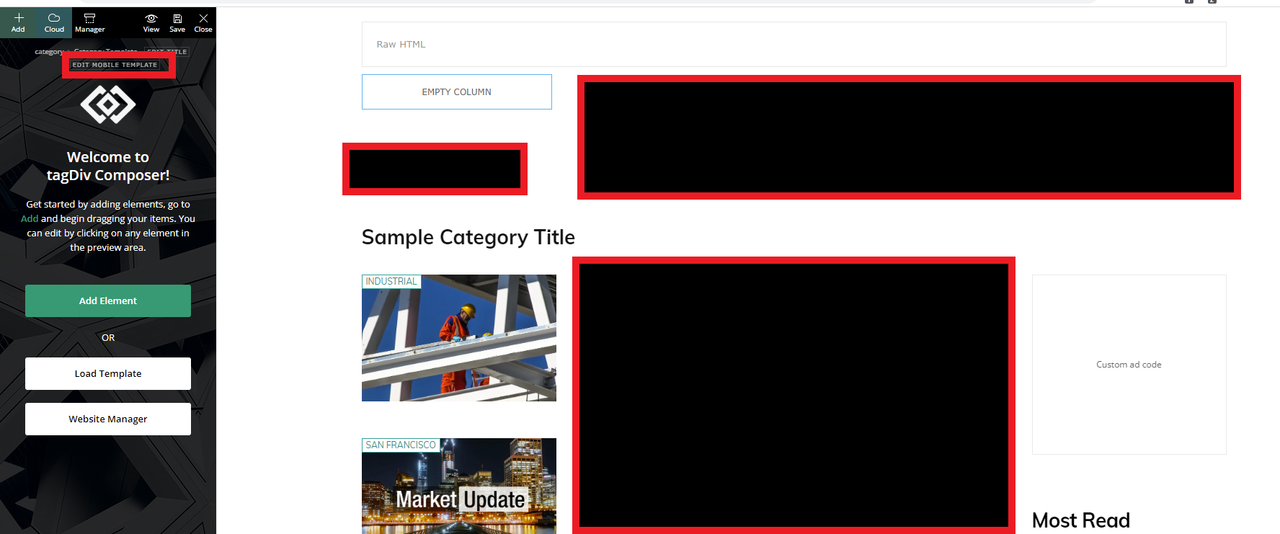
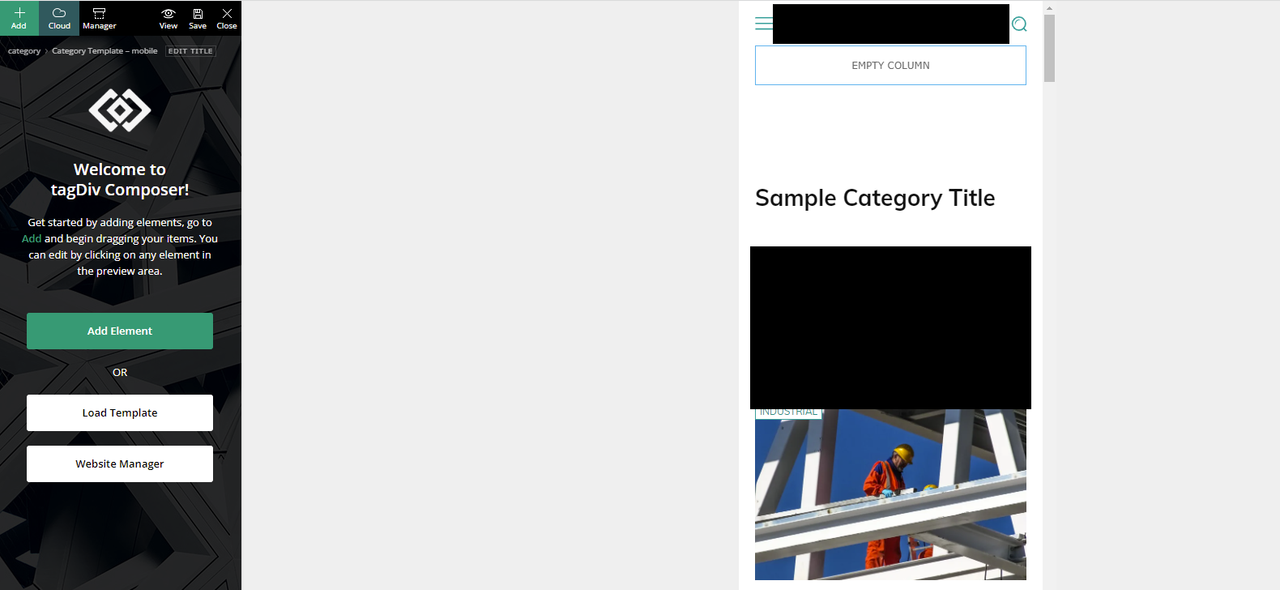
How can we fix this?
Thank you
Bettina Hello!
AMP is faster and works better only with the Mobile Theme plugin. From my point of view, if you don’t use the Mobile Theme plugin, then there is no reason or benefit to AMP. Please read all about AMP here: https://forum.tagdiv.com/tagdiv-amp-plugin-tutorial/
It comes with its own templates/design for page, post, category, etc so your current templates from the desktop theme will get converted to the mobile theme layout. Documentation here:
– https://forum.tagdiv.com/the-mobile-theme/
– https://forum.tagdiv.com/mobile-theme-introduction/
Make sure the redirect mobile visitors to amp option is disabled and try again.
Thank you!
 vekman
Hi, both main page and post template are trying to load a background image using old staging url. I’ve checked everything but can’t find the image in the editor. The file name is cryptocurrency-and-stock-market-business-concept-2021-09-01-21-09-48-utc-300×225.jpg and it’s part of the Crypto Pro template.
Anamaria Hello,
If you want to use the most popular, then you need only hide it ->
If you have a Single Template from tagDiv Cloud Library, you can try to hide the Single Post Views from the tab called “CSS” -> https://i.imgur.com/IyOYDHq.png for post template from Theme Panel, you need to use a custom code CSS to hide it .td-post-views
{
display: none;
}
If you have Single Post Template, to remove you need to edit with tagDiv Composer, select the element and with a right-click, you can delete => https://www.screencast.com/t/6WnNGq6NFx or select the element with drag & drop place into the deleting red zone from the bottom right of the page.
If you have a standard post template, you need to go in Theme Panel -> Post Settings -> Post and Custom Post Types => https://www.screencast.com/t/TftzSAfTWtC and disable the option comment count.
Thank you!
 kibiribi
Hi there,
do you have a manual how to add WPML languages switcher with flags on the all post and page header?
Is it possible to add switcher in a few clicks, or should I dive into PHP code in this case?
I’ve read this
– https://forum.tagdiv.com/using-theme-translations-together-wpml/
and this one
https://wpml.org/documentation/theme-compatibility/create-multilingual-wordpress-websites-using-the-newspaper-theme-and-wpml/
but couldn’t find anything about languages menu mention. 🙁
Bettina Hello!
We recommend to use cloud/PRO templates in order to have the possibility to edit them with the TagDiv Composer which contains a lot of functions and features, please check our tutorial here: https://forum.tagdiv.com/tagdiv-composer-tutorial/
Documentation here:
– https://forum.tagdiv.com/cloud-library-templates/
– https://forum.tagdiv.com/design-post-pages-using-cloud-library-templates/
– https://forum.tagdiv.com/cloud-library-category-templates/
Check also our video tutorials here: https://www.youtube.com/c/tagdivThemes/videos
Thank you!
Bettina Hello!
@metacoach Check if you have some errors in the console on that CPT page. Also, try to check if there is not a plugin conflict with other plugins that you use.
@techwafer AMP has its own style/design/template, so it could overwrite the CPT template. Read all about it here: https://forum.tagdiv.com/tagdiv-amp-plugin-tutorial/
Thank you!
Anamaria Hi,
Please edit the page normally and change the setting for the page into Template: Default template because I think you have there the setting: Pagebuilder + Latest articles + Pagination and these are not editable by the tagDiv Composer plugin.
The standard pack plugin became deprecated, so I recommend using cloud templates.
Thank you!
 fwoedit
Hi:
Since updating the theme this morning the following issues have been encountered:
1) Logo is no longer showing at top (even though theme panel was untouched and appears to still be set up correctly); instead, text from Settings > General in WordPress is appearing
2) For page template “Pagebuilder + latest articles + pagination,” “Homepage Latest Articles” are no longer appearing as a grid of clickable thumbnails. Instead, it’s showing ENTIRE latest articles at bottom.
 Abbaz
AbbazHi,
I’m using a Cloud template for my categories, the problem is, whenever I select a filter on my category template on the composer, it applies to all category pages. I want the same template for all categories but do not want the same content. Here are my categories.https://metaverseunpacked.com/category/metaverse/, https://metaverseunpacked.com/category/nft/
 giuseppesantagata
I’m trying to update to the new template actualization but every time I do I lose the design setting I set in my web and the home page just shows code letters, how can I do that?
 IndiNewsLive
hey whenever i open to edit pages with tagdiv editor it crashes and these message appears:
This site can’t be reachedThe webpage at https://www.indinews.live/wp-admin/post.php?post_id=537&td_action=tdc&tdbTemplateType=page&prev_url=%2F%2Fwww.indinews.live%2Fwp-admin%2Fedit.php%3Fpost_type%3Dpage might be temporarily down or it may have moved permanently to a new web address.
ERR_HTTP2_PROTOCOL_ERROR



