- NewspaperDesign your Post Pages using the Cloud Library Templates
- NewspaperDesign your post pages using the Default Templates
- NewsmagPage templates
- NewspaperPage templates
- NewspaperCreate a form contact page
- NewspaperCloud Library Templates
- NewspaperCloud Library – Category Templates
- NewsmagCategory templates
- NewsmagFooter templates
- NewsmagDefault post templates
- NewsmagPost templates
- NewsmagHomepage – How to build and set it
- NewspaperHomepage – How to build and set it
- NewspaperPost templates
- NewspaperDefault post templates
- NewspaperCategory templates
- NewspaperPost template ads
- Apitd_api_single_template::update_key
- Apitd_api_single_template::update
- Apitd_api_single_template::add
 Catalin
 Hi,
Please note that section comes from your page template configuration. As you can see, your page template used by you is -> https://www.screencast.com/t/fHV4vfms2Y1v which comes by default with that Latest Articles section. If you want to remove that section, you will need to change the page template from here -> https://www.screencast.com/t/9cLHEswRO to default one, for example. For more details about this functionality, please check -> https://forum.tagdiv.com/page-templates-2/
Hope this helps!
Thank you!
 Calin
Calin Hi,
In order to remove the page title you need to change the page template from Page Builder + Page Title -> https://forum.tagdiv.com/page-templates-2/ for example you can use the Default Template
Also you can change the page template size from Theme panel > Theme fonts > Pages
-> https://www.screencast.com/t/w6GBr2egzL
Thank you!
 HighTechDad
I’m trying to have multiple loop post elements on Category and Author pages. Started with a blank template. Inserted in 2-3 “loop post” elements so that I could have different sections with different sized elements for the loop. I offset the additional posts as appropriate. The template looks fine. But when I implement on the site, the same posts appear in all sections, or sometimes it is the same single post repeated in each section. Pagination does show (as there are multiple posts), but each post repeats in all sections.
I saw a similar post here but wanted to start new thread since that one hadn’t been updated.
Essentially the loop is broken when multiple “post loop” elements are on the same page.
I was curious if a fix has been identified or if there is a workaround in place.
Thanks!
HighTechDad Hi there! Found this thread. Any eta or workaround on how to have multiple page loops on a single page? I ran into this same issue on an Author page I’m creating that would have 3 page loops. Did the offsets to make it work (looks fine in the template) but only shows a single post on the actual author page.
 Rhys
RhysHi tagdiv community…
I will have to take some deep breaths as I am getting seriously annoyed with the issues I am repeatedly having with the cloud templates feature in particular with header layover features.
I have been using a cloud header layover template on my page > https://www.inspireorb.com/the-light-lounge/
But today all that was in place has now completely disappeared and has reverted to an appearance I don’t even recognise. I have even tried to go back to an earlier edit under revision but nothing changes. Even though it says 64 revisions in the edit section of the template, but nothing changes.
All edits and the header customisation that have been made have simply vanished.
Any ideas what could be causing this or have you tagdiv, provided something that is loaded with bugs, basically a dog with fleas!!??
The issues are not new with the cloud template section, it has always since I have been using it been buggy.
Some answers to these on going issues would be appreciated as this is simply not acceptable and I am on the verge of ditching tagdiv and moving to another theme given the continued issues I keep having.
Thanks – Rhys
 Simion C.
 Hi,
The name of the author that appears in the modules and in the post page is the one set in the user profile, in WordPress – http://prntscr.com/o3vev7 If you want to change it you can do so there.
All the theme modules, blocks, grids etc can display the article title of the post by default. For example this is a demo page containing blocks and grids that display posts
– https://demo.tagdiv.com/newspaper/
The modules can display a modified date format, but not a time ago format
– http://prntscr.com/o3vhfu – http://prntscr.com/o3vhsd
A time ago is possible only in the post page when using a cloud post template
– http://prntscr.com/o3vj4h
If you want to modify the modules to display a time ago format, you will have to modify the module files which are here – http://prntscr.com/o3vnak
There are various topics that you could try, but note that modifications made to the plugins will be lost after a theme update
– https://forum.tagdiv.com/topic/implementing-the-time-ago/
– https://forum.tagdiv.com/topic/changing-the-date-to-x-time-ago/
– https://forum.tagdiv.com/topic/the-time-ago-in-block-3-is-correct-but-another-block-is-wrong-time/
Thanks
Simion C. Hi,
@Sonjita The functionality is still the same. Excerpts are displayed in modules, in the post page the subtitle will be displayed. So you can use the subtitle field to display a chosen text in the post pages.
The solution from above will require modifications to the post templates, which after the latest updates are located in the tagDiv composer plugin. This means that they can’t be modified in a child theme anymore, only directly. The modifications will be lost after a theme update, the plugins have to be updated as well.
Let me know if you have more questions.
Thanks
 TomChen25
 Hi Simion,
Thanks for your help. I can change the template this way but how do I get to the sidebar on the second part of the page (latest articles). It’s not from here – http://prntscr.com/nwzsn3 and not from the widget area, I think. This is my problem, even if I change a template I can’t find the sidebar. And the sidebar options from the backend shows me only the default and I can’t choose any of my existing sidebars.
Also, how can I remove the allinallspace section in the mid-page – https://prnt.sc/o3dtwp
Thanks,
Calin Hi,
Please set the page template on Page Builder + Overlay Menu -> https://forum.tagdiv.com/page-templates-2/
Also make sure that you have set a row with an image or hero if you want to set a overlay menu.
Get a beautiful Overlay Header with Newspaper Theme -> https://tagdiv.com/overlay-header-newspaper-theme/
Check out the New Header Main Menu with Newspaper Theme -> https://tagdiv.com/header-main-menu-newspaper-theme/
Thank you!
Simion C. Hi,
If you mean this section – http://prntscr.com/o3qh6f it is called the latest articles section. It will always appear at the bottom of the page after your own content, when the needed page template is selected for the page
– https://forum.tagdiv.com/page-templates-2/
The settings for it are here in the composer – http://prntscr.com/nwzs8g
Or here in the backend – http://prntscr.com/nwzsn3
If you don’t want to display this section, select a different page template, like the default page template for example.
Let me know if you have more questions.
Thanks
Calin Hi,
Here is how is look your layout page for me -> https://www.screencast.com/t/nsc4xi03Cdf also please check the page template -> https://www.screencast.com/t/gxOuIw3J -> https://forum.tagdiv.com/page-templates-2/
Thank you!
Calin Hi,
So if I understand correctly you want to build a page template, unfortunately for the moment there is no option for this; what you ca do is to duplicate the page and change the page content.
Also you can create your own elements and save them as shortcode/element -> https://www.screencast.com/t/CKKKojKwYl
You can use homepage from tagDiv Cloud Library -> https://tagdiv.com/what-is-the-cloud-library/
Thank you!
Simion C. Hi,
That demo uses a footer page, not a template. You can edit the page just like any other page, with the composer. Use the shortcut here for example – http://prntscr.com/o3ptxp
Thanks
 jlgraber
Hi there,
We want to use the same cloud template for different category pages on our site, but when we make any changes (such as filtering by category), it changes the template through the whole site.
Is the only way to use the SAME template on different category pages to make a COPY of the template for each new category?
Simion C. Hi,
You could give this code a try, with header style 11 instead – http://prntscr.com/o3ebz7 However this may cause problems in category pages and post pages, by overlapping the breadcrumbs for example. You could use it only in pages, or in the homepage
– https://pastebin.com/BKWJE6Xe
As it is now it will apply only in the homepage.
The theme has a page template that overlays the whole header over the content, like this
– https://demo.tagdiv.com/newspaper_nature/
– https://demo.tagdiv.com/newspaper_spa/
Maybe you could use the overlay page template – https://forum.tagdiv.com/page-templates-2/
Thanks
 rosemciversrc
Hi everyone,
I’m trying to make an overlay header, but everytime my content gets pushed underneath each element contained within my header. I’ve tried to import ‘Header Template 32’ in my page with the header manager, I’ve also tried to set the original ‘Header Template 32’ for all website in the newspaper theme panel but everytime it doesn’t work. Is someone able to help me?
Sorry for my grammar/conjugations errors, english language is not my native language. 🙂
 aheskar
 Hi,
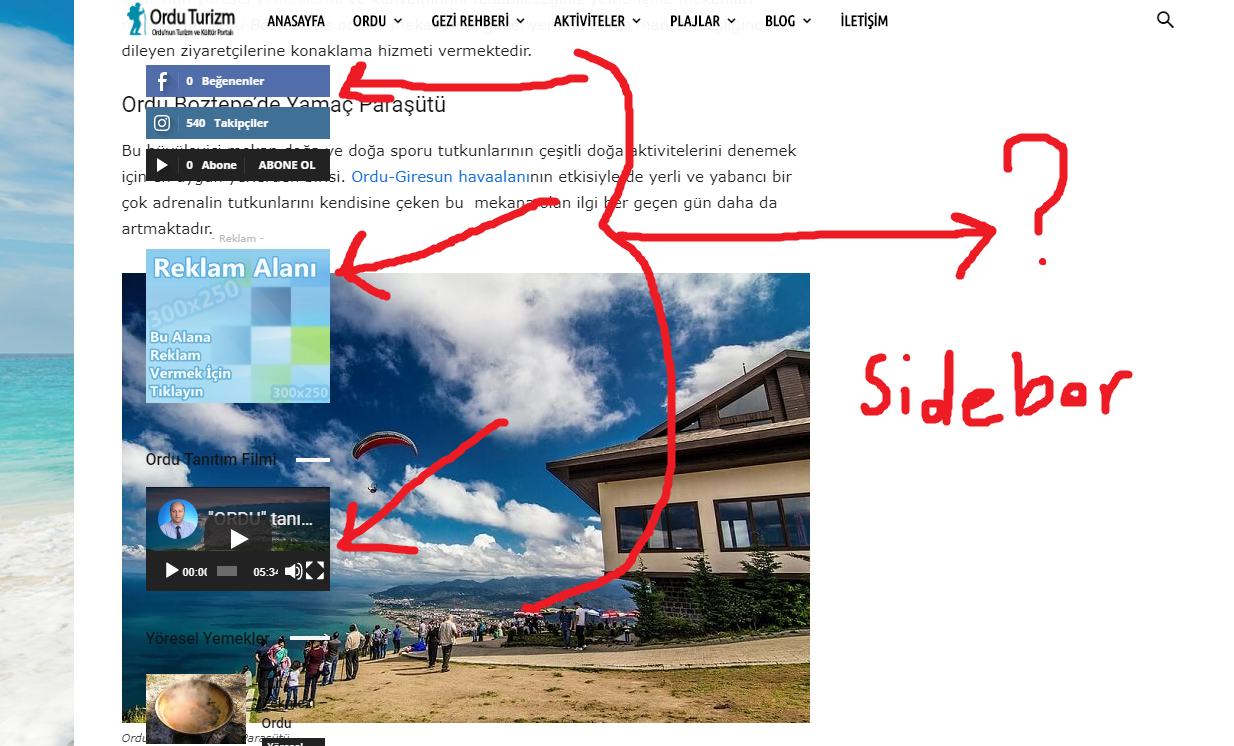
“This is a category page – https://www.orduturizm.com/turizm-aktiviteleri/ using a predefined category template. Looks alright from what I can see, the sidebar appears.” yes it comes out here…
but…
on another page >>> ” https://www.orduturizm.com/orduda-gezilecek-yerler/ ”
>>> https://i.hizliresim.com/DOEZrl.png …. <<<<< If you make the page up and down, you will see it.
Thanks.
 Calin
Calin Hi,
If I understand correctly you want to activate the tagDiv Composer also you can use tagDiv Cloud Library ; notice that tagDiv Composer is a builder for pages and templates not for posts.
Thank you!
Calin Hi,
You Need to edit the page using tagDiv Composer, click on the block that you want to edit and change the header template -> https://tagdiv.com/newspaper-theme-customize-the-header-manager/
If this is not what you mean, please provide some more details and some screenshots if is possible.
Thank you!
 commandeleven
Hello,
This might be a simple question, but it has been causing sleepless nights for me for a while.
The link below is to a page on our site that we created with TagDiv Composer in Newspaper.
We want to use it as a template for similar category (Briefing Papers), but when we change the page for new content, it changes for all the pages that we create using it as a template.
How can I make this easier, since I need to create about 50+ pages for various briefing papers.
Thank you!
Khalid
Simion C. Hi,
I don’t quite understand the problem. This seems to be a 404 page
– https://www.orduturizm.com/ordu-turizm-events/
From what I can see the 404 page may be using a cloud template. If that is the case, try to edit the cloud template and modify it as you want – http://prntscr.com/o3bhfz
Or you could change the 404 template – http://prntscr.com/o3bi3d
This is a category page – https://www.orduturizm.com/turizm-aktiviteleri/ using a predefined category template. Looks alright from what I can see, the sidebar appears.
The screenshot link is not working – http://prntscr.com/o3bjgr
Thanks
 chaddng
Any suggestions why my site http://www.southantrimvox.co.uk (homepage only) is broken in Firefox and not in other browsers I’ve tried.
Any suggestions on what I can do to fix it. It’s built with tagdiv in WP pages. other pages are built using cloud templates. I updated from Newspaper 9.7.2 to 9.7.3 yesterday, but it broke the whole thing so I rolled back from a backup. I also updated tagdiv composer etc before I rolled back, it’s version 2.4.
I’m scared of updating this theme. Something nearly always goes wrong.
Thanks
Calin Hi,
Unfortunately there is no news for the moment about the possibility to create a custom page template, sorry!
Thank you!
 Vlad S
 Hello !
We do not recommend using WP Bakery in posts. That issue can be caused by WP Bakery, you can use a single post template from the cloud library. https://tagdiv.com/cloud-library-page-templates-newspaper-theme/ and you can edit it using the tagDiv Composer.
Hope this was helpful !
Thank you !
Calin Hi,
The simplest way to achieve a different width is to use a template/homepage from tagDiv Cloud Library. You have to import a post style and set it as the default post template in the theme panel post settings, then you need to import a category template that is whit that width and set that one as the default category template. The same for tags, author pages etc:
https://forum.tagdiv.com/tagdiv-cloud-library-plugin/ also for pages (stretch row and content ) https://www.screencast.com/t/i8SQ5eS4 .
Please read similar topics:
-> https://forum.tagdiv.com/topic/force-full-width-on-categories-post-grid/
-> https://forum.tagdiv.com/topic/homepage-full-width-content/
-> https://forum.tagdiv.com/topic/homepage-full-width-content/
Also from what I can see your header and footer is stretch to full width -> https://www.screencast.com/t/8dv4sZzdVu3o -> https://www.screencast.com/t/1nXlJduH7
Thank you!!