- NewspaperDesign your Post Pages using the Cloud Library Templates
- NewspaperDesign your post pages using the Default Templates
- NewspaperPage templates
- NewspaperCreate a form contact page
- NewspaperCloud Library Templates
- NewspaperCloud Library – Category Templates
- NewspaperHomepage – How to build and set it
- NewspaperPost templates
- NewspaperDefault post templates
- NewspaperCategory templates
- NewspaperPost template ads
- NewspaperSingle External Shortcode and External Shortcode
- NewspaperWP Rocket and Newspaper Theme: Optimization Guide
- NewspaperSearch setup for custom post type
- NewspapertagDiv Composer – Website Manager
- NewspaperBookmark – Save For Later
- NewspaperFlex Block Builder and Flex Loop Builder
- NewspaperModules Builder in Newspaper Theme
- NewspaperIntroduction to CPT and ACF with Newspaper Theme
- NewspaperCreate a frontend submission form
 igale2
I using default theme demo for my web site. With new update of Newspaper theme i found new demo which I wanna put on homepage… it’s Fast news.
I create new page and working on new look, but for now still on homepage using default theme.
The question is, what will be with my homepage (which is using Newspaper default theme) if I install new demo page (Fast news)
I create page with template with TD Composer, but still don’t have a header which is using on Demo page:
https://demo.tagdiv.com/newspaper_fast/
 rihtak
I download a autor page from your cloud library but i am unable to edit the content. can you provide me the details to edit it ?
for eg in your template is shown ” sample author name” but there is no option to edit it
 ben.hinc
I have upgraded my site located at https://www.theapex.racing to WordPress 5.0 and Newspaper 9.2.
After the upgrade, I am able to use tagDiv Composer to edit and save custom Cloud Templates. However, I am unable to save any changes made to pages created with tagDiv Composer. After clicking save, it just spins without ever completing the process.
I have checked the updated theme requirements and I am meeting all of them, including having the PHP memory limit set to 128 MB.
 isghari
 Hi Simion,
Than’s for the reply.
1- Solution 1 with cloud library messed up all the formatting of my article ( i used smart list template 4) + the 2 ads disappeared. So I’m considering the solution 2
2- Deactivating the AMP plugin (I will redirect the ancient AMP pages with an Htaccess for google seo) , and NOT using the Mobile Theme. Does that configuration force the back/next buton to appear on both Desktop and Mobile and tablette? (using the smartlist number6)
3- How can I remove the sign “>” and “<” from the back/next button? … to show only “Next” or “Back” without the signs?
4- last question: Is there a way to remove the “back button” completely?
Sure we can hide it with css color White on White, but can we remove it all togheter?
Your code for changing the button on pages 3, 4, 5 .. is working great. Thank’s!
 Calin
Calin Hi,
You can have set the background color, general, on category, or in post/page cloud template.
Background introduction -> https://forum.tagdiv.com/background-introduction/
Thank you for your understanding.
 Frédéric Bénot
Hi !
My 404 page template is going away ? I keep putting it on from the template editing in the theme panel editor… But it’s not staying.
 Daferban
Hello,
For several hours, on the homepage of our website, the images are not displayed as in the footer of the posts where the images of related articles are located.
Please, we need your help as soon as possible, so that our digital media can recover its usual appearance. We remind you, that we use the Newspaper Fast News demo as a template.
Thank you.
Daferban
 bmitchelson
Hi all:
After updating to WP 5.0, the “homepage latest articles” block no longer displays when I go to edit my Home page. I have all three “Advanced Panels” selected, but Custom Fields and Page Template Settings are the only menus that display.
Please help. Thanks!
 henrib
Hi there,
I probably will make you sigh with this question but i give it a try anyway.
Since the introduction of the TagDiv Composer i’ve been wondering what to do. Previous questions did not give me useful answers. I’m very insecure about what to do.
I will try to specify my questions and i hope someone can help me out…
1. In the online tutorial about switching from WPbakary to TagDiv Composer it says:
“Step 2 – The page has to be recreated using the new page builder. You will have to build a new page and edit it with the tagDiv Composer replicating your original page (made with Visual Composer).”
There is no way that i’m going to rebuild all the pages on my website. If that is really nescessary i have to switch to another template soon.
a. What will happen when i do nothing?
b. How long will you keep updating and supporting WPBakery?
2. What will happen to my site if i de-activate WPBakery or when the plugin stops working (for any reason)? Thus: without replacing it by TagDiv Composer.
3. Can i keep WPBakery working on my existing pages and create new pages with TagDiv composer? In that case i will have to activate both plugins. Will that cause problems?
4. Not really a question, but when you like you are welcome to explain why i should use the new composer? What’s in it for me?
I hope you can answer this questions for me. Thanks in advance.
 extraordinarynicci
 Hi Calin,
TagDiv Composer did not update automatically today – nor the last two times. As a result, all the raw code was displaying on my homepage and made it look horrible. The blocks and their elements went missing. For TagDiv Cloud Library – that was deactivate and I had to go to Plugins to activate it. During that time all templates reverted to the default template.
So whenever a new version is updated there is a period of time when the website looks bizarre until the two plugins are updated. Hence my question, is there a way to do these updates without making the website look horrible?
Thanks
 rajuborda
HI Experts,
i have home page with template as ” PAge building + LATEST ARTICLES + PAGINATION”.
i like latest articles but without pagination , infinite loading until certain number is good.
how can i get that ?
 Simion C.
 Hi,
Thank you very much for your appreciation, we try our best.
1. So you want to add a block to display posts, after the post content. The only way of doing that would be to use a cloud post template, these can be built with the tagDiv composer
– https://forum.tagdiv.com/tagdiv-cloud-library-plugin/
Here you can see all the available cloud post templates at the moment, preview and even edit them
– https://affiliate.tagdiv.com/#/load/Single
More templates will be added in the next theme updates. If the post contains a smart list, use a smart list template (designed by us or create your own with the blank template). This way a block can be added after the smart list.
2. Smart lists will be displayed in AMP, but not with next/prev buttons. The list elements will appear one after the other. If AMP is disabled and the mobile theme is active there will be next/prev buttons on mobile.
The mobile theme plugin and our AMP plugin can be active at the same time. The AMP version will be accessed by users only through Google search results page, others will receive the mobile theme version.
3. There could be a way for that. There will be a class on the body with the number of the slide in the smart list
– https://www.screencast.com/t/rtzHNzQyrviK
So you could do something like this – https://www.screencast.com/t/ZWNNGPcu
Code used in example here, multiply it as needed
.paged-2 .td-smart-list-button {

color:red;

}
Let me know if you have more questions.
Thanks
 blimo86
Hello.
I contact because when I import a template in my website throught Cloud Template when I save my work when I try to go again to cloud template to see my templates the link load blank. I attach a video to show you my problem.
To restore the situation I have to go to the Database and delete the records about td_template. https://www.dropbox.com/s/qpjsegip4drtr7c/VideoTagDiv.mp4?dl=0
It is urgent to solve.
The TagDiv Composer works fine in the pages section.
Thank you.
Simion C. Hi,
That is not possible, but now you can create post templates to be just like pages if needed. The tagDiv composer can be used to create post templates
– https://forum.tagdiv.com/tagdiv-cloud-library-plugin/
Or maybe use a sharing plugin that can be displayed on pages and allow sharing for them. The theme sharing is just for posts at the moment.
Thanks
Simion C. Hi,
Is that a post cloud template? The post content cannot be entered in the template, create the post normally, then apply the cloud template
– https://www.screencast.com/t/eBakBX3o
– https://forum.tagdiv.com/tagdiv-cloud-library-plugin/
In the template there will be some placeholder text for the post content, but once you apply the template to a post, it will show the content you have created.
Regarding the demos, you can install/uninstall and change them as you wish. There is no limit in this matter.
– If you install with content, it will import demo posts, menus, logos, categories, the homepage, custom design where available, theme panel settings.
– If you install without content, it will import only the design and theme panel settings.
In case I misunderstand something please correct me and I will try to help you.
Thanks
Simion C. Hi,
There is a small comparison you could read – https://tagdiv.com/newspaper-vs-newsmag-how-to-choose-the-perfect-wordpress-theme-for-your-project/
The features of Newspaper are mentioned in the themeforest page
– https://themeforest.net/item/newspaper/5489609
Also check the Newspaper demos to see what can be achieved with it
– https://demo.tagdiv.com/select_demo/select_demo_newspaper
When it comes to flexibility, wider layouts, cloud templates etc Newspaper can offer them all. The tagDiv composer that comes with it has many more elements and settings than with Newsmag
– https://forum.tagdiv.com/tagdiv-cloud-library-plugin/
You can test the cloud templates live here (preview and edit)
– https://affiliate.tagdiv.com/#/load/All
The categories and tags that you have created won’t be affected when changing the theme. Please let us know if you have more questions or need help.
Thanks
 kotikatu
 Hi,
I just extended Newspaper support. I have to disagree with you now… Can you help me understand, how possibly could the problem be with Facebook and not Newspaper demo template settings?
This FB-page: https://www.facebook.com/pihlajamakiseura/
Feed works in this page: http://kaupunginosat.net.www328.your-server.de/
Feed does not work in this page: http://kaupunginosat.net.www328.your-server.de/pihlajamaki/
 fatihaltin
Hi everyone,
I’m having trouble adding templates when editing pages. Below are two screenshots. Does anyone know what the problem is?
Note: Add-on board and active
Picture 1 : resimag.com/p1/30ffe99459.png
Picture 2: resimag.com/p1/c489f7cae6.png ( This Problem )
blimo86 Thank you for your answer.
The problem is if I click in Cloud Template to import a new template the website that load is in blank. The URL is this: /wp-admin/edit.php?post_type=tdb_templates
Also if I check in Pages section don´t appear the template that I imported.
But if I go to theme options appear the template to check. I attach an image. https://www.dropbox.com/s/0a3rodrx0xv76s1/Template.jpg?dl=0
Thank you.
 Maten
Maten Hello,
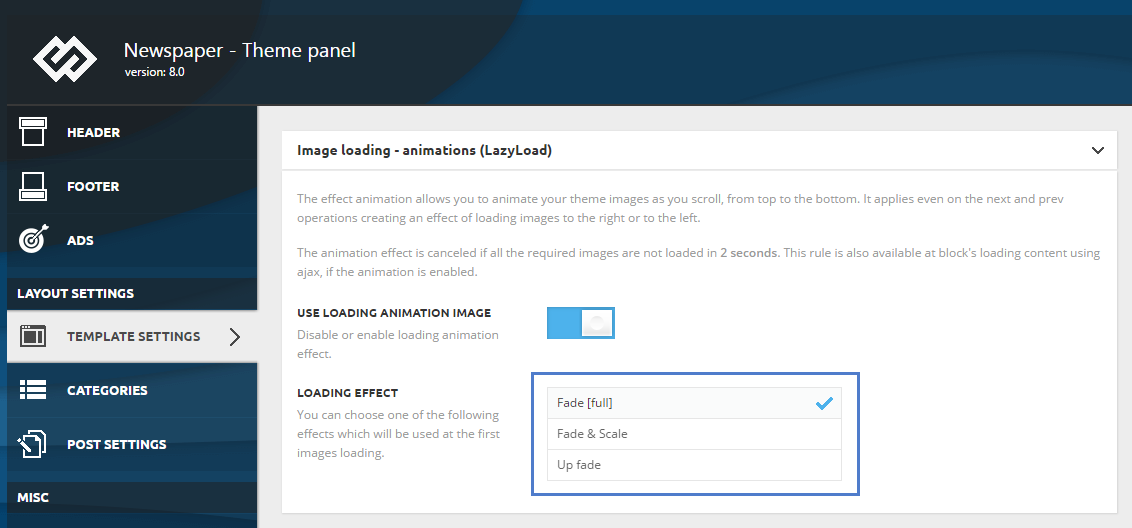
Anyone who has problems loading the page (not displaying images) can solve the problem by turning off Image loading – animations (Lazyload).
Disable: USE LOADING ANIMATION IMAGE
– Newsmag – Theme panel -> TEMPLATE SETTINGS -> Image loading – animations (Lazyload) /TURN OFF – USE LOADING ANIMATION IMAGE/
https://forum.tagdiv.com/wp-content/uploads/2017/05/loading_effects.png
Simion C. Hi,
So you modified the theme files as mentioned in the previous replies. And the Facebook comments appear in the posts. To make them appear in pages using the default page template you would have to enter the HTML code provided by Facebook in the page template.
If the page contains page builder content enter it here
– https://www.screencast.com/t/Xk3ajB3zx4
If the page does not contain composer content, enter it in the cases below that section, in the template. Haven’t tried it myself but it should work.
Thanks
blimo86Hello.
I import a page style template in the cloud library option but now appear the option in blank.
When I go Cloud Template load a empty blank page. I don´t know how… I deactivate the template and also delete it and re-install but the error persist.
Also if I try to install the tagDiv Multi-Porpose plugin appear the following error:
Fatal error: Cannot redeclare class td_api_multi_purpose in /var/www/vhosts/comunidadxbox.com/httpdocs/wp-content/plugins/td-multi-purpose/td-multi-purpose.php on line 44
Thank you
 orrorea33giri
 Thanks but I think we are going around in circles here. I try to explain further.
CURRENT SITUATION:
At the moment I use footer style 13 but what I want to achieve is to create a page through TD Composer to use as a footer.
In the new footer page the social icons element is not consistent with the social networks listed in the template theme options. What I mean is not all available social networks listed in the template theme options are in the social icons element.
QUESTION:
How can I add Spotify link in the social networks elemnt in TD Composer?
Hope this clarifys.
Thanks
 Tengel
Hello, I have not changed anything on my home page in quite some time, but all of a sudden, code is showing above each block/section on the home page. It doesn’t appear to have any problems on mobile devices that I can tell. I do not know how to go about fixing this, because I didn’t change any settings to get it like this. I have just been publishing blog posts for the last couple of weeks.
This is the Lifestyle template, and it’s not longer displaying on the home page, either. (I took Instagram and a few other things off initially, but that was weeks ago.)
Thanks so much, Trudy