- NewsmagReviews
- NewsmagtagDiv Composer Tutorial
- NewsmagCategory templates
- NewsmagHow to add icons in the menu
- NewsmagNewsmag documentation
- NewsmagBlock settings tutorial
- NewsmagInstalling pre-built websites
- NewsmagMain menu
- NewsmagFeatured image or video
 Calin
Calin Hi,
I just checked using my mobile and it seems to be working ok, Also I used a tool and this looks ok, but there are a few suggestions – https://i.imgur.com/9tmNFDF.png – https://socialsharepreview.com/?url=https://jazzjournal.co.uk/2025/05/02/reviewed-rebecca-vasmant-emily-saunders-robert-lee/ maybe this will help you.
Calin Hi,
This situation occurs because a license key can be used on a maximum of two domains. While ThemeForest allows usage on one domain, we permit an additional domain for testing purposes.
If the domains previously using the license no longer exist or no longer use the theme, please contact us at contact@tagdiv.com. Make sure to include the license key used on those domains. We will submit a request to review and remove any inactive or unused domains associated with the key.
Thank you!
Calin Hi simchris,
Thanks for bringing this to our attention! We’ll look into it and make sure it’s reviewed for the next theme update.
Calin Hi,
You are right related to the new review system.
Unfortunately the old review can be used only on articles, there is no option for it to can be used on CPRs.
I also asked a developer and this can be done, but is not yeas to do it, so you’ll need a developer to can bring the review system to cpts.
Thank you for your understanding!
 ashish252
 No, i was talking about the older Author review system.
The new user review system does not give an option to add review/rating while creating a new custom post in the admin panel. The author have to visit the article in the front-end to leave a review. Correct me if i am wrong.
Also in the user review system i can not disable it for the front end user if i wish to.
Calin Hi,
1) For #3, Can you please let me know where did you saw that option? Also a screenshot can help (this is because it is possible to be a custom filed set with a plugin).
2) For #5, The theme has only the option to display the Author name, to add other 2 you can use the ACF plugin and and you can create 2 custom fields, one for Editors and one for Reviewer and display them on posts, then to display the on articles you can edit the single post template with tagDiv Composer and add the custom filed element where you want to have those elements and choose the source for them – https://i.imgur.com/mmSa6dm.jpeg – https://i.imgur.com/7KICfDS.jpeg – https://i.imgur.com/AvLTWZ5.png
3) For #8, please try as I mentioned above. Using that option will bring the categories you have like in the shown image.
Thank you!
 Cloud Hosting
 1) For #3, What’s the Lock Modified Date, means, what exactly would Lock Modified Date do?
2) For #5, How can we add Editors and Reviewed by to a blog post or page, means, how can we add Editors Name and Reviewed by Name in the blog post, just as the Author Name is displayed. A post can have a Author, Editor, and a Reviewer also. Is it possible to add any two or all three of these along with Author Name in the blog post?
3) For #8, I guess the option that you have mentioned is to Filter only. We want the tabs like it is shown in the screenshot shared at https://app.screencast.com/DsEp8ylHDPWcO:
“All, Fashion, Street Fashion, New Look, Vogue, More”, The More drop down shows more Categories/Options.
Calin Hi,
Please check the browser console when you open the content editor. If there’s an error like this: https://i.imgur.com/iiBOHwP.png, go to the Network tab, select the error, and then click on the Preview section.
The issue might be caused by the server host. I suspect it could be a 403 or 404 error.
Please review this topic for suggestions:
https://forum.tagdiv.com/topic/wp-editor-for-text-with-title-and-column-text-not-updating-content/
Also, make sure to clear/purge all cache, as caching issues can sometimes cause this behavior.
Here’s another thread with a similar error that might help:
https://forum.tagdiv.com/topic/err_http2_protocol_error-on-go-daddy-hosting/
Thank you!
Calin Hi,
If you are referring to the new review system – https://forum.tagdiv.com/user-reviews/, then yes, this can be used with CPS.
The tagDiv Standard Pack plugin can be disable, but first you should check to be sure that you have replace all standard templates and elements with cloud templates. The first step will be to set cloud templates for the full website, after that disable the tagDiv Standard Pack plugin and check your website to see if there are any shortcodes if there are, enable the plugin and replace or remove those elements that will be bring by the standard pack.
Thank you!
Cloud Hosting 3) What’s the Lock Modified Date?
4) How can we add the reading time for the blog post or page?
5) How can we add Editors and Reviewed by to a blog post or page?
6) How to customize Ordered / Unordered List with arrow or a custom bullet?
7) Where the option for Box Quote?
8) How to get the marked tabs in the screenshot here: https://app.screencast.com/DsEp8ylHDPWcO
 marcusdoc
 I’ve had numerous test sites built, then moved on to different IP’s but you have to make sure that you only have it actively assigned to 2 addresses (IP or HostName).
Review your license page.
 adamsabbagh
Hi,
So, I changed my favicon and the preview of my website in my mobile browser was exactly as it I expected, expect for the background color. I want the background color to be back but it’s reddish. I changed the theme color to black from the tagdiv theme panel but it is still the same.
Preview pictures: https://drive.google.com/drive/folders/1561CgcaaTWO2sOlwUUj_wLta02T1XAzp?usp=drive_link
ashish252Is there a way to use the built in author review system feature for custom post type? Also i want to disable the tagdiv standard pack. is it possible ? And also is it possible to use the star system by default
Calin Hi mostwonder,
Thank you for your suggestion! We completely understand your request. We’ve added it to our list of user-submitted ideas, and our manager will review it. If it’s approved, the development team will be informed for potential implementation.
We appreciate your input and your understanding!
 Bettina
 Hello!
Make sure you’ve placed them in the right place. Do you have any errors? Ads won’t show until your site is reviewed and approved. Make sure you do not have any ad blockers in your browser. I can see some ads on your homepage, but the ads are using images. Our theme will only display the ads as they are. Also, make sure the code you’ve added is correctly written.
Thank you!
 Mark Gilbert
Hello – using the Facebook link the Single Post Share list on my site, for example, here – https://jazzjournal.co.uk/2025/05/02/reviewed-rebecca-vasmant-emily-saunders-robert-lee/
the Facebook “Create post” box doesn’t load completely. I guess this is not a Newspaper but a Facebook problem?
Thanks
Mark
 nikkigaskins
Hi there. I recently installed the Newsmag template for my WordPress website. I need to organize the front end of the website using “drag & drop” with the tagDiv Composer plugin.
However, the plugin does not appear to be working. Even though it is activated, I don’t see where I have the option to use it. Can someone please help?
SEE IMAGE 1:
SEE IMAGE 2 (front/home page which still needs to be arranged accordingly with the plugin):
I’ve already tried to review this:
 Abder Fath
Hello,
When I try to publish or switch a review to draft, I receive an error message (even though the action is actually completed). For example, if a review is in draft status and I click “Publish,” an error appears (as shown in this screenshot: https://i.ibb.co/q3zcQvH9/reviews.png), but the review is successfully published.
Is there a way to fix this issue? I’ve already tried disabling all caching plugins, but the problem persists.
Thank you in advance!
 Anamaria
 Hello,
There are two types of reviews: the ones on posts, which you can see when editing with Gutenberg, and the ones on the frontend. The frontend ones, meaning user reviews, need to be added using the tagDiv Composer in the Single Post template.
If this is not what you mean, then please provide some screenshots.
Thank you!
 DashDesigns
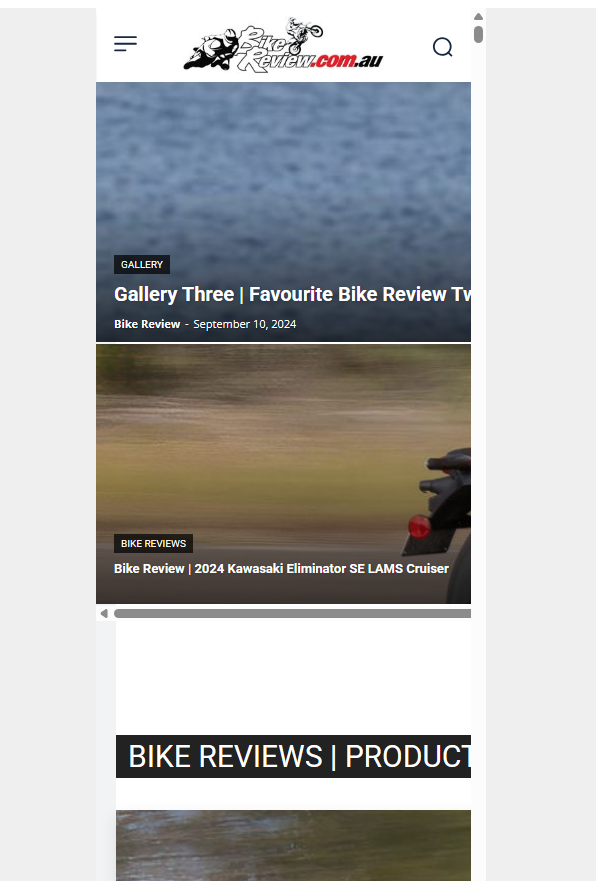
Hi. For some reason when I check the mobile view, this is what I see:
https://bikereview.com.au/images/newspaper-theme-mobile.png
I tried installing the mobile theme plugin, but still the page displays like this in the editor and also if I resize the browser window. Why is it not responsive?
I cannot show you the website as it is not an active URL and you would need to add a record to your HOSTS file to see it.
Please let me know why the mobile view is not working.
 aminier86
 I am experiencing a similar issue. I have reviewed all the queries using Query Monitor. In the past, I have encountered performance issues with this specific template.
I would appreciate it if, when assisting the original poster (OP), you could also provide a step-by-step guide that might help me resolve my issue as well.
 besthomegear
 Bettina
My Post settings look nothing like your screenshot, showing General, Smart list, Reviews. – no such thing.
Are you perhaps showing a Gutenberg post here? We went back to Classic Editor…
thanks
Bettina Hello!
There is no option to make it required. On the form, you can specify the criteria IDs. Documentation here: https://forum.tagdiv.com/user-reviews/
Thank you!
Abder Fath Hello,
Thank you for your answer. I’m actually talking about the review system that works with afc : https://i.ibb.co/7t5ZGqxF/Sans-titre.png. Is there a way to make each review criteria mandatory?
Thank you
Bettina Hello!
If you sent an email, we will review it and try to help you as soon as possible.
Please be patient!
Thank you for understanding!