
- TutorialsSystem status parameters guide
 rjdtramirez
 I have done all the requirements see screenshot below of my status
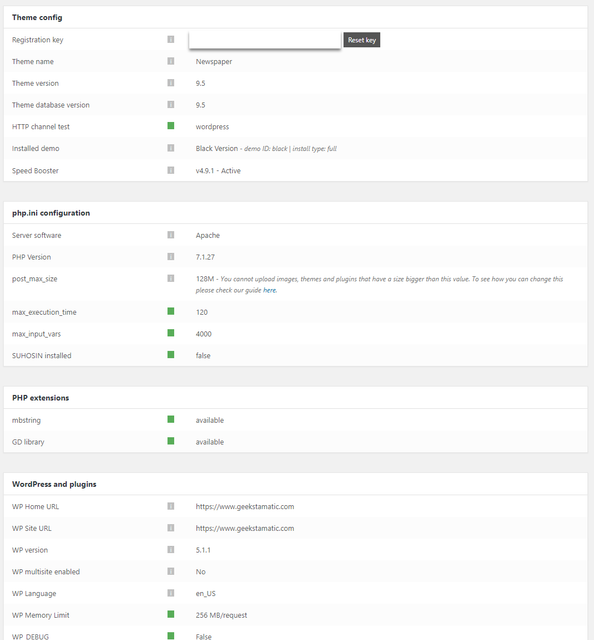
and disable my child theme
but issue still persist. i saw also this error below

 Calin
Calin Hi,
Please deactivate all plugins, use this guide -> https://www.wpbeginner.com/plugins/how-to-deactivate-all-plugins-when-not-able-to-access-wp-admin/
Also please make sure that the theme system status is configured as mentioned in the requirements guide. Please follow the guide carefully
– https://forum.tagdiv.com/requirements-for-newspaper/
and please increase all requirements that are lower, and follow all steps.
Thank you!
Calin Hi,
Please make sure that the theme system status is configured as mentioned in the requirements guide. Please follow the guide carefully
– https://forum.tagdiv.com/requirements-for-newspaper/
and please increase all requirements that are lower, and follow all steps.
Also please check for wordfence and put the firewall in learning mode (or disable any other firewall). This is the most common theme panel blockers.
Thank you!
Calin Hi,
You need to increase page loading speed, please check our guide for this -> https://tagdiv.com/how-to-increase-page-loading-speed/
Also please make sure that the theme system status is configured as mentioned in the requirements guide. Please follow the guide carefully
– https://forum.tagdiv.com/requirements-for-newspaper/
and please increase all requirements that are lower, and follow all steps.
There are many optimization guides provided by our users here in the forum, some made by us, you could check some of them
– https://forum.tagdiv.com/cache-plugin-install-and-configure/
– https://forum.tagdiv.com/how-to-make-the-site-faster/
– https://www.infophilic.com/get-almost-100-pagespeed-newspaper-theme/
– https://forum.tagdiv.com/topic/score-100100-pagespeed-with-newspaper-wordpress-theme/
– https://forum.tagdiv.com/topic/newspaper-theme-speedify-your-website/
– https://forum.tagdiv.com/topic/tutorial-chriss-custom-optimizations-for-functions-php-etc/
– https://forum.tagdiv.com/cloudflare-cdn/
– https://forum.tagdiv.com/topic/theme-causing-high-cpu-usage-2/
– https://forum.tagdiv.com/topic/sql-querys-high-cpu/
– https://forum.tagdiv.com/topic/newspaper-theme-slow-to-respond/
– https://premium.wpmudev.org/blog/optimizing-your-wordpress-database-a-complete-guide/
– https://underconstructionpage.com/optimize-wordpress-database/
– https://crunchify.com/better-optimize-wordpress-database-all-in-one-guide/
Thank you!
 Bogdan B.
 Hello,
There are no general known issues with nginx. In particular however, you will have to check your system status section of the theme panel and make sure all entries there are green: https://forum.tagdiv.com/requirements-for-newspaper/
Thank you!
 Simion C.
 Hi,
That is quite an an old theme version from which you are updating. Here you can find a changelog for each theme update, to see what has been modified, new features etc
– https://themeforest.net/item/newspaper/5489609 (bottom of the page).
This would be the only guide that we created for updating the theme
– https://tagdiv.com/update-newspaper-theme/
The theme requirements guide has been updated as well, please check it carefully and if necessary ask your hosting provider to increase the values of the parameters mentioned in it
– https://tagdiv.com/newspaper-theme-requirements/
For the WP memory we recommend a value of 256M. Having low memory may cause such problems, or if using an older PHP version. You can see the values in the theme system status
– http://prntscr.com/n0dwzx
After the update, deactivate/delete all the old theme plugins and install the new ones from the theme package plugins folder.
Update WPBakery (if you used it), the theme package contains version 5.7
– https://forum.tagdiv.com/how-to-update-visual-composer-plugin/
Note that the tagDiv composer introduced in version 8 of the theme, will automatically be installed and activated – https://tagdiv.com/tagdiv-composer-page-builder-basics/
Since update 8 this is the main page builder in the theme, WPBakery is still provided in the them package however, for users that want to keep using it.
Maybe consider making a copy or clone of the website (local or in sub-domain) and test there. Update there first and see what happens. Let us know if you have more questions.
Thanks
 Catalin
 Hi,
I have made some tests on my website and it seems to work as expected, as you can see here -> https://www.screencast.com/t/QUCFOKlrSfr Check your system status parameters to be increased according to our documentation from here -> https://forum.tagdiv.com/system-status-parameters-guide/ If the problem is still there, please send us an email at contact@tagdv.com with your log-in information (wp-admin) so we can further investigate it closer your setup page.
Thanks for your understanding!
Catalin Hi,
Please make sure that the theme system status is configured as mentioned in the requirements guide. Please follow the guide carefully
– https://tagdiv.com/newspaper-theme-requirements/
and please increase all requirements that are lower, and follow all steps;
If the issue is still a problem, please deactivate all non-theme plugins and child theme ( if you are using child ).
How to Update the Newspaper Theme for WordPress -> https://tagdiv.com/update-newspaper-theme/
Please refer to the following guides for possible fixes:
https://wordpress.org/support/topic-tag/505-error/
https://forum.tagdiv.com/topic/wp-supercache-causes-500-internal-error-and-cannot-deactivate/
https://www.wpbeginner.com/wp-tutorials/how-to-fix-the-internal-server-error-in-wordpress/
– https://support.cloudflare.com/hc/en-us/articles/218378978-What-should-I-do-after-seeing-a-502-or-504-gateway-error-on-my-site-
– https://support.cloudflare.com/hc/en-us/articles/115003011431-5xx-Server-Error
– https://support.cloudflare.com/hc/en-us/articles/200171906-Error-522-Connection-timed-out
– https://support.cloudflare.com/hc/en-us/articles/200171936-Error-520-Web-server-is-returning-an-unknown-error
Please try the same suggestions if your problem is similar. In most cases, 500 errors are caused by low wp-memory.
Hope this helps!
Thank you!
 rom1devweb70
Hello, I have a problem with Newspaper system status: I changed max_input_vars in the php.ini folder in xampp because the site is still local.
so I put 5000 instead of 1000 but in the system status it remains 1000 I think there is a bug on your side all the other values have changed except this one is on my side I have watched several I did not make a mistake? Can you keep me informed thank you
Catalin Hi,
Please make sure if you are using the latest version of the theme installed via FTP way, check your system status parameters to be increased according to our documentation from here -> https://forum.tagdiv.com/system-status-parameters-guide/ remove all of the untested plugins, clear all the caches, purge CDN files and check the results. Check your PHP memory. Maybe, this is exhausted and that’s why you cannot save and make anything.
Hope this helps and let us know how it goes!
Thank you!
Calin Hi,
Please make sure that the theme system status is configured as mentioned in the requirements guide. Please follow the guide carefully
– https://tagdiv.com/newspaper-theme-requirements/
and please increase all requirements that are lower, and follow all steps;
Please make sure that you do not have a plugin conflict, please deactivate all non theme plugins, clear all cache and try again.
If there is still a problem please provide some more details and some screenshots.
Thank you!
Calin Hi @tedslater,
Which version of newspaper are you using? in v9.5 this problem was fixed, also please make sure that you clear all cache, and you do not have any plugin conflicts.
Please make sure that the theme system status is configured as mentioned in the requirements guide. Please follow the guide carefully
– https://tagdiv.com/newspaper-theme-requirements/
and please increase all requirements that are lower, and follow all steps;
If there is still a problem, you can send us an email at contact@tagdiv.com and provide admin login, as well as cPanel or FTP if possible. We will take a look. Include a link to this topic in the email.
Thank you!
Calin Hi,
The multi-purpose plugin was removed and included in the tagDiv composer plugin, this happened in theme update 8.7.5, please check the changelog at the bottom of this page
– https://themeforest.net/item/newspaper/5489609
– https://www.screencast.com/t/cql6czdT
So no need to keep trying to activate the plugin if you use a theme version newer than 8.7.5, the multi-purpose plugin and the tagDiv composer were combined. All the multi-purpose options are now part of the tagDiv composer.
Please check the system status parameters and increased all of these according to our guide from here -> https://forum.tagdiv.com/requirements-for-newspaper/
Also you can make a full backup to your website an make a theme update -> https://forum.tagdiv.com/how-to-update-the-theme-2/
If there is still a problem, you can send us an email at contact@tagdiv.com and provide admin login, as well as cPanel or FTP if possible. We will take a look. Include a link to this topic in the email.
Thank you for your understanding!.
 carlodelano
post_max_size: 33M – You cannot upload images, themes and plugins that have a size bigger than this value. To see how you can change this please check our guide here.
max_execution_time: 30 – the execution time should be bigger than 60 if you plan to use the demos. To see how you can change this please check our guide here.
max_input_vars: 1000 – the max_input_vars should be bigger than 2000, otherwise it can cause incomplete saves in the menu panel in WordPress. To see how you can change this please check our guide here.
I have Media Upload HTTP Error, but i dont know how do change php.ini, please help?
https://forum.tagdiv.com/system-status-parameters-guide/
 jaydayarathna
 Hi, Thank you for the reply and still the issue is there. Please see the link which shows the current issue and system status. Look forward to hearing from you
 John Kord
 Hi,
The system status configured and all squares in “System status” are green,
1) I make new post with Russian symbols and then publish it
2) After that I move to this new post and see error again
3) Then I move back to admin word press page to edit post and see this error too under the post in wordpress windows
When I make new post with only English letter without Russian – no errors
-
This reply was modified 7 years by
John Kord.
Calin Hi,
Please make sure that the theme system status is configured as mentioned in the requirements guide. Please follow the guide carefully
– https://tagdiv.com/newspaper-theme-requirements/
and please increase all requirements that are lower, and follow all steps;
Please make sure that you do not have a plugin conflict, please deactivate all non theme plugins, clear all cache and try again.
If there is still a problem please provide some more details and some screenshots.
Thank you!
Calin Hi,
Please make sure that the theme system status is configured as mentioned in the requirements guide. Please follow the guide carefully
– https://tagdiv.com/newspaper-theme-requirements/
and please increase all requirements that are lower, and follow all steps;
Please make sure that you do not have a plugin conflict, please deactivate all non theme plugins, clear all cache and try again.
If the products images are set in pages then you’ll need to make a new page from mobile theme in mobile editor -> https://www.screencast.com/t/ebUIzt4se
Mobile Theme: Automatic Optimization for Mobile with Newspaper Theme ->https://tagdiv.com/mobile-theme-automatic-optimization-for-mobile-newspaper-theme/
If the problem is still there, please provide me a link were I can make some deep investigation, in this way I will be able to provide you a better answer.
Thank you!
Calin Hi,
Please make sure that the theme system status is configured as mentioned in the requirements guide. Please follow the guide carefully
– https://tagdiv.com/newspaper-theme-requirements/
and please increase all requirements that are lower, and follow all steps;
Also please check our documentation for When tagDiv Composer is not working -> https://forum.tagdiv.com/tagdiv-composer-not-working/
Basics: Using the tagDiv Composer Front-End Page Builder -> https://tagdiv.com/tagdiv-composer-page-builder-basics/
If there is still a problem please provide some more details and some screenshots.
Thank you!
Calin Hi,
Unfortunately I can not inspect this on your link -> https://www.screencast.com/t/FzHkL8nlC
Please make sure that the theme system status is configured as mentioned in the requirements guide. Please follow the guide carefully
– https://tagdiv.com/newspaper-theme-requirements/
and please increase all requirements that are lower, and follow all steps;
Maybe is a plugin conflict, please try to deactivate all non them plugins, clear all cache and try again.
Also please make sure that your image is uploaded in media library( not from external url).
Thank you!
Calin Hi,
If you click outside of wp editor the text from column text should save, clicking on the x button should do the same.
Please make sure that you do not have a plugin conflict, please deactivate all non theme plugins, clear all cache and try again.
Also please make sure that the theme system status is configured as mentioned in the requirements guide. Please follow the guide carefully
– https://tagdiv.com/newspaper-theme-requirements/
and please increase all requirements that are lower, and follow all steps;
Thank you!
Catalin Hi,
This page comes from Seo Yoast plugin. If you cannot access it, it seems that you have some problem with your install or with your system status parameters. Please increase them according to our documentation from here -> https://forum.tagdiv.com/system-status-parameters-guide/. It’s possible that your PHP memory to be exhausted and that’s why you cannot open it.
Hope this helps and let us know how it goes!
Thanks for your understanding!
 tzabula
Sorry, but v 9.6 update was total fail, which cost me huge decrease in mobile traffic – http://prntscr.com/mxpbj7
Who is responsible for such disaster? When do you plan to release new corrected update?
Here is my System Status – http://prntscr.com/mxpc0e
I had to change my perfectly working W3 Total Cache to WP Super Cache, recompile all ads codes (add new to Mobile and AMP section), remake used cloud templates (old ones didn’t want to work) and still the site’s mobile version looks horrible, AMP versions don’t work.
See details: wordofdecor.com
MOBILE
– no banners after header, as promised here – https://tagdiv.com/mobile-theme-automatic-optimization-for-mobile-newspaper-theme/ Screen of my site – http://prntscr.com/mxpkjc
– strange spaces in the loop – http://prntscr.com/mxpl3z (ads don’t load), ad code is inserted – http://prntscr.com/mxplwt
<script async src=”//pagead2.googlesyndication.com/pagead/js/adsbygoogle.js”></script>
<ins class=”adsbygoogle”
style=”display:block”
data-ad-format=”fluid”
data-ad-layout-key=”-i5+f-1x-68+it”
data-ad-client=”ca-pub-9196251467106158″
data-ad-slot=”8255795511″></ins>
<script>
(adsbygoogle = window.adsbygoogle || []).push({});
</script>
– no ads in the article, only after H1 – http://prntscr.com/mxpmra All ad codes are inserted – http://prntscr.com/mxpnjp
– horrible footer – http://prntscr.com/mxpo9h
AMP:
– lots of mistakes – http://prntscr.com/mxpp09
http://prntscr.com/mxpplw
– no guideline how to insert AMP auto-ads in the there panel. Here is one block for it, but Google gives two scripts:
http://prntscr.com/mxpr67
http://prntscr.com/mxps4q
– error in Google Search Console – http://prntscr.com/mxpsuc
Please, advise what should I do to improve the situation as soon as possible.
Many thanks in advance for your reply.
Catalin Hi,
Did you have tried to follow all the above advice? Also, please check the system status parameters to be increased according to our documentation from here -> https://forum.tagdiv.com/system-status-parameters-guide/ If you need more assistance, please send us an email.
Thanks for your understanding!
Calin Hi,
This is usually a requirement configuration problem, please make sure that the theme system status is configured as mentioned in the requirements guide. Please follow the guide carefully
– https://tagdiv.com/newspaper-theme-requirements/
and please increase all requirements that are lower, and follow all steps;
Especially check the php version ( ensure that you have at least php7 ).
Thank you!
