- Apitd_api_top_bar_template::update_key
- Apitd_api_top_bar_template::update
- Apitd_api_single_template::update_key
- Apitd_api_single_template::update
- Apitd_api_footer_template::update_key
- Apitd_api_footer_template::update
- Apitd_api_smart_list::update_key
- Apitd_api_smart_list::update
- Apitd_api_thumb::update_key
- Apitd_api_thumb::update
- Apitd_api_category_top_posts_style::update_key
- Apitd_api_category_top_posts_style::update
- Apitd_api_category_template::update_key
- Apitd_api_category_template::update
- Apitd_api_module::update_key
- Apitd_api_module::update
- Apitd_api_block::update_key
- Apitd_api_block::update
- Apitd_api_header_style::update_key
- Apitd_api_header_style::update
 joshimilestoner
 I have updated just now to 8.2 version now open any of my post it says there is an critical error on your website but when i use 7.4 version all website works good.
Visit website and check any post
-
This reply was modified 2 years by
joshimilestoner.
 Bettina
 Hello!
This situation appears when you are using the mobile theme plugin and the cache plugin that you have does not feature options for a separate mobile theme plugin therefore do not know when to deliver the mobile version and when to deliver the desktop version.
We have 3 options available for mobile versions that you can use:
1. Responsive version: A responsive version of your website looks similar to the desktop version. TagDiv Composer is used to edit the page.Click on the mobile viewport: https://www.screencast.com/t/XDQJedlggSB. There, you can see your mobile version and edit or adjust the elements to look better.
2. Mobile pages: https://tagdiv.com/newspaper-10-3-7-update-brings-customizable-and-fast-mobile-pages
3. Mobile theme plugin: The Mobile Theme is a performance-optimized theme included in the main Newspaper theme that only loads on mobile devices. It comes with its own templates and designs for pages, posts, categories, etc., so your current templates from the desktop theme will get converted to the mobile theme layout. Please see https://forum.tagdiv.com/the-mobile-theme/ and https://forum.tagdiv.com/mobile-theme-introduction/ for more information.
A full explanation is here: https://www.youtube.com/watch?v=SpGkOnJeNZY
If you need to use mobile version 1 or 2, then you need to uninstall the Mobile Theme plugin and AMP.
Thank you!
joshimilestonerThis is my site on wordpress I have updated compatible version of wordpress installed and newspaper theme is also updated, I have updated the PHP 8.1 where it shows lot of errors and website doesn’t work on desktop but it works only on mobile… After changing it to 7.4 version it works absolutely fine please help…. If i doesn’t update the latest php it will slow down the site.
 newspulpaper
Hello TagDiv support team,
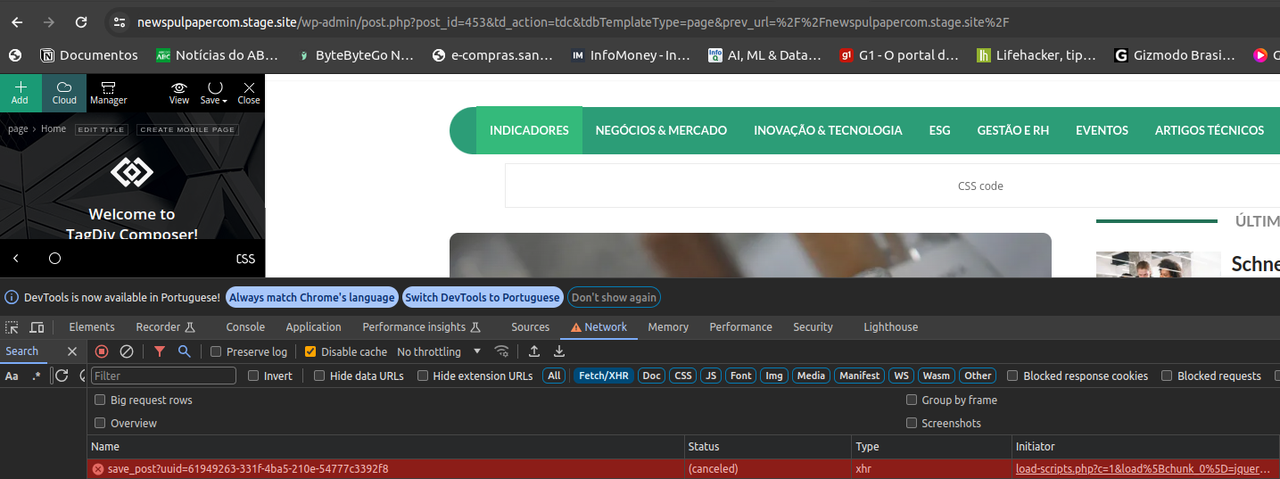
I’ve encountered an issue while editing any page layout on my WordPress site using the Newspaper theme with the “News Hub Pro” plugin. Every time I attempt to save changes on TagDiv Composer, the process fails, and through the browser’s DevTools, I observe a “Canceled” response from the server exactly 10 seconds after the request is made. This behavior is consistent and prevents me from making any further modifications to my site’s layout.
I have followed all the recommended steps outlined in the “Requirements for Newspaper” tutorial on your website, ensuring that my server and WordPress environment meet the necessary specifications. Despite these adjustments, the problem persists.
I am seeking guidance on how to resolve this issue as it’s crucial for me to be able to update and modify the layout of my website. Below is a screenshot from DevTools highlighting the error:
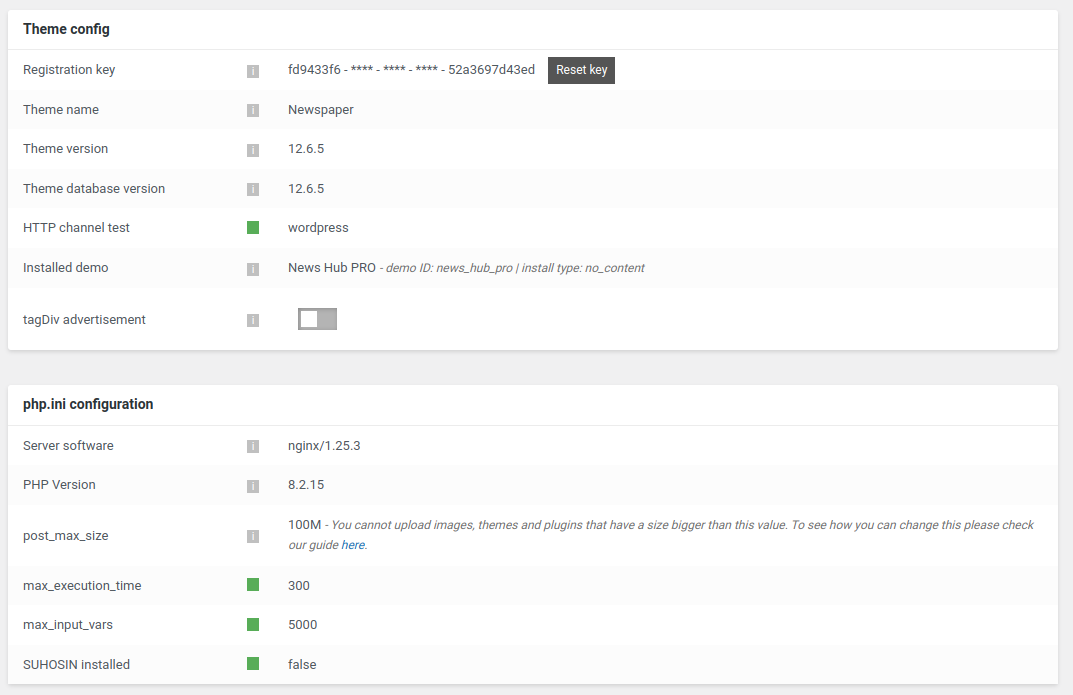
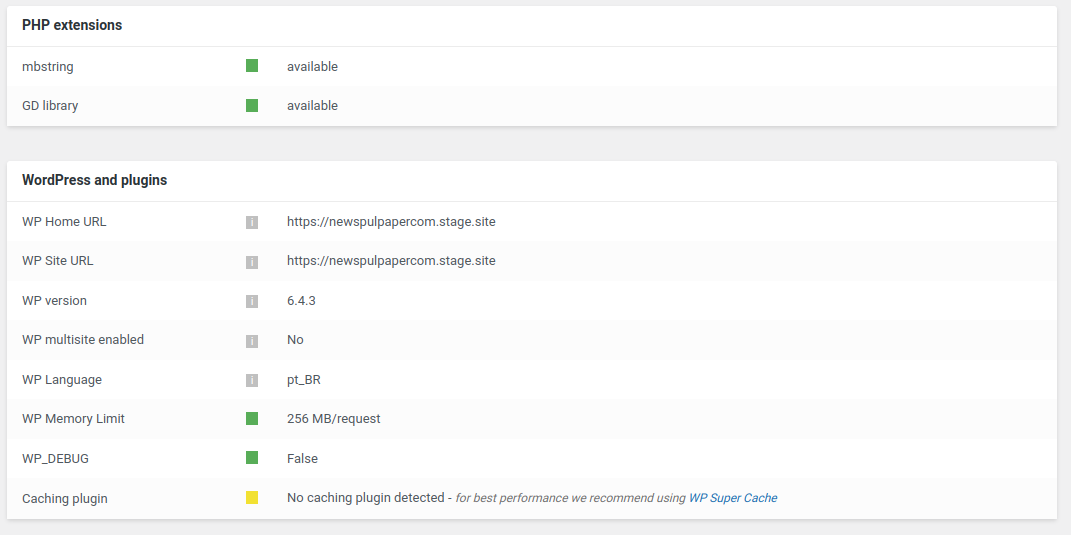
Could anyone provide insights or solutions to overcome this server response issue? Any help or suggestions would be greatly appreciated.
Thank you in advance for your assistance.
Bettina Hello @sangha9!
Yes. Install the Yoast SEO plugin, edit the homepage with Gutenberg, scroll to the bottom, and there you have some SEO settings. Update the changes and check the results.
Thank you!
Bettina Hello @stringbenderb5!
1. In the next update, we will fix an issue regarding the unused JS. The unused CSS problem should not exist anymore. There was a feature in our theme, but we integrated it into the theme code. So, I suggest you update the theme and plugins to the latest version.
2. Check if you do not have this feature enabled: https://forum.tagdiv.com/loading-image-effects/
Check out this guide as well: https://forum.tagdiv.com/what-is-ajax-preloading/.
Thank you!
 Taurinense
Hello there!
I have a problem with my site. when I open an article, it appears below the home page.
The URL is correct, but graphically it appears below the page.
how come? this happened after the theme update
Thank you
 Anamaria
 Hi,
You can download it from Themeforest https://forum.tagdiv.com/how-to-update-the-theme-2/
Thank you!
 IanGJ
IanGJMorning, apologies for long message.
I note that these topics have been covered several times but what is the latest position. Any clear advice or a definitive solution would be handy. The ones we have tried as per some of your suggestions don’t seem to resolve the issue. I have a live site which is using the previous version of Newspaper and a testing/staging site with the latest version 12.6.5. Same issues on both sites. I have the relevant tagDiv plugins installed. Other non tagDiv plugins were deactivated and added one by one to see if there were conflicts with plugins – no conflictions.
Firstly…Is the issue with Save settings something which is likely to be resolved in a future update?
If not and before I try to get someone to help me investigate what’s going on and fix things, the hosting company have asked me to inform you of a few things they found when trying to help – not sure if any of it helps. Their responses are in italics.
Save Settings – Nothing saves, results in Spinning Wheel
Reading through the forum, this got flagged up
Object Cache on Backend
https://forum.tagdiv.com/general-options-may-interfere-newspaper-theme/
Suggestion from tagDiv is that the issue with spinning wheel and settings not being saved ‘could be a situation generated by the object cache on the backend’ ‘this could be either a plugin or it’s a hosting option.’
Contacted hosting company and they have replied as follows:
‘Disabling object caching entirely is not permitted unless it’s for testing purposes only. However, you can contact theme support to inquire if there’s a particular post type, setting, or element for which object caching needs to be disabled.’
So, can tagDiv please advise if there is a specific item that needs to be disabled – many thanks
Another tagDiv option is ‘Plugins – they must be deactivated and the file created by them, named “object-cache.php” must be deleted.
The hosting company and the person who usually does my maintenance wasn’t convinced by the above suggested deletion to deactivate plugins and the file….so to be fair haven’t tried that as yet.
The hosting company also reported that they..
‘noticed in the Envato forum that other users in the past have reported issues with the td_011_settings table, indicating that the theme developer should address and resolve these issues.’
https://forums.envato.com/t/wp-option-set-to-autoload/453841
Is this likely to be anything to do with it?
The hosting company also proceeded to delve deeper and conducted additional investigation, uncovering the following information.
‘I’ve noticed an error or warning message on the dashboard regarding “Excess updates to option td_011_settings blocked.” This could be the reason for the issue.
The error occurred due to a platform configuration on our side. This configuration is designed to prevent site plugins or themes from excessively writing to the database servers and causing overload.
That specific table is where the theme stores backups of the theme panel and other related data. I suggest contacting NewsPaper theme or Tagdiv support to inform them about this issue.
Furthermore, I believe the next step will involve dropping the option that is causing the error.
However, before proceeding with this action, it’s important to contact theme support and inform them of this issue and the subsequent steps, especially concerning the large content in one of the rows related to td_011_settings.
Import/Export Theme Settings
Followed the suggested tagDiv instructions regarding importing and exporting Theme Settings as per this link
https://forum.tagdiv.com/import-export-theme-settings/#
That results in
This page isn’t working…is currently unable to handle this request.
Please advise.Thanks
 jmbernstein
Every time I login to update my sidebar widget, I get a blank page. I have to turn off all the plugins and turn them back on in order to get my widgets back. It’s always the tagDiv Composer plugin that causes the issue. I’m current with all versions.
 zeeshannaqi
Hello, I updated the site to the latest version and everything got broken, codes are visible on site and post pages not showing TAGDIV composer as well, also tried to revert back the theme but that doesn’t work either, please help.
I think CSS errors, but not sure.
 simoala009
Hello I have updated to the last vertion of Newspaper template, and i start having conflict between tagdiv cloud, and the last updated elementor Pro purchased.
I have critical error in the admin panel once i activate both, but i desactivate one of them, the admin page works, but the website is messy.
Do you have any solution to that issue ? can you also share with me the previous version of Newpaper template to test if there is the issue ?
 worldautodb
 Thank you, Anamaria. I haven’t yet used the Single Post Templates. The post I created is a standard one through the left hand menus. The Black Pro theme allows me to update the text color for pages but not for posts. Another option I can try is uninstalling the theme and installing it with sample data to see how those render correctly but not the new ones that I create.
 fm
fmHi
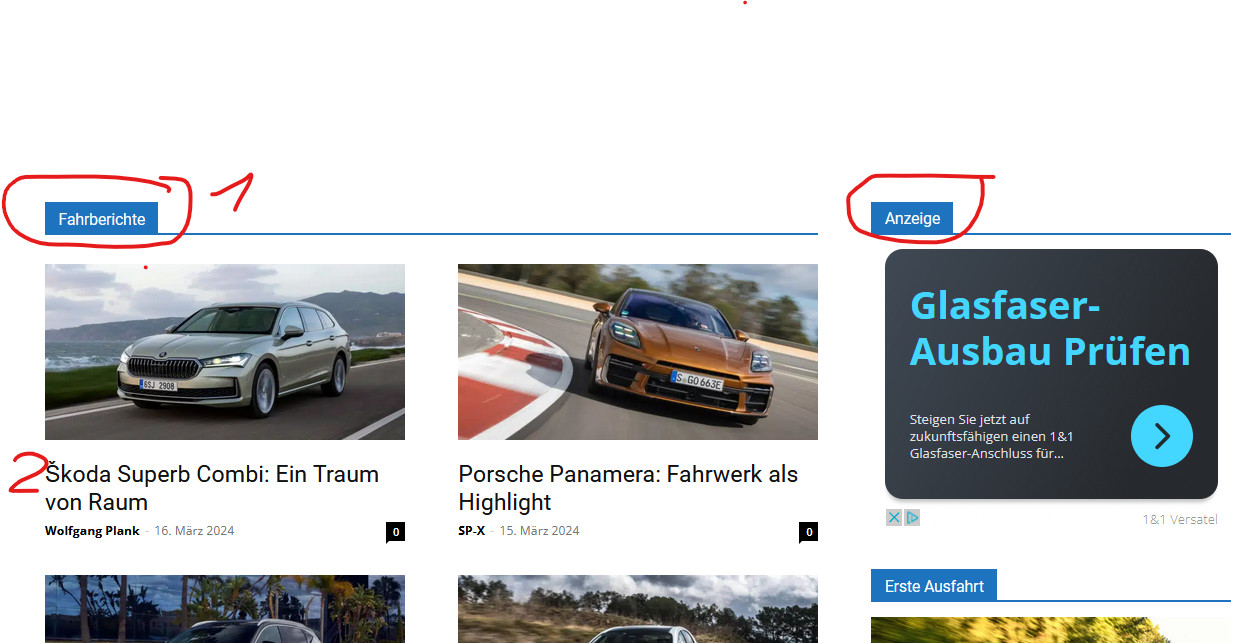
can you please tell me what the elements marked in blue in den URL below (1, Fahrberichte, Anzeige etc.) in the theme panel are called? Where exactly can I change their color? I thinke it ist under Theme Colors? I do not now what I have to change exactly theire.
The Icons must be blue as in the URL: https://www.autozukunft.de/wp-content/uploads/2024/03/BackgroundColour.jpg, but are
but on the article pages they are after the theme update black, what is wrong: https://autogazette.de/fahrberichte/ford/bronco-badlands/ford-bronco-badlands-jenseits-von-asphalt-989422491.html
Thank you, Frank
 Raj Kumari
 you can guide me how to reinstall rather than send detail.
Also, please ready by previous message and update me.
 alessandro_tpp
 @Anamaria, that was us during the weekend trying to install a previous version of the theme but it didn’t work.
We did not backup our website before the update, does that mean our design is now permanently compromised?
Anamaria Hi,
Didn’t you make a backup before the update? You can try to revert this https://i.imgur.com/ttnqOag.png
Thank you!
Anamaria Hi,
You can try to revert a backup that you made before the update.
Thank you!
 stax
staxThis is getting ridiculous now. We’ve been having this issue update after update and it’s never resolved.
When building a new page, we are getting this error on creating a mobile page.
For desktop, it works okay but we can’t create or edit mobile pages.
We tried:
– Giving your support access to our website and they disabled all plugins on the production website without asking
– Disabling the plugins on our own but the problem persists.
– Creating a new header and footer to ensure they are not the problem. (They are not)
– Changing PHP versions
– Using a Newspaper instead of our child theme.
– Disabling Cloudflare and caching plugins to avoid conflicts.
Nothing works. We are getting error after error after error.
On the mobile page editor, we keep getting Delete text injected on top of the page. I have no idea why and where that is injected.
I’ve found it in obscure, minimized files js_files_for_widgets.min.js and js_files_for_wrapper.min.js
what does it do? Is it possible that is the cause of the problem?
I repeat I’ve gone through your page TD Composer not working and nothing helped.
Bettina Hello @ziamoon!
You can delete the logo element and add the other one. So, the overlapping settings will be deleted as well.
If you use the translations from the theme panel, then you can change the default language displayed on your website.
I recommend you use the gTranslate plugin.
This issue with AMP scan failure has already been discussed here: https://forum.tagdiv.com/topic/after-update-theme-9-to-12-site-loading-very-slow-without-enabling-caching-on/ and here: https://forum.tagdiv.com/topic/site-scan-failed-try-again-amp-newspaper-theme/
Please use the correct filter for each page: https://forum.tagdiv.com/flex-block-settings-guide/
Thank you!
Anamaria Hi,
Please check if you have the mobile theme plugin enabled.
Using our theme, you can choose from 3 mobile versions
-> mobile responsive => https://www.screencast.com/t/oJ2ShOp47
-> mobile theme plugin => https://forum.tagdiv.com/the-mobile-theme/
-> mobile page => https://tagdiv.com/newspaper-10-3-7-update-brings-customizable-and-fast-mobile-pages/ The option that you need to use.
Suppose you created the mobile pages with tagDiv Composer. In that case, when you install the Mobile Theme plugin, your pages will be overwritten by the plugin (the mobile theme comes with its templates for page, post, category, etc, so your current templates from the desktop theme will get converted to the mobile theme layout, the page content is made without builders in mobile editor => https://www.screencast.com/t/xbgZG8kH also, the options that are provided to edit the mobile theme version are limited (this keeps the things simple)).
This is a video about Responsive Newspaper Theme, AMP & Mobile Theme, Mobile Pages & Templates -> https://www.youtube.com/watch?v=SpGkOnJeNZY.
So, the mobile responsive is what you see when that you select the viewport on phone => https://www.screencast.com/t/matV17hH, so some settings may apply for each viewport(where is the border blue), and others are not(where the border is black).
The mobile page has the mobile templates from Cloud Library => https://www.screencast.com/t/YCcZ8rL8
The Mobile responsive version of the theme and the mobile page editor can be edit with tagDiv Composer, the mobile theme plugin cannot.
For example, you can have the mobile theme plugin activated and use the mobile page/mobile responsive version for the homepage/pages, but for the categories pages/404 page, you can’t use the mobile page/mobile responsive version if you have the mobile theme plugin activated.
So, if you want to design the pages with tagDiv Composer, you can use the mobile page or mobile responsive version.
Also, please check this topic https://forum.tagdiv.com/topic/amp-pages-not-working-well-with-this-theme/
Thank you!
Anamaria Hello,
@alessandro_tpp Please activate the tagDiv Cloud Library plugin.
After you update the theme, you need to update the theme plugins too.
In the worst cases, the settings in the theme panel may be lost (there have been isolated cases), in these cases, after the theme plugins that were previously used are activated, you will have to use a backup for the theme panel -> https://forum.tagdiv.com/import-export-theme-settings/
Thank you!
Anamaria Hello,
I recommend updating the theme to the latest version, 12.6.5 to be updated and to don’t have malware.
If you want to update the theme, you should download the latest version of it from Theme Forest account and download it.
I recommend that you update the theme manually https://forum.tagdiv.com/how-to-update-the-theme-2/ via FTP/cPanel/File Manager, also if possible disable extra plugins during the theme update to avoid any problems that may arise and make sure that you have activated the tagDiv Standard pack plugin to keep the website’s look. You can try to update the theme on a staging website.
After you update the theme, you need to update the theme plugins too.
In the worst cases, the settings in the theme panel may be lost (there have been isolated cases), in these cases, after the theme plugins that were previously used are activated, you will have to use a backup for the theme panel -> https://forum.tagdiv.com/import-export-theme-settings/
Thank you!
 davinity12
Hello,
My web host told me that I have malicious redirects due to my tagdiv library and composer not being up to date. If I update these as well as the theme will my website stay the same or do I have to worry there will be formatting issues?
 Garron Rose
The site has been working utilizing the Guest Authors feature of Co-Authors Plus. This required some custom code to get working. As we are required (security and PHP version) to update from NewsMag 3x to NewsMag 5x (repurchased the theme). This feature stack is no longer working. The guest author is selected in editor, but is not making it’s way to the front end.
I found this reply by Calin on this post https://forum.tagdiv.com/topic/regarding-adding-multiple-authors-on-newspaper-theme/, regarding the Newspaper theme. However, it does not work with NewsMag (the multiple includes/ “/parts/single” was in the theme root for Newsmag but no longer exists. If you could modify this post with corresponding code for the loop-single.php file, that would be very helpful.