- NewspaperWP Rocket and Newspaper Theme: Optimization Guide
- TutorialsFrom WPBakery to tagDiv Composer
- NewspaperNewspaper Theme Support
- NewspaperNewspaper theme documentation
- NewspaperWeather Shortcode
- NewspaperCloudflare (CDN)
- NewspaperBest Of Forums
- TutorialsSystem status parameters guide
- NewsmagWhat’s included in Newsmag theme package
- NewsmagRequirements for Newsmag
- NewsmagNewsmag documentation
- Thumbnails vs. Featured image size
- NewspaperThumbnails – Fix strange looking images on blocks
- NewspaperRequirements for Newspaper
- NewspaperHow to Make the Site Faster
 nagi
nagiRespected Sir/Mam,
I am a developer at Mallemaala Entertainments, located in Hyderabad. We have a few requirements for our movie review website, 123telugu.com
newspaper theme performance speed is very slow Please give
us some tips to increase website speed
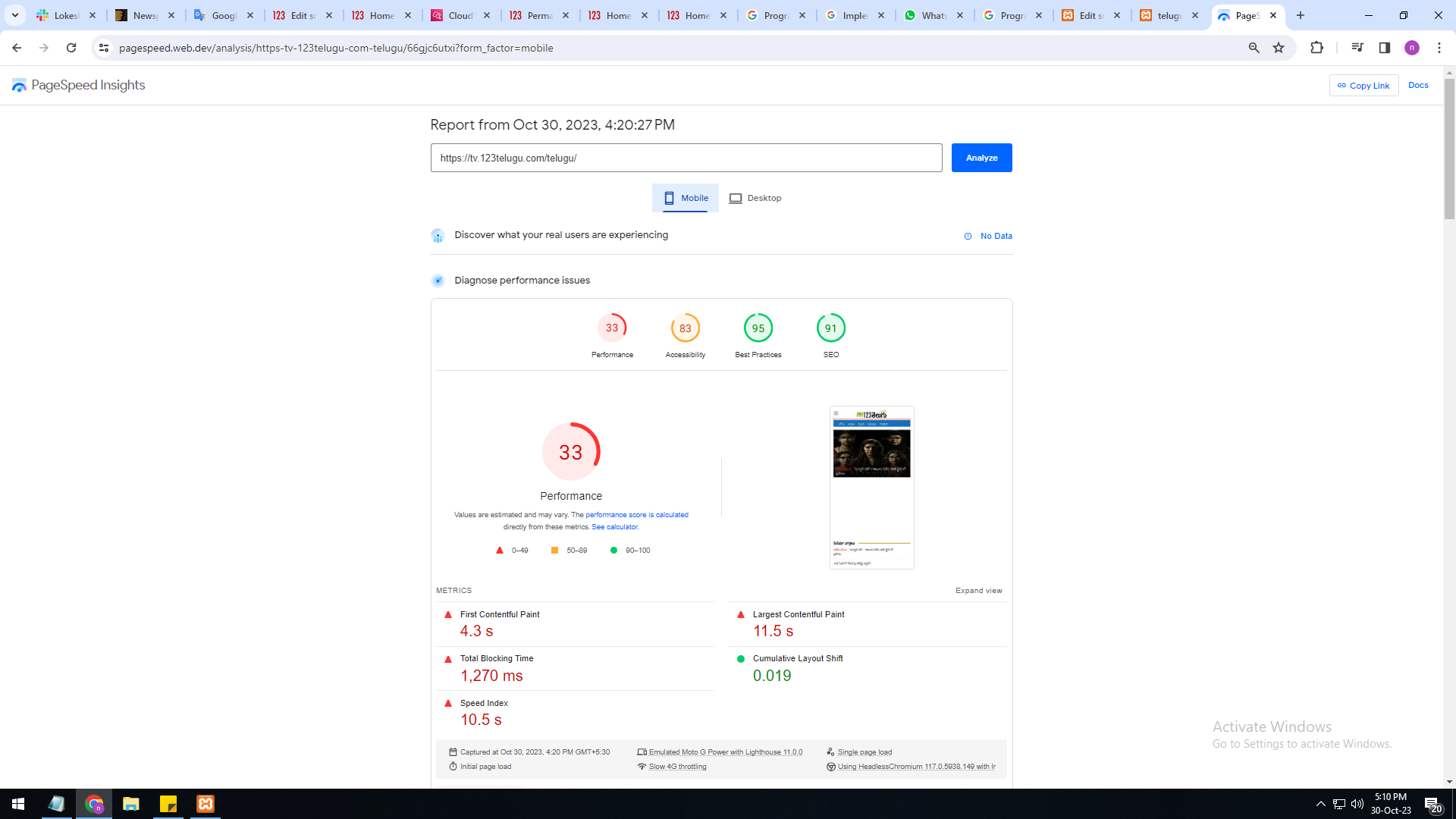
mobile version is very slow 33%
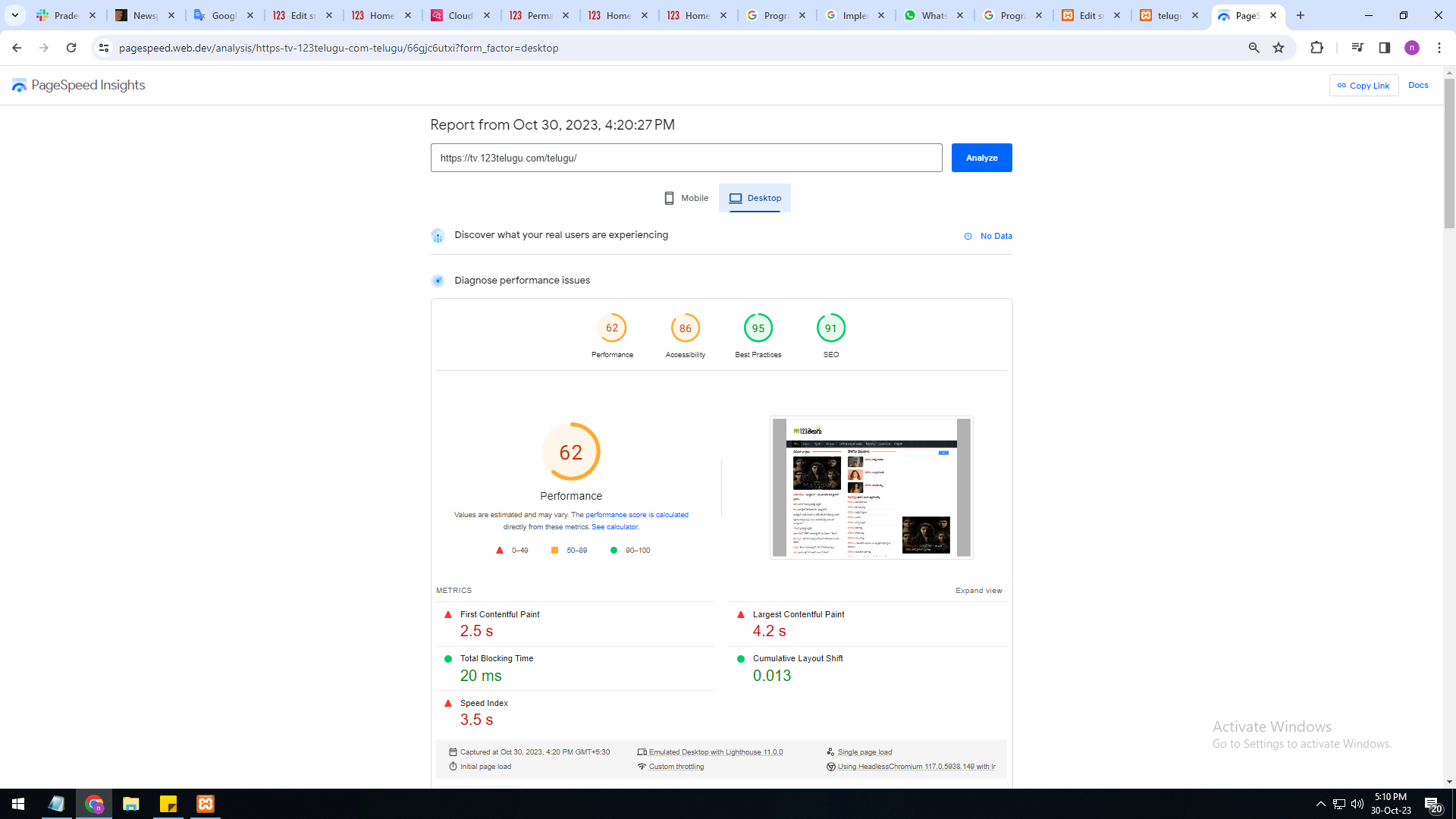
system version is also very slow only 62%
I am sharing images URL links :
https://gallery.123telugu.com/images/theme_test/Basantham1.png
https://gallery.123telugu.com/images/theme_test/Basantham2.png
Thanking you,
Regards,
Narendra.
 Renato Tbw
I am facing a problem on my website. Before he was normal, he has a conventional home and a mobile home, using newspapers. Turns out I had a problem and several functions reset.
I remain with two home pages (conventional and mobile). They appear normally to visitors. However, when I use pagespeed insights the same (conventional) page appears for evaluation. The same page appears on the pagespeed mobile screen for both assessments. How can I resolve this? Before it was normal.
 Anamaria
 Hi,
I suggest using WP Rocket plugin.
There are many optimization guides provided by our users here in the forum, some made by us; you could check some of them
– https://www.infophilic.com/get-almost-100-pagespeed-newspaper-theme/
– https://forum.tagdiv.com/cache-plugin-install-and-configure/
– https://forum.tagdiv.com/how-to-make-the-site-faster/
– https://forum.tagdiv.com/topic/high-number-of-ajax-request/
– https://forum.tagdiv.com/topic/score-100100-pagespeed-with-newspaper-wordpress-theme/
– https://www.andraware.com/wp-rocket-for-newspaper-theme/
– https://forum.tagdiv.com/topic/page-speed-guide-for-2023-beginners-and-advanced/
– https://forum.tagdiv.com/topic/newspaper-theme-speedify-your-website/
– https://forum.tagdiv.com/topic/tutorial-chriss-custom-optimizations-for-functions-php-etc/
– https://forum.tagdiv.com/cloudflare-cdn/
– https://forum.tagdiv.com/topic/theme-causing-high-cpu-usage-2/
– https://forum.tagdiv.com/topic/sql-querys-high-cpu/
– https://forum.tagdiv.com/topic/newspaper-theme-slow-to-respond/
– https://premium.wpmudev.org/blog/optimizing-your-wordpress-database-a-complete-guide/
– https://underconstructionpage.com/optimize-wordpress-database/
– https://crunchify.com/better-optimize-wordpress-database-all-in-one-guide/
Also, pagespeed is not covered by support -> https://forum.tagdiv.com/newspaper-theme-support/
If you use Wp Rocket, you can try to exclude the following files
/jquery-?[0-9.](.*)(.min|.slim|.slim.min)?.js
/jquery-migrate(.min)?.js
/wp-content/plugins/td-composer/legacy/Newspaper/js/tagdiv_theme.min.js
tdBlocksArray
To be able to optimize and to remove CLS and LCP please check these guide => https://developers.google.com/web/tools/lighthouse/ -> https://www.sqlpac.com/en/documents/google-pagespeeds-lighthouse-6-new-features-lcp-cls.html -> https://web.dev/lighthouse-whats-new-6.0/ -> https://web.dev/lcp/ -> https://web.dev/cls/
Thank you!
Anamaria Hello,
The page loading speed can depend on many factors, and each website is unique from this point of view. Let me explain some of these factors and maybe they give you some starting points for optimizing your website. A good choice for the page speed, could be the mobile layout which contains fewer elements because it can improve a bit your page speed.
There are many optimization guides provided by our users here in the forum, some made by us; you could check some of them
– https://www.infophilic.com/get-almost-100-pagespeed-newspaper-theme/
– https://forum.tagdiv.com/cache-plugin-install-and-configure/
– https://forum.tagdiv.com/how-to-make-the-site-faster/
– https://forum.tagdiv.com/topic/high-number-of-ajax-request/
– https://forum.tagdiv.com/topic/score-100100-pagespeed-with-newspaper-wordpress-theme/
– https://www.andraware.com/wp-rocket-for-newspaper-theme/
– https://forum.tagdiv.com/topic/page-speed-guide-for-2023-beginners-and-advanced/
– https://forum.tagdiv.com/topic/newspaper-theme-speedify-your-website/
– https://forum.tagdiv.com/topic/tutorial-chriss-custom-optimizations-for-functions-php-etc/
– https://forum.tagdiv.com/cloudflare-cdn/
– https://forum.tagdiv.com/topic/theme-causing-high-cpu-usage-2/
– https://forum.tagdiv.com/topic/sql-querys-high-cpu/
– https://forum.tagdiv.com/topic/newspaper-theme-slow-to-respond/
– https://premium.wpmudev.org/blog/optimizing-your-wordpress-database-a-complete-guide/
– https://underconstructionpage.com/optimize-wordpress-database/
– https://crunchify.com/better-optimize-wordpress-database-all-in-one-guide/
Also, pagespeed is not covered by support -> https://forum.tagdiv.com/newspaper-theme-support/
If you use Wp Rocket, you can try to exclude the following files
/jquery-?[0-9.](.*)(.min|.slim|.slim.min)?.js
/jquery-migrate(.min)?.js
/wp-content/plugins/td-composer/legacy/Newspaper/js/tagdiv_theme.min.js
tdBlocksArray
To be able to optimize and to remove CLS and LCP please check these guide => https://developers.google.com/web/tools/lighthouse/ -> https://www.sqlpac.com/en/documents/google-pagespeeds-lighthouse-6-new-features-lcp-cls.html -> https://web.dev/lighthouse-whats-new-6.0/ -> https://web.dev/lcp/ -> https://web.dev/cls/
Thank you!
 howtoisolve
We want to complate a setup on my website that cares for speed, SEO, and Google Easy index features.
right now i am facing issue with Date, i installed on my demo website.
Modified Date is not working on Desktop and mobile theme.
if i enable last Modified Date in Mobile Them, Desktop theme options not showing. – Desktop theme showing only Published Date.
i recommend to use Mobile them for mobile users.
Anamaria Hello,
Please check this topic https://forum.tagdiv.com/topic/low-scores-on-mobile-theme-amp-and-desktop-pagespeed-and-gt-metrics-optimize/ and try this code ->
// Preload Newspaper fonts for responsive theme (main theme) function dns_prefetch_responsive()

{

echo '';

echo '';

}

add_action( 'wp_head', 'dns_prefetch_responsive', 0 );
There are many optimization guides provided by our users here in the forum, some made by us; you could check some of them
– https://www.infophilic.com/get-almost-100-pagespeed-newspaper-theme/
– https://forum.tagdiv.com/cache-plugin-install-and-configure/
– https://forum.tagdiv.com/how-to-make-the-site-faster/
– https://forum.tagdiv.com/topic/high-number-of-ajax-request/
– https://forum.tagdiv.com/topic/score-100100-pagespeed-with-newspaper-wordpress-theme/
– https://www.andraware.com/wp-rocket-for-newspaper-theme/
– https://spraythemes.com/newspaper-theme/how-to-speed-up-the-newspaper-wordpress-theme-using-wp-rocket/
– https://forum.tagdiv.com/topic/page-speed-guide-for-2023-beginners-and-advanced/
– https://forum.tagdiv.com/topic/newspaper-theme-speedify-your-website/
– https://forum.tagdiv.com/topic/tutorial-chriss-custom-optimizations-for-functions-php-etc/
– https://forum.tagdiv.com/cloudflare-cdn/
– https://forum.tagdiv.com/topic/theme-causing-high-cpu-usage-2/
– https://forum.tagdiv.com/topic/sql-querys-high-cpu/
– https://forum.tagdiv.com/topic/newspaper-theme-slow-to-respond/
– https://premium.wpmudev.org/blog/optimizing-your-wordpress-database-a-complete-guide/
– https://underconstructionpage.com/optimize-wordpress-database/
– https://crunchify.com/better-optimize-wordpress-database-all-in-one-guide/
Also, pagespeed is not covered by support -> https://forum.tagdiv.com/newspaper-theme-support/
If you use Wp Rocket, you can try to exclude the following files
/jquery-?[0-9.](.*)(.min|.slim|.slim.min)?.js
/jquery-migrate(.min)?.js
/wp-content/plugins/td-composer/legacy/Newspaper/js/tagdiv_theme.min.js
tdBlocksArray
To be able to optimize and to remove CLS and LCP please check these guide => https://developers.google.com/web/tools/lighthouse/ -> https://www.sqlpac.com/en/documents/google-pagespeeds-lighthouse-6-new-features-lcp-cls.html -> https://web.dev/lighthouse-whats-new-6.0/ -> https://web.dev/lcp/ -> https://web.dev/cls/
Thank you!
Anamaria Hello,
The page loading speed can depend on many factors, and each website is unique from this point of view. Let me explain some of these factors and maybe they give you some starting points for optimizing your website. A good choice for the page speed, could be the mobile layout which contains fewer elements because it can improve a bit your page speed.
There are many optimization guides provided by our users here in the forum, some made by us; you could check some of them
– https://www.infophilic.com/get-almost-100-pagespeed-newspaper-theme/
– https://forum.tagdiv.com/cache-plugin-install-and-configure/
– https://forum.tagdiv.com/how-to-make-the-site-faster/
– https://forum.tagdiv.com/topic/high-number-of-ajax-request/
– https://forum.tagdiv.com/topic/score-100100-pagespeed-with-newspaper-wordpress-theme/
– https://www.andraware.com/wp-rocket-for-newspaper-theme/
– https://forum.tagdiv.com/topic/page-speed-guide-for-2023-beginners-and-advanced/
– https://forum.tagdiv.com/topic/newspaper-theme-speedify-your-website/
– https://forum.tagdiv.com/topic/tutorial-chriss-custom-optimizations-for-functions-php-etc/
– https://forum.tagdiv.com/cloudflare-cdn/
– https://forum.tagdiv.com/topic/theme-causing-high-cpu-usage-2/
– https://forum.tagdiv.com/topic/sql-querys-high-cpu/
– https://forum.tagdiv.com/topic/newspaper-theme-slow-to-respond/
– https://premium.wpmudev.org/blog/optimizing-your-wordpress-database-a-complete-guide/
– https://underconstructionpage.com/optimize-wordpress-database/
– https://crunchify.com/better-optimize-wordpress-database-all-in-one-guide/
Also, pagespeed is not covered by support -> https://forum.tagdiv.com/newspaper-theme-support/
If you use Wp Rocket, you can try to exclude the following files
/jquery-?[0-9.](.*)(.min|.slim|.slim.min)?.js
/jquery-migrate(.min)?.js
/wp-content/plugins/td-composer/legacy/Newspaper/js/tagdiv_theme.min.js
tdBlocksArray
To be able to optimize and to remove CLS and LCP please check these guide => https://developers.google.com/web/tools/lighthouse/ -> https://www.sqlpac.com/en/documents/google-pagespeeds-lighthouse-6-new-features-lcp-cls.html -> https://web.dev/lighthouse-whats-new-6.0/ -> https://web.dev/lcp/ -> https://web.dev/cls/
Thank you!
 Iqtidar
 I’ve been waiting days to hear an answer to this issue. In my further research, the issue has to do with how the YouTube embed function is working.
The CSS that adjusts the dimensions of the video is loaded later and the page is rendered first, this shows the video Outside the Viewport at first (this is what the Google crawler sees and renders). The video is adjusted perfectly later on. But Google marks it as Outside the Viewport area (see screenshot below).

This screenshot was taken from this URL: https://www.teslaoracle.com/2023/08/02/tesla-adds-the-traffic-flow-speed-matching-feature-for-highways-in-fsd-beta-v11-4-6-video/
 nasirnadeem628
Dear Support team,
hope you’re fine and doing well, I tried my very best to optimize my website speed unfortunately, It’s becoming hard due to a header ad issue with this theme. I’ve google adsense approval on my website due to a header ad its performance decreased. I tried many ways to fix it but I could not find out any type of header ad yet to remove it. it’s from the theme script I think.
I would request you to please assist me with it I’ll be very very thankful to you. I’m ready to pay for this if you like this is really a critical issue or else release an update. please
Website URL:
Awaiting for your kind reply
 bhcrow
 I have found this old post looking for solution for my website. I have live news portal page which has same issue as described above. In last 24h all setting reset itself to default twice. Yes, I have backup for settings and I import them back. Also I need to set to global my cloud templates which also resets.
I dont have this Ajax search plugin on my website. I have folloowing active plugins:
Admin notices manages
Adrotate banner manager
advanced editor tools
classic editor
codestyling localization
crop thumbnails
custom sidebar
disable comments
facebook comments plugin
feautured image in rss feed
open graph and twitter card tags
optimize images resizing
really simple ssl
Smash Balloon Custom Facebook Feed
Solid security basic
standard widgets
tagdiv cloud library
tagdiv composer
tagdiv speed booster
tagdiv standard pack
theia sticky sidebar
thumbnail upscale
w3 total cache
wp rest api
wp-cors
wp-polls
wpcode lite
yop poll
 franchisegoal
I’m facing performance and functionality issues with the LiteSpeed Cache plugin on one of my websites. Unlike the main domain, this site experiences slow page loads and non-functional JavaScript elements with the same plugin settings.
Problem Description:
Slow Page Load: The website loads slowly with the LiteSpeed Cache plugin active, impacting the user experience.
JavaScript Issues: Key JavaScript features, like next/previous buttons and drop-down menus, do not work when the plugin is enabled.
Plugin Settings:
Plugin Version: 5.7
CSS Optimization: https://prnt.sc/kjbJakk9N2du
JavaScript Optimization: https://prnt.sc/9OsqnNNIDocv
I’ve tested various configurations but haven’t resolved the issues, suggesting a compatibility problem.
I request your assistance to investigate and resolve these issues to optimize website performance.
Please let me know if you need more information or access for debugging. FYI, I have disabled the plugin on my website as it was impacting the user experience.
Your prompt support is appreciated.
Best regards,
Gaurav
 Moyne
MoyneHello, I’ve implemented most of your recommendations to optimize my site’s speed and align it with Google’s requirements, but I still can’t seem to reduce my FCP. Is there any custom CSS or other solution you could recommend to help improve the situation? Thank you. Have a great day! Url of my website : https://jurojin.net/
Anamaria Hi,
Unfortunately, you can try to use the suggestions from those topics.
There are many optimization guides provided by our users here in the forum, some made by us; you could check some of them
– https://www.infophilic.com/get-almost-100-pagespeed-newspaper-theme/
– https://forum.tagdiv.com/cache-plugin-install-and-configure/
– https://forum.tagdiv.com/how-to-make-the-site-faster/
– https://forum.tagdiv.com/topic/high-number-of-ajax-request/
– https://forum.tagdiv.com/topic/score-100100-pagespeed-with-newspaper-wordpress-theme/
– https://www.andraware.com/wp-rocket-for-newspaper-theme/
– https://forum.tagdiv.com/topic/page-speed-guide-for-2023-beginners-and-advanced/
– https://forum.tagdiv.com/topic/newspaper-theme-speedify-your-website/
– https://forum.tagdiv.com/topic/tutorial-chriss-custom-optimizations-for-functions-php-etc/
– https://forum.tagdiv.com/cloudflare-cdn/
– https://forum.tagdiv.com/topic/theme-causing-high-cpu-usage-2/
– https://forum.tagdiv.com/topic/sql-querys-high-cpu/
– https://forum.tagdiv.com/topic/newspaper-theme-slow-to-respond/
– https://premium.wpmudev.org/blog/optimizing-your-wordpress-database-a-complete-guide/
– https://underconstructionpage.com/optimize-wordpress-database/
– https://crunchify.com/better-optimize-wordpress-database-all-in-one-guide/
Also, pagespeed is not covered by support -> https://forum.tagdiv.com/newspaper-theme-support/
If you use Wp Rocket, you can try to exclude the following files
/jquery-?[0-9.](.*)(.min|.slim|.slim.min)?.js
/jquery-migrate(.min)?.js
/wp-content/plugins/td-composer/legacy/Newspaper/js/tagdiv_theme.min.js
tdBlocksArray
To be able to optimize and to remove CLS and LCP please check these guide => https://developers.google.com/web/tools/lighthouse/ -> https://www.sqlpac.com/en/documents/google-pagespeeds-lighthouse-6-new-features-lcp-cls.html -> https://web.dev/lighthouse-whats-new-6.0/ -> https://web.dev/lcp/ -> https://web.dev/cls/
 Otaku
Otaku Thank You and i have also two more queries
1. Is there any type of plugin or feature in newspaper theme which can automatically share my articles directly to my social media accounts.
2. How can I optimize these theme to increase the website speed for both mobile and desktop. my current score is below 60 in both devices even after amp installation
Anamaria Hello,
The page loading speed can depend on many factors, and each website is unique from this point of view. Let me explain some of these factors and maybe they give you some starting points for optimizing your website. A good choice for the page speed, could be the mobile layout which contains fewer elements because it can improve a bit your page speed.
There are many optimization guides provided by our users here in the forum, some made by us; you could check some of them
– https://www.infophilic.com/get-almost-100-pagespeed-newspaper-theme/
– https://forum.tagdiv.com/cache-plugin-install-and-configure/
– https://forum.tagdiv.com/how-to-make-the-site-faster/
– https://forum.tagdiv.com/topic/high-number-of-ajax-request/
– https://forum.tagdiv.com/topic/score-100100-pagespeed-with-newspaper-wordpress-theme/
– https://www.andraware.com/wp-rocket-for-newspaper-theme/
– https://forum.tagdiv.com/topic/page-speed-guide-for-2023-beginners-and-advanced/
– https://forum.tagdiv.com/topic/newspaper-theme-speedify-your-website/
– https://forum.tagdiv.com/topic/tutorial-chriss-custom-optimizations-for-functions-php-etc/
– https://forum.tagdiv.com/cloudflare-cdn/
– https://forum.tagdiv.com/topic/theme-causing-high-cpu-usage-2/
– https://forum.tagdiv.com/topic/sql-querys-high-cpu/
– https://forum.tagdiv.com/topic/newspaper-theme-slow-to-respond/
– https://premium.wpmudev.org/blog/optimizing-your-wordpress-database-a-complete-guide/
– https://underconstructionpage.com/optimize-wordpress-database/
– https://crunchify.com/better-optimize-wordpress-database-all-in-one-guide/
Also, pagespeed is not covered by support -> https://forum.tagdiv.com/newspaper-theme-support/
If you use Wp Rocket, you can try to exclude the following files
/jquery-?[0-9.](.*)(.min|.slim|.slim.min)?.js
/jquery-migrate(.min)?.js
/wp-content/plugins/td-composer/legacy/Newspaper/js/tagdiv_theme.min.js
tdBlocksArray
To be able to optimize and to remove CLS and LCP please check these guide => https://developers.google.com/web/tools/lighthouse/ -> https://www.sqlpac.com/en/documents/google-pagespeeds-lighthouse-6-new-features-lcp-cls.html -> https://web.dev/lighthouse-whats-new-6.0/ -> https://web.dev/lcp/ -> https://web.dev/cls/
Thank you!
 Cinefilia.ro
 The tutorial I followed (https://www.theblogmarket.co/how-to-customize-the-jetpack-subscribe-opt-in-form/) was aiming for this look that i liked and i copied the code exactly how it was here, but it didn’t completely changed.

So i actually got that exact code as a start… but it doesn’t change… it still looks like the default widget that i added before the custom code. 
I don’t use a shortcode, it’s just the jetpack widget. I tried one found online but it looked horrible so i deleted it. I usually use Shortcodes Ultimate as a plugin for basic shortcodes I need on posts.
I tried browsing the cloud, but it doesn’t actually fit the estetic I wanted for the website so I worked with what I could actually edit as I wanted to look, i wanted the custom blocks that have only 16/9 images, because i’m not interested in mixed image dimensions as I don’t want to worry about them being cut or stretched and this format almost fit my old website featured image dimension. I only use Flex Blocks. I really don’t get why are you asking to make my website like other website, with those not movies related templates. I bought a theme so I can make it custom, If i wanted predefined designs I would’ve stuck to wordpress.com themes. When I got the theme I uploaded a custom design from cloud (as it was suggested) that I edited to fit my needs. Every time I imported something from the cloud all my global settings, content and colours went all over the place and I had to redo everything and lost a lot of time deleting and recolour things. I still find things that I’m pretty sure I fixed before and now they are wrong again. I’m not anymore on the staging website, I’m on the live one so I cannot remake everything again from scratch. Please explain why are you suggesting this. What have I done wrong by working with these settings that I choose?
You are quite confusing and it seems you merged two separate questions in one answer and I don’t really understand what do you ask me. You mean that my website can be slow because I placed the widget with the jetpack subscription box? Or you mean the column text block is making the website slow? Or you mean other part is doing that?
I only used column text block in only three places. The Popcorn section and with the two sliders because the two kind of sliders the theme provided were useless for what I wanted (actually one was useless and other too complex to handle). The one I’m using is called MetaSlider and it is really simple and it has a shortcode that i added in the text box… so that is who i find it quite lite.
The Popcorn section is the one with the shortcodes that is worrying me in the future. I initially wanted to make a separate page with it but the content to be shown on the homepage as it can be seen now… but to keep the whole code on the page, not on the homepage, and just load it the homepage. But it didn’t work so I uploaded the whole content on a column text block

(that might affect the page speed in the FUTURE if it will get full of images in all of the days, even if those pictures are not shown – I now clean slots while I’m updating it with new ones). I made the separate page with the shortcodes here: https://www.cinefilia.ro/10963-2/ but I want to show the content of the page on the homepage, as you can see on the homepage (but with some kind of a display shortcode so it wouldn’t have all the code on the homepage as now). I tried to do that with a block that shows the meta of the page, but it only gets the code that should not be seen. 
So the questions is if there is a way to display other page shown content in a box on the homepage so I would not worry about adding too much content on the homepage at least with this big text. I don’t want to keep all this content on the homepage, but i can’t display it automatically on homepage from a separate page. Maybe it would’ve been just easier to explain in Romanian…
Thank you for the optimisations resources. I will check them to see what I can make better.
Have a nice day!
-
This reply was modified 2 years by
Cinefilia.ro.
Anamaria Hello,
Please let me know how you want to look at the button.
Please let me know what plugin you use to have that shortcode. Yes, if you have set more of this type of block in the sidebar, this can cause the website to be slow. I notice that you use the tagdiv standard pack plugin, I recommend replacing all templates with cloud templates and blocks 1-25 or big grid blocks with flex blocks and big grid flex.
The page loading speed can depend on many factors, and each website is unique from this point of view. Let me explain some of these factors, and maybe they give you some starting points for optimizing your website. A good choice for the page speed could be the mobile layout, which contains fewer elements because it can improve a bit your page speed https://forum.tagdiv.com/topic/website-optimization/
We offer services for page speed; if you want, you can request a quote here -> https://tagdiv.com/submit-a-request/
Thank you!
 Bettina
 Hello!
You need to optimize your website. Please note that page speed or optimization is not covered by the support team: https://forum.tagdiv.com/newspaper-theme-support/
I will add this issue to our investigation list, and if it is something we should modify in the theme, we will do it as soon as possible.
Thank you for understanding!
 Calin
Calin Hi shahjada, I see that you are using the mobile theme plugin, so the mobile layout will be different. If you want the same layout as on desktop, then please disable the mobile theme plugin or if needs use it only for amp.
Hi mudassar120859, I checked your website and I do not see the mobile theme, but I see a litespeed cache and maybe you are using the mobile page template, in this case you’ll needed to be sure that your cache plugin cam deliver cache for mobile separately then desktop.
Is this problem persisting when you are logged in? If no, then the problem is related to the cache plugin.
Tank you!
 Doan Thanh Nhut
 If I turn off lazyload, will it affect website speed or SEO?
Anamaria Hello,
The page loading speed can depend on many factors, and each website is unique from this point of view. Let me explain some of these factors and maybe they give you some starting points for optimizing your website. A good choice for the page speed, could be the mobile layout which contains fewer elements because it can improve a bit your page speed.
There are many optimization guides provided by our users here in the forum, some made by us; you could check some of them
– https://www.infophilic.com/get-almost-100-pagespeed-newspaper-theme/
– https://forum.tagdiv.com/cache-plugin-install-and-configure/
– https://forum.tagdiv.com/how-to-make-the-site-faster/
– https://forum.tagdiv.com/topic/high-number-of-ajax-request/
– https://forum.tagdiv.com/topic/score-100100-pagespeed-with-newspaper-wordpress-theme/
– https://www.andraware.com/wp-rocket-for-newspaper-theme/
– https://forum.tagdiv.com/topic/page-speed-guide-for-2023-beginners-and-advanced/
– https://forum.tagdiv.com/topic/newspaper-theme-speedify-your-website/
– https://forum.tagdiv.com/topic/tutorial-chriss-custom-optimizations-for-functions-php-etc/
– https://forum.tagdiv.com/cloudflare-cdn/
– https://forum.tagdiv.com/topic/theme-causing-high-cpu-usage-2/
– https://forum.tagdiv.com/topic/sql-querys-high-cpu/
– https://forum.tagdiv.com/topic/newspaper-theme-slow-to-respond/
– https://premium.wpmudev.org/blog/optimizing-your-wordpress-database-a-complete-guide/
– https://underconstructionpage.com/optimize-wordpress-database/
– https://crunchify.com/better-optimize-wordpress-database-all-in-one-guide/
Also, pagespeed is not covered by support -> https://forum.tagdiv.com/newspaper-theme-support/
If you use Wp Rocket, you can try to exclude the following files
/jquery-?[0-9.](.*)(.min|.slim|.slim.min)?.js
/jquery-migrate(.min)?.js
/wp-content/plugins/td-composer/legacy/Newspaper/js/tagdiv_theme.min.js
tdBlocksArray
To be able to optimize and to remove CLS and LCP please check these guide => https://developers.google.com/web/tools/lighthouse/ -> https://www.sqlpac.com/en/documents/google-pagespeeds-lighthouse-6-new-features-lcp-cls.html -> https://web.dev/lighthouse-whats-new-6.0/ -> https://web.dev/lcp/ -> https://web.dev/cls/
Thank you!
 Michael Mensah
Hello there, please I just checked my website (moreoftech.com) performance on PageSpeed Insights and the result wasn’t good. I would like you to help me optimize my website (moreoftech.com). I have attached screenshots of the site’s performance. Thank you!
https://app.screencast.com/0WRX5jcApFS2X
https://app.screencast.com/PhtdgksH1q73c
 lonestarbbq.fr@gmail.com
Hello,
My website use Newspaper 12,5,1 and the Paid Membership Pro plugin. Everything is fine with the web version but the mobile theme sucks with the PMP Pro Plugin.
I know it works if I don’t use the Mobile Theme because the web version is responsive but my problem is that if I don’t use the mobile theme, then the speed on Google Insight is catastrophic.
Any Recommendation?
Thank you.
Rohan
Anamaria Hello,
The tagdiv analyzer is only beta; we recommend it only if you have a few blocks on the page and a standard style.
The page loading speed can depend on many factors, and each website is unique from this point of view. Let me explain some of these factors and maybe they give you some starting points for optimizing your website. A good choice for the page speed, could be the mobile layout which contains fewer elements because it can improve a bit your page speed.
There are many optimization guides provided by our users here in the forum, some made by us; you could check some of them
– https://www.infophilic.com/get-almost-100-pagespeed-newspaper-theme/
– https://forum.tagdiv.com/cache-plugin-install-and-configure/
– https://forum.tagdiv.com/how-to-make-the-site-faster/
– https://forum.tagdiv.com/topic/high-number-of-ajax-request/
– https://forum.tagdiv.com/topic/score-100100-pagespeed-with-newspaper-wordpress-theme/
– https://www.andraware.com/wp-rocket-for-newspaper-theme/
– https://forum.tagdiv.com/topic/page-speed-guide-for-2023-beginners-and-advanced/
– https://forum.tagdiv.com/topic/newspaper-theme-speedify-your-website/
– https://forum.tagdiv.com/topic/tutorial-chriss-custom-optimizations-for-functions-php-etc/
– https://forum.tagdiv.com/cloudflare-cdn/
– https://forum.tagdiv.com/topic/theme-causing-high-cpu-usage-2/
– https://forum.tagdiv.com/topic/sql-querys-high-cpu/
– https://forum.tagdiv.com/topic/newspaper-theme-slow-to-respond/
– https://premium.wpmudev.org/blog/optimizing-your-wordpress-database-a-complete-guide/
– https://underconstructionpage.com/optimize-wordpress-database/
– https://crunchify.com/better-optimize-wordpress-database-all-in-one-guide/
Also, pagespeed is not covered by support -> https://forum.tagdiv.com/newspaper-theme-support/
If you use Wp Rocket, you can try to exclude the following files
/jquery-?[0-9.](.*)(.min|.slim|.slim.min)?.js
/jquery-migrate(.min)?.js
/wp-content/plugins/td-composer/legacy/Newspaper/js/tagdiv_theme.min.js
tdBlocksArray
To be able to optimize and to remove CLS and LCP please check these guide => https://developers.google.com/web/tools/lighthouse/ -> https://www.sqlpac.com/en/documents/google-pagespeeds-lighthouse-6-new-features-lcp-cls.html -> https://web.dev/lighthouse-whats-new-6.0/ -> https://web.dev/lcp/ -> https://web.dev/cls/
Thank you!
 PTJ
PTJHi,
problem: I need urgent help regarding my website, I am facing issue of no links working from my homepage, everything is returning 404, not even new posts are opening and returning me to 404. please visit my webiste here and guide me.
background: my website was working fine till couple of days when it started to become very slow, I then ask a server reboot and when that didn’t worked i requested a server change and after that, now no link is working although the speed has return to normal.
thanks.