
 Vlad S
 Hello!
Please provide a link to your website in order to take a look. Also we suggest you to resize your images before uploading them in order to keep the quality.
Thank you !
Vlad S Hello !
Please make sure that you have accomplished all the system requirements as in our documentation here: https://forum.tagdiv.com/requirements-for-newspaper/
Please make sure that you do not have a plugin conflict, please deactivate ALL plugins except tagDiv ones, also if you are using child theme or cache plugin, deactivate them, clear all cache and try again.
Thank you !
Vlad S Hello !
Please remove the category and re-create it. This should refresh the category id.
Let us know the result.
Thank you !
Vlad S Hello !
Please make sure that you are running the latest Newspaper Theme version: 10.3.6.1.
Please make sure to update Newspaper theme manually as you can see in our guide here: https://forum.tagdiv.com/how-to-update-the-theme-2/
Make sure to update the plugins too: https://forum.tagdiv.com/newspaper-how-to-update-a-plugin/
Thank you !
Vlad S Hello !
Please make sure that you have accomplished all the system requirements as in our documentation here: https://forum.tagdiv.com/requirements-for-newspaper/
Also please make sure that you are running the latest Newspaper theme version: 10.3.6.1
Thank you !
Vlad S Hello !
Please make sure to connect your Instagram account to Newspaper Theme from Theme Panel – Social Network as you can see in our Guide here: https://forum.tagdiv.com/instagram-widget/
Thank you !
Vlad S Hello !
Please make sure that you have accomplished all the system requirements as in our documentation here: https://forum.tagdiv.com/requirements-for-newspaper/
Please make sure that you do not have a plugin conflict, please deactivate ALL plugins except tagDiv ones, also if you are using child theme or cache plugin, deactivate them, clear all cache and try again.
Thank you !
Vlad S Hello !
All the PRO demos are built using tagDiv Composer and also the cloud library templates; in order to change the background color / image you will have to edit all the ROWS as you can see here: https://www.screencast.com/t/QlYxvmdoUxea
Thank you !
Vlad S Hello !
Please deactivate ALL plugins except tagDiv ones, also if you are using child theme or cache plugin, deactivate them, clear all cache and try again.
Thank you !
Vlad S Hello !
This happens due to cache. Please follow our guide and make sure that WP Super Cache has been installed properly: https://forum.tagdiv.com/cache-plugin-install-and-configure/
Let us know the result.
Thank you !
Vlad S Hello !
We cannot find your e-mail.
Please make sure to update Newspaper theme manually as you can see in our guide here: https://forum.tagdiv.com/how-to-update-the-theme-2/
Make sure to update the plugins too: https://forum.tagdiv.com/newspaper-how-to-update-a-plugin/
Let us know the result.
Thank you !
Vlad S Hello !
Please make sure that you have accomplished all the system requirements as in our documentation here: https://forum.tagdiv.com/requirements-for-newspaper/
Please make sure that you do not have a plugin conflict, please deactivate ALL plugins except tagDiv ones, also if you are using child theme or cache plugin, deactivate them, clear all cache and try again.
Thank you !
Vlad S Hello !
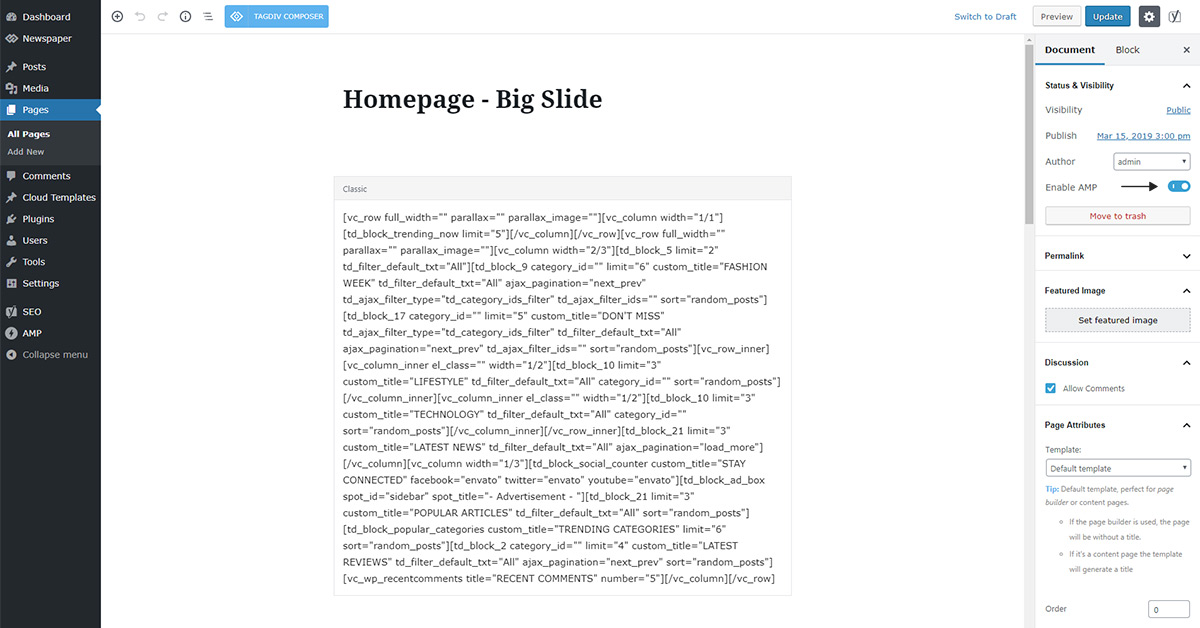
Indeed you are running amp only on posts as you can see here: https://search.google.com/test/amp?id=0TCGFcnSp5UhRA-VPBZqWA
You can also enable or disable AMP for specific posts, pages, categories, etc from the WordPress editor so you have better control over specific localized activation
Thank you !
Vlad S Hello !
Please make sure that you are running the latest Newspaper Theme Version: 10.3.6.1 This can happen by not having the latest update in WordPress 5.5
Let us know the result !
Thank you !
Vlad S Hello !
Please make sure to connect your instagram in Theme panel – Social Sharing as you can see in our guide here: https://forum.tagdiv.com/instagram-widget/
Thank you !
Vlad S Hello !
That is the Mobile theme, not AMP, AMP is just an Extension and you can reach to AMP only by entering your page from google results.
Thank you !
Vlad S Hello !
You will have to activate the API key first then you should be able to insert any video you want. Follow our guide here for more information: https://forum.tagdiv.com/youtube-api-key/
Thank you !
Vlad S Hello
1. Please note that this is considered as being custom work and it is not covered by the Newspaper Theme support. You can contact our team here and they will be able to help you over a fee: https://tagdiv.com/web-development-services/
2. Please let us know what icons don’t work and provide a link to your website in order to inspect.
Thank you !
Vlad S Hello !
Please make sure you are running the latest version of Newspaper Theme: 10.3.6.1
Please make sure that you do not have a plugin conflict, please deactivate ALL plugins except tagDiv ones, also if you are using child theme or cache plugin, deactivate them, clear all cache and try again.
Thank you !
Vlad S Hello !
For that you will have to edit themes code as you can see here: https://prnt.sc/u2nx66
Thank you !
Vlad S Hello !
Please make sure that your header zone does not have the overlay option as you can see here: https://prnt.sc/u2n7ls
Thank you !
Vlad S Hello !
Please contact us via email at contact@tagdiv.com and provide the following:
– admin url and credentials
– cPanel url and credentials
– A link to this topic in order to identify you
Our team will take a look !
Thank you !
Vlad S Hello !
Please make sure that all of your theme requirements are met as you can see here: https://tagdiv.com/newspaper-theme-requirements/ And also please deactivate the Newspaper Theme and plugins and make sure that you can upload your images on a default WordPress theme.
Thank you !
Vlad S Hello !
Are you talking about this ajax tags / categories that can be inserted in here: https://www.screencast.com/t/nmDR9t4U90G If not, please provide a screenshot of what you want to achieve.
Thank you !
Vlad S Hello !
In post pages you will need to add a Cloud library post template so you can edit it using tagDiv Composer. Follow our guide here for more: https://forum.tagdiv.com/design-post-pages-using-cloud-library-templates/
Thank you !
