- NewspapertagDiv AMP Plugin Tutorial
- ApiPractical example – How to add a new Block and Module
- NewspaperTrack Subscription Sources with Locker URL in Opt-In Builder
- NewspaperWP Rocket and Newspaper Theme: Optimization Guide
- NewspaperCredit System
- NewspaperIntroduction to CPT and ACF with Newspaper Theme
- NewspaperHow to edit modules for Flex Block X
- NewspaperHow to use the Posts List shortcode
- NewspaperUser review system
- NewspaperCustom Fields Support
- NewspaperHow to generate Facebook App ID
- NewspaperHow to insert a block inside the content of a post
- NewspaperModal Popup
- NewspaperPayPal Setup
- NewspaperLink Tracker
- NewspaperLockers
- NewspaperGeneral Options that May Interfere with the Newspaper Theme
- NewspaperAdd Cryptocurrency Price Ticker Widget
- NewspaperPosts Loop Element
- NewspaperThe Newspaper Mobile Theme: Introduction
 k24
k24 After updating to the latest version of Ad Rotate, my ads stopped wrapping text around the ad. It previously worked. I’ve been in contact with the Ad Rotate developer and he confirms that this code should allow the text to wrap around the ad: <div style="float: left;"></div> as it did before. If you are familiar with Ad Rotate it has a section in Group management for Wrapper code before and Wrapper after. I’m just wondering if there may be anything with the theme that might prevent this from working properly.
Thanks,
Kris
Edit: Here is an example of the ad not text wrapping. http://www.vbjusa.com/news/top-stories/ipz-helping-to-grow-tech-scene-in-downtown-vancouver/
-
This reply was modified 11 years by
k24.
 paitchadze
 Making promoted post will be hard, but is there any other option. for example is it possible to use visual composer in this case? It can be image over text or smth like that.
 Alin [tagDiv]
 Hi,
I cannot recreate this as google show a different ads by country that your site is accessed: http://screencast.com/t/Foq4ah7ljM4a
Also this happens because of the z-index of the ad that is smaller(you cannot control it) then some theme ‘s elements like the menu for example. You can change it but this can cause more issues.
Thanks!
Alin [tagDiv] Hi,
You can use Widgetised Sidebar block and try to target with .wpb_widgetised_column like this: http://screencast.com/t/9Rw9pCPqXLjz – http://screencast.com/t/Iqa3Sn3SmWE
I’m not sure what you are trying to change, the screenshots from above are only an example how to target block in the sidebar. Also for post if you want to change something in the sidebar you can use .td-post-sidebar class.
Hope this helps!
Alin [tagDiv] Hi,
Please provide a link so I can take a look and specify which block are you using. The above code is an example how to target the block as you did not say block that you are using. Also like I said above you can set a color style for your blocks and make your changes in Theme Panel.
Thanks!
 dracodraconis
 Hi Chris,
I spotted and added the add type JS and fonts as per your recommendation. Thanks for that.
Repeat speed tests have improved results and decreased load times.
However, still displaying JS & font errors.

Any ideas on how I can improve this further?
Strangely, I am not employing a CDN (yet), but YSlow scored me full marks for that….
 Steve
SteveHi guys,
I just thought I’d put in my request for some more design work in the shopping cart.
To me, the Cart & Checkout pages are the most important on the site as it’s where the money comes in so anything we can do to increase conversions is critical.
My feeling is that the current cart design (see below) could be improved to provide more clarity and confidence to the customer to get them to the finish line – nothing drastic, just small tweaks.
Current layout
https://www.dropbox.com/s/5tvkfyac7eer9lj/current-cart-layout.jpg?dl=0
I’ve photoshopped some simple changes I’d like that (see below) and would love your feedback.
Ideal layout
https://www.dropbox.com/s/rgj84kepq7q3nx3/Ideal-cart-layout.jpg?dl=0
Specifically:
Bigger thumbnails for the products
Bigger buttons with bold text
Ability to change the colour of the Proceed to Checkout and Place Order Buttons to make them jump off the page.
Best case scenario would be if you could create a new page in the Theme Options Panel with a whole bunch of adjustments that can be made to the cart & checkout to fine tune it.
This theme is excellent in so many ways, if we could improve the cart and checkout it would be perfect.
Thanks
Steve
 simchris
 DOCS:
how to use ad system
https://forum.tagdiv.com/ads/
note the examples of inserting your own code, where the example uses the default demo tagdiv banners. 🙂
simchris DOCS:
how to use ad system
https://forum.tagdiv.com/ads/
example of putting your own ad code in the header box
<div class="td-visible-desktop">

</div>
<div class="td-visible-tablet-l">

</div>
<div class="td-visible-tablet-tp">
</div>
<div class="td-visible-phone">

</div>
simchris DOCS:
how to use ad system
https://forum.tagdiv.com/ads/
example of putting your own ad code in the header box
<div class="td-visible-desktop">


</div>

<div class="td-visible-tablet-l">


</div>

<div class="td-visible-tablet-tp">


</div>

<div class="td-visible-phone">


</div>
simchris Well… you realize that the purpose of that lineup in the robots.txt file and hence the words “disallow” are intended to tell Google and other bots what *not* to spider or look at (e.g., friendly blocking).
Anything you don’t want blocked shouldn’t be there.
Anything you do want blocked should be.
Some people have just taken to removing all that stuff for WordPress.
For instance my code in the examples from my optimization sticky effective disable trackbacks.
If you don’t have an affiliate (“aff” ?) folder — no need to block it.
If you don’t have a cgi-bin folder … why block it?
With “search” — I am not sure yes/no on whether that should be blocked since technically you do want Google to “discover” your search to add the new site search hinting.
For instance the Yoast site got rid of all of those items entirely.
So, upshot — unless you KNOW WHY you’re blocking something, why block it?
Some hosting companies have an old default robots.txt template that gets built “for you” which is how you might have ended up with that — but in most cases, really not needed now.
Those are only “guidelines” anyway — they don’t really block anything except those ‘bots that adhere to your “request” not to look in those folders. They are not actually “real” blocks against anybody.
-
This reply was modified 11 years by
simchris.
 JBH
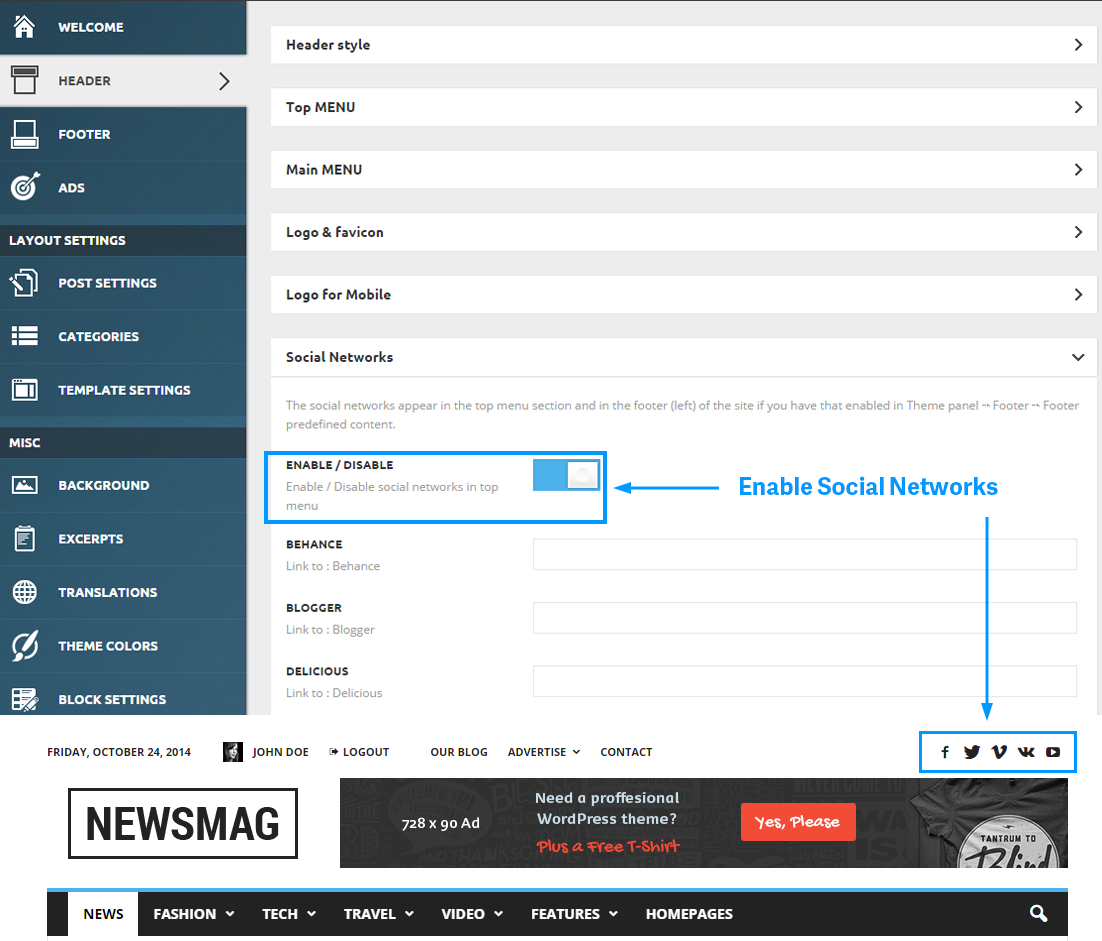
JBHWhen i look at this example: https://forum.tagdiv.com/wp-content/uploads/2014/10/social-network.png
There are ‘social settings’ available…
When i look at my admin setting, they are gone
http://gyazo.com/d79714cf74042d14119da9283136a7c8
Where to find those settings?
I’m using: Version: 4.6.2
Thanks
paitchadzeI want to offer on my website post promotion for companies. For example they can place their advertising post on homepage for 1 week and I’ll get paid for that.
I’ve created similar screen with photoshop. I don’t want to make exactly like this, but I want to fix post there for 1 week or several.
Homepage with promoted post: http://www.picz.ge/img/s4/1503/29/a/a8e46d0da6fe.jpg
 TBreezy
Can i add my own ads inside the Adsense Boxes?
In the header for example , i dont use adsense. I want to place my own ads in the spots. Am i able to do this?
 Vinay Prajapati
I was browsing Google Webmaster Tools. I found some links under Blocked Resources. I do not know how to deal with them? Please help me.
Here is the list of files…
Blocked resource	Pages affected

http://www.techprevue.com/wp-content/cache/wpfc-minified/1d7a81fd5a4182daa2f9b45509663829/1425913222index.css	3

http://www.techprevue.com/wp-content/cache/wpfc-minified/2e2522fce78091f76d7a3350fbd868dd/1426415452index.css	4

http://www.techprevue.com/wp-content/cache/wpfc-minified/478aabfa4f274cfb29e25cec06ea2bd9/1426697362index.css	2

http://www.techprevue.com/wp-content/cache/wpfc-minified/67bc248e14c3b1ff68a671c62730484a/1421398930index.js	8

http://www.techprevue.com/wp-content/cache/wpfc-minified/67bc248e14c3b1ff68a671c62730484a/1426415452index.js	22

http://www.techprevue.com/wp-content/cache/wpfc-minified/6e59ab1d36bec6b38aee08510ab4166d/1426491454index.css	6

http://www.techprevue.com/wp-content/cache/wpfc-minified/80aed8e336937973b2ae4f3c3a92b7db/1426497454index.css	1

http://www.techprevue.com/wp-content/cache/wpfc-minified/80c2a05da60bb425fc911c0b17690ab2/1426415452index.css	16

http://www.techprevue.com/wp-content/cache/wpfc-minified/ce48a5455685866c64af1177628b9de2/1426698175index.css	3

http://www.techprevue.com/wp-content/cache/wpfc-minified/d41d8cd98f00b204e9800998ecf8427e/1421398930index.js	8

http://www.techprevue.com/wp-content/cache/wpfc-minified/d41d8cd98f00b204e9800998ecf8427e/1426415452index.js	22

http://www.techprevue.com/wp-content/cache/wpfc-minified/f182248a7577007f997757bc3285ea1e/1421398930index.css	8

http://www.techprevue.com/wp-content/plugins/contact-form-7/includes/css/styles.css?ver=4.5d	1

http://www.techprevue.com/wp-content/plugins/contact-form-7/includes/css/styles.css?ver=4.6.1	21

http://www.techprevue.com/wp-content/plugins/contact-form-7/includes/css/styles.css?ver=4.6.2	393

http://www.techprevue.com/wp-content/plugins/contact-form-7/includes/js/jquery.form.min.js?ver=3.51.0-2014.06.20	466

http://www.techprevue.com/wp-content/plugins/contact-form-7/includes/js/scripts.js?ver=4.0.3	2

http://www.techprevue.com/wp-content/plugins/contact-form-7/includes/js/scripts.js?ver=4.1	125

http://www.techprevue.com/wp-content/plugins/contact-form-7/includes/js/scripts.js?ver=4.1.1	126

http://www.techprevue.com/wp-content/plugins/jetpack/css/jetpack.css?ver=3.3	6

http://www.techprevue.com/wp-content/plugins/jetpack/css/jetpack.css?ver=3.3.2	110

http://www.techprevue.com/wp-content/plugins/jetpack/css/jetpack.css?ver=3.4	8

http://www.techprevue.com/wp-content/plugins/jetpack/modules/holiday-snow/snowstorm.js?ver=1.43.20111201	2

http://www.techprevue.com/wp-content/plugins/js_composer/assets/js/js_composer_front.js?ver=4.4.2	2

http://www.techprevue.com/wp-content/plugins/revslider/rs-plugin/css/settings.css?rev=4.6.0&ver=4.0.1	1

http://www.techprevue.com/wp-content/plugins/revslider/rs-plugin/css/settings.css?ver=4.6.5	271

http://www.techprevue.com/wp-content/plugins/revslider/rs-plugin/js/jquery.themepunch.revolution.min.js?rev=4.6.0&ver=4.0.1	1

http://www.techprevue.com/wp-content/plugins/revslider/rs-plugin/js/jquery.themepunch.revolution.min.js?ver=4.6.5	460

http://www.techprevue.com/wp-content/plugins/revslider/rs-plugin/js/jquery.themepunch.tools.min.js?rev=4.6.0&ver=4.0.1	1

http://www.techprevue.com/wp-content/plugins/revslider/rs-plugin/js/jquery.themepunch.tools.min.js?ver=4.6.5	258

http://www.techprevue.com/wp-content/plugins/wp-math-captcha/css/frontend.css?ver=4.1.1	11

http://www.techprevue.com/wp-content/themes/Newspaper/images/icons/ico-video-large.png	6

http://www.techprevue.com/wp-content/themes/Newspaper/images/icons/similar-left.png	409

http://www.techprevue.com/wp-content/themes/Newspaper/images/icons/similar-right.png	407

http://www.techprevue.com/wp-content/themes/Newspaper/includes/wp_booster/external/bootstrap/td-bootstrap.css?ver=4.5d	1

http://www.techprevue.com/wp-content/themes/Newspaper/includes/wp_booster/external/bootstrap/td-bootstrap.css?ver=4.6.1	21

http://www.techprevue.com/wp-content/themes/Newspaper/includes/wp_booster/external/bootstrap/td-bootstrap.css?ver=4.6.2	360

http://www.techprevue.com/wp-content/themes/Newspaper/js/min/site.min.js?ver=4.5d	1

http://www.techprevue.com/wp-content/themes/Newspaper/js/min/site.min.js?ver=4.6.1	16

http://www.techprevue.com/wp-content/themes/Newspaper/js/min/site.min.js?ver=4.6.2	377

http://www.techprevue.com/wp-content/themes/Newspaper/js/td_external.js?ver=4.5d	1

http://www.techprevue.com/wp-content/themes/Newspaper/js/td_external.js?ver=4.6.1	16

http://www.techprevue.com/wp-content/themes/Newspaper/js/td_external.js?ver=4.6.2	377

http://www.techprevue.com/wp-content/themes/Newspaper/style.css?ver=4.5d	1

http://www.techprevue.com/wp-content/themes/Newspaper/style.css?ver=4.6.1	21

http://www.techprevue.com/wp-content/themes/Newspaper/style.css?ver=4.6.2	360

http://www.techprevue.com/wp-includes/images/smilies/icon_biggrin.gif	5

http://www.techprevue.com/wp-includes/images/smilies/icon_sad.gif	1

http://www.techprevue.com/wp-includes/images/smilies/icon_smile.gif	39

http://www.techprevue.com/wp-includes/images/smilies/icon_wink.gif	1

http://www.techprevue.com/wp-includes/js/comment-reply.min.js?ver=4.1.1	443

http://www.techprevue.com/wp-includes/js/jquery/jquery.js?ver=1.11.1	264

http://www.techprevue.com/wp-includes/js/jquery/jquery-migrate.min.js?ver=1.2.1	264
 aleister
 Well we tried all the suggestions, but in the end VC and Newsmag combination is broken in our system no matter which combination we try. I have already invested too much time to trying these theme-plugin version combinations and disabling other plugins, trying with different themes.
Also in these changes our ad serving got problematic with theme changes deleting ad zone codes and I had to replace them all. Calculate lost impressions and delivery time of campaigns.
In the end CPU spike was too much pain so we have rolled back to Newsmag 1.6, uninstalled Visual Composer and changed homepage into blogroll.
Theme is great, VC is great but they don’t scale well with lots of traffic. But I still like it, it’s foundations are strong, support staff is working. I hope these problems will be solved in a month, next update etc. and we will be able to use a different homepage design and also keep it fast and bug free.
Thank you again, I’ll be waiting for an update.
-
This reply was modified 11 years by
aleister.
 andynrg
 and what about the theme Font issue? I can’t change nothing to Module & Blocks Article Title section :/
Endless loading and none come up to edit… just the loading animation
andynrg Thank you very much guys, i solved that out following your advise!
But i have now same problems with the new update.
1. Theme fonts, clicking on Modules & Blocks Article Title,results in endless loading and no fonts options are shown after on… Nothing to access and to eventually edit.
2. How to remove the lazy load of pictures? I prefer old way
Andy
simchris Right … so I can’t write your code for you…
if you look at *MY* example code, you can see I’ve added both “type” handlers to definte .js and font files and then added expirations for the font formats.
Try copying the code for fonts and js I have which you’re missing.
Chris
simchris btw…
if you’re *not* using my example cache expiration file for htaccess … note most of the other versions forget to include expirations for font files (!).
So, be sure to look at that as one possible element for the font expiration headers (e.g., .woff).
As to the .js issue … that is odd … might be a setting on the main server for default expiration times, or some interaction with varnish cache time.
 felizubi
On retina screen the logo looks too big, ugly, using header style 7.
Please, how to correct it? Example.
Regards,
Fz
 neakriti
Hi,
I cannot write directly to visual composer support as I have the plugin via your theme (Newspaper).
I would like to ask a question. When under HHVM (instead of plain PHP), in the “Grid Elements” when I try to “Add New” I get a blank screen. Under normal php it works.
We use Nginx+HHVM+MariaDB at ubuntu 14.04 for performance reasons at our setup instead of classic AMP.
Any suggestion please?
 FussballGeld
I have a problem with the Mail icon in the header and in the author box.
It does not connect to the Mailadress.
Instead it connects to “page/mailadress”
Example: http://fussball-geld.de/einnahmetabelle-1-bundesliga-20142015-26-spieltag/
It shows: http://fussball-geld.de/einnahmetabelle-1-bundesliga-20142015-26-spieltag/info@fussball-geld.de
 lospicos
My website shows 24 errors and 1 warning on validator.w3.org
You can check
How we will solve this errors?
it seems 7 different errors. To be sure i have checked the newspaper demo website
it showed 39 errors and 1 warning.
Regards
 am
am Thanks redtaileagle, I’ll take my time to read it carefully. I was in a hurry so workarounded it, installed everything online then exported sql & files in my local virtual machine and… everything worked (and working) flawless.
Thanks again,
AM