- NewsmagUsing the theme translations together with WPML
- NewsmagHow to update a plugin
- NewsmagCustom Post Type Support
- NewsmagAbove footer ads
- NewsmagWeather Widget
- NewsmagHow to update the theme
- NewsmagIntroduction
- NewsmagLogo & Favicon
- NewsmagFooter templates
- NewsmagUsing other ads
- NewsmagCustom ad spots
- NewsmagArticle ads
- NewsmagSidebar ads
- NewsmagHeader ads
- NewsmagLoading image effects
- NewsmagCategory top post styles
- NewsmagSmart Lists
- NewsmagGeneral settings
- NewsmagTheme thumbs
- NewsmagtagDiv slider gallery
 Anamaria
 Hi,
Yes, this is possible because we support amp using mobile theme – > https://forum.tagdiv.com/tagdiv-amp-plugin-tutorial/
Thank you!
 dc1
dc1Hi,
I’d like to remove the “More by this author” tab next to the “Related articles” one on posts. From the documentation it isn’t clear to me how to do so. You can find an example here (near the bottom of the page): https://www.qxmagazine.com/2022/08/brawn-mediocre-white-male-and-bi-baileigh-are-boys-boys-boys/.
Thanks in advance.
Anamaria Hello,
Seems you have the Mobile theme plugin activate, when you install and activate the Mobile Theme plugin, your pages will be overwritten by the plugin (the mobile theme comes with its own templates for page, post, category, etc so your current templates from the desktop theme will get converted to the mobile theme layout, the page content is made without builders in mobile editor => https://www.screencast.com/t/xbgZG8kH also, the options that are provided to edit the mobile theme version are limited (this keeps the things simple)).
Better deactivate the plugin and see the results
Also, if you create a mobile page, please make sure you assign it like this https://www.screencast.com/t/lektAhyjd
This is a video about Responsive Newspaper Theme, AMP & Mobile Theme, Mobile Pages & Templates -> https://www.youtube.com/watch?v=SpGkOnJeNZY
Thank you!
 avi
avi Guys
I have recently brought
– Newspaper & defult WordPress Theme
my mobile nd pc version is not showing the way I’m expecting
my website is https://www.profasttv.com/
The above URL is completely different from the desktop. It’s different from Mobile.
also, the category page is not showing at all
aviGuys
I have recently brought
– Newspaper & defult WordPress Theme
my mobile nd pc version is not showing the way I’m expecting
my website is https://www.profasttv.com/
The above URL is completely different from the desktop. It’s different from Mobile.
also, the category page is not showing at all
 webmastermetrozita
 Hey Peter,
We are also using this plugin but currently unable to inject them inside the content somehow with the Newspaper theme.
Do you use the plugins option of placements (for example inject in 2nd paragraph) or do you copy the shortcode of the ad/ad group and paste this shortcode somewhere in the newspaper template files (or in the tagdiv composer) or in the custom ad spots forseen for ads.
 ted
ted Thanks for Replying.
I am trying to figure out about any other setting which is activating the plugin. Meanwhile, I have “Official AMP for WP” plugin activated. Could this be internally activating “tagDiv Mobile Theme” every time there is an update?
 thedonatshop
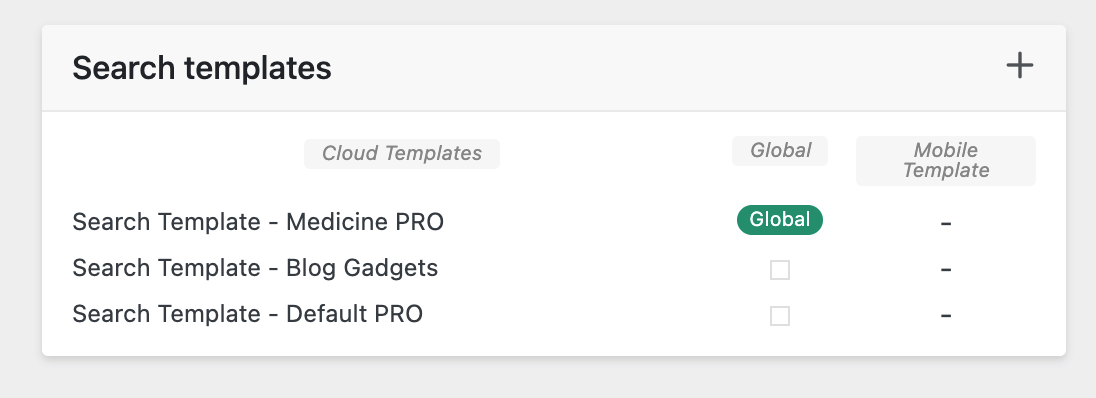
 I have added yet another. The results are still sample posts.
https://i.gyazo.com/9f5f1ab7b22e40fc22de03263ff1cab0.png
when I click “view” directly from the search template it brings me to the medicine pro search page. it shows with “sample posts”
but then when I do a search on that page it reloads to the “blog gadgets” search template again. but maybe it’s cached. I don’t know.
thedonatshopHello,
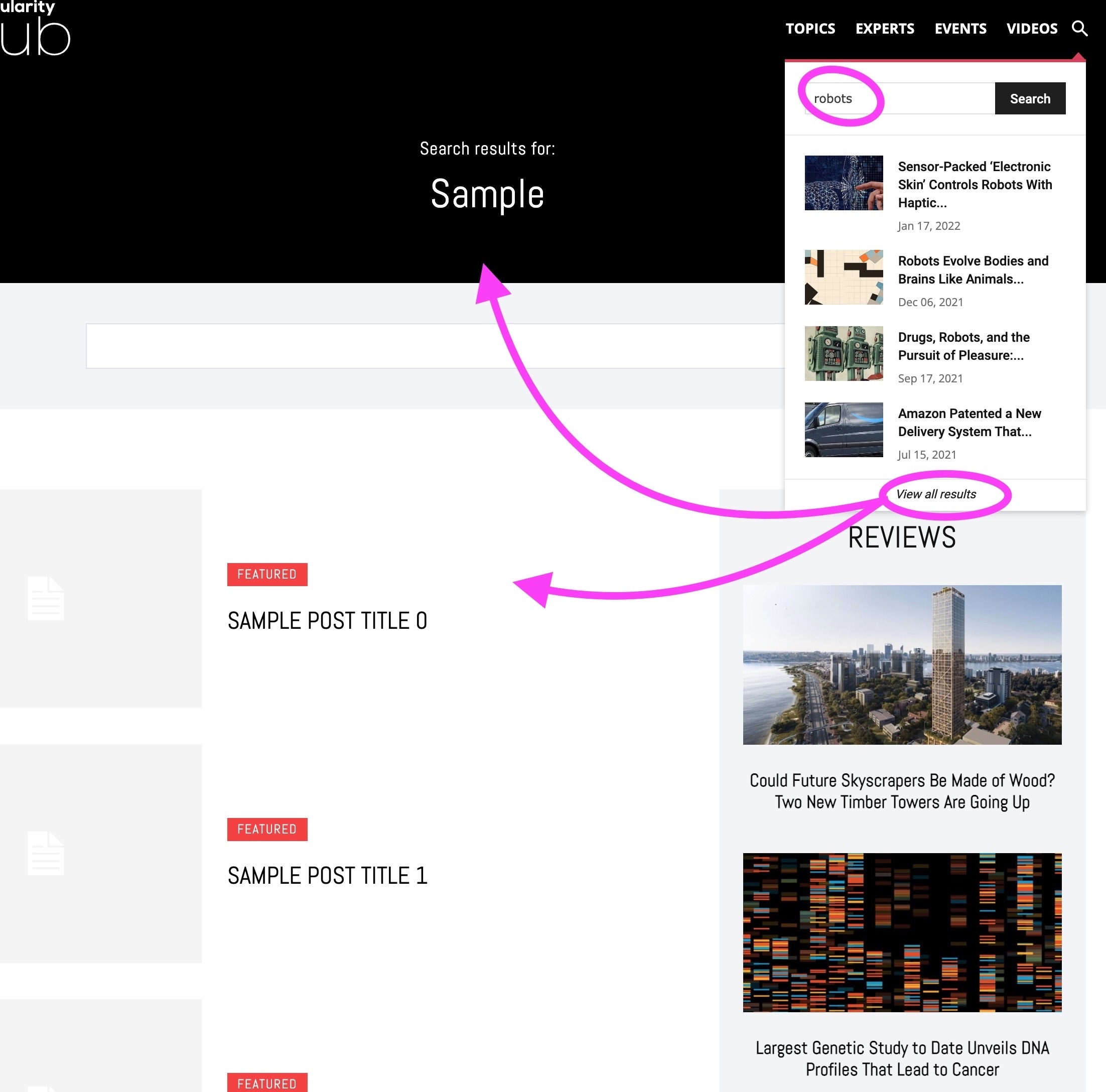
The search in the navigation works correctly. But, when I hit the magnifying glass to get to see all the results on a search results page, I get to the results page but it no longer shows the search time I was searching. Instead it shows “sample” as the search term. and then it only shows sample posts.
same happens if I got directly to the search page.
https://i.gyazo.com/aba34d0605d969829b4ab559dafd8a47.jpg
I very much wish there was documentation on setting up search correctly. I found nothing here https://forum.tagdiv.com/newspaper-theme-documentation/
thank you for your help
 creativeopole
 After all, everything is described above. Just post you in your demo version in the following article html codes:
https://forum.tagdiv.com/using-other-ads-non-adsense-ads/
1. Just add banners for different sizes from “Sample image ad with different images for each device:”
2. Then install and run the template plugin for mobile devices.
In the screenshot below you can see that ads for all devices and sizes are displayed.
Anamaria Hello,
I send a video using wetransfer, you need to download it, but I made a new video please check it -> https://www.screencast.com/t/cewzRgAmPaEz
I did a test and I was able to register -> https://i.imgur.com/wmdxulg.png
Thank you!
 Hispanic L.A.
The front page at HispanicLA.com is broken.
When trying to change (fix) it through composer I get the following errormessage:
Error at zones: 6(models) : 5(dom). The model does not match the content Current state has involved an issue. You could try an UNDO operation (CTRL+Z / CTRL+SHIFT+Z)
Also, I deactivated all the plugins with the exception of Akismet and AMP.
Looking for reasons, I just upgraded the PHP version from 7.4 to 8.0. I rolled it back to 7.4 but the problem remains.
Please help,
Gabriel
 willkar
 Hello Calin, sorry being annoying but just to point out that the “raw html” suggested, text or text with title does not display the content from the shortcode.
1 – Custom field created at the taxonomy: https://imgur.com/C9JbxmL & https://imgur.com/tmEspdQ
2- I’ve tried all the option suggested (column text, text title and raw html) and none of them displayed the imaged I uploaded at the custom field – https://imgur.com/n3VzdAA. The shortcode is displayed on the page. I even tested it out with a shortcode created with the plugin “Code Snippets”.
Please check this page https://gamingnovato.com/developer/nerdook-productions/ (my website) that display the result that I mention above (note, all the text is black so It might be hard to see it at first)
 Micha
Micha Unfortunately, not quite so simple, there is a tutorial (https://forum.tagdiv.com/how-to-make-the-site-faster/), but really much, you get out unfortunately not. You can do a lot with Cloudflare, but only with the Pro version and of course if you optimize WpRocket a little bit (https://www.andraware.com/wp-rocket-for-newspaper-theme/)
If it’s your own server, you can get a lot out of it with Nginx and Redis in conjunction with W3C Cache. And of course in which one throws for example some from the head (rds etc.)
Anamaria Hello,
I’m sorry but maybe you didn’t understand how our theme works, but we’ll try to help you.
1. Usually, the ads are set in the element AD BOX, and you can remove it, edit with tagDiv Composer, select the Ad box element and with right-click you can delete it => https://www.screencast.com/t/2GfCVx9BCAw7 or with drag & drop place it into the deleting red zone from the bottom right of the page.
You can add a sidebar like in this guide https://forum.tagdiv.com/sidebars-tutorial/
We have some settings for the rows and different stretch sizes: https://www.screencast.com/t/bsbB5P97A
2. I checked and seems you have the mobile theme plugin activated, but the cache plugin doesn’t recognise the mobile version and desktop version.
This problem is caused by the cache plugin. If the cache plugin does not have mobile support then the mobile theme version can be delivered instead.
The solution would be to use the recommended WP Super Cache plugin instead and activate these settings (especially the mobile device support): https://forum.tagdiv.com/cache-plugin-install-and-configure/
Also, please make sure you have enabled the mobile cache if the plugin has this option
3. Please check this topic where I explained each mobile version -> https://forum.tagdiv.com/topic/mobile-version-not-working-properly-2/ and choose what mobile version you want.
The AMP works better only with the Mobile Theme plugin. From my point of view, if you don’t use the Mobile Theme plugin, then there is no reason or benefit to AMP. Please read all about AMP here: https://forum.tagdiv.com/tagdiv-amp-plugin-tutorial/
4. Please follow the steps from point 1 to delete the ads.
Thank you!
 Cyber994
Hello,
I Recently Purchased a Newspaper theme. But it is not activating.
After entering the purchase code it shows the theme is activated. But in the dashboard, it is showing activate the theme.
Because of these, I am not able to add prebuild sites to my site.
Registration key:
bcc55ec9 – **** – **** – **** – 0380f5af14bb (Hidden because of security)
Licensor’s Author Username: tagDiv
Licensee: Cyber Planet
Item Title: Newspaper – News & WooCommerce WordPress Theme
Item URL: https://themeforest.net/item/newspaper/5489609
Item ID: 5489609
Purchase Date: 2022-08-10 06:32:14 UTC
 jonesjw
 My host provider says this is a memory issue
2022/08/09 22:11:07 [error] 101843#101843: *4214654 FastCGI sent in stderr: “PHP message: PHP Fatal error: Allowed memory size of 268435456 bytes exhausted (tried to allocate 8429568 bytes) in /www/outandaboutpvcom_794/public/wp-includes/functions.php on line 626” while reading upstream, client: 108.18.207.57, server: outandaboutpv.com, request: “POST /wp-admin/admin-ajax.php?td_theme_name=Newspaper&v=11.5.1 HTTP/1.1”, upstream: “fastcgi://unix:/var/run/php8.0-fpm-outandaboutpvcom.sock:”, host: “outandaboutpv.com:35502”, referrer: “https://outandaboutpv.com/wp-admin/admin.php?page=td_theme_panel”
I tried bumping up the memory to a higher threshold and it did work, but I couldn’t leave it at that threshold ?
 maxedoutecom
 Tried both, didn’t help.
What doesn’t make sense is the second color is for the Menu Active & Hover color.
Yet, it ONLY applies for Hover, not Active. The active color is another color, which I can’t find anywhere in the settings.
 Mudassir Moin
Hello,
I published a new post on my blog. However, I came across several issues.
1. I have ads turned off in my theme panel however, I had to remove them manually from the post page using the Tagdiv Composer. When I did:
https://snipboard.io/IZsX0E.jpg
The post stayed like this. The content is not wide enough. I want to push the most popular suggestions further to the left and spread out make my images and content on a wider area.
Link: https://wirefray.com/kaiju-no-8-anime-announced/
2. The article when suggested on my homepage does not display any image. How do I fix this.
Link: https://wirefray.com/
3. My mobile page breaks down very often and becomes like the following:
https://snipboard.io/oR8tDJ.jpg
How do I permanently fix this? This happens very often but gets fixed automatically for some reason. I keep seeing this inconsistency in your theme.
I am really sorry to say this but I am really disappointed with the user experience so far. I keep encountering problems like this over and over again. I had to reinstall my WordPress quite I few times because I failed to implement AMP with your theme. I faced this same problem with my mobile page over and over again then too.
4. I want to permanently remove all of your own promotional ads from my website. How do I do it?
Thank you for your time.
Regards.
 fredredwoods
Hello. Some simple questions.
I made a new Custom Post Type (CPT) called “letters”
Temp
I have this page to show all the posts. I made the page using the Cloud Templates. I used “Duplicate” from an the existing Category template that I am using in my website, and then modified it as needed. See here:
https://arcata1.com/category/gateway-plan/community/letters-comments/
That is fine.
When I click on a post link, it takes me this (link here) to display the post:
Example: https://arcata1.com/letters/lee-dedini-april-25-2022/
Questions:
1: What is this “https://arcata1.com/letters/lee-dedini-april-25-2022/” page? That is, what is it called and where do I go to edit it?
It does not seem to be any of the Single Templates that are shown. (Shown for me are Smart List Templates 1, 3, 6, plus some others.
2: How were the CPT posts linked to this page? (https://arcata1.com/category/gateway-plan/community/letters-comments/)
It seems to have been done automatically — which is great.
But I want to have the CPT posts on another Category page too. I built the page, using the same techniques in creating a Category Template but the CPT posts are not displayed on it.
3: In the tutorials / on-line manual on Custom Post Types, it shows the TagDiv Cloud Template page as having a new “box” for CPT. My screen does not show that.
I am using “CPT UI” as a plug-in, as this is what you recommend on this Forum.
Thank you.
willkar Sorry for opening this again. But since it’s related, I believe it’s better for me to continue using this forum post:
Problem:
I’ve created a taxonomy (https://imgur.com/qY56fFD). But after associating a cloud template to it, I noticed that when I try to edit the template, there are no CPT shortcodes (https://imgur.com/undefined). For example I would like to use the “Single External Shortcode” in order to display the fields I’ve created for the taxonomies (https://imgur.com/undefined).
So my idea here is just to show at the page the custom field I’ve created and then style it.
Another question:
Is it possible for me to show in the taxonomy, other posts related to the specific taxonomy? In my case, I’am using the taxonomy “Developer”. I would like to show all the games (CPT) and news (Defult wordpress category) associated with that taxonomy. If this is possible, how can I achive it? Can you guide me, please?
My goal would be (with real examples from my website:
1 – Game: https://gamingnovato.com/games/rogue-ai-simulator/
2- Developer: https://gamingnovato.com/developer/nerdook-productions/
3 – I want to show on “Developer”, all the news and games associated with it.
I could use the filter option that I found on some of the tagdiv composer blocks, to filter for example by tag, but this manual work is not viable on my case. Is there a more “global” solution for what I’am trying to achieve?
-
This reply was modified 4 years by
willkar.
 integris
 Something doesn’t seem right here. When I try to change and save the “DEFAULT SITE POST TEMPLATE”, it always revert back to the default template.
For example, if I change it to the custom “Single Template” and hit save, at first it looks like the custom template is now the default site post template. But if I reload the page, it shows that it’s back to the default:
https://www.screencast.com/t/LBxlSwuX
Any suggestions?
Thank you,
Joe
 Calin
Calin Hi,
The theme builder can be suppress from amp, this should not affect the theme.
Unfortunately, for ads I checked the documentation and the only section where I saw ads mentioned is this -> https://wordpress.com/support/amp-accelerated-mobile-pages/ -> https://i.imgur.com/jAXOy2p.png
Thank you!
Calin Hi,
You can edit it with tagDiv Composer like this -> https://i.imgur.com/sQy33HZ.jpg select the flex block to remove the dropdown more, check the filter tab and changed the ajax filter -> https://i.imgur.com/tC3N4qF.jpg
For the row, to stretch it, click on the text and select the row -> https://i.imgur.com/6P7zw0U.png then in general tab you can stretch it to 1400px -> https://i.imgur.com/G1tVQRm.png
For the space between the menu and text what you can do is to set on the row text css tab a margin bottom negative for example (-24 or -48) -> https://i.imgur.com/vzD6EaP.png also be sure that the element is display as show -> https://i.imgur.com/K7E04Lh.png and not inline block.
Anamaria Hello,
Once you have added the code, you do not need to add it again.
Also, the code needs to be set between head tags, this can be set in our theme in Theme Panel -> Analytics/Js Codes. Example:-> https://prnt.sc/10jk7fq
Thank you!