
- NewsmagUsing the theme translations together with WPML
- NewsmagHow to update a plugin
- NewsmagCustom Post Type Support
- NewsmagAbove footer ads
- NewsmagWeather Widget
- NewsmagHow to update the theme
- NewsmagIntroduction
- NewsmagLogo & Favicon
- NewsmagFooter templates
- NewsmagUsing other ads
- NewsmagCustom ad spots
- NewsmagArticle ads
- NewsmagSidebar ads
- NewsmagHeader ads
- NewsmagLoading image effects
- NewsmagCategory top post styles
- NewsmagSmart Lists
- NewsmagGeneral settings
- NewsmagTheme thumbs
- NewsmagtagDiv slider gallery
 dlrms
dlrms Yup, the css code is such bloat! Way too excessive – more than 80% of it is unused. The function available in theme to reduce this simply DOESNT WORK.
Only way to trim it efficiently is via wp-roc$*&@t – not marketing a third party plugin – but, only best/efficient way.
 Universidad Comfamiliar
 Hello Anamaria
Thank you for your response, unfortunately what you tell us does not solve our error, we had already seen and reviewed it before opening the support ticket.
Inspecting the error, this is what it shows us:
JQMIGRATE: Migrate is installed, version 3.3.2
blocks.min.js:3 The block “yoast-seo/breadcrumbs” is registered with an invalid category “yoast-internal-linking-blocks”.
Mt @ blocks.min.js:3
deprecated.min.js:2 select( ‘core/edit-post’ ).getPreferences is deprecated since version 6.0. Please use select( ‘core/preferences’ ).get instead.
i @ deprecated.min.js:2
post-edit.js:5 Uncaught TypeError: Cannot read properties of undefined (reading ‘registerPlugin’)
at i.registerPlugin (post-edit.js:5:24876)
at new i (post-edit.js:5:24502)
at post-edit.js:5:25244
at HTMLDocument.<anonymous> (post-edit.js:5:26471)
jquery-migrate.min.js:2 JQMIGRATE: Migrate is installed, version 3.3.2
?td_action=tdc_edit&post_id=9187&tdbTemplateType=page:10320 Uncaught ReferenceError: tdcComposerBlocksApi is not defined
at ?td_action=tdc_edit&post_id=9187&tdbTemplateType=page:10320:43
at ?td_action=tdc_edit&post_id=9187&tdbTemplateType=page:10390:6
floatMenu.min.js:5 (!) Float Menu: “labelSpace: true” incompatible with “labelConnected: true”. “labelSpace” reset to false.
http://www.cesaridarraga.com/universidad/wp-content/uploads/2021/09/back.jpg:1 Failed to load resource: the server responded with a status of 404 ()
js_files_for_wp_admin.min.js:42 Object
js_files_for_wp_admin.min.js:30 Uncaught Errors at columns elements: 1(models) : 2(dom). The model does not match the content Current state has involved an issue. You could try an UNDO operation (CTRL+Z / CTRL+SHIFT+Z)
http://www.cesaridarraga.com/universidad/wp-content/uploads/2021/09/back.jpg:1 Failed to load resource: the server responded with a status of 404 ()
Likewise, you can see a screenshot of the same code: https://uc.edu.co/wp-content/uploads/2022/06/tagDiv-error-1.jpeg
Thank you for your help 🙂
 Bill Fleak
 We are just wanting to know if we can deploy Google Ad Manager code to your theme in the same way as Google Ad Sense? Or do we treat Google Ad Manage as non-AdSense ads? For example, for AdSense, your documentation states “For AdSense ads just paste your full code into the box and customize the ad via the on/off switches and the predefined sizes.”
-
This reply was modified 4 years by
Bill Fleak.
 lehoangkhang
First, adding the Nofollow attribute is probably easy in the general tab of the elements (https://prnt.sc/HKsJj_mXSl78).
What I want to talk about here is how can I add the Nofollow attribute to elements that don’t already have the option for this attribute?
I will give an example of this question with some photos below:
Author box: https://prnt.sc/HhbMqKKKMggk
In the image, you will see the author box containing the Dofollow link marked with a green dotted line and in the general tab to the left of the image, there is no option for adding the Nofollow attribute.
Likewise, I have some components like:
Recent Post (Flex Blog 1): https://prnt.sc/AdyTyDbKGBvc
Popular Category: https://prnt.sc/FaZG7lzk7YyB
So how can I solve this problem? Please support me.
 Bettina
 clemenza
 Hello @Anamaria,
This example not run in my website, please see my video: https://www.screencast.com/t/w4AolRuF
 Greg19
hello i havec buy your theme but i have 2 issues:
1. i have problem with your mega menu as you can see when i unable display all categories not specific child.
2. when i try to update your theme my site destroyed why happened this?
https://www.greekaffair.news/
Thank you very much…
Bettina Hello!
Please let me know an example of how you need to align those 2 elements, so I can understand and help you efficiently.
Thank you!
 Anamaria
 Hello,
I recommend you to use the Single Post Template from tagDiv Cloud Library and there you can edit the template with tagDiv Composer. Please try to edit the Single Post Content and set the font-size for default blockquote => https://i.imgur.com/603Qupg.png and set the color -> https://www.screencast.com/t/7OeUEnYsO
Also, I saw that you sue AMP, but this is not configured like in our guide, please check the documentation
-> https://forum.tagdiv.com/tagdiv-amp-plugin-tutorial/
Also, please check this topic where I explained each mobile version -> https://forum.tagdiv.com/topic/mobile-version-not-working-properly-2/ and choose what mobile version you want.
Thank you!
 slivertorp
Hi there,
I have been using your amazing theme for a while but there is something I am always struggling with.
How can I display the thumbnail of a specific article with a clickable text underneath?
This is a perfect example of what I want to achieve: https://tinyurl.com/4e6jxxze
I don’t want to filter by last post or so, I want to choose the articles I want to display one by one. I will have 1 by column.
And I also want the text underneath to change color when I mouse over the image or the text itself.
Thank you very much in advance for your insights.
Cheers,
Adrien
 sylentears
Hi,
i am not able to find the blockquote settings to change text size on blockquote example page
kindly help to manage it. Also, please advice to manage tweet font size. that also display large font.
sylentearsHi,
i am not able to find the blockquote settings to change text size on
kindly help to manage it. Also, please advice to manage tweet font size. that also display large font.
 davixstudio2022
 Hi there,
I have a problem with my mobile theme template, it’s not responding with the AMP and it gives me a blank page. How can I set up it so my modified template will show up on the mobile devices?
Here is the Mobile Theme Page https://prnt.sc/lkJ5AOHkUbps
Here is the page, everything is done correctly – https://prnt.sc/7GBNHX_N2HZe – https://prnt.sc/wcRj7AuivLuX
And now this is the page that is loaded on mobile devices https://prnt.sc/fnLqIZcmbJRe instead of this https://prnt.sc/raRUBmuVVoni (my template)
Can you help me with how I can set up my mobile theme to load on mobile devices with the AMP plugin, just don’t send me those forum links with docs, I go thru them and nothing helps me.
I can even give you my login info on email so you can log in and fix this for me, cuz it’s’ easy for you.
Thank you.
 sil2
sil2Newspaper version: 11.5.1
I have templates set for my main site language. How I can copy them to other languages I have for my website?
I don’t see templates in Pages section, only ‘footer mobile’ (don’t know why).
If I change the language, Cloud templates pave shows me no templates and I have the only one option – download from cloud, but I dont need to download, I want to translate mine.

Bettina Hello!
Please check all the changes here: https://tagdiv.com/newspaper/?utm_source=forum&utm_medium=menu&utm_campaign=forum_loggedin&utm_content=91053
I would gladly recommend you to make a backup and update plugins and the theme via file transfer to the latest update: https://forum.tagdiv.com/how-to-update-the-theme-2/
First of all, please make sure you have a backup done and then you can update the theme and the TagDiv plugins also.
Please take a look for this advice before updating: https://forum.tagdiv.com/topic/action-required-please-read-how-to-update-to-the-newspaper-theme-v-10/
If you have some custom modifications in the theme files, then better save the code and replace it after every update.
Thank you!
 newlind
 Hi,
I can confirm that i am not using WPBakery on the site.
I have deactivated all plugins except tagDiv plugins (you can see in the screenshots below).
I have deactivated WP Super Cache & cleared all cache.
I then uninstalled & reinstalled the Gossip Pro pre-built website.
It is still the same situation.
This time, it also displays the following text below the footer:
y-campaign/” rel=” bookmark” class=”td-image-wrap ” title=”These Fabulous Photos Will Have Astonishing Impact for Any Campaign” >
I note that this is not an issue when viewing the site on a mobile device but shows on a desktop/laptop.
2 x screenshots: https://imgur.com/a/wFaRW4r
Additional screenshot: https://imgur.com/a/h9EjxqX
 sanjeev
Hello,
I am unable to use Sticky bar properly on my website http://www.agniveer.com. For example, if you can see here where I have used sticky bar – https://agniveer.com/vedic-deeksha-copy/ , Screenshot – https://ibb.co/tZskN8Y), it works well in Desktop version but once I check in Mobile version, when I scroll up the page after scrolling down, the header area where the logo of Agniveer is placed, disappears. Example – https://ibb.co/VVYLFcz (see the red arrow. It is pointing towards disappeared logo once I scroll up after scrolling down the page).
Please help me to resolve the issue as I am unable to use the sticky feature for this reason.
Waiting eagerly for your active support!
Thanks,
Team Sanjeev
Bettina Hello!
Please make a test and switch the theme to another one, and check the amp pages with your stories.
AMP is faster and works better only with the Mobile Theme plugin. From my point of view, if you don’t use the Mobile Theme plugin, then there is no reason or benefit to AMP. Please read all about AMP here: https://forum.tagdiv.com/tagdiv-amp-plugin-tutorial/
It comes with its own templates/design for page, post, category, etc so your current templates from the desktop theme will get converted to the mobile theme layout. Documentation here:
– https://forum.tagdiv.com/the-mobile-theme/
– https://forum.tagdiv.com/mobile-theme-introduction/
Thank you!
Anamaria Hello,
The pagination number has only the elements posts loop and posts loop 2 -> https://i.imgur.com/RXAh0iM.png
The Posts Loops settings are divided into 5 tabs: General, Layout, Style, ADS and CSS. The Posts loop is a special block and doesn’t have filtering options.
Also, one of the options for pagination of the Posts Loop has the option for normal numbered and the flex blocks do not have this option.
The Posts Loop is automatically filtering the posts depending on the cloud template you set (for example on the category page there will be posted posts from that category).
The Flex Block, have the option for pagination to load more button and infinite load -> https://i.imgur.com/NTHv3g6.png
Also, there is no scroll bar, if you have a mouse with the scroll you can use it to scroll in tagDiv Composer.
Thank you!
newlindI purchased the Newspaper theme a couple of days ago. When I install the ‘Gossip Pro’ pre-built website with all content. Sadly, there appears to be an issue with it. It all looks good until I scroll down to the footer and underneath the footer, it appears to be a load of duplicate content but all messed up & another footer right at the bottom of the page.
I uninstalled Gossip Pro and installed the Default pre-built website. That also encountered the same issue.
Please could you help.
Many thanks.
Screenshots: https://imgur.com/a/nIHfCLK
 grezako
Bonjour.
We are using “Newspaper The Rimont Pro” Theme (https://demo.tagdiv.com/newspaper_the_rimont_pro/).
In fact we try to do like exactly how the news site of “New York Times” (https://www.nytimes.com/) on Desktop and on Responsive Design (Mobile Device). So for this fact, we had already contacted you previously (via this link: ) on the Newspaper Forum:
TO ASK YOU THE FOLLOWING QUESTION: How to create a new Menu Bar located just above the Logo exactly like on the screenshot of the New York Times home page that we have “circled in RED” just above the Logo: https://imgur.com/a/yv7fFHK ???
AND YOU ANSWERED US BY SAYING: A workaround there could be this one: https://www.screencast.com/t/qJZARQex3.
So, it works well, but our problem is that it does not appear on small screens i.e. on mobiles as you can see in the following screenshot of our website on Mobile: https://imgur.com/a/e7QLWod.
How to display this Top Menu Bar on small screens (mobile screen) ???
In other words, how does this Top Menu Bar appear on Mobile phone screens as it already appears on computer screens since it does not currently appear on small screens as you can see in the screenshot? following screen: https://imgur.com/a/e7QLWod ???
Please help us step by step.
We are blocked on the use of “Newspaper The Rimont Pro”.
Please, answer us through sample demonstrations in screenshots because it will help us best to quickly understand and solve our problem.
Awaiting your reply.
 Raul_Pla_TagDiv
I use the Newspaper template (I’m a new customer).
In the Gutemberg editor I get a dropdown list called “Shortcodes”, with access to 3 items(“Youtube playlist”, “Vimeo playlist”, “Smart list end”).
I want to add some of my custom shortcodes to this list or a similar one. Basically I want that when clicking on a custom element, it inserts in the text editor “a specific text”, for example 3 elements:
- [gallery ids="id" size="medium" columns="1" link="file"]
- [gallery ids="id" size="medium" columns="2" link="file"]
- [gallery ids="id" size="medium" columns="3" link="file"]
- …or “bla bla bla” (the plain text that I want)
Thus, later I only have to change the “ids”.
The name that should appear on the list could be:
- Gallery Column 1
- Gallery Column 2
- Gallery Column 3
And the title of the group in the list: “My Shortcodes”
How can I do all this? I don’t want to use the native Gutenberg editor block options.
Actually, what I want is to insert various custom plain texts that I want directly from the Shortcodes list menu (or create a similar list menu).
Is it possible to insert all the necessary code in the theme options, in “Newspaper / Themes Panel / Custom Code”? How can I create it?
 sunagorik
My website post’s title is showing but the post content is not showing (Example Link). What I should do now.
 gwk
gwkHi!
I configure the Mega Menu in the Header main menu.
Look.


“Uczę się!” this is the main category and later are “A1” and “A2”. For example here: 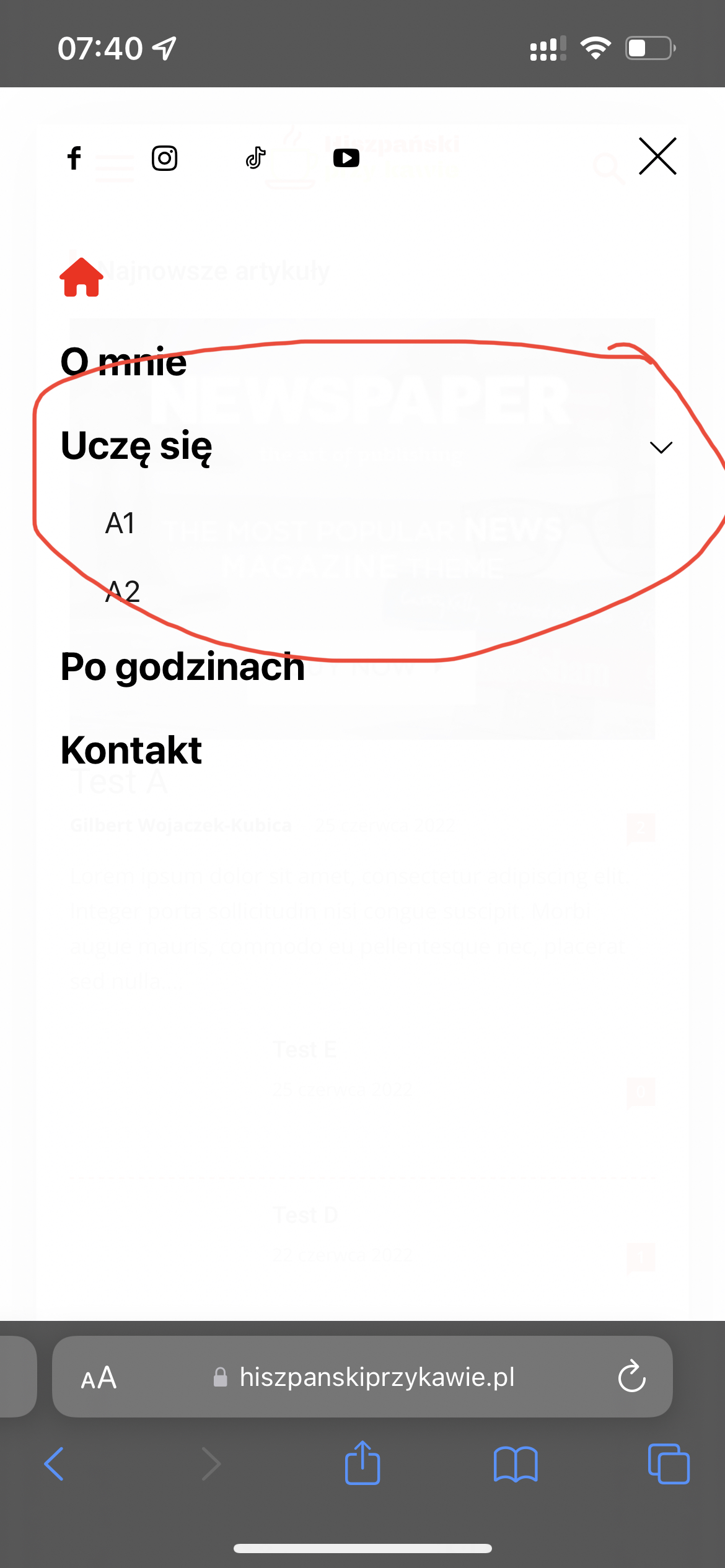
I can’t set sub menu icon …
 pawan
pawanMY webstories are having many amp issues and I suspect it is because of newspaper theme. please look at the theme codes and help to solve my problem.



