
- NewspapertagDiv AMP Plugin Tutorial
- ApiPractical example – How to add a new Block and Module
- NewspaperTrack Subscription Sources with Locker URL in Opt-In Builder
- NewspaperWP Rocket and Newspaper Theme: Optimization Guide
- NewspaperCredit System
- NewspaperIntroduction to CPT and ACF with Newspaper Theme
- NewspaperHow to edit modules for Flex Block X
- NewspaperHow to use the Posts List shortcode
- NewspaperUser review system
- NewspaperCustom Fields Support
- NewspaperHow to generate Facebook App ID
- NewspaperHow to insert a block inside the content of a post
- NewspaperModal Popup
- NewspaperPayPal Setup
- NewspaperLink Tracker
- NewspaperLockers
- NewspaperGeneral Options that May Interfere with the Newspaper Theme
- NewspaperAdd Cryptocurrency Price Ticker Widget
- NewspaperPosts Loop Element
- NewspaperThe Newspaper Mobile Theme: Introduction
 mgiannelis
I am running just mobile header. No mobiles pages or amp installed
How can I remove this ” Login” option that is showing on mobile phone?
 Kfm90
Kfm90 Thanks, I have another problem but with module “team member”.
How I can put two columns on mobile that they are equal in height and width. (The title of first team member is more longer).
I am attaching a sample photo of mobile.
(also add that sometimes it becomes impossible to select the row, columns if I put custom width and inline-block). I am forced each time to exit the editor and start over

 Archerix
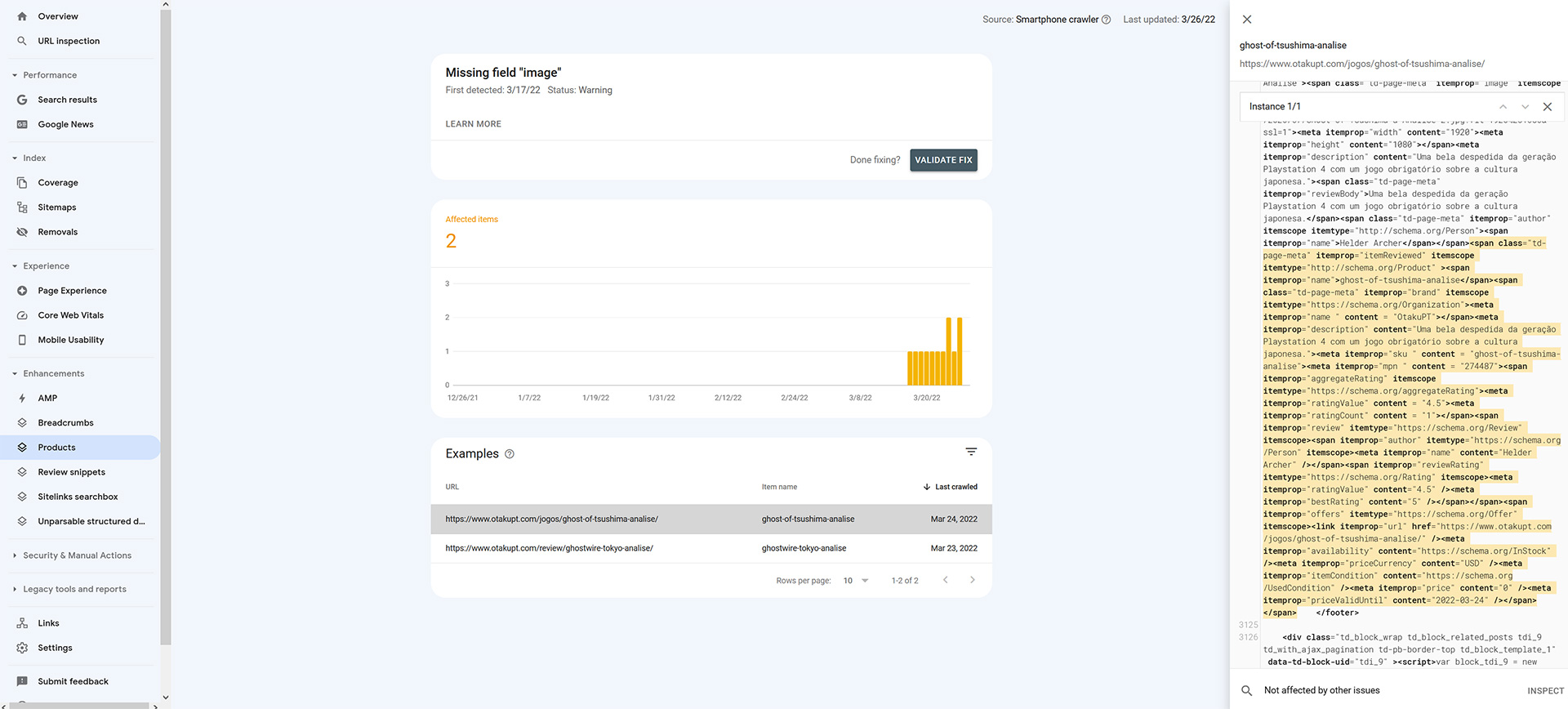
Hi, Search Console is giving a warning related to how Newspaper shows reviews
Although in “Review snippets” it gives no warnings, in “Products” it says that it’s missing de field “Image” (I’m sending a screenshot)
It’s not a site breaking feature, but in a future actualization of newspaper you could give a revamp in how the reviews are showing in Newspaper, for example allow a 10 star ratting instead of 5 star, and fields for pros and cons, something google now takes into account. Takes into account the new SEO rules for reviews.
 Alexandru-Valentin Muşat
 Hi,
I have the latest theme version, but I cannot do that. Your example uses two websites hosted on localhost; I have two websites hosted on the same provider. I don’t think that’s relevant. The sites are using WordPress Multisite, which means it is a single WordPress installation behind, but the tables in the database differ.
If I copy an element from website A, the paste options are not available on website B, but it’s active on website A. The same happens when I try to copy the style from A to B.
Should I activate something first? I’ve used Chrome, as you presented in your example. Are there some limitations that you are aware of?
Thanks,
Alex
 fatih-2
 Bettina
We have been using WPML and tagdiv for a long time. As I have mentioned, we had no problem translating cloud templates, including, single, category, menus, author etc..and setting them. Settings in the documentation you sent are already checked.
Please re-read my initial question. Mobile cloud templates do not apear in the dashboard. It’s only visibile in the single language tagdiv composer website manager; duplicating it there do not help it to appear in the dashboard
https://pasteboard.co/Ag6QKilpGNac.png
For the mobile; on the english home page, I imported a header and a footer, edited all the way, saved. However, I’d like to set the same template for the secondary language but I can’t find it anywhere to duplicate & edit. The mobile header template can only be edited and viewed on the mobile page -edith with-tagdiv composer. The imported footer is not even on the web site manager..
-
This reply was modified 4 years by
fatih-2.
 themusicessentials
Hi,
Tag social counter is not working proper for facebook & instagram in my given website.
Please check & resolve my issue.
Website url : https://themusicessentials.com/
 ahmedzaky
Hi
In all posts under the image there’s no space between the picture & text
 leandrocastro
 There is no reference to this font in Theme Panel -> Mobile Theme -> Theme Fonts
Is there any other place I can look to get this?
My AMP rating on PageSpeed is awful and that’s part of the problem.
 Anamaria
 Hello,
If you want to have the menu like this https://www.screencast.com/t/pA7nIJuafC you need to create the menu with a custom link -> https://i.imgur.com/ahzJgGH.png
If you referring to using anchors links, you can do it easy. You need to set an extra class on the element, for example, I set it on the “Single Post Comment” => https://i.imgur.com/EewW11X.png and set the class on the element icon or button, in Scroll to class => https://i.imgur.com/O3x7xpV.png -> https://imgur.com/xqIOgu0
Thank you!
 bluetang
 Please check screenshot1 where stock status is not displayed for the product.https://ibb.co/f4ZkrZr
Also the same happened in your demo products,
for products that have variations the stock is displayed
https://shop4house.gr/product/boy-cartoon-dinosaur-print-long-sleeve-tee/ check this for example.
I want to display the stock status to every products, even if it is single, or variable.
And also if possible in the Shop page where all products are displayed, see next screenshot
thank you
fatih-2 Besides, URL’s slugs for mobile pages are like .com/xxxxx. so it’s like another page created for home page and sends google wrong ping..How do you fix this? Tagdiv mobile theme and amp plugins active and it is set Mobil+Amp in the theme panel
fatih-2I’m arranging mobile page templates for our multilanguage site. For the language adaption; I duplicate the cloud template that I want, change name and url and connect translations with WPML. It works very fine
For the mobile; on the english home page, I imported a header and a footer, edited all the way, saved. However, I’d like to set the same template for the secondary language but I can’t find it anywhere to duplicate & edit. The mobile header template can only be edited and viewed on the mobile page -edith with-tagdiv composer. The imported footer is not even on the web site manager..
https://pasteboard.co/5MU6bQlWpjcx.jpg
https://pasteboard.co/x6W3ApCN9Rw1.jpg
https://pasteboard.co/fbP4vt49vqjt.jpg
 Calin
Calin Hi,
I think that this can be improved only if you enable Persistent object for AMP.
-> https://wordpress.org/support/topic/how-enable-persistent-object-in-amp-plugin/
-> https://amp-wp.org/documentation/getting-started/amp-site-setup/persistent-object-caching/
I hope those articles will help you!
Thank you!
 Bettina
 Hello @leandrocastro!
For Mobile Theme + AMP, you can change the fonts from Theme Panel -> Mobile Theme -> Theme Fonts. Check our documentation: https://forum.tagdiv.com/font-customization/
Thank you!
 FKnews
Hello
I want to ask how to insert related articles between post content like this. https://ibb.co/hXwspJN ?
This is an example of the article https://www.tribunnews.com/superskor/2022/03/25/penaltinya-gentayangan-tangisan-jorginho-iringi-kegagalan-italia-tembus-piala-dunia-2022
leandrocastroI would like to remove this font from the AMP version. I’m using Mobile Theme.
Can you help me? I can’t understand where I can go to stop loading.
 mverminski
 Hello Calin,
When editing the template in TD Composer both blocks look correct. I just tried your idea of copying the style from the lower box that is correct and pasting it into the top box. It still looks correct within TD Composer, but it is wrong on the front-end.
Back end – https://imgur.com/rjABEIJ
What is showing on the live site – https://imgur.com/4fPRqoE
EDIT: I installed Healthcheck & Troubleshooting. Enabled Newspaper and the required plugins. So all other plugins were disabled except for those required by the theme. The problem still exists.
-
This reply was modified 4 years by
mverminski.
Anamaria Hello,
Depends on what elements do you want to import, for example, if you want to import templates, then you need to copy-paste the code => https://i.imgur.com/SSgIAGm.png from a template to a new template.
Also, a workaround there could be to edit the page normally and copy-paste the code: https://www.screencast.com/t/g4JodZMv into a new page on the other website.
Thank you!
Bettina Hello @brain4web!
We have the possibility to save elements and use it on our cloud templates only. You can save for example an entire row with elements inside and paste it in another page. But, you can not save whole homepage or many rows into one element.
Thank you!
mgiannelisHello
I have now completed my staging site thanks to the support from these forums
I have done quite a few performance optimisations and can now get my site loading at just under 100% pagespeed scores which I am happy with.
However, I have an issue with the mobile score only showing 30 to 40 % speed. It’s very very low.
I have not setup a separate mobile page as yet so everything is running from the desktop version.
Can you please provide me with some advise here to help me proceed to a faster mobile pagespeed score
I don’t want to have to setup a whole new template and design for mobile page. Currently the format on mobile I see is good (Haven’t set the header yet under the mobile view screen)
How can I proceed to get this working faster and showing a faster mobile speed score without setting up a new mobile template. Can I just install AMP will that work?
Please advise.
Thanks
Bettina Hello @sloope!
This element “Single background images” have set up by default the image height:400 and image width:100%. For example if you will write there 100 and 100, then you will have a little image in a square shape.
Thank you!
 estaths
 In order to have modified date, make sure you select Show date from the Layout tab.
I just test it on the latest version of the theme 11.4.2 and this is working perfectly.
For example: an article is from 11.03 and the modified date is 14.03. So, the modified date 14.03 should be displayed only when the option is on.
Please make sure it is not about cache. Deactivate the cache plugin that you use and see the results.
Hello, first of all I would like to clarify that the issue is with the flex block element (post grid) that we use on tagDiv page builder, the dates on the post page are working fine.
We have updated the theme from 11.4 to 11.4.2 and the issue persists.
We have deactivated the cache plugin, we have selected Show date and whether we tick the option “Show modified date” or not, it always shows the modified date.
For example, a post was published on 19.03 and modified on 23.03. It always shows 23.03 on the grid and we would like it to show the publish date 19.03.
Calin Hi,
The code was for entire website where was injected that code. If you want to be only for the header, then you can try it like this -> https://i.imgur.com/VzscXz5.png
.td-header-template-wrap .td_block_wrap {

    margin-bottom: 0;

}
Like you said, there are elements that by default have set a margin or padding and all elements have in tagDiv Composer a css tab from where can be adjusted. For example this https://i.imgur.com/OFEZBRz.png is a margin -> https://i.imgur.com/CsOlY71.png
I hope this will help you!
Calin Hi,
So, If I understand correctly you set the mobile theme and the amp plugin and the settings from mobile theme are set like this -> https://i.imgur.com/RPCQXb5.png -> https://i.imgur.com/e4eYjhu.png If is set like this it should work.
Thank you!
Calin Hi,
This can be done, but for this we’ll need to check and see what type for search page are you using and we also need an example with different results.
Thank you!



